
Buying Guide
The Best Noctua Thermal Paste
Five thermal pastes compared, from the NT-H1 to the NT-H2 10g, with the trade-offs of each named.
By The PC Journal editorial team
12 min read5 products evaluated
Noctua sells two pastes, NT-H1 and its successor NT-H2, in several pack sizes and kits. Every pick is a Noctua paste, ordered from the lowest price.
We sorted these picks by amount, rated service life and applications per tube, working from the makers' own data; if a maker skips rated service life, the guide says so, and no figure here comes from our own testing.
Quick Picks
Our 5 recommendations at a glance. Tap a pick for the full verdict.
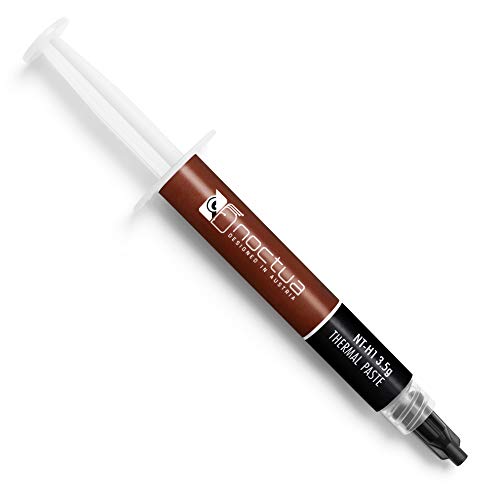
Lowest Price Here
Noctua NT-H1 (3.5g)
Undercutting the NT-H1 SW on price when we checked.
Best for: Keeping the budget tight.
Our take Check price for Noctua NT-H1 (3.5g) (opens in a new tab)

Also Consider
Noctua NT-H1 SW Edition (3.5g)
A rated usage time of up to five years on a CPU or GPU.
Best for: Buyers who want rated usage time of up to five years on a CPU or GPU.
Our take Check price for Noctua NT-H1 SW Edition (3.5g) (opens in a new tab)

Strong Alternative
Noctua NT-H2 (3.5g)
A recommended usage time of up to five years on the CPU.
Best for: Buyers who want recommended usage time of up to five years on the CPU.
Our take Check price for Noctua NT-H2 (3.5g) (opens in a new tab)

Worth a Look
Noctua NT-H2 AM5 Edition (3.5g)
An NA-TPG1 guard that keeps paste out of the AM5 heatspreader's cut-outs.
Best for: Buyers who want NA-TPG1 guard that keeps paste out of the AM5 heatspreader's cut-outs.
Our take Check price for Noctua NT-H2 AM5 Edition (3.5g) (opens in a new tab)

Largest Tube Size
Noctua NT-H2 (10g)
The largest tube size here (10g).
Best for: Buyers who put tube size first.
Our take Check price for Noctua NT-H2 (10g) (opens in a new tab)
| Pick | Why it’s here | Best for | Price |
|---|---|---|---|
| Undercutting the NT-H1 SW on price when we checked. | Keeping the budget tight. | Check price for Noctua NT-H1 (3.5g) (opens in a new tab) |
| A rated usage time of up to five years on a CPU or GPU. | Buyers who want rated usage time of up to five years on a CPU or GPU. | Check price for Noctua NT-H1 SW Edition (3.5g) (opens in a new tab) |
| A recommended usage time of up to five years on the CPU. | Buyers who want recommended usage time of up to five years on the CPU. | Check price for Noctua NT-H2 (3.5g) (opens in a new tab) |
| An NA-TPG1 guard that keeps paste out of the AM5 heatspreader's cut-outs. | Buyers who want NA-TPG1 guard that keeps paste out of the AM5 heatspreader's cut-outs. | Check price for Noctua NT-H2 AM5 Edition (3.5g) (opens in a new tab) |
| The largest tube size here (10g). | Buyers who put tube size first. | Check price for Noctua NT-H2 (10g) (opens in a new tab) |
Our Picks
Lowest Price Here1 of 5
Noctua NT-H1 (3.5g) on Amazon (opens in a new tab)
NT-H1 needs no spreading and wipes off with a dry paper towel, which makes it one of the least fussy pastes to work with.
Best for
- Keeping the budget tight.
Skip if
- Look at the others if this bothers you: tube size of 3.5g, behind the NT-H2 10g (10g).
Why we like it
Noctua rates it for up to five years on a CPU and about 15 applications on AM4 or LGA1700. On tube size it ties with the NT-H1 SW, the NT-H2 and the NT-H2 AM5 at 3.5g. It shares an about 3 to 20 applications per tube with the NT-H1 SW and NT-H2 AM5; the NT-H2 10g goes with an about 9 to 60 applications per tube.
It also offers a recommended storage time of up to three years. Clean off old paste with isopropyl alcohol first, then apply a pea-sized dot or a thin line on the heatspreader; on large Intel chips an X or a line covers the longer die better. It cost the least of the 5 picks at the time of writing, with the NT-H1 SW the next step up. What it gives up: tube size of 3.5g, behind the NT-H2 10g (10g); by contrast, the NT-H2 10g comes in at 10g.
Key dimensions & specs
- Amount: 3.5g
- Rated service life: up to 5 years
- Applications per tube: About 3 to 20
- Application: No need to spread before mounting
Pros
- Maker-rated for up to 5 years without reapplying
- Cleanup with a dry paper towel, no alcohol needed
- Recommended storage time of up to three years
- Undercutting the NT-H1 SW on price when we checked
Cons
- Tube size of 3.5g, behind the NT-H2 10g (10g)
Also Consider2 of 5
Noctua NT-H1 SW Edition (3.5g) on Amazon (opens in a new tab)
The SW Edition adds a spatula and three cleaning wipes to NT-H1, so it covers a full repaste from cleanup to spreading.
Best for
- Buyers who want rated usage time of up to five years on a CPU or GPU.
Skip if
- If budget leads, the NT-H1 was cheaper at our last price check.
Why we like it
Noctua rates it for up to five years on a CPU or GPU. It matches the NT-H1, the NT-H2 and the NT-H2 AM5 on tube size (3.5g). Like the NT-H1 and NT-H2 AM5, it has an about 3 to 20 applications per tube, while the NT-H2 10g uses an about 9 to 60 applications per tube.
You also get a rated usage time of up to five years on a CPU or GPU and wipes that remove old paste without a separate cleaner. Clean off old paste with isopropyl alcohol first, then apply a pea-sized dot or a thin line on the heatspreader; on large Intel chips an X or a line covers the longer die better. Its price falls between the NT-H1 and the NT-H2, based on our last check.
Key dimensions & specs
- Amount: 3.5g
- Rated service life: up to 5 years
- Applications per tube: About 3 to 20
- In the box: a spatula and three cleaning wipes
Pros
- Maker-rated for up to 5 years without reapplying
- Includes a spatula and three cleaning wipes
- Rated usage time of up to five years on a CPU or GPU
- Wipes that remove old paste without a separate cleaner
Cons
- Costs more than the NT-H1 at the time of writing
Strong Alternative3 of 5
Noctua NT-H2 (3.5g) on Amazon (opens in a new tab)
NT-H2 comes with three cleaning wipes and needs no spreading.
Best for
- Buyers who want recommended usage time of up to five years on the CPU.
Skip if
- Pass if a published rated service life matters; this one has none.
Why we like it
Noctua rates it for up to five years on the CPU, which suits builders who set it and forget it. On tube size it ties with the NT-H1, the NT-H1 SW and the NT-H2 AM5 at 3.5g. It is the only pick here with a three cleaning wipes in the box; the NT-H2 10g has a 10 cleaning wipes in the box instead.
It also offers a recommended usage time of up to five years on the CPU and enough for around 3 to 20 applications. Clean off old paste with isopropyl alcohol first, then apply a pea-sized dot or a thin line on the heatspreader; on large Intel chips an X or a line covers the longer die better. It was priced above the NT-H1 SW and below the NT-H2 AM5 at the time of writing. There is no published rated service life figure, whereas the NT-H1 offers up to 5 years.
Key dimensions & specs
- Amount: 3.5g
- In the box: three cleaning wipes
- Application: No need to spread before mounting
Pros
- Includes three cleaning wipes
- Recommended usage time of up to five years on the CPU
- Enough for around 3 to 20 applications
Cons
- No published rated service life
- Costs more than the NT-H1 at the time of writing
Worth a Look4 of 5
Noctua NT-H2 AM5 Edition (3.5g) on Amazon (opens in a new tab)
This NT-H2 edition adds a guard that keeps paste out of the cut-outs around an AM5 heatspreader, a real annoyance when repasting Ryzen 7000 and 9000 chips.
Best for
- Buyers who want NA-TPG1 guard that keeps paste out of the AM5 heatspreader's cut-outs.
Skip if
- Skip it if tube size matters most to you; the NT-H2 10g offers 10g.
Why we like it
It also comes with three cleaning wipes. The guard sits around an AM5 chip during application and lifts away, leaving the heatspreader cut-outs clean. Noctua rates the paste for up to five years on a CPU.
It matches the NT-H1, the NT-H1 SW and the NT-H2 on tube size (3.5g). Like the NT-H1 and NT-H1 SW, it has an about 3 to 20 applications per tube, while the NT-H2 10g uses an about 9 to 60 applications per tube. It also offers the second generation of Noctua's NT-H1.
Clean off old paste with isopropyl alcohol first, then apply a pea-sized dot or a thin line on the heatspreader; on large Intel chips an X or a line covers the longer die better. The trade-off is tube size; for more, the NT-H2 10g comes in at 10g.
Key dimensions & specs
- Amount: 3.5g
- Rated service life: up to 5 years
- Applications per tube: About 3 to 20
- In the box: an AM5 paste guard and three cleaning wipes
Pros
- Maker-rated for up to 5 years without reapplying
- Includes an AM5 paste guard and three cleaning wipes
- NA-TPG1 guard that keeps paste out of the AM5 heatspreader's cut-outs
- The second generation of Noctua's NT-H1
Cons
- Tube size trails the NT-H2 10g (10g)
- Costs more than the NT-H1 at the time of writing
Largest Tube Size5 of 5
Noctua NT-H2 (10g) on Amazon (opens in a new tab)
The 10g NT-H2 is Noctua's second-generation paste in a size meant for builders who work on many machines, with 10 cleaning wipes included.
Best for
- Buyers who put tube size first.
Skip if
- Price-first buyers should look at the NT-H1, which cost less when we checked.
Why we like it
Noctua quotes around 9 to 60 applications depending on CPU size. Its 10g tube size is the largest here; the NT-H1 comes next at 3.5g. It is the only pick here with an about 9 to 60 applications per tube; the NT-H1 has an about 3 to 20 applications per tube instead.
You get a 10 cleaning wipes in the box here, which sets it apart from the NT-H2 and its a three cleaning wipes in the box. You also get enough for dozens of mainstream CPUs. It was the highest-priced of the 5 picks at the time of writing, so the case for it rests on what it adds over the NT-H2 AM5 and the rest. The trade-off is rated service life; for more, the NT-H1 offers up to 5 years.
Key dimensions & specs
- Amount: 10g
- Rated service life: up to 5 years
- Applications per tube: About 9 to 60
- In the box: 10 cleaning wipes
- Application: No need to spread before mounting
Pros
- 10g is enough for several applications
- Maker-rated for up to 5 years without reapplying
- Includes 10 cleaning wipes
- The second generation of Noctua's NT-H1
Cons
- Costs more than the NT-H1 at the time of writing
How We Chose
Each pick was assessed across 4 criteria weighted for real-world use.
- Durability
- We looked for maker claims on pump-out and long-term stability.
- Value
- We compared tube sizes and what comes in the box.
- Application
- We noted spreaders, wipes and the maker's application guidance.
- Safety
- We checked that each paste is listed as electrically non-conductive.
What to Look for in a Noctua Thermal Paste
Key buying criteria so you get the right fit the first time.
Differences between good pastes are small
Among reputable pastes, temperatures usually differ by a few degrees at most. Mounting pressure and application matter as much as the paste.
Choose non-conductive paste
Non-conductive pastes are safe if a little spills onto nearby parts. Avoid liquid metal unless you know the risks.
Thicker pastes are harder to spread
High-performance pastes are often thick. Warming the tube in your hand makes them easier to apply.
GPU repasting needs more care
Graphics card dies are bare, so non-conductive paste and a thin, even layer matter more. Some pastes are sold specifically for direct-die use.
Check the rated service life
Some makers state how long the paste can stay on a CPU before it needs replacing, from about five years to eight. A longer rating suits a PC you won't open often.
Durability matters on hot CPUs
Some pastes pump out or dry over thermal cycles. Pastes built for long-term stability suit high-power CPUs you do not want to remount often.
How to Choose a Noctua Thermal Paste
By priority
| Priority | Consider | Why |
|---|---|---|
| Keeping the budget tight | NT-H1 | Undercutting the NT-H1 SW on price when we checked |
| Buyers who want rated usage time of up to five years on a CPU or GPU | NT-H1 SW | A rated usage time of up to five years on a CPU or GPU |
| Buyers who want recommended usage time of up to five years on the CPU | NT-H2 | A recommended usage time of up to five years on the CPU |
| Buyers who want NA-TPG1 guard that keeps paste out of the AM5 heatspreader's cut-outs | NT-H2 AM5 | An NA-TPG1 guard that keeps paste out of the AM5 heatspreader's cut-outs |
| Buyers who put tube size first | NT-H2 10g | The largest tube size here (10g) |
Scroll sideways to see every column.
Key specs side by side
Figures as each maker states them.
| Paste | Amount | Rated service life | Applications per tube | In the box |
|---|---|---|---|---|
| NT-H1 | 3.5g | up to 5 years | About 3 to 20 | Not listed |
| NT-H1 SW | 3.5g | up to 5 years | About 3 to 20 | a spatula and three cleaning wipes |
| NT-H2 | 3.5g | Not listed | Not listed | three cleaning wipes |
| NT-H2 AM5 | 3.5g | up to 5 years | About 3 to 20 | an AM5 paste guard and three cleaning wipes |
| NT-H2 10g | 10g | up to 5 years | About 9 to 60 | 10 cleaning wipes |
Scroll sideways to see every column.
Frequently Asked Questions
Which of these thermal pastes has the largest tube size?
The NT-H2 10g leads at 10g, ahead of the NT-H1 at 3.5g; the NT-H2 AM5 sits at the other end with 3.5g.
What is the least I can spend on one of these thermal pastes?
Start with the NT-H1, the lowest-priced pick when we checked. The NT-H2 10g is the premium end, so the spread between them shows what extra money buys here.
Can I use CPU paste on a graphics card?
Yes, if it is non-conductive. Apply a thin, even layer on the bare die.
How often should I replace thermal paste?
Only when you remove the cooler or temperatures rise over time. Many pastes last several years on a desktop CPU.
How much paste should I use?
About a pea-sized dot on most desktop CPUs. Too much mostly spills out; too little leaves gaps.
Bottom Line
Our first pick is the NT-H1, chosen for undercutting the NT-H1 SW on price when we checked. Look at the NT-H1 SW for a rated usage time of up to five years on a CPU or GPU, the NT-H2 for a recommended usage time of up to five years on the CPU and the NT-H2 AM5 for an NA-TPG1 guard that keeps paste out of the AM5 heatspreader's cut-outs if those matter more to you.
Neither needs pre-spreading; Noctua recommends a dot and letting the cooler press it out.