
Buying Guide
The Best Gaming Mice for Apex Legends
From the Basilisk V3 to the Basilisk V3 Pro 35K: five gaming mice ranked on button count and programmable buttons, with who should skip each one.
By The PC Journal editorial team
12 min read5 products evaluated
Apex Legends has several abilities and items to reach in a fight, so extra thumb buttons can save a keyboard reach. Every mouse here lists between 6 and 13 buttons, enough for binds without the grid of an MMO mouse.
Our comparison rests on published figures for programmable buttons, max DPI and connection; nothing here was tested in-house, and where a maker leaves out max DPI, we say so.
Quick Picks
Our 5 recommendations at a glance. Tap a pick for the full verdict.
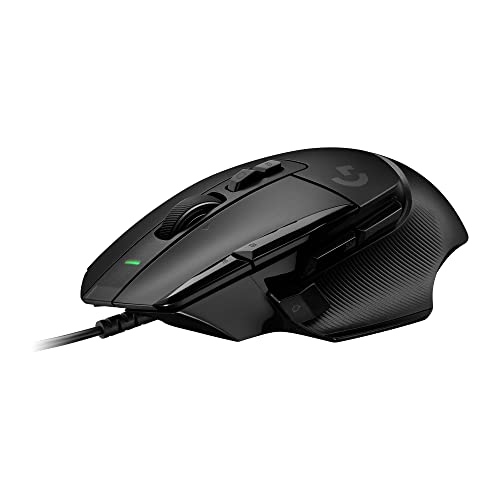
Also Consider
Logitech G502 X Wired Gaming Mouse
Lightforce hybrid optical-mechanical switches.
Best for: Buyers who want Lightforce hybrid optical-mechanical switches.
Our take Check price for Logitech G502 X Wired Gaming Mouse (opens in a new tab)

Premium Pick
Razer Basilisk V3 Pro 35K Wireless
The highest-priced pick here at the time of writing, with 13 programmable controls.
Best for: Buyers who want 13 programmable controls and can spend more than the G502 Lightspeed costs.
Our take Check price for Razer Basilisk V3 Pro 35K Wireless (opens in a new tab)

Lowest Price Here
Razer Basilisk V3 Wired Gaming Mouse
The lowest price of the group at our last check.
Best for: Spending as little as possible, with the G502 Hero the next step up.
Our take Check price for Razer Basilisk V3 Wired Gaming Mouse (opens in a new tab)

Strong Alternative
Logitech G502 Hero Wired Mouse
A Hero sensor.
Best for: Buyers who want Hero sensor.
Our take Check price for Logitech G502 Hero Wired Mouse (opens in a new tab)

Worth a Look
Logitech G502 Lightspeed Wireless
Adjustable weights.
Best for: Buyers who want adjustable weights.
Our take Check price for Logitech G502 Lightspeed Wireless (opens in a new tab)
Our Picks
Also Consider1 of 5
Logitech G502 X Wired Gaming Mouse on Amazon (opens in a new tab)
Logitech's wired G502 X is an 89g, 13-button mouse with Lightforce hybrid switches.
Best for
- Buyers who want Lightforce hybrid optical-mechanical switches.
Skip if
- Worth skipping when heavier 89g body is a problem.
Why we like it
Its DPI-shift button is reversible. It keeps the G502's thumb-rest shape with a lighter build, and LIGHTFORCE hybrid switches combine optical speed with a mechanical feel. The wired cable avoids battery concerns.
Its scroll wheel switches between free spin and ratcheting and tilts for two more controls. A thin-wall shell brings the weight to 89g. It matches the Basilisk V3 Pro 35K on button count (13).
It shares a wired connection with the Basilisk V3 and G502 Hero; the G502 Lightspeed goes with a lightspeed 2.4GHz connection. It also offers a Hero 25K sensor. Side-button mapping is done in the maker's software, which runs on Windows. When we checked, only the G502 Hero and cheaper picks cost less, and the G502 Lightspeed cost more.
Key dimensions & specs
- Weight: 89g
- Programmable buttons: 13
- Connection: Wired
Pros
- 13 programmable buttons
- No battery to charge
- Lightforce hybrid optical-mechanical switches
- Hero 25K sensor
Cons
- Heavier 89g body
- Costs more than the Basilisk V3 at the time of writing
Premium Pick2 of 5
Razer Basilisk V3 Pro 35K Wireless on Amazon (opens in a new tab)
Razer's Basilisk V3 Pro 35K is a 13-control thumb-rest mouse with 8000Hz wireless polling.
Best for
- Buyers who want 13 programmable controls and can spend more than the G502 Lightspeed costs.
Skip if
- Skip it if price comes first: the Basilisk V3 cost less when we checked.
Why we like it
It connects over HyperSpeed, Bluetooth or a cable. Its 13 controls include a multi-function trigger, and 13-zone Chroma lighting includes an underglow. The HyperScroll wheel switches modes automatically.
On button count it ties with the G502 X at 13. Keep the Basilisk V3 Pro 35K on its dongle for games; Bluetooth is for a laptop. Polling above 1,000Hz shortens battery life and needs a CPU with headroom.
Side-button mapping is done in the maker's software, which runs on Windows. Worth noting: up to 140 hours per charge. It was the most expensive pick when we checked, so weigh what it adds over the G502 Lightspeed.
Key dimensions & specs
- Programmable buttons: 13
- Max DPI: 35,000
- Battery life: 140 hours
- Polling rate: 8,000Hz
- Connection: HyperSpeed 2.4GHz, Bluetooth, wired
- Shape: Right-handed ergonomic with thumb rest
Pros
- 13 programmable buttons
- Up to 140 hours per charge
- 8,000Hz polling
- Dongle plus Bluetooth
Cons
- Costs more than the Basilisk V3 at the time of writing
Lowest Price Here3 of 5
Razer Basilisk V3 Wired Gaming Mouse on Amazon (opens in a new tab)
Razer's wired Basilisk V3 has a thumb rest built into the shell and a HyperScroll tilt wheel.
Best for
- Spending as little as possible, with the G502 Hero the next step up.
Skip if
- Skip it if this is a deal-breaker for you: button count of 11, behind the G502 X (13).
Why we like it
It has 11 buttons. Its 11 programmable buttons and thumb rest suit games with many binds. The HyperScroll wheel free-spins through long pages or switches to tactile steps for weapon swaps.
Razer Chroma lighting has 11 zones for effects that follow the scroll wheel and sides. A sculpted thumb rest supports the hand, and 11 programmable buttons take macros such as push-to-talk. It matches the G502 Hero and the G502 Lightspeed on button count (11).
It shares a wired connection with the G502 X and G502 Hero; the G502 Lightspeed goes with a lightspeed 2.4GHz connection. No other pick here cost less at our last price check, and the G502 Hero was closest. What it gives up: button count of 11, behind the G502 X (13); by contrast, the G502 X offers 13.
Key dimensions & specs
- Programmable buttons: 11
- Max DPI: 26,000
- Connection: Wired
- Shape: Right-handed ergonomic with thumb rest
Pros
- 11 programmable buttons
- No battery to charge
- Thumb rest built into the shell
- HyperScroll tilt wheel
Cons
- Button count of 11, behind the G502 X (13)
Strong Alternative4 of 5
Logitech G502 Hero Wired Mouse on Amazon (opens in a new tab)
The G502 Hero is the wired classic, with 11 buttons and removable weights to tune the feel.
Best for
- Buyers who want Hero sensor.
Skip if
- If budget leads, the Basilisk V3 was cheaper at our last price check.
Why we like it
Its HERO sensor tracks up to 25,600 DPI, and five 3.6g weights tune the balance. Metal springs tension the main buttons. Five 3.6g weights let you tune the balance, and the scroll wheel switches into a hyper-fast mode.
The HERO sensor works with no smoothing, filtering or acceleration, and the left and right buttons use metal pivot hinges. LIGHTSYNC RGB is included and needs Logitech's software. It matches the Basilisk V3 and the G502 Lightspeed on button count (11).
It shares a wired connection with the G502 X and Basilisk V3; the G502 Lightspeed goes with a lightspeed 2.4GHz connection. When we checked, only the Basilisk V3 cost less, and the G502 X cost more.
Key dimensions & specs
- Programmable buttons: 11
- Connection: Wired
Pros
- 11 programmable buttons
- No battery to charge
- Hero sensor
- Adjustable weights
Cons
- Costs more than the Basilisk V3 at the time of writing
Worth a Look5 of 5
Logitech G502 Lightspeed Wireless on Amazon (opens in a new tab)
The G502 Lightspeed brings Logitech's 11-button G502 shape to wireless with adjustable weights and a fast scroll wheel.
Best for
- Buyers who want adjustable weights.
Skip if
- Skip it if button count matters most to you; the G502 X offers 13.
Why we like it
It supports PowerPlay charging. Its HERO 25K sensor tracks up to 25,600 DPI with no smoothing, and a thin-wall design with an internal endoskeleton keeps it wireless-light. On button count it ties with the Basilisk V3 and the G502 Hero at 11.
No other pick in this guide offers a lightspeed 2.4GHz connection; compare the G502 Hero, which has a wired connection. The G502 Lightspeed's dongle works best on a front USB port or an extender near the mouse. Its price falls between the G502 X and the Basilisk V3 Pro 35K, based on our last check. If button count is your priority, the G502 X (13) is the stronger choice.
Key dimensions & specs
- Programmable buttons: 11
- Max DPI: 25,600
- Connection: Lightspeed 2.4GHz
Pros
- 11 programmable buttons
- Adjustable weights
- Hyper-fast scroll wheel
- PowerPlay wireless charging support
Cons
- Button count trails the G502 X (13)
- Costs more than the Basilisk V3 at the time of writing
How We Chose These Gaming Mice for Apex Legends
Each pick was assessed across 4 criteria weighted for real-world use.
- The figures behind the order
- We set side by side five mice on button count, max DPI, connection and shape as the makers state them. Nothing was tested in-house; 2 of the 4 fields compared are stated for every pick, while max DPI and shape have gaps.
- The shared baseline
- All 5, from the G502 X to the G502 Lightspeed, state button count and connection.
- Where the specs have gaps
- The G502 X and the G502 Hero give no max DPI; the G502 X, the G502 Hero and the G502 Lightspeed give no shape.
- Price range
- At our last check the picks ran from the Basilisk V3 (under $50) to the Basilisk V3 Pro 35K ($100 to $150).
What to Look for in a Gaming Mouse for Apex Legends
Key buying criteria so you get the right fit the first time.
Button count
The G502 X tops button count at 13 and the G502 Lightspeed sits lowest at 11; 2 picks share the top figure. The G502 X is the pick for button count.
Setup checks
Keep the Basilisk V3 Pro 35K on its dongle for games; Bluetooth is for a laptop. The G502 Lightspeed's dongle works best on a front USB port or an extender near the mouse.
Features beyond the spec table
The Basilisk V3 Pro 35K: a HyperScroll tilt wheel. The G502 Hero: adjustable weights. The G502 Lightspeed: a hyper-fast scroll wheel.
How much to spend
Under $50 buys the Basilisk V3 and the G502 Hero; $50 to $100 buys the G502 X and the G502 Lightspeed; $100 to $150 buys the Basilisk V3 Pro 35K at our last check.
Match the pick to your priority
Buyers who want 13 programmable controls and can spend more than the G502 Lightspeed costs: the Basilisk V3 Pro 35K. Spending as little as possible, with the G502 Hero the next step up: the Basilisk V3.
How to Choose a Gaming Mouse for Apex Legends
By priority
| Priority | Consider | Why |
|---|---|---|
| Buyers who want Lightforce hybrid optical-mechanical switches | G502 X | Lightforce hybrid optical-mechanical switches |
| Buyers who want 13 programmable controls and can spend more than the G502 Lightspeed costs | Basilisk V3 Pro 35K | The highest-priced pick here at the time of writing, with 13 programmable controls |
| Spending as little as possible, with the G502 Hero the next step up | Basilisk V3 | The lowest price of the group at our last check |
| Buyers who want Hero sensor | G502 Hero | A Hero sensor |
| Buyers who want adjustable weights | G502 Lightspeed | Adjustable weights |
Scroll sideways to see every column.
Key specs side by side
The G502 X leads on button count at 13, ahead of the Basilisk V3 Pro 35K at 13. "Not listed" marks max DPI where the G502 X and the G502 Hero leave the figure out.
| Mice | Programmable buttons | Max DPI | Connection | Shape |
|---|---|---|---|---|
| G502 X | 13 | Not listed | Wired | Not listed |
| Basilisk V3 Pro 35K | 13 | 35,000 | HyperSpeed 2.4GHz, Bluetooth, wired | Right-handed ergonomic with thumb rest |
| Basilisk V3 | 11 | 26,000 | Wired | Right-handed ergonomic with thumb rest |
| G502 Hero | 11 | Not listed | Wired | Not listed |
| G502 Lightspeed | 11 | 25,600 | Lightspeed 2.4GHz | Not listed |
Scroll sideways to see every column.
By price at the time of writing
At our last check the cheapest pick, the Basilisk V3, sat in the under $50 tier, 3 tiers in all up to the Basilisk V3 Pro 35K at $100 to $150; Amazon prices move, so recheck before buying.
| Price tier | Mice |
|---|---|
| Under $50 | Basilisk V3, G502 Hero |
| About $50 to $100 | G502 X, G502 Lightspeed |
| About $100 to $150 | Basilisk V3 Pro 35K |
Frequently Asked Questions
Is the Basilisk V3 Pro 35K worth paying more than the Basilisk V3?
The spec sheets show button count (13 against 11) in its favour. The Basilisk V3 sat in the under $50 tier and the Basilisk V3 Pro 35K in the $100 to $150 tier when we checked, with 3 other picks between them; pay the difference only if button count decides your purchase.
What makes the Basilisk V3 Pro 35K the Premium Pick?
The label rests on the highest-priced pick here at the time of writing, with 13 programmable controls. The Basilisk V3, the cheapest pick, sat in the under $50 tier against $100 to $150 here, without out-ranking it on any listed spec. It suits anyone who wants 13 programmable controls and can spend more than the G502 Lightspeed costs.
What should I check before buying the G502 Lightspeed?
The G502 Lightspeed's dongle works best on a front USB port or an extender near the mouse. In this guide it ranks fifth of 5, and fifth of 5 on button count (11).
Beyond the specs, what sets the G502 X and the Basilisk V3 Pro 35K apart?
The G502 X: Lightforce hybrid optical-mechanical switches. The Basilisk V3 Pro 35K: 13 programmable controls. The Basilisk V3: a thumb rest built into the shell.
Who should choose the Basilisk V3?
The Basilisk V3 carries our Lowest Price Here label for the lowest price of the group at our last check. It ranks third of 5 here and sat in the under $50 tier at our last price check; it suits spending as little as possible, with the G502 Hero the next step up.
Bottom Line
Our first pick is the G502 X, chosen for Lightforce hybrid optical-mechanical switches. Look at the Basilisk V3 Pro 35K for the highest-priced pick here at the time of writing, with 13 programmable controls, the Basilisk V3 for the lowest price of the group at our last check and the G502 Hero for a Hero sensor if those matter more to you.
Bind only the actions you reach for in a fight; more buttons than you remember to use just add accidental presses.