
Buying Guide
The Best Gaming Mice
From the Pulsefire Haste 2 to the PRO X2 Superstrike: five gaming mice ranked on weight and battery life, with who should skip each one.
By Alex Morgan, PC Hardware Editor
12 min read5 products evaluated

Gaming mice differ most in shape, weight, connection and polling rate. We ordered this set by listed polling rate so the fastest-reporting mice lead, then balanced it with budget and ergonomic options.
We sorted these picks by weight, max DPI and battery life, working from the makers' own data; nothing here was tested in-house, and if a maker skips weight, the guide says so.
Quick Picks
Which of the 5 picks to look at first. Tap a name for the full analysis.

Lightest Mouse
HyperX Pulsefire Haste 2 Wired Gaming MouseThe lightest weight here (53g).
Best for: Fast flick aiming.
Check price for HyperX Pulsefire Haste 2 Wired Gaming Mouse on Amazon (opens in a new tab)
Also Consider
Razer DeathAdder V3 Wired Gaming MouseThe DeathAdder ergonomic shape refined with esports players.
Best for: Buyers who want DeathAdder ergonomic shape refined with esports players.
Check price for Razer DeathAdder V3 Wired Gaming Mouse on Amazon (opens in a new tab)
Solid Alternative
Corsair Sabre v2 PRO Wireless MouseThe Sabre v2 PRO is built around polling rate: 8,000Hz, a 33,000 DPI sensor and dongle, Bluetooth and wired modes.
Best for: Buyers who want up to 120 hours per charge.
Check price for Corsair Sabre v2 PRO Wireless Mouse on Amazon (opens in a new tab)
Symmetrical Shape
Razer Viper V3 Pro WirelessA symmetrical shape.
Best for: Buyers who want a symmetrical shape.
Check price for Razer Viper V3 Pro Wireless on Amazon (opens in a new tab)
Premium Pick
Logitech G PRO X2 Superstrike WirelessHaptic click feedback at the highest price in the group.
Best for: Buyers for whom price is not the deciding factor, since the Pulsefire Haste 2 costs less.
Check price for Logitech G PRO X2 Superstrike Wireless on Amazon (opens in a new tab)
Our Picks
Lightest Mouse1 of 5
HyperX Pulsefire Haste 2 Wired Gaming Mouse
HyperX's wired Pulsefire Haste 2 weighs 53g and reaches 8000Hz polling.
Best for
- Fast flick aiming.
Skip if
- Look at the other picks if you need a feature not covered above.
Why we like it
Grip tape is included. It weighs 53g with a solid shell rather than holes, and the HyperX 26K sensor tracks up to 26,000 DPI. The wired cable keeps it simple.
Its paracord-style HyperFlex 2 cable reduces drag, and it polls at up to 8,000Hz, reporting every 0.125ms. Nothing else here matches its 53g weight; the Viper V3 Pro comes closest at 54g. It shares a wired connection with the DeathAdder V3; the PRO X2 Superstrike goes with a lightspeed 2.4GHz connection.
Polling above 1,000Hz shortens battery life and needs a CPU with headroom. No other pick here cost less at our last price check, and the DeathAdder V3 was closest. If you want a confirmed battery life, look to the Sabre v2 PRO instead: it runs for 120 hours, while this one gives no figure.
Key specs
- Weight
- 53g
- Max DPI
- 26,000
- Polling rate
- 8,000Hz
- Connection
- Wired
Pros
- Light 53g body
- 8,000Hz polling
- No battery to charge
- Four pieces of included grip tape
Also Consider2 of 5
Razer DeathAdder V3 Wired Gaming Mouse
Razer's wired DeathAdder V3 is a 59g right-handed mouse with a Focus Pro 30K sensor and 8000Hz polling.
Best for
- Buyers who want DeathAdder ergonomic shape refined with esports players.
Skip if
- Skip it if weight matters most to you; the Pulsefire Haste 2 offers 53g.
Why we like it
The shape was refined with esports players, per Razer. Gen-3 optical switches are rated for 90 million clicks. Its Speedflex cable reduces drag compared with a standard rubber cable.
Its 59g weight is the heaviest in this group; the Pulsefire Haste 2 leads at 53g. Like the Pulsefire Haste 2, it has a wired connection, while the Viper V3 Pro uses a HyperSpeed 2.4GHz connection. Polling above 1,000Hz shortens battery life and needs a CPU with headroom.
Another plus: light 59g body. Its price falls between the Pulsefire Haste 2 and the Sabre v2 PRO, based on our last check.
Key specs
- Weight
- 59g
- Polling rate
- 8,000Hz
- Connection
- Wired
- Shape
- Right-handed ergonomic
Pros
- Light 59g body
- 8,000Hz polling
- No battery to charge
- The DeathAdder ergonomic shape refined with esports players
Cons
- Weight trails the Pulsefire Haste 2 (53g)
- Costs more than the Pulsefire Haste 2 at the time of writing
Solid Alternative3 of 5
Corsair Sabre v2 PRO Wireless Mouse
The Sabre v2 PRO is built around polling rate: 8,000Hz, a 33,000 DPI sensor and dongle, Bluetooth and wired modes.
Best for
- Buyers who want up to 120 hours per charge.
Skip if
- Pass if a published weight matters; this one has none.
Why we like it
Its magnesium alloy shell keeps weight down, and 8,000Hz polling works both wired and over SLIPSTREAM wireless. The sensor tracks at up to 750 IPS with 50G acceleration, well beyond most players' swipes. It uses Corsair's MARKSMAN S sensor, and the 120-hour battery figure applies with 2.4GHz at 1kHz polling.
Reaching 8,000Hz depends on your CPU. Polling above 1,000Hz shortens battery life and needs a CPU with headroom. It was priced above the DeathAdder V3 and below the Viper V3 Pro at the time of writing. There is no published weight figure, whereas the Pulsefire Haste 2 weighs 53g.
Key specs
- Max DPI
- 33,000
- Battery life
- 120 hours
- Polling rate
- 8,000Hz
- Connection
- Slipstream 2.4GHz, Bluetooth, wired
Pros
- Up to 120 hours per charge
- 8,000Hz polling
- Dongle plus Bluetooth
Cons
- No published weight
- Costs more than the Pulsefire Haste 2 at the time of writing
Symmetrical Shape4 of 5
Razer Viper V3 Pro Wireless
Razer's Viper V3 Pro is a 54g symmetrical esports mouse with a Focus Pro 35K sensor and 8000Hz wireless polling.
Best for
- Buyers who want a symmetrical shape.
Skip if
- Price-first buyers should look at the Pulsefire Haste 2, which cost less when we checked.
Why we like it
It has 95 hours of battery life. On weight it sits mid-pack at 54g: the Pulsefire Haste 2 weighs 53g, and the DeathAdder V3 comes in at 59g. A HyperSpeed 2.4GHz connection is unique to it among these picks, while the PRO X2 Superstrike uses a lightspeed 2.4GHz connection.
The Viper V3 Pro's dongle works best on a front USB port or an extender near the mouse. Polling above 1,000Hz shortens battery life and needs a CPU with headroom. Worth noting: light 54g body. When we checked, only the Sabre v2 PRO and cheaper picks cost less, and the PRO X2 Superstrike cost more.
Key specs
- Weight
- 54g
- Max DPI
- 35,000
- Battery life
- 95 hours
- Polling rate
- 8,000Hz
- Connection
- HyperSpeed 2.4GHz
- Shape
- Symmetrical
Pros
- Light 54g body
- 8,000Hz polling
- Focus Pro 35K sensor
- 8000Hz wireless polling
Cons
- Costs more than the Pulsefire Haste 2 at the time of writing
Premium Pick5 of 5
Logitech G PRO X2 Superstrike Wireless
Logitech's PRO X2 Superstrike adds haptic click feedback and 8kHz wireless polling to the PRO shape.
Best for
- Buyers for whom price is not the deciding factor, since the Pulsefire Haste 2 costs less.
Skip if
- Skip it if you need to know its weight before buying; the maker doesn't publish one.
Why we like it
It uses a Hero 2 sensor. Logitech quotes 30ms faster clicks, with 10 levels of actuation point and 5 levels of rapid trigger to tune. Its haptic trigger system adds real-time click feedback, which is unusual in a gaming mouse.
A lightspeed 2.4GHz connection is unique to it among these picks, while the DeathAdder V3 uses a wired connection. The PRO X2 Superstrike's dongle works best on a front USB port or an extender near the mouse. Polling above 1,000Hz shortens battery life and needs a CPU with headroom.
At our last price check it topped the group, with the Viper V3 Pro the nearest cheaper option. If you want a confirmed weight, look to the Pulsefire Haste 2 instead: it weighs 53g, while this one gives no figure.
Key specs
- Max DPI
- 44,000
- Polling rate
- 8,000Hz
- Connection
- Lightspeed 2.4GHz
Pros
- 8,000Hz polling
- Haptic click feedback
- Hero 2 sensor
- 8kHz wireless polling
Cons
- No published weight
- Costs more than the Pulsefire Haste 2 at the time of writing
How We Chose These Gaming Mice
Alex Morgan compared the manufacturer specifications, connectivity, warranty terms and compatibility of every pick. Figures come from the makers unless a third-party source is named; we did not test these products ourselves.
- How these picks were ranked
- We lined up five mice on weight, max DPI, battery life and polling rate, using each maker's published specs. These are research figures, not bench results: 2 of 5 picks leave out weight.
- The shared baseline
- All 5, from the Pulsefire Haste 2 to the PRO X2 Superstrike, state polling rate and connection.
- Where the specs have gaps
- The Sabre v2 PRO and the PRO X2 Superstrike give no weight; the DeathAdder V3 gives no max DPI.
- Price range
- At our last check the picks ran from the Pulsefire Haste 2 (under $50) to the PRO X2 Superstrike ($150 to $250).
What to Look for in a Gaming Mouse
Key buying criteria so you get the right fit the first time.
Weight
Here weight runs from 59g on the DeathAdder V3 to 53g on the Pulsefire Haste 2, a 10% spread. Start with the Pulsefire Haste 2 if weight decides it. The Sabre v2 PRO and the PRO X2 Superstrike give no weight figure, so 3 of 5 picks are compared here.
How much battery life you need
The Sabre v2 PRO tops battery life at 120 hours and the Viper V3 Pro sits lowest at 95 hours. The Sabre v2 PRO is the pick for battery life. The Pulsefire Haste 2, the DeathAdder V3 and the PRO X2 Superstrike give no battery life figure, so 2 of 5 picks are compared here.

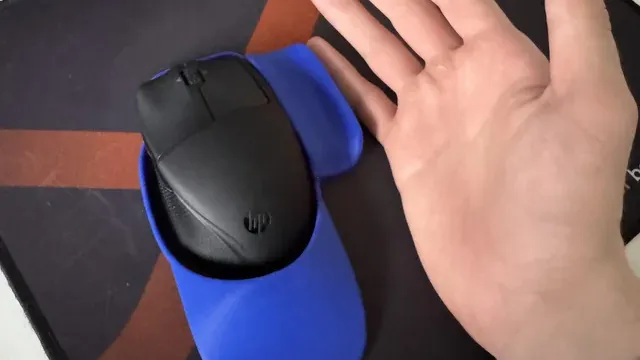
A hand holding a light-blue mouse on a red mousepad Fit and compatibility
Keep the Sabre v2 PRO on its dongle for games; Bluetooth is for a laptop. The Viper V3 Pro's dongle works best on a front USB port or an extender near the mouse.
Features beyond the spec table
The DeathAdder V3: 8000Hz HyperPolling. The Viper V3 Pro: 8000Hz wireless polling. The PRO X2 Superstrike: a Hero 2 sensor.
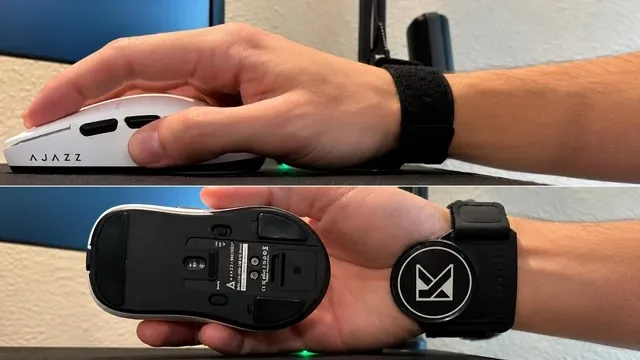
A hand on a white gaming mouse, and the same mouse shown from below Where your budget lands
Under $50 buys the Pulsefire Haste 2; $50 to $100 buys the DeathAdder V3 and the Sabre v2 PRO; $100 to $150 buys the Viper V3 Pro; $150 to $250 buys the PRO X2 Superstrike at our last check.
How to Choose a Gaming Mouse
By priority
| Priority | Consider | Why |
|---|---|---|
| Fast flick aiming | Pulsefire Haste 2 | The lightest weight here (53g) |
| Buyers who want DeathAdder ergonomic shape refined with esports players | DeathAdder V3 | The DeathAdder ergonomic shape refined with esports players |
| Buyers who want a symmetrical shape | Viper V3 Pro | A symmetrical shape |
| Buyers for whom price is not the deciding factor, since the Pulsefire Haste 2 costs less | PRO X2 Superstrike | Haptic click feedback at the highest price in the group |
Scroll sideways to see every column.
Key specs side by side
The Pulsefire Haste 2 leads on weight at 53g, ahead of the Viper V3 Pro at 54g. "Not listed" marks weight where the Sabre v2 PRO and the PRO X2 Superstrike leave the figure out.
| Mice | Weight | Max DPI | Battery life | Polling rate |
|---|---|---|---|---|
| Pulsefire Haste 2 | 53g | 26,000 | Not listed | 8,000Hz |
| DeathAdder V3 | 59g | Not listed | Not listed | 8,000Hz |
| Sabre v2 PRO | Not listed | 33,000 | 120 hours | 8,000Hz |
| Viper V3 Pro | 54g | 35,000 | 95 hours | 8,000Hz |
| PRO X2 Superstrike | Not listed | 44,000 | Not listed | 8,000Hz |
Scroll sideways to see every column.
By price at the time of writing
At our last check the cheapest pick, the Pulsefire Haste 2, sat in the under $50 tier, 4 tiers in all up to the PRO X2 Superstrike at $150 to $250; Amazon prices move, so recheck before buying.
| Price tier | Mice |
|---|---|
| Under $50 | Pulsefire Haste 2 |
| About $50 to $100 | DeathAdder V3, Sabre v2 PRO |
| About $100 to $150 | Viper V3 Pro |
| About $150 to $250 | PRO X2 Superstrike |
Frequently Asked Questions
Is the Pulsefire Haste 2 ahead of the Viper V3 Pro on weight?
The Pulsefire Haste 2 comes out best at 53g, with the Viper V3 Pro at 54g. The DeathAdder V3 is at the other end of this group with 59g. The Sabre v2 PRO and the PRO X2 Superstrike are left out of this ranking because their weight isn't stated; 3 of 5 picks are ranked.
Which has the longest battery life: the Sabre v2 PRO or the Viper V3 Pro?
The Sabre v2 PRO tops battery life at 120 hours; the Viper V3 Pro follows at 95 hours, 26% apart. The Pulsefire Haste 2, the DeathAdder V3 and the PRO X2 Superstrike don't state a battery life figure, so they sit outside this comparison; 2 of 5 picks are ranked.
What makes the Pulsefire Haste 2 the Lightest Mouse?
It carries the badge for the lightest weight here (53g). The Viper V3 Pro is next on weight at 54g, so this pick's 53g is 2% further out. It makes sense for fast flick aiming.
Do the DeathAdder V3 and the Viper V3 Pro differ on shape?
The DeathAdder V3 uses Right-handed ergonomic; the Viper V3 Pro uses symmetrical. The makers of the Pulsefire Haste 2, the Sabre v2 PRO and the PRO X2 Superstrike don't state shape, so 2 of 5 picks are covered here.
What should I check before buying the PRO X2 Superstrike?
The PRO X2 Superstrike's dongle works best on a front USB port or an extender near the mouse. In this guide it ranks fifth of 5, as our Premium Pick.
Beyond the specs, what sets the Pulsefire Haste 2 and the DeathAdder V3 apart?
The Pulsefire Haste 2: four pieces of included grip tape. The DeathAdder V3: the DeathAdder ergonomic shape refined with esports players. The Viper V3 Pro: a Focus Pro 35K sensor.
Bottom Line
Our first pick is the Pulsefire Haste 2. Look at the DeathAdder V3 for the DeathAdder ergonomic shape refined with esports players, the Viper V3 Pro for a symmetrical shape and the PRO X2 Superstrike for haptic click feedback at the highest price in the group if those matter more to you.
Polling above 1,000Hz is a small gain; buy for shape and weight first.
Related Guides
- Related guideThe Best Gaming Mice Right Now
- Related guideThe Best Wireless Gaming Mice for Every Grip and Budget
- Related guideThe Best FPS Gaming Mice
- Lower budgetThe Best Gaming Mice Under $20
- Similar guideThe Best MMO Gaming Mice
- ExplainerHow to Choose a Gaming Mouse
- ExplainerMouse polling rate and DPI: what each number changes
- Also see: mouse pads and desk matsMouse Pad Features Explained: What Is Worth Paying For?
- Similar guideThe Best Gaming Mice for CS2
- Topic hubAll mice guides
About the author
PC Hardware Editor
Alex covers PC hardware, monitors, components, upgrades and peripherals for The PC Journal, with a focus on helping readers understand specifications, compatibility and meaningful product trade-offs.
Covers: Monitors, Graphics cards, Processors, PC components, Peripherals, Upgrades and compatibility
View all articles