
Buying Guide
The Best Easy-to-Apply Thermal Paste
We weighed five thermal pastes on tube size and rated service life; the XTM50 has the largest tube size, and the MX-4 costs the least.
By The PC Journal editorial team
12 min read5 products evaluated
Some pastes are made to be forgiving: they need no spreading, flow easily or spread evenly without mess. Every pick is sold on one of those traits, ordered from the lowest price.
The order reflects amount, rated service life and compound from maker specifications; we did not test these thermal pastes ourselves, and a missing rated service life is flagged, not filled in.
Quick Picks
Our 5 recommendations at a glance. Tap a pick for the full verdict.

Lowest Price Here
ARCTIC MX-4 (4g)
The cheapest way into this group, below the NT-H1.
Best for: Buyers who would rather put the savings elsewhere in the build.
Our take Check price for ARCTIC MX-4 (4g) (opens in a new tab)
Also Consider
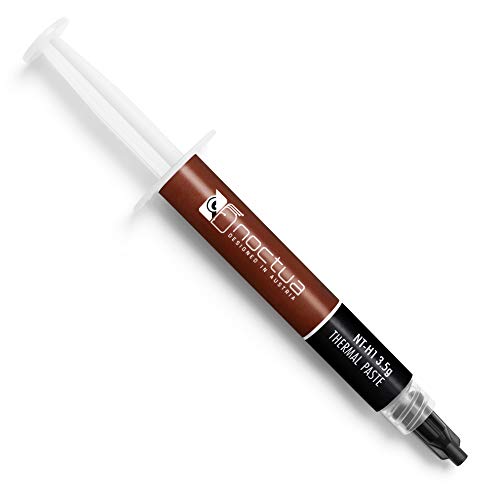
Noctua NT-H1 (3.5g)
Cleanup with a dry paper towel, no alcohol needed.
Best for: Buyers who want cleanup with a dry paper towel, no alcohol needed.
Our take Check price for Noctua NT-H1 (3.5g) (opens in a new tab)

Strong Alternative
Corsair XTM60 (3g)
A low-viscosity formula for an even layer.
Best for: Buyers who want low-viscosity formula for an even layer.
Our take Check price for Corsair XTM60 (3g) (opens in a new tab)

Worth a Look
Noctua NT-H2 (3.5g)
A recommended usage time of up to five years on the CPU.
Best for: Buyers who want recommended usage time of up to five years on the CPU.
Our take Check price for Noctua NT-H2 (3.5g) (opens in a new tab)

Largest Tube Size
Corsair XTM50 (5g)
The largest tube size here (5g).
Best for: Buyers who put tube size first.
Our take Check price for Corsair XTM50 (5g) (opens in a new tab)
| Pick | Why it’s here | Best for | Price |
|---|---|---|---|
| The cheapest way into this group, below the NT-H1. | Buyers who would rather put the savings elsewhere in the build. | Check price for ARCTIC MX-4 (4g) (opens in a new tab) |
| Cleanup with a dry paper towel, no alcohol needed. | Buyers who want cleanup with a dry paper towel, no alcohol needed. | Check price for Noctua NT-H1 (3.5g) (opens in a new tab) |
| A low-viscosity formula for an even layer. | Buyers who want low-viscosity formula for an even layer. | Check price for Corsair XTM60 (3g) (opens in a new tab) |
| A recommended usage time of up to five years on the CPU. | Buyers who want recommended usage time of up to five years on the CPU. | Check price for Noctua NT-H2 (3.5g) (opens in a new tab) |
| The largest tube size here (5g). | Buyers who put tube size first. | Check price for Corsair XTM50 (5g) (opens in a new tab) |
Our Picks
Lowest Price Here1 of 5
ARCTIC MX-4 (4g) on Amazon (opens in a new tab)
MX-4 is the long-running default for good reason: a carbon-based, non-conductive paste that ARCTIC says lasts at least eight years once applied.
Best for
- Buyers who would rather put the savings elsewhere in the build.
Skip if
- Worth skipping when tube size of 4g, behind the XTM50 (5g is a problem.
Why we like it
It forgives a clumsy first application, and 4g covers several builds. On tube size it sits mid-pack at 4g: the XTM50 comes in at 5g, and the XTM60 comes in at 3g. You also get a consistency ARCTIC pitches at first-time builders.
Clean off old paste with isopropyl alcohol first, then apply a pea-sized dot or a thin line on the heatspreader; on large Intel chips an X or a line covers the longer die better. Worth noting too: maker-rated for up to 8 years without reapplying. No other pick here cost less at our last price check, and the NT-H1 was closest.
Key dimensions & specs
- Amount: 4g
- Rated service life: up to 8 years
- Compound: Carbon microparticle
- Electrically non-conductive: Yes
Pros
- 4g is enough for several applications
- Maker-rated for up to 8 years without reapplying
- Carbon microparticle formula
- Electrically non-conductive, so spills are harmless
Cons
- Tube size of 4g, behind the XTM50 (5g)
Also Consider2 of 5
Noctua NT-H1 (3.5g) on Amazon (opens in a new tab)
NT-H1 needs no spreading and wipes off with a dry paper towel, which makes it one of the least fussy pastes to work with.
Best for
- Buyers who want cleanup with a dry paper towel, no alcohol needed.
Skip if
- Skip it if price comes first: the MX-4 cost less when we checked.
Why we like it
Noctua rates it for up to five years on a CPU and about 15 applications on AM4 or LGA1700. It matches the NT-H2 on tube size (3.5g). It also comes with a recommended storage time of up to three years.
Clean off old paste with isopropyl alcohol first, then apply a pea-sized dot or a thin line on the heatspreader; on large Intel chips an X or a line covers the longer die better. Do not pre-spread it; let the cooler's mounting pressure distribute it. Before buying, weigh one limit: costs more than the MX-4 at the time of writing. Its price falls between the MX-4 and the XTM60, based on our last check.
Key dimensions & specs
- Amount: 3.5g
- Rated service life: up to 5 years
- Applications per tube: About 3 to 20
- Application: No need to spread before mounting
Pros
- Maker-rated for up to 5 years without reapplying
- Cleanup with a dry paper towel, no alcohol needed
- Recommended storage time of up to three years
- Tube size of 3.5g, ahead of the XTM60
Cons
- Costs more than the MX-4 at the time of writing
Strong Alternative3 of 5
Corsair XTM60 (3g) on Amazon (opens in a new tab)
XTM60 is Corsair's low-viscosity paste with an applicator card for an even layer every time.
Best for
- Buyers who want low-viscosity formula for an even layer.
Skip if
- Skip it if tube size matters most to you; the XTM50 offers 5g.
Why we like it
Corsair pitches it at overclocking and says it resists drying and cracking over time. Its 3g tube size is the smallest in this group; the XTM50 leads at 5g. You get an an applicator card in the box here, which sets it apart from the NT-H2 and its a three cleaning wipes in the box.
Clean off old paste with isopropyl alcohol first, then apply a pea-sized dot or a thin line on the heatspreader; on large Intel chips an X or a line covers the longer die better. On price it sat third of 5, between the cheaper NT-H1 and the pricier NT-H2, at the time of writing.
Key dimensions & specs
- Amount: 3g
- In the box: an applicator card
Pros
- Includes an applicator card
- Low-viscosity formula for an even layer
- Resistance to drying and cracking over time
Cons
- Tube size trails the XTM50 (5g)
- Costs more than the MX-4 at the time of writing
Worth a Look4 of 5
Noctua NT-H2 (3.5g) on Amazon (opens in a new tab)
NT-H2 comes with three cleaning wipes and needs no spreading.
Best for
- Buyers who want recommended usage time of up to five years on the CPU.
Skip if
- Skip it if price comes first: the MX-4 cost less when we checked.
Why we like it
Noctua rates it for up to five years on the CPU, which suits builders who set it and forget it. It matches the NT-H1 on tube size (3.5g). A three cleaning wipes in the box is unique to it among these picks, while the XTM60 uses an an applicator card in the box.
It also offers a recommended usage time of up to five years on the CPU and enough for around 3 to 20 applications. Clean off old paste with isopropyl alcohol first, then apply a pea-sized dot or a thin line on the heatspreader; on large Intel chips an X or a line covers the longer die better. Do not pre-spread it; let the cooler's mounting pressure distribute it.
Its price falls between the XTM60 and the XTM50, based on our last check. Buyers who need a confirmed rated service life should compare it with the MX-4, which offers up to 8 years.
Key dimensions & specs
- Amount: 3.5g
- In the box: three cleaning wipes
- Application: No need to spread before mounting
Pros
- Includes three cleaning wipes
- Recommended usage time of up to five years on the CPU
- Enough for around 3 to 20 applications
- Tube size of 3.5g, ahead of the XTM60
Cons
- Costs more than the MX-4 at the time of writing
Largest Tube Size5 of 5
Corsair XTM50 (5g) on Amazon (opens in a new tab)
XTM50 is a zinc-oxide, non-conductive paste with a stencil and spreader in the box, which takes the guesswork out of coverage.
Best for
- Buyers who put tube size first.
Skip if
- Skip it if price comes first: the MX-4 cost less when we checked.
Why we like it
Its low viscosity fills fine surface channels, and Corsair says it contains no volatile compounds. Nothing else here matches its 5g tube size; the MX-4 comes closest at 4g. It also comes with zero volatile compounds, by the maker's claim.
Clean off old paste with isopropyl alcohol first, then apply a pea-sized dot or a thin line on the heatspreader; on large Intel chips an X or a line covers the longer die better. Only the NT-H2 came close to it on price at the time of writing; it cost the most of the 5 picks. There is no published rated service life figure, whereas the MX-4 offers up to 8 years.
Key dimensions & specs
- Amount: 5g
- Compound: Zinc oxide
- Electrically non-conductive: Yes
- In the box: an application stencil and spreader
Pros
- 5g is enough for several applications
- Electrically non-conductive, so spills are harmless
- Includes an application stencil and spreader
- Low-viscosity compound that fills fine surface channels
Cons
- Costs more than the MX-4 at the time of writing
How We Chose
Each pick was assessed across 4 criteria weighted for real-world use.
- Application
- We noted spreaders, wipes and the maker's application guidance.
- Value
- We compared tube sizes and what comes in the box.
- Durability
- We looked for maker claims on pump-out and long-term stability.
- Safety
- We checked that each paste is listed as electrically non-conductive.
What to Look for in an Easy-to-Apply Thermal Paste
Key buying criteria so you get the right fit the first time.
Durability matters on hot CPUs
Some pastes pump out or dry over thermal cycles. Pastes built for long-term stability suit high-power CPUs you do not want to remount often.
Buy the amount you will use
One large CPU uses about 0.2g to 0.5g. A 1g tube covers a couple of builds; 4g or more suits regular remounts or several machines.
Check the rated service life
Some makers state how long the paste can stay on a CPU before it needs replacing, from about five years to eight. A longer rating suits a PC you won't open often.
GPU repasting needs more care
Graphics card dies are bare, so non-conductive paste and a thin, even layer matter more. Some pastes are sold specifically for direct-die use.
Treat W/mK figures with care
Makers measure conductivity under their own conditions, so a higher W/mK number on the box does not always mean lower temperatures in a PC. Compare pastes from the same test source instead.
Choose non-conductive paste
Non-conductive pastes are safe if a little spills onto nearby parts. Avoid liquid metal unless you know the risks.
How to Choose an Easy-to-Apply Thermal Paste
By priority
| Priority | Consider | Why |
|---|---|---|
| Buyers who would rather put the savings elsewhere in the build | MX-4 | The cheapest way into this group, below the NT-H1 |
| Buyers who want cleanup with a dry paper towel, no alcohol needed | NT-H1 | Cleanup with a dry paper towel, no alcohol needed |
| Buyers who want low-viscosity formula for an even layer | XTM60 | A low-viscosity formula for an even layer |
| Buyers who want recommended usage time of up to five years on the CPU | NT-H2 | A recommended usage time of up to five years on the CPU |
| Buyers who put tube size first | XTM50 | The largest tube size here (5g) |
Scroll sideways to see every column.
Key specs side by side
Figures as each maker states them.
| Paste | Amount | Rated service life | Compound | Electrically non-conductive |
|---|---|---|---|---|
| MX-4 | 4g | up to 8 years | Carbon microparticle | Yes |
| NT-H1 | 3.5g | up to 5 years | Not listed | Not listed |
| XTM60 | 3g | Not listed | Not listed | Not listed |
| NT-H2 | 3.5g | Not listed | Not listed | Not listed |
| XTM50 | 5g | Not listed | Zinc oxide | Yes |
Scroll sideways to see every column.
Frequently Asked Questions
Which pick leads on tube size?
The XTM50, at 5g. The MX-4 follows at 4g, while the XTM60 has 3g.
Which pick costs the least here?
Start with the MX-4, the lowest-priced pick when we checked. The XTM50 is the premium end, so the spread between them shows what extra money buys here.
Does thermal paste expire in the tube?
It can separate or thicken after a few years in storage. Noctua, for example, recommends using its paste within three years of purchase.
Can I use CPU paste on a graphics card?
Yes, if it is non-conductive. Apply a thin, even layer on the bare die.
Is a higher W/mK rating always better?
Not reliably. Makers test conductivity differently, so the figures are not directly comparable between brands.
Bottom Line
Our first pick is the MX-4, chosen for the cheapest way into this group, below the NT-H1. Look at the NT-H1 for cleanup with a dry paper towel, no alcohol needed, the XTM60 for a low-viscosity formula for an even layer and the NT-H2 for a recommended usage time of up to five years on the CPU if those matter more to you.
Warm a thick tube in your hand for a minute; it flows more easily.