
Buying Guide
The Best Wireless Mice Under $40
We weighed three mice on battery life and grip, and the EM11 NL costs the least.
By The PC Journal editorial team
11 min read3 products evaluated
From $15 to $40 you find ergonomic, vertical and multi-device mice. Every mouse cost 15 to 40 when we checked and connects without a cable.
Rankings weigh battery life, grip and connection as the makers state them; we did not test these mice ourselves, and if a maker skips battery life, the guide says so.
Quick Picks
Our 3 recommendations at a glance. Tap a pick for the full verdict.

Also Consider
Logitech M720 Triathlon Multi-Device Mouse
Switching between 3 computers at the touch of a button.
Best for: Buyers who want switching between 3 computers at the touch of a button.
Our take Check price for Logitech M720 Triathlon Multi-Device Mouse (opens in a new tab)

Premium Pick
Logitech Signature M650
The top of this price range, adding customizable side buttons.
Best for: Spending more than the M720 costs for the fullest feature set in this group.
Our take Check price for Logitech Signature M650 (opens in a new tab)
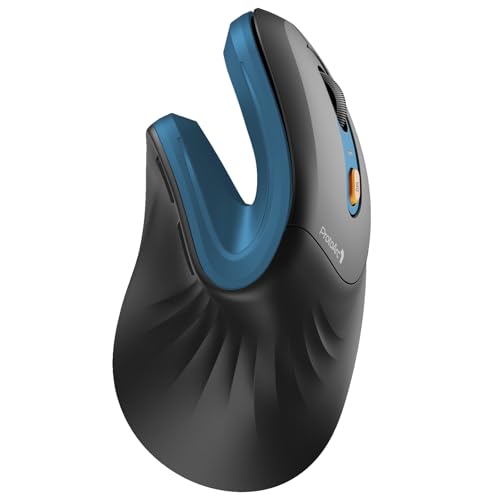
Lowest Price Here
ProtoArc EM11 NL Wireless Ergonomic Vertical Mouse
The lowest price among these mice at the time of writing.
Best for: Keeping the cost under $50.
Our take Check price for ProtoArc EM11 NL Wireless Ergonomic Vertical Mouse (opens in a new tab)
| Pick | Why it’s here | Best for | Price |
|---|---|---|---|
| Switching between 3 computers at the touch of a button. | Buyers who want switching between 3 computers at the touch of a button. | Check price for Logitech M720 Triathlon Multi-Device Mouse (opens in a new tab) |
| The top of this price range, adding customizable side buttons. | Spending more than the M720 costs for the fullest feature set in this group. | Check price for Logitech Signature M650 (opens in a new tab) |
| The lowest price among these mice at the time of writing. | Keeping the cost under $50. | Check price for ProtoArc EM11 NL Wireless Ergonomic Vertical Mouse (opens in a new tab) |
Our Picks
Also Consider1 of 3
Logitech M720 Triathlon Multi-Device Mouse on Amazon (opens in a new tab)
Logitech's M720 Triathlon switches between three computers with a button and supports Logitech Flow.
Best for
- Buyers who want switching between 3 computers at the touch of a button.
Skip if
- Skip it if price comes first: the EM11 NL cost less when we checked.
Why we like it
It has 24 months of battery life. Its hyper-fast scroll wheel spins freely through long documents and switches back to click-by-click scrolling when you need precision. The rubber body and sculpted right-hand shape suit a relaxed palm grip.
Logitech Flow moves the cursor, text and files between up to three computers, and it connects over Bluetooth or the Unifying receiver. The Unifying receiver can also pair up to six compatible Logitech devices, which saves USB ports. On price it sat second of 3, between the cheaper EM11 NL and the pricier Signature M650, at the time of writing.
Key dimensions & specs
- Battery life: up to 24 months
- Programmable buttons: 6
- Grip: Full-size, right-handed
- Connection: Bluetooth or Unifying receiver, 3 devices
Pros
- Switching between 3 computers at the touch of a button
- Logitech Flow across computers
- Unifying receiver for up to 6 Logitech devices
Cons
- Costs more than the EM11 NL at the time of writing
Premium Pick2 of 3
Logitech Signature M650 on Amazon (opens in a new tab)
Logitech's Signature M650 is a quiet-click mouse sized for small to medium hands.
Best for
- Spending more than the M720 costs for the fullest feature set in this group.
Skip if
- If budget leads, the EM11 NL was cheaper at our last price check.
Why we like it
It supports Windows, macOS, Linux, ChromeOS, iPadOS and Android. Its SmartWheel switches between line-by-line and fast scrolling, and rubber grips suit small to medium hands. Plastics include up to 64% recycled material.
It also comes with customizable side buttons and silent clicks. It is shaped for right hands only. It connects over Bluetooth or a Logi Bolt receiver; Bolt does not pair with older Unifying receivers.
Before buying, weigh one limit: costs more than the EM11 NL at the time of writing. It was the highest-priced of the 3 picks at the time of writing, so the case for it rests on what it adds over the M720 and the rest.
Key dimensions & specs
- Battery life: up to 24 months
- Grip: Right-handed, small to medium hands
- Connection: Bluetooth or Logi Bolt
Pros
- Customizable side buttons
- Silent clicks
- Support for Windows, macOS, Linux, ChromeOS, iPadOS and Android
- Bluetooth or Logi Bolt connection, the only one here
Cons
- Costs more than the EM11 NL at the time of writing
Lowest Price Here3 of 3
ProtoArc EM11 NL Wireless Ergonomic Vertical Mouse on Amazon (opens in a new tab)
ProtoArc's EM11 NL is a 58-degree vertical mouse for hands under 7.5 inches, with silent left and right buttons.
Best for
- Keeping the cost under $50.
Skip if
- Skip it if you need to know its battery life before buying; the maker doesn't publish one.
Why we like it
It recharges over USB-C and pairs with three devices across two Bluetooth channels and a 2.4GHz receiver. It charges in about 2 hours over the included Type-C cable and lists up to 200 days of standby. The scroll wheel and the back and forward buttons are not silent.
It also offers a USB-C rechargeable 500mAh battery rated for up to 100 hours and a stated hand-length limit of 7.5 inches. Vertical mice put your hand in a handshake position; allow a week to adjust, and check the hand size. No other pick here cost less at our last price check, and the M720 was closest. If you want a confirmed battery life, look to the M720 instead: it runs for up to 24 months, while this one gives no figure.
Key dimensions & specs
- Sensor: 2,400 DPI
- Grip: Vertical, right-handed, hands under 7.5 in (58°)
- Connection: Bluetooth (2 channels) and 2.4GHz, 3 devices
Pros
- Silent left and right buttons (the wheel and side buttons are not silent)
- USB-C rechargeable 500mAh battery rated for up to 100 hours
- Stated hand-length limit of 7.5 inches
- The lowest price among these mice at the time of writing
Cons
- No published battery life
How We Chose These Wireless Mice Under $40
Each pick was assessed across 4 criteria weighted for real-world use.
- How these picks were ranked
- We set side by side three mice on battery life, grip and connection from manufacturer specifications. Nothing was tested in-house; 2 of the 3 fields compared are stated for every pick, while battery life has gaps.
- What every pick has in common
- All 3, from the M720 to the EM11 NL, state grip and connection.
- Where the specs have gaps
- The EM11 NL gives no battery life.
- Price range
- From the EM11 NL to the Signature M650, all sat in the under $50 tier when we checked.
What to Look for in a Wireless Mouse Under $40
Key buying criteria so you get the right fit the first time.
Extras that separate them
The M720: Logitech Flow across computers. The Signature M650: silent clicks. The EM11 NL: a USB-C rechargeable 500mAh battery rated for up to 100 hours.
Budget
All 3 sat in the under $50 tier when we checked, from the EM11 NL at the low end to the Signature M650 at the top, so decide on features first.
Start from what matters most
Spending more than the M720 costs for the fullest feature set in this group: the Signature M650. Keeping the cost under $50: the EM11 NL.
Match the hand size
Makers often state a hand size range, especially for vertical mice. A mouse that is too small forces a claw grip.
Measure from wrist crease to middle fingertip before buying.
Programmable buttons save shortcuts
Extra buttons can run copy, paste, undo or IDE commands. Per-app profiles change them automatically in each program.
Check that the software runs on your operating system.
How to Choose a Wireless Mouse Under $40
By priority
| Priority | Consider | Why |
|---|---|---|
| Buyers who want switching between 3 computers at the touch of a button | M720 | Switching between 3 computers at the touch of a button |
| Spending more than the M720 costs for the fullest feature set in this group | Signature M650 | The top of this price range, adding customizable side buttons |
| Keeping the cost under $50 | EM11 NL | The lowest price among these mice at the time of writing |
Scroll sideways to see every column.
Key specs side by side
The M720, the Signature M650 and the rest, as their makers list them.
| Mice | Battery life | Grip | Connection |
|---|---|---|---|
| M720 | up to 24 months | Full-size, right-handed | Bluetooth or Unifying receiver, 3 devices |
| Signature M650 | up to 24 months | Right-handed, small to medium hands | Bluetooth or Logi Bolt |
| EM11 NL | Not listed | Vertical, right-handed, hands under 7.5 in (58°) | Bluetooth (2 channels) and 2.4GHz, 3 devices |
Scroll sideways to see every column.
Frequently Asked Questions
Why is the EM11 NL our Lowest Price Here pick?
It earns the label for the lowest price among these mice at the time of writing. It makes sense for keeping the cost under $50.
What extras do the M720 and the Signature M650 include?
The M720: switching between 3 computers at the touch of a button. The Signature M650: customizable side buttons. The EM11 NL: silent left and right buttons (the wheel and side buttons are not silent).
Who should choose the Signature M650?
The Signature M650 carries our Premium Pick label for the top of this price range, adding customizable side buttons. It ranks second of 3 here and sat in the under $50 tier at our last price check; it suits spending more than the M720 costs for the fullest feature set in this group.
Should I pick the M720 or the EM11 NL?
The M720 suits buyers who want switching between 3 computers at the touch of a button; the EM11 NL suits keeping the cost under $50.
Are there left-handed versions?
Many ergonomic mice are right-handed only. Check the product page for a left-handed model.
Bottom Line
Our first pick is the M720, chosen for switching between 3 computers at the touch of a button. Look at the Signature M650 for the top of this price range, adding customizable side buttons and the EM11 NL for the lowest price among these mice at the time of writing if those matter more to you.
A vertical mouse changes your wrist position; give it a few days before judging it.