
Buying Guide
The Best Wireless Keyboards Under $30
Three keyboards compared, from the TECKNET mini to the K250, with the trade-offs of each named.
By The PC Journal editorial team
11 min read3 products evaluated
Under $30 a wireless keyboard is a basic receiver or Bluetooth model for one computer. Every pick cost 30 or less when we checked and connects without a cable.
This is a research roundup, not a lab test: battery (backlight off), layout and key type come from each maker's published specs; a missing battery (backlight off) is flagged, not filled in, and no figure here comes from our own testing.
Quick Picks
Our 3 recommendations at a glance. Tap a pick for the full verdict.

Lowest Price Here
TECKNET 2.4G Mini Wireless Keyboard
A lower price than the Macally compact and the rest when we checked.
Best for: Buyers who would rather put the savings elsewhere than into the Macally compact.
Our take Check price for TECKNET 2.4G Mini Wireless Keyboard (opens in a new tab)
Also Consider
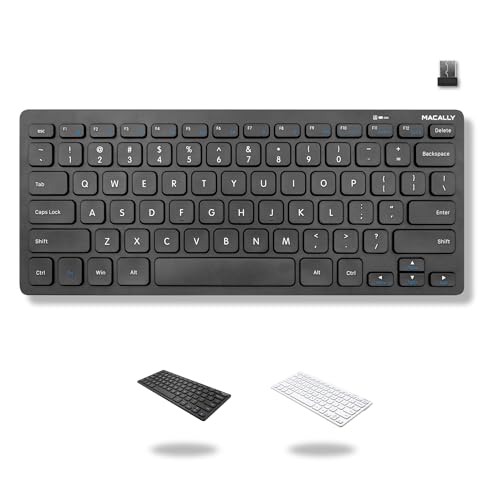
Macally Compact Wireless Keyboard
12 shortcut keys.
Best for: Buyers who want 12 shortcut keys.
Our take Check price for Macally Compact Wireless Keyboard (opens in a new tab)

Premium Pick
Logitech K250 Compact Bluetooth Keyboard
The top of this price range, adding a number pad in a compact frame.
Best for: Spending more than the Macally compact costs for the fullest feature set in this group.
Our take Check price for Logitech K250 Compact Bluetooth Keyboard (opens in a new tab)
| Pick | Why it’s here | Best for | Price |
|---|---|---|---|
| A lower price than the Macally compact and the rest when we checked. | Buyers who would rather put the savings elsewhere than into the Macally compact. | Check price for TECKNET 2.4G Mini Wireless Keyboard (opens in a new tab) |
| 12 shortcut keys. | Buyers who want 12 shortcut keys. | Check price for Macally Compact Wireless Keyboard (opens in a new tab) |
| The top of this price range, adding a number pad in a compact frame. | Spending more than the Macally compact costs for the fullest feature set in this group. | Check price for Logitech K250 Compact Bluetooth Keyboard (opens in a new tab) |
Our Picks
Lowest Price Here1 of 3
TECKNET 2.4G Mini Wireless Keyboard on Amazon (opens in a new tab)
What the TECKNET mini brings to the table is a 36-month warranty with registration, plus media hotkeys.
Best for
- Buyers who would rather put the savings elsewhere than into the Macally compact.
Skip if
- Look at the other picks if you need a feature not covered above.
Why we like it
It also runs for up to 12 months. A compact layout is unique to it among these picks, while the K250 uses a compact with number pad layout. You get a quiet low-travel keys key type here, which sets it apart from the K250 and its a deep-profile keys key type.
You get a 2.4GHz USB receiver only connection here, which sets it apart from the K250 and its a bluetooth connection. It also offers Windows, Mac, ChromeOS and Linux support. It cost the least of the 3 picks at the time of writing, with the Macally compact the next step up.
Key dimensions & specs
- Battery (backlight off): up to 12 months
- Layout: Compact
- Key type: Quiet low-travel keys
- Connection: 2.4GHz USB receiver only
Pros
- Up to 12 months per charge (backlight off)
- 36-month warranty with registration
- Media hotkeys
- Windows, Mac, ChromeOS and Linux support
Also Consider2 of 3
Macally Compact Wireless Keyboard on Amazon (opens in a new tab)
What the Macally compact brings to the table is 12 shortcut keys, plus an on/off switch to save battery.
Best for
- Buyers who want 12 shortcut keys.
Skip if
- The maker gives no battery life, so skip it if that figure decides your choice.
Why we like it
The 78-key layout drops the number pad to save desk space but keeps 12 shortcut keys for media and system functions. A 2.4GHz USB-A dongle handles the connection, so there's no Bluetooth pairing to manage. It is the only pick here with a compact (78 keys) layout; the TECKNET mini has a compact layout instead.
No other pick in this guide offers a slim keys key type; compare the TECKNET mini, which has a quiet low-travel keys key type. Its price falls between the TECKNET mini and the K250, based on our last check. Buyers who need a confirmed battery life should compare it with the TECKNET mini, which runs for up to 12 months.
Key dimensions & specs
- Layout: Compact (78 keys)
- Key type: Slim keys
- Connection: 2.4GHz USB receiver, 1 AAA battery
Pros
- 12 shortcut keys
- On/off switch to save battery
- Battery included in the box
- Compact (78 keys) layout, the only one here
Cons
- No published battery life
- Costs more than the TECKNET mini at the time of writing
Premium Pick3 of 3
Logitech K250 Compact Bluetooth Keyboard on Amazon (opens in a new tab)
Logitech's K250 keeps a number pad inside a compact frame and connects over Bluetooth.
Best for
- Spending more than the Macally compact costs for the fullest feature set in this group.
Skip if
- Price-first buyers should look at the TECKNET mini, which cost less when we checked.
Why we like it
It adds deep-profile keys, a spill-resistant design and adjustable tilt legs, with a battery rating of up to 12 months. No other pick in this guide offers a compact with number pad layout; compare the TECKNET mini, which has a compact layout. It is the only pick here with a deep-profile keys key type; the TECKNET mini has a quiet low-travel keys key type instead.
It is the only pick here with a bluetooth connection; the TECKNET mini has a 2.4GHz USB receiver only connection instead. Check that your computer has Bluetooth, or use the included receiver if there is one. It was the highest-priced of the 3 picks at the time of writing, so the case for it rests on what it adds over the Macally compact and the rest.
Key dimensions & specs
- Battery (backlight off): up to 12 months
- Layout: Compact with number pad
- Key type: Deep-profile keys
- Connection: Bluetooth
Pros
- Up to 12 months per charge (backlight off)
- Number pad in a compact frame
- Spill-resistant design
- Adjustable tilt legs
Cons
- Costs more than the TECKNET mini at the time of writing
How We Chose These Wireless Keyboards Under $30
Each pick was assessed across 4 criteria weighted for real-world use.
- What we compared
- We lined up three keyboards on battery life, layout, key type and connection from manufacturer specifications. We did not test them in-house, and battery life is missing for at least one pick.
- The shared baseline
- All 3, from the TECKNET mini to the K250, state layout, key type and connection.
- Where the specs have gaps
- The Macally compact gives no battery life.
- Price range
- From the TECKNET mini to the K250, all sat in the under $50 tier when we checked.
What to Look for in a Wireless Keyboard Under $30
Key buying criteria so you get the right fit the first time.
Key type
The TECKNET mini lists quiet low-travel keys; the Macally compact lists slim keys; the K250 lists deep-profile keys.
Features beyond the spec table
The TECKNET mini: media hotkeys. The Macally compact: an on/off switch to save battery. The K250: a spill-resistant design.
Where your budget lands
Price does little to separate these 3: the TECKNET mini through the K250 all landed in the under $50 tier, which leaves features to decide it.
Match the pick to your priority
Buyers who would rather put the savings elsewhere than into the Macally compact: the TECKNET mini. Spending more than the Macally compact costs for the fullest feature set in this group: the K250.
Multi-device switching
Keyboards that pair with three devices let you move between a work laptop, a personal PC and a tablet with one key.
Check whether switching uses Bluetooth, a receiver, or both.
How to Choose a Wireless Keyboard Under $30
By priority
| Priority | Consider | Why |
|---|---|---|
| Buyers who would rather put the savings elsewhere than into the Macally compact | TECKNET mini | A lower price than the Macally compact and the rest when we checked |
| Buyers who want 12 shortcut keys | Macally compact | 12 shortcut keys |
| Spending more than the Macally compact costs for the fullest feature set in this group | K250 | The top of this price range, adding a number pad in a compact frame |
Scroll sideways to see every column.
Key specs side by side
The TECKNET mini, the Macally compact and the rest, as their makers list them.
| Keyboard | Battery (backlight off) | Layout | Key type | Connection |
|---|---|---|---|---|
| TECKNET mini | up to 12 months | Compact | Quiet low-travel keys | 2.4GHz USB receiver only |
| Macally compact | Not listed | Compact (78 keys) | Slim keys | 2.4GHz USB receiver, 1 AAA battery |
| K250 | up to 12 months | Compact with number pad | Deep-profile keys | Bluetooth |
Scroll sideways to see every column.
Frequently Asked Questions
What makes the TECKNET mini the Lowest Price Here?
The label rests on a lower price than the Macally compact and the rest when we checked. It suits anyone who would rather put the savings elsewhere than into the Macally compact.
Do the TECKNET mini and the Macally compact differ on layout?
The TECKNET mini uses compact; the Macally compact uses compact (78 keys); the K250 uses Compact with number pad.
Beyond the specs, what sets the TECKNET mini and the Macally compact apart?
The TECKNET mini: a 36-month warranty with registration. The Macally compact: 12 shortcut keys. The K250: a number pad in a compact frame.
Who should choose the K250?
The K250 carries our Premium Pick label for the top of this price range, adding a number pad in a compact frame. It ranks third of 3 here and sat in the under $50 tier at our last price check; it suits spending more than the Macally compact costs for the fullest feature set in this group.
Should I pick the TECKNET mini or the K250?
The TECKNET mini suits buyers who would rather put the savings elsewhere than into the Macally compact; the K250 suits spending more than the Macally compact costs for the fullest feature set in this group.
Bottom Line
Our first pick is the TECKNET mini, chosen for a lower price than the Macally compact and the rest when we checked. Look at the Macally compact for 12 shortcut keys and the K250 for the top of this price range, adding a number pad in a compact frame if those matter more to you.
Check whether the battery is replaceable or rechargeable before you buy.