
Buying Guide
The Best Keyboards for Work and Office Use
Six keyboards for long workdays compared on ergonomics, noise, connections and battery life, from split designs to a wired office board.
By The PC Journal editorial team
12 min read6 products evaluated
A keyboard for work has to be comfortable for eight hours, quiet enough for calls and simple to switch between the computers on your desk. Those needs point to different designs, from low-profile boards to split ergonomic layouts.
We compared six keyboards on the layout, key type, connections and battery life their makers list. We did not test them ourselves.
If you have wrist discomfort, start with the ergonomic picks; if not, a low-profile multi-device board is usually the better daily fit.
Quick Picks
Our 6 recommendations at a glance. Tap a pick for the full verdict.

Best Overall for Work
Logitech MX Keys S
Low-profile keys, smart backlighting and three-device pairing.
Best for: Most office and home-office setups.
Our take Check price for Logitech MX Keys S (opens in a new tab)

Best Split Ergonomic
Logitech Ergo K860 Split Keyboard
A curved split layout with a pillowed wrist rest and negative tilt.
Best for: Long typing days and wrist discomfort.
Our take Check price for Logitech Ergo K860 Split Keyboard (opens in a new tab)

Best Ergonomic Value
Logitech Wave Keys
A wave layout and memory-foam palm rest at well under the K860's price.
Best for: A first ergonomic keyboard.
Our take Check price for Logitech Wave Keys (opens in a new tab)

Longest Battery Life
Logitech MX Mechanical (Tactile Quiet)
The longest battery life here (up to 10 months).
Best for: Offices where the keyboard stays on all day.
Our take Check price for Logitech MX Mechanical (Tactile Quiet) (opens in a new tab)

Best Budget Slim Keyboard
Keychron B6 Pro Ultra-Slim
A full-size ultra-slim layout and long listed battery life at a low price.
Best for: Tight budgets and laptop-style typists.
Our take Check price for Keychron B6 Pro Ultra-Slim (opens in a new tab)
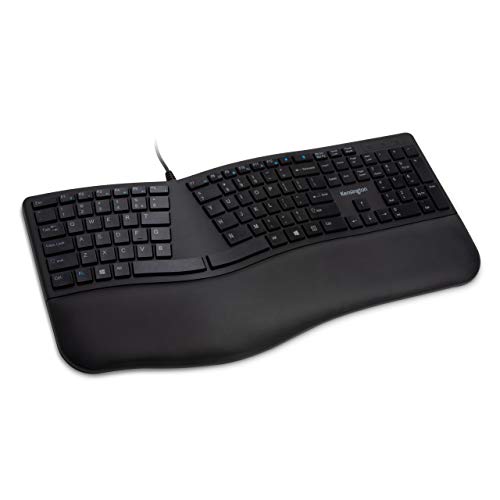
Best Wired Office Keyboard
Kensington Pro Fit Ergonomic Wired Keyboard
Quiet keys and a surface rated for alcohol and bleach cleaning.
Best for: Shared desks and IT-managed PCs.
Our take Check price for Kensington Pro Fit Ergonomic Wired Keyboard (opens in a new tab)
Our Picks
Best Overall for Work1 of 6
Logitech MX Keys S on Amazon (opens in a new tab)
The MX Keys S is the default choice for a work desk: laptop-like dished keys, backlighting that wakes as your hands approach, and pairing with three devices over Bluetooth or Logi Bolt.
Best for
- Most office and home-office setups.
Skip if
- Skip it if battery life matters most to you; the MX Mechanical offers up to 10 months.
Why we like it
Smart Actions in Logi Options+ can automate repetitive shortcuts. It lasts up to 10 days with backlighting or 5 months without, and charges over USB-C. The low-profile angle suits wrist posture.
Its up to 5 months battery life is the shortest in this group; the MX Mechanical leads at up to 10 months. It pairs over Bluetooth or Logitech's Logi Bolt receiver; Bolt is not compatible with older Unifying receivers, so keep the one in the box. It supports Windows and macOS layouts, which helps if you switch between computers. It was priced above the Wave Keys and below the Ergo K860 at the time of writing.
Key dimensions & specs
- Battery (backlight off): up to 5 months
- Paired devices: 3 devices
- Layout: Full-size, low-profile
- Key type: Spherically dished scissor keys
- Connection: Bluetooth or Logi Bolt, multi-OS
- Wrist support: None
Pros
- Backlighting that wakes as your hands approach
- Smart Actions shortcuts in Logi Options+
- Low-profile keys, smart backlighting and three-device pairing
Cons
- Battery life trails the MX Mechanical (up to 10 months)
- Costs more than the Pro Fit at the time of writing
Best Split Ergonomic2 of 6
Logitech Ergo K860 Split Keyboard on Amazon (opens in a new tab)
The Ergo K860 is the most ergonomic board here: a curved, split layout, a pillowed memory-foam wrist rest and palm lift at 0, -4 or -7 degrees.
Best for
- Long typing days and wrist discomfort.
Skip if
- Its battery life is not published, which rules it out if you need that number.
Why we like it
Logitech says the rest gives 54% more wrist support than a standard keyboard. It is the only pick here with a scooped Perfect Stroke keys key type; the Pro Fit has a quiet keys key type instead. It is the only pick here with a USB receiver or Bluetooth connection; the Pro Fit has a wired USB connection instead.
It also comes with certification by United States Ergonomics. Check that your computer has Bluetooth, or use the included receiver if there is one. Ergonomic layouts take a few days to get used to, especially if you type with your hands crossing the centre.
On price it sat fifth of 6, between the cheaper MX Keys S and the pricier MX Mechanical, at the time of writing. The maker doesn't give its battery life; if that figure matters, the MX Mechanical runs for up to 10 months.
Key dimensions & specs
- Layout: Full-size, curved split
- Key type: Scooped Perfect Stroke keys
- Connection: USB receiver or Bluetooth
- Wrist support: Pillowed wrist rest with 0, -4 and -7 degree palm lift
Pros
- Pillowed wrist rest with 0, -4 and -7 degree palm lift
- 54% more wrist support than a standard keyboard, per Logitech
- Certification by United States Ergonomics
- Scooped Perfect Stroke keys key type, the only one here
Cons
- No published battery life
- Costs more than the Pro Fit at the time of writing
Best Ergonomic Value3 of 6
Logitech Wave Keys on Amazon (opens in a new tab)
Wave Keys gives you a gentler ergonomic shape without learning a split layout: a wave-shaped compact board with a cushioned palm rest, certified by United States Ergonomics.
Best for
- A first ergonomic keyboard.
Skip if
- Its battery life is not published, which rules it out if you need that number.
Why we like it
It costs well under half the K860. No other pick in this guide offers a compact wave layout; compare the Pro Fit, which has a full-size ergonomic layout. It is the only pick here with a wave-shaped membrane keys key type; the Keychron B6 Pro has a quiet scissor keys key type instead.
You also get Easy-Switch between devices. It pairs over Bluetooth or Logitech's Logi Bolt receiver; Bolt is not compatible with older Unifying receivers, so keep the one in the box. Ergonomic layouts take a few days to get used to, especially if you type with your hands crossing the centre.
It supports Windows and macOS layouts, which helps if you switch between computers. On price it sat third of 6, between the cheaper Keychron B6 Pro and the pricier MX Keys S, at the time of writing. The maker doesn't give its battery life; if that figure matters, the MX Mechanical runs for up to 10 months.
Key dimensions & specs
- Layout: Compact wave
- Key type: Wave-shaped membrane keys
- Connection: Bluetooth or Logi Bolt, multi-OS
- Wrist support: Cushioned memory-foam palm rest
Pros
- Cushioned memory-foam palm rest
- Certification by United States Ergonomics
- Easy-Switch between devices
- Compact wave layout, the only one here
Cons
- No published battery life
- Costs more than the Pro Fit at the time of writing
Longest Battery Life4 of 6
Logitech MX Mechanical (Tactile Quiet) on Amazon (opens in a new tab)
The MX Mechanical brings Tactile Quiet mechanical switches to Logitech's MX line, with low-profile keys that stay office-friendly.
Best for
- Offices where the keyboard stays on all day.
Skip if
- If budget leads, the Pro Fit was cheaper at our last price check.
Why we like it
Its battery life with the backlight off is the longest here, up to 10 months. Its up to 10 months battery life is the longest here; the Keychron B6 Pro comes next at up to 8 months. It also offers smart backlighting that adjusts to room light and Logitech Flow for moving between computers.
It pairs over Bluetooth or Logitech's Logi Bolt receiver; Bolt is not compatible with older Unifying receivers, so keep the one in the box. It supports Windows and macOS layouts, which helps if you switch between computers. It was the highest-priced of the 6 picks at the time of writing, so the case for it rests on what it adds over the Ergo K860 and the rest.
Key dimensions & specs
- Battery (backlight off): up to 10 months
- Paired devices: 3 devices
- Layout: Full-size, low-profile
- Key type: Tactile Quiet mechanical switches
- Connection: Bluetooth or Logi Bolt, multi-OS
- Wrist support: None
Pros
- Up to 10 months per charge (backlight off)
- Smart backlighting that adjusts to room light
- Logitech Flow for moving between computers
- The longest battery life here (up to 10 months)
Cons
- Costs more than the Pro Fit at the time of writing
Best Budget Slim Keyboard5 of 6
Keychron B6 Pro Ultra-Slim on Amazon (opens in a new tab)
The Keychron B6 Pro is a slim full-size board at a budget price, with multi-device wireless and a 1000Hz polling rate.
Best for
- Tight budgets and laptop-style typists.
Skip if
- Skip it if price comes first: the Pro Fit cost less when we checked.
Why we like it
Keychron rates it for about 1,200 hours of use per charge. It is rated for up to 1,200 hours, about eight months at five hours a day, and it keeps working while charging. Its 2.4GHz link polls at 1,000Hz.
Its up to 8 months battery life ranks second of 3 here, behind the MX Mechanical (up to 10 months) and ahead of the MX Keys S (up to 5 months). A quiet scissor keys key type is unique to it among these picks, while the Ergo K860 uses a scooped Perfect Stroke keys key type. It also comes with online key remapping.
When we checked, only the Pro Fit cost less, and the Wave Keys cost more. If you want a confirmed device pairing, look to the MX Keys S instead: it offers 3 devices, while this one gives no figure.
Key dimensions & specs
- Battery (backlight off): up to 8 months
- Layout: Full-size, ultra-slim
- Key type: Quiet scissor keys
- Connection: Wireless, multi-device, 1000Hz polling
- Wrist support: None
Pros
- Up to 8 months per charge (backlight off)
- About 1,200 hours of use per charge, per Keychron
- Online key remapping
- Quiet scissor keys key type, the only one here
Cons
- Costs more than the Pro Fit at the time of writing
Best Wired Office Keyboard6 of 6
Kensington Pro Fit Ergonomic Wired Keyboard on Amazon (opens in a new tab)
The Kensington Pro Fit is the wired option for shared or IT-managed desks: quiet keys, durability testing to MIL-STD-810H Method 504, and a surface rated for cleaning with alcohol and bleach.
Best for
- Shared desks and IT-managed PCs.
Skip if
- Look at the others if this bothers you: wired only.
Why we like it
It needs no pairing or charging. A full-size ergonomic layout is unique to it among these picks, while the Wave Keys uses a compact wave layout. You get a quiet keys key type here, which sets it apart from the Wave Keys and its a wave-shaped membrane keys key type.
You get a wired USB connection here, which sets it apart from the Ergo K860 and its a USB receiver or Bluetooth connection. Being wired, it needs no pairing or charging, which suits shared desks and IT-managed PCs. It cost the least of the 6 picks at the time of writing, with the Keychron B6 Pro the next step up. There is no published battery life figure, whereas the MX Mechanical runs for up to 10 months.
Key dimensions & specs
- Layout: Full-size ergonomic
- Key type: Quiet keys
- Connection: Wired USB
Pros
- Durability testing to MIL-STD-810H Method 504
- Surface rated for cleaning with alcohol and bleach
- Full-size ergonomic layout, the only one here
- Quiet keys key type, the only one here
Cons
- Wired only
How We Chose These Keyboards for Work
Each pick was assessed across 4 criteria weighted for real-world use.
- Layout and ergonomics
- We compared layouts, wrist support and tilt options described in each listing.
- Connections
- We recorded Bluetooth, receiver and wired options and how many devices each keyboard pairs with.
- Noise and key feel
- We noted key type and whether the listing describes quiet operation.
- Battery claims
- We compared rated battery life with the backlight off, since that is how makers quote it.
What to Look for in a Keyboard for Work
Key buying criteria so you get the right fit the first time.
Choose the shape before the switch
Split, curved and wave layouts keep your wrists straighter than a flat board. They take a few days to learn.
If you type for most of the day, an ergonomic layout usually matters more than the switch type.
Quiet keys for shared offices
Low-profile scissor keys and quiet mechanical switches keep noise down in open offices and on calls. Clicky switches do not.
If you share a room, look for listings that describe quiet or silent keys.
Wrist rests and tilt
A palm rest reduces wrist extension, and negative tilt can help further. Positive tilt with the rear feet raised usually makes wrist bending worse.
Look for boards with a built-in rest or adjustable tilt.
Check IT and security needs
Some workplaces restrict Bluetooth or require encrypted receivers. A wired keyboard avoids pairing problems entirely.
If your company manages your PC, check which connections it allows.
Backlighting cuts battery life
Battery claims usually assume the backlight is off. With it on, runtime can drop from months to days.
If you want backlighting, prefer USB-C charging so a cable can top it up during the day.
Multi-device switching
Keyboards that pair with three devices let you move between a work laptop, a personal PC and a tablet with one key.
Check whether switching uses Bluetooth, a receiver, or both.
How to Choose a Keyboard for Work
By priority
| Priority | Consider | Why |
|---|---|---|
| Most office and home-office setups | MX Keys S | Low-profile keys, smart backlighting and three-device pairing |
| Long typing days and wrist discomfort | Ergo K860 | A curved split layout with a pillowed wrist rest and negative tilt |
| A first ergonomic keyboard | Wave Keys | A wave layout and memory-foam palm rest at well under the K860's price |
| Offices where the keyboard stays on all day | MX Mechanical | The longest battery life here (up to 10 months) |
| Tight budgets and laptop-style typists | Keychron B6 Pro | A full-size ultra-slim layout and long listed battery life at a low price |
| Shared desks and IT-managed PCs | Pro Fit | Quiet keys and a surface rated for alcohol and bleach cleaning |
Scroll sideways to see every column.
Key specs side by side
Figures as each maker states them.
| Keyboard | Battery (backlight off) | Paired devices | Layout | Key type |
|---|---|---|---|---|
| MX Keys S | up to 5 months | 3 devices | Full-size, low-profile | Spherically dished scissor keys |
| Ergo K860 | Not listed | Not listed | Full-size, curved split | Scooped Perfect Stroke keys |
| Wave Keys | Not listed | Not listed | Compact wave | Wave-shaped membrane keys |
| MX Mechanical | up to 10 months | 3 devices | Full-size, low-profile | Tactile Quiet mechanical switches |
| Keychron B6 Pro | up to 8 months | Not listed | Full-size, ultra-slim | Quiet scissor keys |
| Pro Fit | Not listed | Not listed | Full-size ergonomic | Quiet keys |
Scroll sideways to see every column.
By price at the time of writing
Prices change often; these tiers reflect Amazon prices when this guide was updated.
| Price tier | Keyboards |
|---|---|
| Under $50 | Pro Fit, Keychron B6 Pro |
| About $50 to $100 | Wave Keys |
| About $100 to $150 | MX Keys S, Ergo K860 |
| About $150 to $250 | MX Mechanical |
Frequently Asked Questions
How long does it take to get used to an ergonomic keyboard?
Usually a few days to a couple of weeks, depending on how different the layout is from a flat board.
How do I clean a keyboard safely?
Unplug or switch it off, use compressed air between keys and wipe with a slightly damp cloth. Some office keyboards are rated for alcohol wipes.
Wired or wireless for work?
Wireless keeps the desk tidy and moves between devices; wired needs no charging and suits locked-down office PCs.
Is a mechanical keyboard OK for the office?
Yes, if the switches are quiet. Tactile quiet or linear switches suit shared spaces better than clicky ones.
Will these work with a Mac?
Most wireless work keyboards support macOS, and several switch layouts automatically. Check the product page for Mac key labels.
Do I need a number pad?
If you work with spreadsheets or figures, a full-size layout saves time. Otherwise a compact board leaves more room for the mouse.
Bottom Line
The Logitech MX Keys S is the best all-round work keyboard, with quiet low-profile keys, smart backlighting and three-device pairing. For ergonomics, the Ergo K860 is the most supportive split design, and Wave Keys is the gentler, cheaper step in.
The MX Mechanical suits typists who want quiet mechanical switches, the Keychron B6 Pro is the budget slim option, and the Kensington Pro Fit is the wired choice for shared or managed desks.