
Buying Guide
The Best Wired Gaming Headset
Five headsets compared, from the Vliveaudax to the Fosi i5, with the trade-offs of each named.
By Alex Morgan, PC Hardware Editor
12 min read5 products evaluated

A wired gaming headset needs no charging and works on PC and consoles through a 3.5mm or USB plug. These are ordered by listed driver size.
Our comparison rests on published figures for driver size, connection and design; where a maker leaves out design, we say so, and no figure here comes from our own testing.
Quick Picks
Which of the 5 picks to look at first. Tap a name for the full analysis.

Largest Drivers
ASUS ROG Kithara Planar Magnetic Gaming HeadphonesThe largest driver size here (100mm).
Best for: Listeners who want the biggest drivers here.
Check price for ASUS ROG Kithara Planar Magnetic Gaming Headphones on Amazon (opens in a new tab)
Premium Pick
Fosi Audio i5 Open-Back Planar Magnetic HeadphonesThe top of this price range, adding a 97mm diaphragm.
Best for: Spending more than the ROG Kithara costs for the fullest feature set in this group.
Check price for Fosi Audio i5 Open-Back Planar Magnetic Headphones on Amazon (opens in a new tab)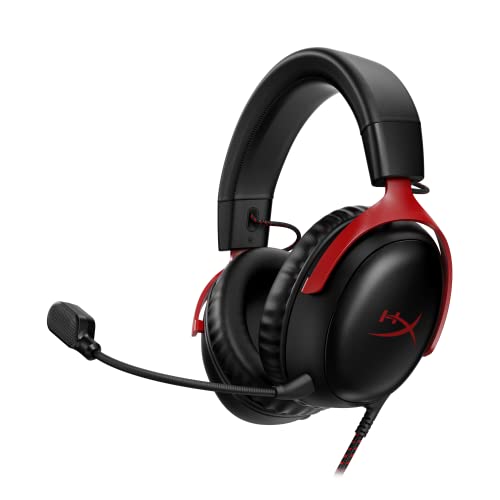
Upgraded Microphone
HyperX Cloud III WiredA upgraded microphone.
Best for: Buyers who want a upgraded microphone.
Check price for HyperX Cloud III Wired on Amazon (opens in a new tab)
Lowest Price Here
Vliveaudax USB Gaming Headset with 7.1 SurroundThe cheapest way into this group, below the IMYB A36.
Best for: Spending as little as possible, with the IMYB A36 the next step up.
Check price for Vliveaudax USB Gaming Headset with 7.1 Surround on Amazon (opens in a new tab)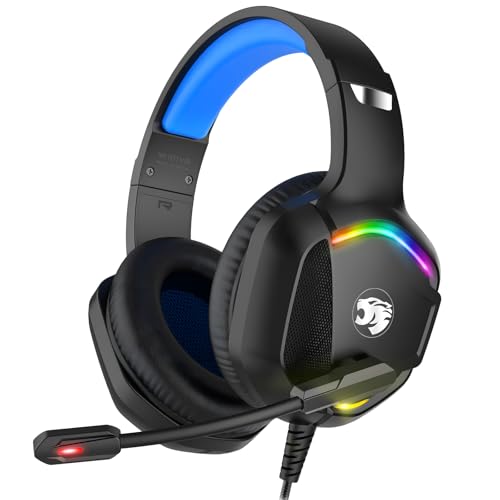
Also Consider
IMYB A36 Wired Gaming Headset50mm drivers at a low price.
Best for: Buyers who want 50mm drivers at a low price.
Check price for IMYB A36 Wired Gaming Headset on Amazon (opens in a new tab)
Our Picks
Largest Drivers1 of 5
ASUS ROG Kithara Planar Magnetic Gaming Headphones
What the ROG Kithara brings to the table is 100mm HIFIMAN planar drivers tuned by ROG, plus a full-band MEMS boom microphone.
Best for
- Listeners who want the biggest drivers here.
Skip if
- Skip it if this is a deal-breaker for you: open-back leaks sound both ways.
Why we like it
The headband has eight adjustment levels with a metal frame and hinges, extra ear pads come in the box, and the mic covers 20Hz to 20kHz. Plugs include 4.4mm balanced, 3.5mm and 6.3mm, plus a USB-C adapter. On driver size it leads this guide at 100mm, ahead of the Fosi i5 (97mm).
Like the Fosi i5, it has a wired connection, while the Vliveaudax uses a wired USB sound card connection. You get an on-cable MEMS boom mic microphone here, which sets it apart from the IMYB A36 and its a boom mic microphone. You also get an open-back design.
Because it is open-back, other people in the room will hear it, and it will not block outside noise. On price it sat fourth of 5, between the cheaper Cloud III and the pricier Fosi i5, at the time of writing.
Key specs
- Driver size
- 100mm
- Connection
- Wired
- Design
- Open-back planar magnetic
- Microphone
- On-cable MEMS boom mic
Pros
- 100mm drivers
- No charging or pairing needed
- Open-back for a wider soundstage
- 100mm HIFIMAN planar drivers tuned by ROG
Cons
- Open-back leaks sound both ways
- Costs more than the Vliveaudax at the time of writing
Premium Pick2 of 5
Fosi Audio i5 Open-Back Planar Magnetic Headphones
What the Fosi i5 brings to the table is a 97mm diaphragm, plus CNC metal and walnut construction.
Best for
- Spending more than the ROG Kithara costs for the fullest feature set in this group.
Skip if
- Look at the others if this bothers you: open-back leaks sound both ways.
Why we like it
It also offers a 97mm driver size. Its 97mm planar diaphragm is 2 microns thin with a sputtered silver alloy coating. A memory-steel headband, multi-axis pivoting cups and silicone sliders handle the fit.
On driver size it sits mid-pack at 97mm: the ROG Kithara comes in at 100mm, and the IMYB A36 comes in at 50mm. It shares a wired connection with the ROG Kithara; the IMYB A36 goes with a wired 3.5mm connection. Because it is open-back, other people in the room will hear it, and it will not block outside noise. Only the ROG Kithara came close to it on price at the time of writing; it cost the most of the 5 picks.
Key specs
- Driver size
- 97mm
- Connection
- Wired
- Design
- Open-back planar magnetic
- Microphone
- None
Pros
- 97mm drivers
- No charging or pairing needed
- Open-back for a wider soundstage
- 97mm diaphragm
Cons
- Open-back leaks sound both ways
- No built-in microphone
- Costs more than the Vliveaudax at the time of writing
Upgraded Microphone3 of 5
HyperX Cloud III Wired
The Cloud III is the easiest recommendation: angled 53mm drivers, an upgraded microphone and both USB and 3.5mm connections, so it moves between a PC and a controller.
Best for
- Buyers who want a upgraded microphone.
Skip if
- If budget leads, the Vliveaudax was cheaper at our last price check.
Why we like it
HyperX offers support for PC, PS5 and Xbox Series X|S. Its aluminium frame is flexible and resists knocks. The wired connection needs no charging and works with PC, consoles and phones through a 3.5mm or USB cable.
Its comfort-first design targets long matches, with memory-foam cushions and a padded headband. Its 53mm driver size ranks third of 5 here, behind the ROG Kithara (100mm) and ahead of the IMYB A36 (50mm). No other pick in this guide offers a wired (USB and 3.5mm) connection; compare the Vliveaudax, which has a wired USB sound card connection.
A upgraded microphone is unique to it among these picks, while the Vliveaudax uses a boom mic microphone. USB and 3.5mm options let it move between a PC and a controller. Its price falls between the IMYB A36 and the ROG Kithara, based on our last check.
Key specs
- Driver size
- 53mm
- Connection
- Wired (USB and 3.5mm)
- Microphone
- Upgraded
Pros
- 53mm drivers
- No charging or pairing needed
- Angled 53mm drivers
- Upgraded microphone
Cons
- Costs more than the Vliveaudax at the time of writing
Lowest Price Here4 of 5
Vliveaudax USB Gaming Headset with 7.1 Surround
Vliveaudax's headset connects through a USB sound card with 7.1 virtual surround.
Best for
- Spending as little as possible, with the IMYB A36 the next step up.
Skip if
- Pass on it if driver size of 50mm, behind the ROG Kithara (100mm) rules it out for your setup.
Why we like it
It is the lowest-priced USB headset here. Its noise-cancelling mic and ear-cup volume control are plug-and-play over USB-A or USB-C. On driver size it ties with the IMYB A36 at 50mm.
You get a wired USB sound card connection here, which sets it apart from the IMYB A36 and its a wired 3.5mm connection. Like the IMYB A36, it has a boom mic microphone, while the ROG Kithara uses an on-cable MEMS boom mic microphone. It connects over USB, which also handles the audio processing on your PC.
It cost the least of the 5 picks at the time of writing, with the IMYB A36 the next step up. What it gives up: driver size of 50mm, behind the ROG Kithara (100mm); by contrast, the ROG Kithara comes in at 100mm.
Key specs
- Driver size
- 50mm
- Connection
- Wired USB sound card
- Microphone
- Boom mic
Pros
- 50mm drivers
- No charging or pairing needed
- USB sound card
- 7.1 virtual surround
Cons
- Driver size of 50mm, behind the ROG Kithara (100mm)
Also Consider5 of 5
IMYB A36 Wired Gaming Headset
IMYB's A36 fits 50mm drivers into a 3.5mm headset at an entry price.
Best for
- Buyers who want 50mm drivers at a low price.
Skip if
- Skip it if driver size matters most to you; the ROG Kithara offers 100mm.
Why we like it
The headband adjusts for fit. Its 50mm drivers and 3.5mm connection work with PCs, PlayStation, Xbox (older pads need an adapter) and Switch. The mic handles basic voice chat.
It matches the Vliveaudax on driver size (50mm). No other pick in this guide offers a wired 3.5mm connection; compare the Cloud III, which has a wired (USB and 3.5mm) connection. It shares a boom mic microphone with the Vliveaudax; the Cloud III goes with a upgraded microphone.
A 3.5mm plug means it works with a controller or front-panel jack; on PC, a separate mic and headphone jack may need a splitter. Its price falls between the Vliveaudax and the Cloud III, based on our last check.
Key specs
- Driver size
- 50mm
- Connection
- Wired 3.5mm
- Microphone
- Boom mic
Pros
- 50mm drivers
- No charging or pairing needed
- 50mm drivers at a low price
- 3.5mm connection
Cons
- Driver size trails the ROG Kithara (100mm)
- Costs more than the Vliveaudax at the time of writing
The catch
If driver size is your priority, the ROG Kithara (100mm) is the stronger choice.
How We Chose
Alex Morgan compared the manufacturer specifications, connectivity, warranty terms and compatibility of every pick. Figures come from the makers unless a third-party source is named; we did not test these products ourselves.
- What we compared
- We lined up five headsets on driver size, connection, design and microphone from manufacturer specifications. We did not test them in-house, and design is missing for at least one pick.
- The shared baseline
- All 5, from the ROG Kithara to the IMYB A36, state driver size, connection and microphone.
- Where the specs have gaps
- The Cloud III, the Vliveaudax and the IMYB A36 give no design.
- Price range
- At our last check the picks ran from the Vliveaudax (under $50) to the Fosi i5 ($500 to $1000).
What to Look for in a Wired Gaming Headset
Key buying criteria so you get the right fit the first time.
How much driver size you need
The ROG Kithara tops driver size at 100mm and the IMYB A36 sits lowest at 50mm. The ROG Kithara is the pick for driver size.
Features beyond the spec table
The Cloud III: an upgraded microphone. The Vliveaudax: 7.1 virtual surround. The IMYB A36: a 3.5mm connection.
A gaming headset beside a desk with backlit speakers How much to spend
Under $50 buys the Vliveaudax and the IMYB A36; $50 to $100 buys the Cloud III; $250 to $500 buys the ROG Kithara; $500 to $1000 buys the Fosi i5 at our last check.
Match the pick to your priority
Listeners who want the biggest drivers here: the ROG Kithara. Spending more than the ROG Kithara costs for the fullest feature set in this group: the Fosi i5. Buyers who want a upgraded microphone: the Cloud III.
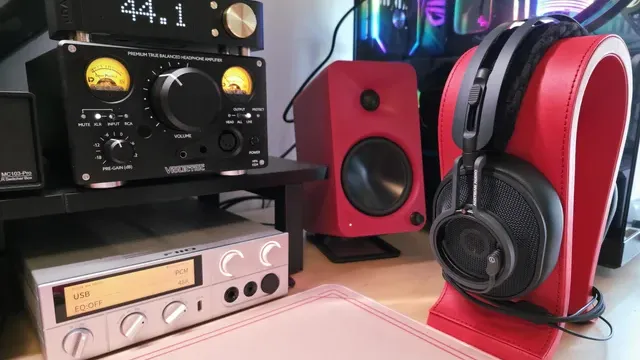
Headphones on a red stand next to an amplifier and bookshelf speakers Weight and clamp matter after an hour
Lighter headsets reduce pressure on the top of the head, and memory foam or fabric pads stay cooler. A difference of 50g is noticeable over long sessions.
If you wear glasses, look for soft pads that do not press the arms into your head.
How to Choose a Wired Gaming Headset
By priority
| Priority | Consider | Why |
|---|---|---|
| Listeners who want the biggest drivers here | ROG Kithara | The largest driver size here (100mm) |
| Spending more than the ROG Kithara costs for the fullest feature set in this group | Fosi i5 | The top of this price range, adding a 97mm diaphragm |
| Buyers who want a upgraded microphone | Cloud III | A upgraded microphone |
| Spending as little as possible, with the IMYB A36 the next step up | Vliveaudax | The cheapest way into this group, below the IMYB A36 |
| Buyers who want 50mm drivers at a low price | IMYB A36 | 50mm drivers at a low price |
Scroll sideways to see every column.
Key specs side by side
The ROG Kithara leads on driver size at 100mm, ahead of the Fosi i5 at 97mm. "Not listed" marks design where the Cloud III, the Vliveaudax and the IMYB A36 leave the figure out.
| Headset | Driver size | Connection | Design | Microphone |
|---|---|---|---|---|
| ROG Kithara | 100mm | Wired | Open-back planar magnetic | On-cable MEMS boom mic |
| Fosi i5 | 97mm | Wired | Open-back planar magnetic | None |
| Cloud III | 53mm | Wired (USB and 3.5mm) | Not listed | Upgraded |
| Vliveaudax | 50mm | Wired USB sound card | Not listed | Boom mic |
| IMYB A36 | 50mm | Wired 3.5mm | Not listed | Boom mic |
Scroll sideways to see every column.
By price at the time of writing
At our last check the cheapest pick, the Vliveaudax, sat in the under $50 tier, 4 tiers in all up to the Fosi i5 at $500 to $1000; Amazon prices move, so recheck before buying.
| Price tier | Headsets |
|---|---|
| Under $50 | Vliveaudax, IMYB A36 |
| About $50 to $100 | Cloud III |
| About $250 to $500 | ROG Kithara |
| About $500 to $1000 | Fosi i5 |
Frequently Asked Questions
Which has the largest driver size: the ROG Kithara or the Fosi i5?
The ROG Kithara tops driver size at 100mm; the Fosi i5 follows at 97mm, 3% apart. The IMYB A36 closes the ranking at 50mm.
Is the Fosi i5 worth paying more than the Vliveaudax?
What it brings is driver size (97mm against 50mm). The Vliveaudax sat in the under $50 tier and the Fosi i5 in the $500 to $1000 tier when we checked, with 3 other picks between them; pay the difference only if driver size decides your purchase.
What makes the Cloud III the Upgraded Microphone?
It earns the label for a upgraded microphone. The Vliveaudax, the cheapest pick, sat in the under $50 tier against $50 to $100 here, without out-ranking it on any listed spec. It makes sense for anyone who wants a upgraded microphone.
Do the ROG Kithara and the Cloud III differ on connection?
The ROG Kithara and the Fosi i5 use Wired; the Cloud III uses Wired (USB and 3.5mm); the Vliveaudax uses Wired USB sound card; the IMYB A36 uses Wired 3.5mm.
Beyond the specs, what sets the ROG Kithara and the Fosi i5 apart?
The ROG Kithara: 100mm HIFIMAN planar drivers tuned by ROG. The Fosi i5: a 97mm diaphragm. The Cloud III: angled 53mm drivers.
Bottom Line
Our first pick is the ROG Kithara. Look at the Fosi i5 for the top of this price range, adding a 97mm diaphragm, the Cloud III for a upgraded microphone and the Vliveaudax for the cheapest way into this group, below the IMYB A36 if those matter more to you.
3.5mm headsets plug into controllers; USB ones add their own sound card.
Related Guides
- Related guideThe Best Gaming Headsets Right Now
- Related guideThe Best Wireless Gaming Headsets Now
- Related guideThe Best Budget Gaming Headsets Under $50
- Lower budgetThe Best Cheap Gaming Headsets
- Similar guideThe Best Headsets for a Gaming PC
- ExplainerHow to Choose a PC Headset
- ExplainerHeadset connection types for PC, PS5 and Xbox
- Also see: microphonesHow to Choose a USB Microphone for Your PC
- Similar guideThe Best FPS Gaming Headsets
- Topic hubAll headsets and headphones guides
About the author
PC Hardware Editor
Alex covers PC hardware, monitors, components, upgrades and peripherals for The PC Journal, with a focus on helping readers understand specifications, compatibility and meaningful product trade-offs.
Covers: Monitors, Graphics cards, Processors, PC components, Peripherals, Upgrades and compatibility
View all articles