
Buying Guide
The Best FPS Gaming Headsets
Five headsets for shooters, compared on low-latency connection, drivers and mic.
By Alex Morgan, PC Hardware Editor
11 min read4 products evaluated

In shooters, a low-latency connection and a clear mic for callouts matter most. These five use 2.4GHz wireless or a wired cable.
We compared connection, drivers and mic from each listing.
Quick Picks
Which of the 4 picks to look at first. Tap a name for the full analysis.

Best Esports Pick
Logitech G PRO X 2 Lightspeed Wireless50mm drivers, a 6mm cardioid mic and 50 hours of battery.
Best for: Competitive shooters.
Check price for Logitech G PRO X 2 Lightspeed Wireless on Amazon (opens in a new tab)
Longest Battery Life
Razer BlackShark V2 HyperSpeedThe longest battery life here (70 hours).
Best for: Long sessions away from a charging cable.
Check price for Razer BlackShark V2 HyperSpeed on Amazon (opens in a new tab)
Best Wired Pick
HyperX Cloud Alpha WiredDual-chamber drivers with a detachable mic.
Best for: No-charge setups.
Check price for HyperX Cloud Alpha Wired on Amazon (opens in a new tab)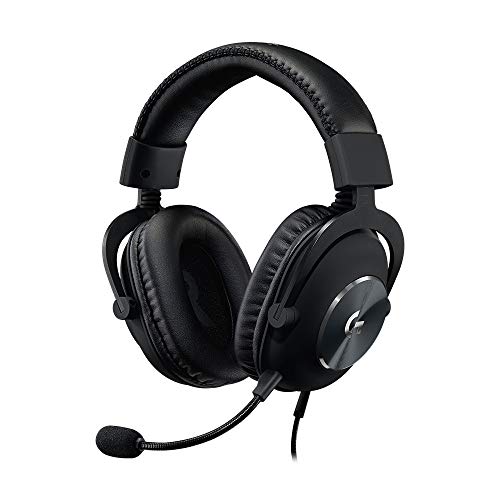
Best Mic Filters
Logitech G PRO X WiredBlue VO!CE mic filters and a USB sound card.
Best for: Team voice chat.
Check price for Logitech G PRO X Wired on Amazon (opens in a new tab)
| Pick | Why it stands out | Best for | Check price |
|---|---|---|---|
| 50mm drivers, a 6mm cardioid mic and 50 hours of battery. | Competitive shooters. | Check price for Logitech G PRO X 2 Lightspeed Wireless on Amazon (opens in a new tab) |
| The longest battery life here (70 hours). | Long sessions away from a charging cable. | Check price for Razer BlackShark V2 HyperSpeed on Amazon (opens in a new tab) |
| Dual-chamber drivers with a detachable mic. | No-charge setups. | Check price for HyperX Cloud Alpha Wired on Amazon (opens in a new tab) |
| Blue VO!CE mic filters and a USB sound card. | Team voice chat. | Check price for Logitech G PRO X Wired on Amazon (opens in a new tab) |
Our Picks
Best Esports Pick1 of 4
Logitech G PRO X 2 Lightspeed Wireless
The G PRO X 2 is the most complete wireless headset here: Lightspeed for low-latency games, Bluetooth for a phone and a 3.5mm cable for a controller, all around 50mm graphene drivers.
Best for
- Competitive shooters.
Skip if
- Price-first buyers should look at the Cloud Alpha, which cost less when we checked.
Why we like it
Its detachable 6mm cardioid mic lets it double as everyday headphones. A detachable 6mm cardioid microphone is unique to it among these picks, while the G PRO X uses a detachable with Blue VO!CE microphone. It also offers a USB-A dongle with a 3.5mm pass-through port.
On a PC, use the Lightspeed dongle for games and keep Bluetooth for a phone, since Bluetooth adds latency. A 3.5mm plug means it works with a controller or front-panel jack; on PC, a separate mic and headphone jack may need a splitter. It was the most expensive pick when we checked, so weigh what it adds over the G PRO X.
Key specs
- Battery life
- 50 hours
- Driver size
- 50mm
- Connection
- Lightspeed 2.4GHz, Bluetooth, 3.5mm
- Microphone
- Detachable 6mm cardioid
Pros
- Up to 50 hours of battery life
- 50mm drivers
- Dual wireless: dongle plus Bluetooth
- Graphene drivers
Cons
- Costs more than the Cloud Alpha at the time of writing
Longest Battery Life2 of 4
Razer BlackShark V2 HyperSpeed
The BlackShark V2 HyperSpeed brings Razer's TriForce Titanium 50mm drivers and a 70-hour battery to a mid-range price.
Best for
- Long sessions away from a charging cable.
Skip if
- If budget leads, the Cloud Alpha was cheaper at our last price check.
Why we like it
At 280g it is one of the two lightest headsets here. You get a HyperSpeed 2.4GHz wireless connection here, which sets it apart from the Cloud Alpha and its a wired 3.5mm connection. No other pick in this guide offers an included microphone; compare the G PRO X 2, which has a detachable 6mm cardioid microphone.
It also comes with an ultra-light 280g frame. It connects through a USB wireless dongle, so keep a free USB port near your desk for the best range. It was priced above the Cloud Alpha and below the G PRO X at the time of writing.
Key specs
- Battery life
- 70 hours
- Driver size
- 50mm
- Weight
- 280g
- Connection
- HyperSpeed 2.4GHz wireless
- Microphone
- Included
Pros
- Up to 70 hours of battery life
- 50mm drivers
- Light 280g build
- TriForce Titanium drivers
Cons
- Costs more than the Cloud Alpha at the time of writing
Best Wired Pick3 of 4
HyperX Cloud Alpha Wired
HyperX's wired Cloud Alpha uses dual-chamber drivers in an aluminum frame.
Best for
- No-charge setups.
Skip if
- Pass if a published driver size matters; this one has none.
Why we like it
The noise-cancelling mic detaches. The frequency response runs from 15Hz to 25,000Hz in an over-ear fit, and the braided cable detaches and carries an inline audio control. It works with PC, PS4, PS5, Xbox, Switch, Mac, mobile and VR through a 3.5mm port.
You get a wired 3.5mm connection here, which sets it apart from the BlackShark V2 HyperSpeed and its a HyperSpeed 2.4GHz wireless connection. It also offers a detachable mic. A 3.5mm plug means it works with a controller or front-panel jack; on PC, a separate mic and headphone jack may need a splitter. It cost the least of the 4 picks at the time of writing, with the BlackShark V2 HyperSpeed the next step up.
Key specs
- Connection
- Wired 3.5mm
- Microphone
- Detachable, noise-cancelling
Pros
- No charging or pairing needed
- Dual-chamber drivers
- Detachable mic
- Aluminum frame
Cons
- No published driver size
The catch
There is no published battery life figure, whereas the BlackShark V2 HyperSpeed runs for 70 hours.
Best Mic Filters4 of 4
Logitech G PRO X Wired
The G PRO X wired is for players who tune their sound: its USB external sound card stores EQ profiles, and the detachable mic supports Blue VO!CE processing.
Best for
- Team voice chat.
Skip if
- If budget leads, the Cloud Alpha was cheaper at our last price check.
Why we like it
An aluminum fork and steel headband make it one of the sturdier builds here. Its USB sound card stores pro-tuned EQ profiles on board, and you can choose leatherette or velour ear pads. It is the only pick here with a detachable with Blue VO!CE microphone; the G PRO X 2 has a detachable 6mm cardioid microphone instead.
USB and 3.5mm options let it move between a PC and a controller. When we checked, only the BlackShark V2 HyperSpeed and cheaper picks cost less, and the G PRO X 2 cost more. If you want a confirmed battery life, look to the BlackShark V2 HyperSpeed instead: it runs for 70 hours, while this one gives no figure.
Key specs
- Driver size
- 50mm
- Connection
- Wired (USB sound card and 3.5mm)
- Microphone
- Detachable with Blue VO!CE
Pros
- 50mm drivers
- No charging or pairing needed
- USB external sound card with EQ profile storage
- Aluminum fork and steel headband
Cons
- Costs more than the Cloud Alpha at the time of writing
How We Chose These FPS Gaming Headsets
Alex Morgan compared the manufacturer specifications, connectivity, warranty terms and compatibility of every pick. Figures come from the makers unless a third-party source is named; we did not test these products ourselves.
- What we compared
- We set side by side four headsets on battery life, driver size, connection and microphone as the makers state them. Nothing was tested in-house; 2 of the 4 fields compared are stated for every pick, while battery life and driver size have gaps.
- The shared baseline
- All 4, from the G PRO X 2 to the G PRO X, state connection and microphone.
- Where the specs have gaps
- The Cloud Alpha and the G PRO X give no battery life; the Cloud Alpha gives no driver size.
- Price range
- At our last check the picks ran from the Cloud Alpha ($50 to $100) to the G PRO X 2 ($150 to $250).
What to Look for in an FPS Gaming Headset
Key buying criteria so you get the right fit the first time.
Battery life
Across these 2 picks battery life spans 50 hours (the G PRO X 2) to 70 hours (the BlackShark V2 HyperSpeed). If battery life is your first filter, the BlackShark V2 HyperSpeed sets the ceiling at 70 hours. The Cloud Alpha and the G PRO X give no battery life figure, so 2 of 4 picks are compared here.
Features beyond the spec table
The BlackShark V2 HyperSpeed: an ultra-light 280g frame. The Cloud Alpha: a detachable mic. The G PRO X: an aluminum fork and steel headband.
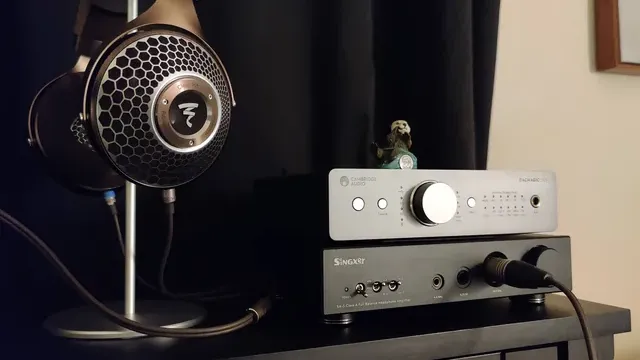
Open-back headphones on a stand beside a headphone amplifier Budget
$50 to $100 buys the Cloud Alpha, the BlackShark V2 HyperSpeed and the G PRO X; $150 to $250 buys the G PRO X 2 at our last check.
Match the pick to your priority
Competitive shooters: the G PRO X 2. Long sessions away from a charging cable: the BlackShark V2 HyperSpeed. No-charge setups: the Cloud Alpha.
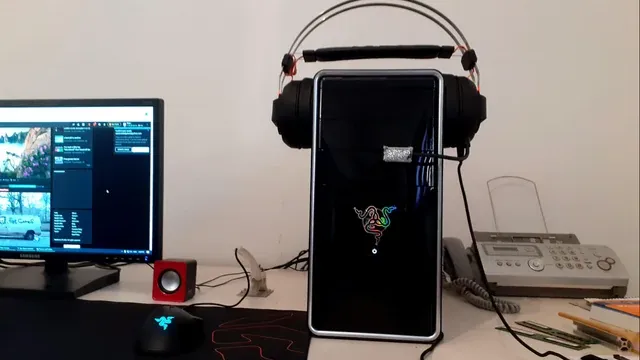
A headset hanging on a PC case next to a monitor Console versions are not always interchangeable
Some wireless headsets come in PC, PlayStation and Xbox versions with different dongles. An Xbox-specific model may not connect wirelessly to a PlayStation.
Buy the version that matches every system you plan to use.
How to Choose an FPS Gaming Headset
By priority
| Priority | Consider | Why |
|---|---|---|
| Competitive shooters | G PRO X 2 | 50mm drivers, a 6mm cardioid mic and 50 hours of battery |
| Long sessions away from a charging cable | BlackShark V2 HyperSpeed | The longest battery life here (70 hours) |
| No-charge setups | Cloud Alpha | Dual-chamber drivers with a detachable mic |
| Team voice chat | G PRO X | Blue VO!CE mic filters and a USB sound card |
Scroll sideways to see every column.
Key specs side by side
The BlackShark V2 HyperSpeed leads on battery life at 70 hours, ahead of the G PRO X 2 at 50 hours. "Not listed" marks battery life where the Cloud Alpha and the G PRO X leave the figure out.
| Headset | Battery life | Driver size | Connection | Microphone |
|---|---|---|---|---|
| G PRO X 2 | 50 hours | 50mm | Lightspeed 2.4GHz, Bluetooth, 3.5mm | Detachable 6mm cardioid |
| BlackShark V2 HyperSpeed | 70 hours | 50mm | HyperSpeed 2.4GHz wireless | Included |
| Cloud Alpha | Not listed | Not listed | Wired 3.5mm | Detachable, noise-cancelling |
| G PRO X | Not listed | 50mm | Wired (USB sound card and 3.5mm) | Detachable with Blue VO!CE |
Scroll sideways to see every column.
By price at the time of writing
At our last check the cheapest pick, the Cloud Alpha, sat in the $50 to $100 tier, 2 tiers in all up to the G PRO X 2 at $150 to $250; Amazon prices move, so recheck before buying.
| Price tier | Headsets |
|---|---|
| About $50 to $100 | Cloud Alpha, BlackShark V2 HyperSpeed, G PRO X |
| About $150 to $250 | G PRO X 2 |
Frequently Asked Questions
Is the BlackShark V2 HyperSpeed ahead of the G PRO X 2 on battery life?
The BlackShark V2 HyperSpeed leads at 70 hours, with the G PRO X 2 at 50 hours. The Cloud Alpha and the G PRO X don't state a battery life figure, so they sit outside this comparison; 2 of 4 picks are ranked.
What makes the G PRO X 2 the Best Esports Pick?
It earns the label for 50mm drivers, a 6mm cardioid mic and 50 hours of battery. The Cloud Alpha, the cheapest pick, sat in the $50 to $100 tier against $150 to $250 here, without out-ranking it on any listed spec. It makes sense for competitive shooters.
Beyond the specs, what sets the G PRO X 2 and the BlackShark V2 HyperSpeed apart?
The G PRO X 2: graphene drivers. The BlackShark V2 HyperSpeed: TriForce Titanium drivers. The Cloud Alpha: dual-chamber drivers.
Who should choose the BlackShark V2 HyperSpeed?
The BlackShark V2 HyperSpeed carries our Longest Battery Life label for the longest battery life here (70 hours). It ranks second of 4 here and sat in the $50 to $100 tier at our last price check; it suits long sessions away from a charging cable.
Should I pick the G PRO X 2 or the G PRO X?
The G PRO X 2 suits competitive shooters; the G PRO X suits team voice chat.
Bottom Line
Logitech's G PRO X 2 is the complete esports pick. Razer's BlackShark V3 Pro is the tri-mode alternative, and the wired Cloud Alpha avoids charging altogether.
Related Guides
- Related guideThe Best Gaming Headsets
- Related guideThe Best Wireless Gaming Headsets for PC
- Related guideThe Best Wired Gaming Headsets and Headphones for PC
- Lower budgetThe Best Cheap Gaming Headsets
- Similar guideThe Best Gaming Headsets Right Now
- ExplainerHow to Choose a PC Headset
- ExplainerHeadset connection types for PC, PS5 and Xbox
- Also see: microphonesUSB Microphone Features Explained: What Is Worth Paying For?
- Similar guideThe Best Headsets for a Gaming PC
- Topic hubAll headsets and headphones guides
About the author
PC Hardware Editor
Alex covers PC hardware, monitors, components, upgrades and peripherals for The PC Journal, with a focus on helping readers understand specifications, compatibility and meaningful product trade-offs.
Covers: Monitors, Graphics cards, Processors, PC components, Peripherals, Upgrades and compatibility
View all articles