
Buying Guide
The Best Wireless Gaming Headsets for PC
Six wireless headsets compared on connection type, battery life, weight and microphone, from a budget dual-wireless model to Logitech's pro pick.
By The PC Journal editorial team
12 min read6 products evaluated
A wireless gaming headset removes the cable without adding lag, as long as it uses a 2.4GHz dongle rather than Bluetooth alone. The models here differ most in how they handle a second device, how long the battery lasts and how much they weigh after a long session.
We compared six headsets on the connections, battery life, weight and microphone details their makers list on Amazon. This is a research-based comparison; we did not test them ourselves.
Decide first whether you need Bluetooth alongside the dongle. If your phone joins your gaming sessions, that one feature narrows the list quickly.
Quick Picks
Our 6 recommendations at a glance. Tap a pick for the full verdict.

Best Overall Wireless
Logitech G PRO X 2 Lightspeed Wireless
Lightspeed, Bluetooth and 3.5mm in one headset, with 50mm graphene drivers.
Best for: PC players who also want Bluetooth and wired options.
Our take Check price for Logitech G PRO X 2 Lightspeed Wireless (opens in a new tab)
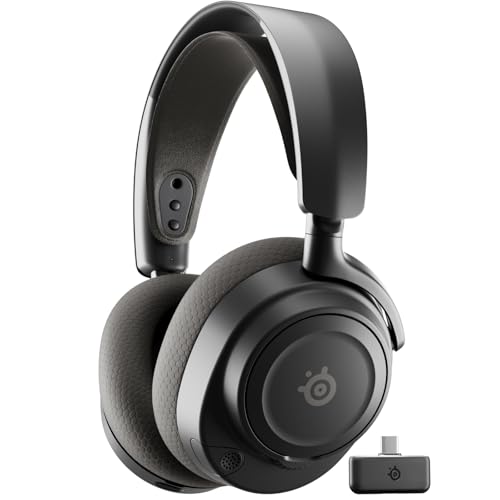
Best for PC and Phone at Once
SteelSeries Arctis Nova 7 Wireless Gen 2
Simultaneous 2.4GHz and Bluetooth audio.
Best for: Gamers who take calls or play music from a phone mid-game.
Our take Check price for SteelSeries Arctis Nova 7 Wireless Gen 2 (opens in a new tab)

Longest Battery Life
HyperX Cloud Alpha Wireless
The longest battery life here (300 hours).
Best for: Long sessions away from a charging cable.
Our take Check price for HyperX Cloud Alpha Wireless (opens in a new tab)

Best Value Wireless
Razer BlackShark V2 HyperSpeed
A 70-hour battery and 50mm drivers at a mid-range price.
Best for: Players who want long battery life without paying pro prices.
Our take Check price for Razer BlackShark V2 HyperSpeed (opens in a new tab)

Best Microphone
Logitech G522 Lightspeed Wireless
A full-bandwidth 48kHz microphone.
Best for: Streamers and players who spend hours on voice chat.
Our take Check price for Logitech G522 Lightspeed Wireless (opens in a new tab)
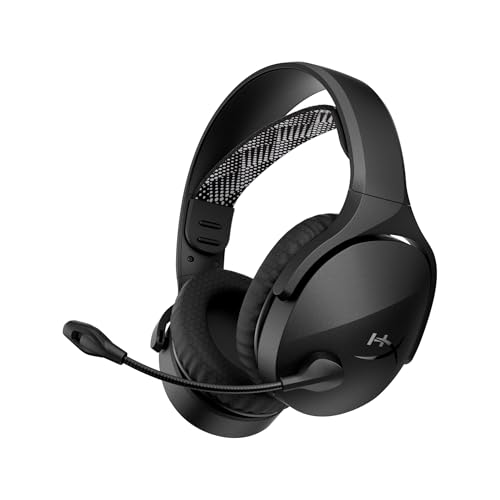
Best Budget Dual Wireless
HyperX Cloud Jet Dual Wireless
2.4GHz and Bluetooth 5.3 at an entry-level price.
Best for: A first wireless headset on a tight budget.
Our take Check price for HyperX Cloud Jet Dual Wireless (opens in a new tab)
Our Picks
Best Overall Wireless1 of 6
Logitech G PRO X 2 Lightspeed Wireless on Amazon (opens in a new tab)
The G PRO X 2 is the most complete wireless headset here: Lightspeed for low-latency games, Bluetooth for a phone and a 3.5mm cable for a controller, all around 50mm graphene drivers.
Best for
- PC players who also want Bluetooth and wired options.
Skip if
- Skip it if price comes first: the Cloud Jet cost less when we checked.
Why we like it
Its detachable 6mm cardioid mic lets it double as everyday headphones. On battery life it ties with the Arctis Nova 7 Gen 2 at 50 hours. It matches the BlackShark V2 HyperSpeed on driver size (50mm).
You get a detachable 6mm cardioid microphone here, which sets it apart from the G522 and its a 48kHz/16-bit microphone. You also get a USB-A dongle with a 3.5mm pass-through port. On a PC, use the Lightspeed dongle for games and keep Bluetooth for a phone, since Bluetooth adds latency.
A 3.5mm plug means it works with a controller or front-panel jack; on PC, a separate mic and headphone jack may need a splitter. It was the highest-priced of the 6 picks at the time of writing, so the case for it rests on what it adds over the Arctis Nova 7 Gen 2 and the rest. The maker doesn't give its weight; if that figure matters, the BlackShark V2 HyperSpeed weighs 280g.
Key dimensions & specs
- Battery life: 50 hours
- Driver size: 50mm
- Connection: Lightspeed 2.4GHz, Bluetooth, 3.5mm
- Microphone: Detachable 6mm cardioid
Pros
- Up to 50 hours of battery life
- 50mm drivers
- Dual wireless: dongle plus Bluetooth
- Graphene drivers
Cons
- Costs more than the Cloud Jet at the time of writing
Best for PC and Phone at Once2 of 6
SteelSeries Arctis Nova 7 Wireless Gen 2 on Amazon (opens in a new tab)
The Arctis Nova 7 Gen 2 is the pick if your phone stays in your ears during a game: it plays 2.4GHz and Bluetooth audio at the same time, so a call or music mixes with game sound.
Best for
- Gamers who take calls or play music from a phone mid-game.
Skip if
- Skip it if you need to know its driver size before buying; the maker doesn't publish one.
Why we like it
Its noise-rejecting mic suits noisy rooms. Its ClearCast Gen 2 mic cuts background noise by up to 25dB, and battery lasts over 50 hours with USB-C fast charge. A steel frame and memory foam balance weight and comfort.
It matches the G PRO X 2 on battery life (50 hours). It is the only pick here with a noise-rejecting microphone; the Cloud Jet has an included microphone instead. You also get 360-degree spatial audio support.
On a PC, use the 2.4GHz dongle for games and keep Bluetooth for a phone, since Bluetooth adds latency. When we checked, only the G522 and cheaper picks cost less, and the G PRO X 2 cost more. If you want a confirmed driver size, look to the G PRO X 2 instead: it comes in at 50mm, while this one gives no figure.
Key dimensions & specs
- Battery life: 50 hours
- Connection: 2.4GHz and Bluetooth simultaneously
- Microphone: Noise-rejecting
Pros
- Up to 50 hours of battery life
- Dual wireless: dongle plus Bluetooth
- Simultaneous 2.4GHz and Bluetooth audio
- 360-degree spatial audio support
Cons
- No published driver size
- Costs more than the Cloud Jet at the time of writing
Longest Battery Life3 of 6
HyperX Cloud Alpha Wireless on Amazon (opens in a new tab)
The Cloud Alpha Wireless stands apart on battery: HyperX offers up to 300 hours, several times any other claim here.
Best for
- Long sessions away from a charging cable.
Skip if
- Pass if a published driver size matters; this one has none.
Why we like it
It pairs that with DTS Headphone:X spatial audio and dual-chamber drivers in an aluminum frame. Its 300 hours battery life is the longest here; the BlackShark V2 HyperSpeed comes next at 70 hours. You get a 2.4GHz wireless connection here, which sets it apart from the G522 and its a lightspeed 2.4GHz connection.
Like the BlackShark V2 HyperSpeed and Cloud Jet, it has an included microphone, while the G PRO X 2 uses a detachable 6mm cardioid microphone. It connects through a USB wireless dongle, so keep a free USB port near your desk for the best range. It was priced above the BlackShark V2 HyperSpeed and below the G522 at the time of writing. There is no published driver size figure, whereas the G PRO X 2 comes in at 50mm.
Key dimensions & specs
- Battery life: 300 hours
- Connection: 2.4GHz wireless
- Microphone: Included
Pros
- Up to 300 hours of battery life
- DTS Headphone:X spatial audio
- Dual-chamber drivers in a durable aluminum frame
- 2.4GHz wireless connection, the only one here
Cons
- No published driver size
- Costs more than the Cloud Jet at the time of writing
Best Value Wireless4 of 6
Razer BlackShark V2 HyperSpeed on Amazon (opens in a new tab)
The BlackShark V2 HyperSpeed brings Razer's TriForce Titanium 50mm drivers and a 70-hour battery to a mid-range price.
Best for
- Players who want long battery life without paying pro prices.
Skip if
- If budget leads, the Cloud Jet was cheaper at our last price check.
Why we like it
At 280g it is one of the two lightest headsets here. Its 70 hours battery life ranks second of 6 here, behind the Cloud Alpha Wireless (300 hours) and ahead of the Cloud Jet (25 hours). On driver size it ties with the G PRO X 2 at 50mm.
A HyperSpeed 2.4GHz wireless connection is unique to it among these picks, while the G522 uses a lightspeed 2.4GHz connection. Like the Cloud Alpha Wireless and Cloud Jet, it has an included microphone, while the G PRO X 2 uses a detachable 6mm cardioid microphone. You also get an ultra-light 280g frame.
It connects through a USB wireless dongle, so keep a free USB port near your desk for the best range. When we checked, only the Cloud Jet cost less, and the Cloud Alpha Wireless cost more.
Key dimensions & specs
- Battery life: 70 hours
- Driver size: 50mm
- Weight: 280g
- Connection: HyperSpeed 2.4GHz wireless
- Microphone: Included
Pros
- Up to 70 hours of battery life
- 50mm drivers
- Light 280g build
- TriForce Titanium drivers
Cons
- Costs more than the Cloud Jet at the time of writing
Best Microphone5 of 6
Logitech G522 Lightspeed Wireless on Amazon (opens in a new tab)
The G522 is built around voice: Logitech offers a full-bandwidth 48kHz microphone alongside 48kHz/24-bit audio.
Best for
- Streamers and players who spend hours on voice chat.
Skip if
- Its driver size is not published, which rules it out if you need that number.
Why we like it
It weighs 280g and offers up to 60 hours with lighting off. On battery life it sits mid-pack at 60 hours: the Cloud Alpha Wireless runs for 300 hours, and the Cloud Jet comes in at 25 hours. It is the only pick here with a lightspeed 2.4GHz connection; the Cloud Alpha Wireless has a 2.4GHz wireless connection instead.
You get a 48kHz/16-bit microphone here, which sets it apart from the Cloud Jet and its an included microphone. It connects through a USB wireless dongle, so keep a free USB port near your desk for the best range. On price it sat fourth of 6, between the cheaper Cloud Alpha Wireless and the pricier Arctis Nova 7 Gen 2, at the time of writing. The maker doesn't give its driver size; if that figure matters, the G PRO X 2 comes in at 50mm.
Key dimensions & specs
- Battery life: 60 hours
- Weight: 280g
- Connection: Lightspeed 2.4GHz
- Microphone: 48kHz/16-bit
Pros
- Up to 60 hours of battery life
- Light 280g build
- 48kHz/24-bit audio
- Full-bandwidth 48kHz microphone
Cons
- No published driver size
- Costs more than the Cloud Jet at the time of writing
Best Budget Dual Wireless6 of 6
HyperX Cloud Jet Dual Wireless on Amazon (opens in a new tab)
The Cloud Jet is the entry point to dual wireless, pairing a 2.4GHz dongle with Bluetooth 5.3 at a budget price.
Best for
- A first wireless headset on a tight budget.
Skip if
- Pass on it if shorter 25-hour batter rules it out for your setup.
Why we like it
Its 25-hour battery is the shortest here, so plan to charge it every few days. Volume, mic mute and connection switching sit on the headset, and mesh ear pads with an elastic suspension headband keep it light on long sessions. Its 25 hours battery life is the shortest in this group; the Cloud Alpha Wireless leads at 300 hours.
On driver size it trails the group at 40mm, while the G PRO X 2 comes in at 50mm. Like the Cloud Alpha Wireless and BlackShark V2 HyperSpeed, it has an included microphone, while the G522 uses a 48kHz/16-bit microphone. On a PC, use the 2.4GHz dongle for games and keep Bluetooth for a phone, since Bluetooth adds latency. No other pick here cost less at our last price check, and the BlackShark V2 HyperSpeed was closest.
Key dimensions & specs
- Battery life: 25 hours
- Driver size: 40mm
- Connection: 2.4GHz dongle and Bluetooth 5.3
- Microphone: Included
Pros
- Dual wireless: dongle plus Bluetooth
- Dual wireless at an entry-level price
- 25-hour rated battery
- 2.4GHz and Bluetooth 5.3 at an entry-level price
Cons
- Shorter 25-hour battery
- Battery life trails the Cloud Alpha Wireless (300 hours)
- Driver size trails the G PRO X 2 (50mm)
How We Chose These Wireless Gaming Headsets
Each pick was assessed across 4 criteria weighted for real-world use.
- Drivers and design
- We noted driver size and whether the design is open or closed, which shapes sound and isolation.
- Connection options
- We recorded each headset's connections, since they decide which systems it works with and how much latency to expect.
- Battery and weight
- We compared rated battery life and weight where makers state them, noting where lighting affects the battery claim.
- Microphone
- We checked whether a microphone is included, detachable or noise-rejecting.
What to Look for in a Wireless Gaming Headset
Key buying criteria so you get the right fit the first time.
Pick the connection first
A 2.4GHz dongle gives the lowest latency for games; Bluetooth is convenient for phones but lags for shooters. Wired headsets have no latency or battery concerns.
If you play on a console as well as a PC, check which connections each platform supports before buying.
Battery life claims vary with lighting
Makers quote battery life under their own conditions, often with RGB lighting off. A 50-hour claim can drop noticeably with lighting on.
Compare figures at similar settings, and look for fast charging if you forget to plug in.
Virtual surround is software
7.1 and spatial audio labels usually describe software processing, not extra drivers. They can help locate sounds in some games and hurt music in others.
Make sure you can switch it off in the headset's software.
Weight and clamp matter after an hour
Lighter headsets reduce pressure on the top of the head, and memory foam or fabric pads stay cooler. A difference of 50g is noticeable over long sessions.
If you wear glasses, look for soft pads that do not press the arms into your head.
Console versions are not always interchangeable
Some wireless headsets come in PC, PlayStation and Xbox versions with different dongles. An Xbox-specific model may not connect wirelessly to a PlayStation.
Buy the version that matches every system you plan to use.
Check the microphone type
Detachable microphones let the headset double as everyday headphones. Some audiophile headphones have no microphone at all, so you would need a separate one.
If you stream or join calls, a cardioid or noise-rejecting mic is worth prioritising.
How to Choose a Wireless Gaming Headset
By priority
| Priority | Consider | Why |
|---|---|---|
| PC players who also want Bluetooth and wired options | G PRO X 2 | Lightspeed, Bluetooth and 3.5mm in one headset, with 50mm graphene drivers |
| Gamers who take calls or play music from a phone mid-game | Arctis Nova 7 Gen 2 | Simultaneous 2.4GHz and Bluetooth audio |
| Long sessions away from a charging cable | Cloud Alpha Wireless | The longest battery life here (300 hours) |
| Players who want long battery life without paying pro prices | BlackShark V2 HyperSpeed | A 70-hour battery and 50mm drivers at a mid-range price |
| Streamers and players who spend hours on voice chat | G522 | A full-bandwidth 48kHz microphone |
| A first wireless headset on a tight budget | Cloud Jet | 2.4GHz and Bluetooth 5.3 at an entry-level price |
Scroll sideways to see every column.
Key specs side by side
Figures as each maker states them.
| Headset | Battery life | Driver size | Weight | Connection |
|---|---|---|---|---|
| G PRO X 2 | 50 hours | 50mm | Not listed | Lightspeed 2.4GHz, Bluetooth, 3.5mm |
| Arctis Nova 7 Gen 2 | 50 hours | Not listed | Not listed | 2.4GHz and Bluetooth simultaneously |
| Cloud Alpha Wireless | 300 hours | Not listed | Not listed | 2.4GHz wireless |
| BlackShark V2 HyperSpeed | 70 hours | 50mm | 280g | HyperSpeed 2.4GHz wireless |
| G522 | 60 hours | Not listed | 280g | Lightspeed 2.4GHz |
| Cloud Jet | 25 hours | 40mm | Not listed | 2.4GHz dongle and Bluetooth 5.3 |
Scroll sideways to see every column.
By price at the time of writing
Prices change often; these tiers reflect Amazon prices when this guide was updated.
| Price tier | Headsets |
|---|---|
| Under $50 | Cloud Jet |
| About $50 to $100 | BlackShark V2 HyperSpeed |
| About $100 to $150 | Cloud Alpha Wireless, G522 |
| About $150 to $250 | Arctis Nova 7 Gen 2, G PRO X 2 |
Frequently Asked Questions
Do wired headsets sound better than wireless ones?
Not necessarily. Driver quality and tuning matter more, but wired models avoid compression, latency and charging.
Are open-back headphones good for gaming?
They give a wide, natural soundstage but leak sound and block little noise. They suit quiet rooms, not shared spaces.
Can I use one headset on PC and console?
Many can, but check the connection for each system. Xbox-specific wireless headsets often need a matching adapter or Bluetooth on PC.
Should I turn on virtual surround?
Try it in each game. It can help with positioning in some titles and make others sound hollow.
Do I need a separate microphone?
Only if your headphones do not include one or you stream. Most gaming headsets include a usable microphone.
Is Bluetooth good enough for gaming?
For casual games it is fine, but 2.4GHz dongles have noticeably lower latency. Use the dongle for competitive play.
Bottom Line
The Logitech G PRO X 2 is the most versatile pick, with Lightspeed, Bluetooth and wired connections. The SteelSeries Arctis Nova 7 Gen 2 is the one to choose if you mix phone and game audio, and the HyperX Cloud Alpha Wireless is unmatched on listed battery life.
The Razer BlackShark V2 HyperSpeed is the value pick, the Logitech G522 favours voice quality, and the HyperX Cloud Jet is the budget entry to dual wireless.