
Buying Guide
The Best PWM Fan Hubs
Five PWM fan hubs ranked on port count and fan ports; the UMLIFE 5-way hub is the cheapest route in.
By The PC Journal editorial team
12 min read5 products evaluated
A fan hub lets one motherboard header run several fans, which matters when a case has more fans than headers. Every pick here lists how many fans it connects and what power it takes.
Rankings weigh fan ports, power input and stated current limit as the makers state them; if a maker skips stated current limit, the guide says so rather than guess, since we have not benched them.
Quick Picks
Our 5 recommendations at a glance. Tap a pick for the full verdict.
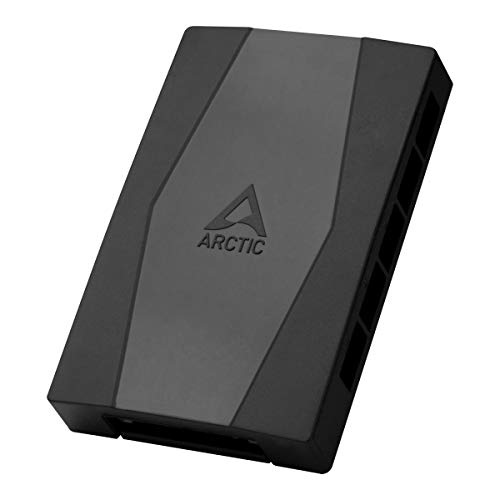
Also Consider
ARCTIC Case Fan Hub (10 Port, SATA Powered)
Synchronous PWM control passed to every fan.
Best for: Buyers who want synchronous PWM control passed to every fan.
Our take Check price for ARCTIC Case Fan Hub (10 Port, SATA Powered) (opens in a new tab)

Strong Alternative
EZDIY-FAB 10-Port PWM Fan Hub
A dedicated FAN1 port for CPU speed detection.
Best for: Buyers who want dedicated FAN1 port for CPU speed detection.
Our take Check price for EZDIY-FAB 10-Port PWM Fan Hub (opens in a new tab)

Premium Pick
Noctua NA-FH1 (8 Port)
The highest-priced pick here at the time of writing, with short circuit protection.
Best for: Buyers who want short circuit protection and can spend more than the 6-fan PWM controller hub costs.
Our take Check price for Noctua NA-FH1 (8 Port) (opens in a new tab)

Worth a Look
4-Pin 12V PWM Fan Controller Hub (6 Fans)
An adjustable PWM duty cycle from 1 to 99 percent.
Best for: Buyers who want adjustable PWM duty cycle from 1 to 99 percent.
Our take Check price for 4-Pin 12V PWM Fan Controller Hub (6 Fans) (opens in a new tab)

Lowest Price Here
UMLIFE 4-Pin PWM Fan Hub 1-to-5 (2 Pack)
Undercutting the ARCTIC Case Fan Hub on price when we checked.
Best for: Getting two hubs in the box for the least money.
Our take Check price for UMLIFE 4-Pin PWM Fan Hub 1-to-5 (2 Pack) (opens in a new tab)
| Pick | Why it’s here | Best for | Price |
|---|---|---|---|
| Synchronous PWM control passed to every fan. | Buyers who want synchronous PWM control passed to every fan. | Check price for ARCTIC Case Fan Hub (10 Port, SATA Powered) (opens in a new tab) |
| A dedicated FAN1 port for CPU speed detection. | Buyers who want dedicated FAN1 port for CPU speed detection. | Check price for EZDIY-FAB 10-Port PWM Fan Hub (opens in a new tab) |
| The highest-priced pick here at the time of writing, with short circuit protection. | Buyers who want short circuit protection and can spend more than the 6-fan PWM controller hub costs. | Check price for Noctua NA-FH1 (8 Port) (opens in a new tab) |
| An adjustable PWM duty cycle from 1 to 99 percent. | Buyers who want adjustable PWM duty cycle from 1 to 99 percent. | Check price for 4-Pin 12V PWM Fan Controller Hub (6 Fans) (opens in a new tab) |
| Undercutting the ARCTIC Case Fan Hub on price when we checked. | Getting two hubs in the box for the least money. | Check price for UMLIFE 4-Pin PWM Fan Hub 1-to-5 (2 Pack) (opens in a new tab) |
Our Picks
Also Consider1 of 5
ARCTIC Case Fan Hub (10 Port, SATA Powered) on Amazon (opens in a new tab)
What the ARCTIC Case Fan Hub brings to the table is synchronous PWM control passed to every fan, plus the first slot's RPM read back to the motherboard.
Best for
- Buyers who want synchronous PWM control passed to every fan.
Skip if
- If budget leads, the UMLIFE 5-way hub was cheaper at our last price check.
Why we like it
It also offers a 10 ports port count. It matches the EZDIY-FAB hub on port count (10 ports). It shares an SATA plus a 4-pin header power input with the EZDIY-FAB hub and Noctua NA-FH1; the UMLIFE 5-way hub goes with a motherboard header only power input.
No other pick in this guide offers 4-pin PWM fan types; compare the UMLIFE 5-way hub, which has 4-pin PWM and 3-pin fan types. It also comes with fans powered directly from the power supply. Plug the hub's input lead into a motherboard fan header (CPU_FAN or a chassis header) so the board can set speed, and keep the total fan current within the header or SATA rating.
It needs a free SATA power lead from the power supply as well as the header connection. On price it sat second of 5, between the cheaper UMLIFE 5-way hub and the pricier EZDIY-FAB hub, at the time of writing.
Key dimensions & specs
- Fan ports: 10 ports
- Power input: SATA plus a 4-pin header
- Stated current limit: 1A per port, 4.5A input
- Fan types: 4-pin PWM
Pros
- 10 fan ports
- Takes fan power from a SATA connector instead of the motherboard header
- Synchronous PWM control passed to every fan
- The first slot's RPM read back to the motherboard
Cons
- Costs more than the UMLIFE 5-way hub at the time of writing
Strong Alternative2 of 5
EZDIY-FAB 10-Port PWM Fan Hub on Amazon (opens in a new tab)
The EZDIY-FAB hub is built around a dedicated FAN1 port for CPU speed detection, with synchronized PWM control on the other nine ports on top.
Best for
- Buyers who want dedicated FAN1 port for CPU speed detection.
Skip if
- Skip it if price comes first: the UMLIFE 5-way hub cost less when we checked.
Why we like it
On the spec sheet, it offers a 10 ports port count. It matches the ARCTIC Case Fan Hub on port count (10 ports). It shares an SATA plus a 4-pin header power input with the ARCTIC Case Fan Hub and Noctua NA-FH1; the UMLIFE 5-way hub goes with a motherboard header only power input.
No other pick in this guide offers 4-pin PWM and 3-pin DC fan types; compare the ARCTIC Case Fan Hub, which has 4-pin PWM fan types. It also offers 3-pin fans run at full speed without PWM control. Plug the hub's input lead into a motherboard fan header (CPU_FAN or a chassis header) so the board can set speed, and keep the total fan current within the header or SATA rating. On price it sat third of 5, between the cheaper ARCTIC Case Fan Hub and the pricier 6-fan PWM controller hub, at the time of writing.
Key dimensions & specs
- Fan ports: 10 ports
- Power input: SATA plus a 4-pin header
- Stated current limit: 3A combined
- Fan types: 4-pin PWM and 3-pin DC
- Mounting: Double-sided tape and a screw hole
Pros
- 10 fan ports
- Takes fan power from a SATA connector instead of the motherboard header
- Dedicated FAN1 port for CPU speed detection
- Synchronized PWM control on the other nine ports
Cons
- Costs more than the UMLIFE 5-way hub at the time of writing
Premium Pick3 of 5
Noctua NA-FH1 (8 Port) on Amazon (opens in a new tab)
The Noctua NA-FH1 stands out for short circuit protection, and it adds four strong magnets for steel case panels.
Best for
- Buyers who want short circuit protection and can spend more than the 6-fan PWM controller hub costs.
Skip if
- Price-first buyers should look at the UMLIFE 5-way hub, which cost less when we checked.
Why we like it
It also offers an 8 ports port count. Its 8 ports port count ranks third of 5 here, behind the ARCTIC Case Fan Hub (10 ports) and ahead of the UMLIFE 5-way hub (5 ports). It shares an SATA plus a 4-pin header power input with the ARCTIC Case Fan Hub and EZDIY-FAB hub; the UMLIFE 5-way hub goes with a motherboard header only power input.
It also offers a six-year warranty. Plug the hub's input lead into a motherboard fan header (CPU_FAN or a chassis header) so the board can set speed, and keep the total fan current within the header or SATA rating. It needs a free SATA power lead from the power supply as well as the header connection. It was the highest-priced of the 5 picks at the time of writing, so the case for it rests on what it adds over the 6-fan PWM controller hub and the rest.
Key dimensions & specs
- Fan ports: 8 ports
- Power input: SATA plus a 4-pin header
- Stated current limit: 54W via SATA, 24W via the 4-pin header
- Fan types: 4-pin PWM, 5V and 12V fans
- Mounting: Magnetic
Pros
- 8 fan ports
- Takes fan power from a SATA connector instead of the motherboard header
- Short circuit protection
- Four strong magnets for steel case panels
Cons
- Costs more than the UMLIFE 5-way hub at the time of writing
Worth a Look4 of 5
4-Pin 12V PWM Fan Controller Hub (6 Fans) on Amazon (opens in a new tab)
The 6-fan PWM controller hub stands out for an adjustable PWM duty cycle from 1 to 99 percent, and it adds a speed knob on the board.
Best for
- Buyers who want adjustable PWM duty cycle from 1 to 99 percent.
Skip if
- Price-first buyers should look at the UMLIFE 5-way hub, which cost less when we checked.
Why we like it
It also offers a 6 ports port count. Its 6 ports port count ranks fourth of 5 here, behind the ARCTIC Case Fan Hub (10 ports) and ahead of the UMLIFE 5-way hub (5 ports). It is the only pick here with 4-pin PWM only fan types; the ARCTIC Case Fan Hub has 4-pin PWM fan types instead.
It also offers fans not included. Plug the hub's input lead into a motherboard fan header (CPU_FAN or a chassis header) so the board can set speed, and keep the total fan current within the header or SATA rating. It needs a free SATA power lead from the power supply as well as the header connection. Its price falls between the EZDIY-FAB hub and the Noctua NA-FH1, based on our last check.
Key dimensions & specs
- Fan ports: 6 ports
- Power input: SATA or a 5.5 x 2.5mm DC input
- Stated current limit: 2A per port, 5A and 60W combined
- Fan types: 4-pin PWM only
Pros
- 6 fan ports
- Takes fan power from a SATA connector instead of the motherboard header
- Adjustable PWM duty cycle from 1 to 99 percent
- Speed knob on the board
Cons
- Costs more than the UMLIFE 5-way hub at the time of writing
Lowest Price Here5 of 5
UMLIFE 4-Pin PWM Fan Hub 1-to-5 (2 Pack) on Amazon (opens in a new tab)
What the UMLIFE 5-way hub brings to the table is two hubs in the box, plus a 13 inch tin-plated copper cable.
Best for
- Getting two hubs in the box for the least money.
Skip if
- Pass on it if draws all fan power through one motherboard header rules it out for your setup.
Why we like it
It also offers a 5 ports port count. On port count it trails the group at 5 ports, while the ARCTIC Case Fan Hub offers 10 ports. No other pick in this guide offers a motherboard header only power input; compare the Noctua NA-FH1, which has an SATA plus a 4-pin header power input.
You get 4-pin PWM and 3-pin fan types here, which sets it apart from the 6-fan PWM controller hub and its 4-pin PWM only fan types. Plug the hub's input lead into a motherboard fan header (CPU_FAN or a chassis header) so the board can set speed, and keep the total fan current within the header or SATA rating. No other pick here cost less at our last price check, and the ARCTIC Case Fan Hub was closest.
Key dimensions & specs
- Fan ports: 5 ports
- Power input: Motherboard header only
- Fan types: 4-pin PWM and 3-pin
Pros
- 5 fan ports
- Two hubs in the box
- 13 inch tin-plated copper cable
- Support for 4-pin and 3-pin fans
Cons
- Draws all fan power through one motherboard header
- Port count trails the ARCTIC Case Fan Hub (10 ports)
How We Chose These PWM Fan Hubs
Each pick was assessed across 4 criteria weighted for real-world use.
- What we compared
- We lined up five fan hubs on port count, power input, stated current limit and fan types as the makers state them. These are research figures, not bench results: 1 of 5 picks leave out stated current limit.
- What every pick has in common
- All 5, from the ARCTIC Case Fan Hub to the UMLIFE 5-way hub, state port count, power input and fan types.
- Where the specs have gaps
- The UMLIFE 5-way hub gives no stated current limit; the ARCTIC Case Fan Hub, the 6-fan PWM controller hub and the UMLIFE 5-way hub give no mounting.
- Price range
- From the UMLIFE 5-way hub to the Noctua NA-FH1, all sat in the under $50 tier when we checked.
What to Look for in a PWM Fan Hub
Key buying criteria so you get the right fit the first time.
Port count
The ARCTIC Case Fan Hub tops port count at 10 ports and the UMLIFE 5-way hub sits lowest at 5 ports; 2 picks share the top figure. The ARCTIC Case Fan Hub is the pick for port count.
Extras that separate them
The Noctua NA-FH1: four strong magnets for steel case panels. The 6-fan PWM controller hub: a speed knob on the board. The UMLIFE 5-way hub: a 13 inch tin-plated copper cable.
Budget
All 5 sat in the under $50 tier when we checked, from the UMLIFE 5-way hub at the low end to the Noctua NA-FH1 at the top, so decide on features first.
Start from what matters most
Buyers who want short circuit protection and can spend more than the 6-fan PWM controller hub costs: the Noctua NA-FH1. Getting two hubs in the box for the least money: the UMLIFE 5-way hub.
Mounting and cable length
Magnets, adhesive and screw holes decide where the hub can live. Short input cables limit placement.
How to Choose a PWM Fan Hub
By priority
| Priority | Consider | Why |
|---|---|---|
| Buyers who want synchronous PWM control passed to every fan | ARCTIC Case Fan Hub | Synchronous PWM control passed to every fan |
| Buyers who want dedicated FAN1 port for CPU speed detection | EZDIY-FAB hub | A dedicated FAN1 port for CPU speed detection |
| Buyers who want short circuit protection and can spend more than the 6-fan PWM controller hub costs | Noctua NA-FH1 | The highest-priced pick here at the time of writing, with short circuit protection |
| Buyers who want adjustable PWM duty cycle from 1 to 99 percent | 6-fan PWM controller hub | An adjustable PWM duty cycle from 1 to 99 percent |
| Getting two hubs in the box for the least money | UMLIFE 5-way hub | Undercutting the ARCTIC Case Fan Hub on price when we checked |
Scroll sideways to see every column.
Key specs side by side
The ARCTIC Case Fan Hub leads on port count at 10 ports, ahead of the EZDIY-FAB hub at 10 ports. "Not listed" marks stated current limit where the UMLIFE 5-way hub leaves the figure out.
| Fan Hub | Fan ports | Power input | Stated current limit | Fan types |
|---|---|---|---|---|
| ARCTIC Case Fan Hub | 10 ports | SATA plus a 4-pin header | 1A per port, 4.5A input | 4-pin PWM |
| EZDIY-FAB hub | 10 ports | SATA plus a 4-pin header | 3A combined | 4-pin PWM and 3-pin DC |
| Noctua NA-FH1 | 8 ports | SATA plus a 4-pin header | 54W via SATA, 24W via the 4-pin header | 4-pin PWM, 5V and 12V fans |
| 6-fan PWM controller hub | 6 ports | SATA or a 5.5 x 2.5mm DC input | 2A per port, 5A and 60W combined | 4-pin PWM only |
| UMLIFE 5-way hub | 5 ports | Motherboard header only | Not listed | 4-pin PWM and 3-pin |
Scroll sideways to see every column.
Frequently Asked Questions
What does the Noctua NA-FH1 add over the UMLIFE 5-way hub?
The spec sheets show port count (8 ports against 5 ports) in its favour. Both sat in the under $50 tier when we checked, so the gains in port count cost little extra by tier.
Why is the UMLIFE 5-way hub our Lowest Price Here pick?
It carries the badge for undercutting the ARCTIC Case Fan Hub on price when we checked. It suits getting two hubs in the box for the least money.
What extras do the ARCTIC Case Fan Hub and the EZDIY-FAB hub include?
The ARCTIC Case Fan Hub: synchronous PWM control passed to every fan. The EZDIY-FAB hub: a dedicated FAN1 port for CPU speed detection. The Noctua NA-FH1: short circuit protection.
Who should choose the Noctua NA-FH1?
The Noctua NA-FH1 carries our Premium Pick label for the highest-priced pick here at the time of writing, with short circuit protection. It ranks third of 5 here and sat in the under $50 tier at our last price check; it suits anyone who wants short circuit protection and can spend more than the 6-fan PWM controller hub costs.
Should I pick the ARCTIC Case Fan Hub or the UMLIFE 5-way hub?
The ARCTIC Case Fan Hub suits buyers who want synchronous PWM control passed to every fan; the UMLIFE 5-way hub suits getting two hubs in the box for the least money.
Bottom Line
Our first pick is the ARCTIC Case Fan Hub, chosen for synchronous PWM control passed to every fan. Look at the EZDIY-FAB hub for a dedicated FAN1 port for CPU speed detection, the Noctua NA-FH1 for the highest-priced pick here at the time of writing, with short circuit protection and the 6-fan PWM controller hub for an adjustable PWM duty cycle from 1 to 99 percent if those matter more to you.
Add up the current each fan draws from its label and keep the total inside the hub's stated limit.