
Buying Guide
The Best PCIe Riser Cables
From the ELECNEXUS 100mm to the Corsair PCIe 5.0 175mm: five PCIe riser cables ranked on PCIe generation and length, with who should skip each one.
By The PC Journal editorial team
12 min read5 products evaluated
A riser cable moves the graphics card to a vertical mount, and the PCIe generation it supports decides whether a new card runs at full speed. Every pick here states its PCIe generation.
Our comparison rests on published figures for PCIe generation, cable length and connector; nothing here was tested in-house, and where a maker leaves out cable length, we say so.
Quick Picks
Our 5 recommendations at a glance. Tap a pick for the full verdict.

Also Consider
RGEEK PCIe 5.0 Riser Cable x16 200mm
A PC+ABS housing.
Best for: Buyers who want PC+ABS housing.
Our take Check price for RGEEK PCIe 5.0 Riser Cable x16 200mm (opens in a new tab)

Strong Alternative
JEYI PCIe 5.0 Riser Cable Vertical GPU Mount
A 6-layer PCB with gold-plated pins.
Best for: Buyers who want 6-layer PCB with gold-plated pins.
Our take Check price for JEYI PCIe 5.0 Riser Cable Vertical GPU Mount (opens in a new tab)

Worth a Look
LINKUP PCIe 5.0 Riser Cable (20cm, right angle)
Use with PCIe 4.0 and RX 9070 or RTX 5090 cards, by the listing.
Best for: Buyers who want use with PCIe 4.0 and RX 9070 or RTX 5090 cards, by the listing.
Our take Check price for LINKUP PCIe 5.0 Riser Cable (20cm, right angle) (opens in a new tab)

Premium Pick
Corsair Premium PCIe 5.0 x16 Riser Cable 175mm
The top of this price range, adding an ultra-flexible ribbon cable.
Best for: Spending more than the LINKUP PCIe 5.0 20cm costs for the fullest feature set in this group.
Our take Check price for Corsair Premium PCIe 5.0 x16 Riser Cable 175mm (opens in a new tab)
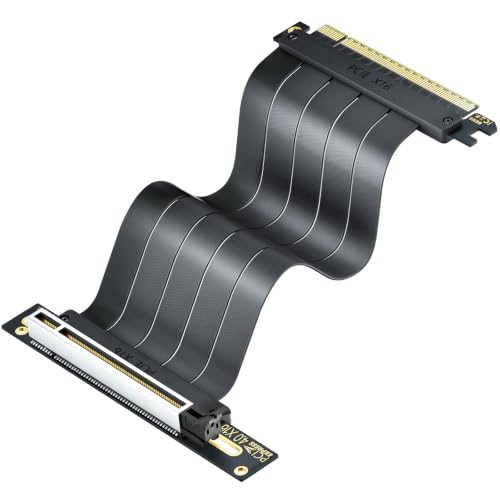
Lowest Price Here
ELECNEXUS PCIe 4.0 x16 Riser Cable 100mm
A lower price than the RGEEK PCIe 5.0 200mm and the rest when we checked.
Best for: Keeping the cost under $50.
Our take Check price for ELECNEXUS PCIe 4.0 x16 Riser Cable 100mm (opens in a new tab)
Our Picks
Also Consider1 of 5
RGEEK PCIe 5.0 Riser Cable x16 200mm on Amazon (opens in a new tab)
What the RGEEK PCIe 5.0 200mm brings to the table is a PC+ABS housing, plus a 24cm overall length including connectors.
Best for
- Buyers who want PC+ABS housing.
Skip if
- If budget leads, the ELECNEXUS 100mm was cheaper at our last price check.
Why we like it
On PCIe generation it ties with the JEYI PCIe 5.0, the LINKUP PCIe 5.0 20cm and the Corsair PCIe 5.0 175mm at PCIe 5.0 x16. It matches the LINKUP PCIe 5.0 20cm on length (200mm). Like the LINKUP PCIe 5.0 20cm and Corsair PCIe 5.0 175mm, it has a right-angle connector, while the JEYI PCIe 5.0 uses a 90 or 180 degree bend connector.
It is the only pick here with a multi-layer shielding; the JEYI PCIe 5.0 has an anti-EMI shielded 29AWG shielding instead. It also comes with NVIDIA, AMD and Intel GPU support. Measure from the motherboard slot to the card's connector with a string before ordering; a cable that is too short will not reach, and a very long one adds bends. When we checked, only the ELECNEXUS 100mm cost less, and the JEYI PCIe 5.0 cost more.
Key dimensions & specs
- PCIe generation: PCIe 5.0 x16
- Cable length: 200mm
- Connector: right-angle
- Shielding: multi-layer shielding
- Stated bandwidth: 128GB/s, validated by a 3DMark PCI Express test, by the listing
Pros
- A PCIe 5.0 x16 link
- right-angle connector
- multi-layer shielding
- PC+ABS housing
Cons
- Costs more than the ELECNEXUS 100mm at the time of writing
Strong Alternative2 of 5
JEYI PCIe 5.0 Riser Cable Vertical GPU Mount on Amazon (opens in a new tab)
The JEYI PCIe 5.0 stands out for a 6-layer PCB with gold-plated pins, and it adds a soft cable that bends 90 or 180 degrees without kinking.
Best for
- Buyers who want 6-layer PCB with gold-plated pins.
Skip if
- The maker gives no length, so skip it if that figure decides your choice.
Why we like it
It matches the RGEEK PCIe 5.0 200mm, the LINKUP PCIe 5.0 20cm and the Corsair PCIe 5.0 175mm on PCIe generation (PCIe 5.0 x16). A 90 or 180 degree bend connector is unique to it among these picks, while the RGEEK PCIe 5.0 200mm uses a right-angle connector. You get an anti-EMI shielded 29AWG shielding here, which sets it apart from the RGEEK PCIe 5.0 200mm and its a multi-layer shielding.
It also comes with backward compatibility with older PCIe generations. Measure from the motherboard slot to the card's connector with a string before ordering; a cable that is too short will not reach, and a very long one adds bends. Its price falls between the RGEEK PCIe 5.0 200mm and the LINKUP PCIe 5.0 20cm, based on our last check. Buyers who need a confirmed length should compare it with the RGEEK PCIe 5.0 200mm, which comes in at 200mm.
Key dimensions & specs
- PCIe generation: PCIe 5.0 x16
- Connector: 90 or 180 degree bend
- Shielding: anti-EMI shielded 29AWG
- Stated bandwidth: 128GB/s, by the listing
Pros
- A PCIe 5.0 x16 link
- 90 or 180 degree bend connector
- anti-EMI shielded 29AWG shielding
- 6-layer PCB with gold-plated pins
Cons
- No published length
- Costs more than the ELECNEXUS 100mm at the time of writing
Worth a Look3 of 5
LINKUP PCIe 5.0 Riser Cable (20cm, right angle) on Amazon (opens in a new tab)
What the LINKUP PCIe 5.0 20cm brings to the table is use with PCIe 4.0 and RX 9070 or RTX 5090 cards, by the listing, plus other lengths and connector shapes sold in the same line.
Best for
- Buyers who want use with PCIe 4.0 and RX 9070 or RTX 5090 cards, by the listing.
Skip if
- Price-first buyers should look at the ELECNEXUS 100mm, which cost less when we checked.
Why we like it
It also offers a PCIe 5.0 x16 PCIe generation and offers a 200mm length. Like the RGEEK PCIe 5.0 200mm and Corsair PCIe 5.0 175mm, it has a right-angle connector, while the JEYI PCIe 5.0 uses a 90 or 180 degree bend connector. It is the only pick here with a multilayer shielding; the ELECNEXUS 100mm has a triple-layer EMI shielding instead.
You also get tuned impedance and premium conductors. Measure from the motherboard slot to the card's connector with a string before ordering; a cable that is too short will not reach, and a very long one adds bends. A Gen 5 cable also works with Gen 4 and Gen 3 cards at their native speed, but it costs more than a Gen 4 cable. When we checked, only the JEYI PCIe 5.0 and cheaper picks cost less, and the Corsair PCIe 5.0 175mm cost more.
Key dimensions & specs
- PCIe generation: PCIe 5.0 x16
- Cable length: 200mm
- Connector: right-angle
- Shielding: multilayer shielding
- Stated bandwidth: 128GB/s on PCIe 5.0 x16, by the listing
Pros
- A PCIe 5.0 x16 link
- right-angle connector
- multilayer shielding
- Use with PCIe 4.0 and RX 9070 or RTX 5090 cards, by the listing
Cons
- Costs more than the ELECNEXUS 100mm at the time of writing
Premium Pick4 of 5
Corsair Premium PCIe 5.0 x16 Riser Cable 175mm on Amazon (opens in a new tab)
The Corsair PCIe 5.0 175mm stands out for an ultra-flexible ribbon cable, and it adds a right-angle connector that mounts with two bolts.
Best for
- Spending more than the LINKUP PCIe 5.0 20cm costs for the fullest feature set in this group.
Skip if
- If budget leads, the ELECNEXUS 100mm was cheaper at our last price check.
Why we like it
It also offers a PCIe 5.0 x16 PCIe generation and offers a 175mm length. On length it sits mid-pack at 175mm: the RGEEK PCIe 5.0 200mm comes in at 200mm, and the ELECNEXUS 100mm comes in at 100mm. It shares a right-angle connector with the RGEEK PCIe 5.0 200mm and LINKUP PCIe 5.0 20cm; the JEYI PCIe 5.0 goes with a 90 or 180 degree bend connector.
It also offers a length meant to stay tidy rather than long. Measure from the motherboard slot to the card's connector with a string before ordering; a cable that is too short will not reach, and a very long one adds bends. A Gen 5 cable also works with Gen 4 and Gen 3 cards at their native speed, but it costs more than a Gen 4 cable. It was the most expensive pick when we checked, so weigh what it adds over the LINKUP PCIe 5.0 20cm.
Key dimensions & specs
- PCIe generation: PCIe 5.0 x16
- Cable length: 175mm
- Connector: right-angle
- Stated bandwidth: 128GB/s, by the listing
Pros
- A PCIe 5.0 x16 link
- right-angle connector
- Ultra-flexible ribbon cable
- Right-angle connector that mounts with two bolts
Cons
- Costs more than the ELECNEXUS 100mm at the time of writing
Lowest Price Here5 of 5
ELECNEXUS PCIe 4.0 x16 Riser Cable 100mm on Amazon (opens in a new tab)
What the ELECNEXUS 100mm brings to the table is a thickened 6-layer PCB, plus 75W power delivery through a reinforced 40-pin connector.
Best for
- Keeping the cost under $50.
Skip if
- Skip it if PCIe generation matters most to you; the RGEEK PCIe 5.0 200mm offers PCIe 5.0 x16.
Why we like it
It also offers a PCIe 4.0 x16 PCIe generation and offers a 100mm length. Its PCIe 4.0 x16 PCIe generation is the oldest in this group; the RGEEK PCIe 5.0 200mm leads at PCIe 5.0 x16. You get a triple-layer EMI shielding here, which sets it apart from the LINKUP PCIe 5.0 20cm and its a multilayer shielding.
It also offers gold-plated contacts. Measure from the motherboard slot to the card's connector with a string before ordering; a cable that is too short will not reach, and a very long one adds bends. This is a PCIe 4.0 cable. A PCIe 5.0 graphics card on it will run at Gen 4 speed, which costs little in most games. It was the cheapest of the group when we checked; the RGEEK PCIe 5.0 200mm was the next step up.
Key dimensions & specs
- PCIe generation: PCIe 4.0 x16
- Cable length: 100mm
- Shielding: triple-layer EMI shielding
- Stated bandwidth: 64GB/s bidirectional, by the listing
Pros
- A PCIe 4.0 x16 link
- triple-layer EMI shielding
- Thickened 6-layer PCB
- 75W power delivery through a reinforced 40-pin connector
Cons
- PCIe generation trails the RGEEK PCIe 5.0 200mm (PCIe 5.0 x16)
How We Chose These PCIe Riser Cables
Each pick was assessed across 4 criteria weighted for real-world use.
- What we compared
- We set side by side five PCIe riser cables on PCIe generation, length, connector and shielding as the makers state them. Nothing was tested in-house; 2 of the 5 fields compared are stated for every pick, while length and connector have gaps.
- The shared baseline
- All 5, from the RGEEK PCIe 5.0 200mm to the ELECNEXUS 100mm, state PCIe generation and stated bandwidth.
- Where the specs have gaps
- The JEYI PCIe 5.0 gives no length; the ELECNEXUS 100mm gives no connector.
- Price range
- At our last check the picks ran from the ELECNEXUS 100mm (under $50) to the Corsair PCIe 5.0 175mm ($50 to $100).
What to Look for in a PCIe Riser Cable
Key buying criteria so you get the right fit the first time.
PCIe generation
Here PCIe generation runs from PCIe 4.0 x16 on the ELECNEXUS 100mm to PCIe 5.0 x16 on the RGEEK PCIe 5.0 200mm, a 25% spread. The RGEEK PCIe 5.0 200mm is the pick for PCIe generation.
How much length you need
The RGEEK PCIe 5.0 200mm tops length at 200mm and the ELECNEXUS 100mm sits lowest at 100mm; 2 picks share the top figure. If length is your first filter, the RGEEK PCIe 5.0 200mm sets the ceiling at 200mm. The JEYI PCIe 5.0 gives no length figure, so 4 of 5 picks are compared here.
Shielding
The RGEEK PCIe 5.0 200mm lists multi-layer shielding; the JEYI PCIe 5.0 lists anti-EMI shielded 29AWG; the LINKUP PCIe 5.0 20cm lists multilayer shielding; the ELECNEXUS 100mm lists triple-layer EMI shielding. Sort out shielding before price: it splits 4 stated picks into groups of 1, 1, 1 and 1.
Features beyond the spec table
The LINKUP PCIe 5.0 20cm: other lengths and connector shapes sold in the same line. The Corsair PCIe 5.0 175mm: a right-angle connector that mounts with two bolts. The ELECNEXUS 100mm: 75W power delivery through a reinforced 40-pin connector.
Budget
Under $50 buys the ELECNEXUS 100mm, the RGEEK PCIe 5.0 200mm and the JEYI PCIe 5.0; $50 to $100 buys the LINKUP PCIe 5.0 20cm and the Corsair PCIe 5.0 175mm at our last check.
How to Choose a PCIe Riser Cable
By priority
| Priority | Consider | Why |
|---|---|---|
| Buyers who want PC+ABS housing | RGEEK PCIe 5.0 200mm | A PC+ABS housing |
| Buyers who want 6-layer PCB with gold-plated pins | JEYI PCIe 5.0 | A 6-layer PCB with gold-plated pins |
| Buyers who want use with PCIe 4.0 and RX 9070 or RTX 5090 cards, by the listing | LINKUP PCIe 5.0 20cm | Use with PCIe 4.0 and RX 9070 or RTX 5090 cards, by the listing |
| Spending more than the LINKUP PCIe 5.0 20cm costs for the fullest feature set in this group | Corsair PCIe 5.0 175mm | The top of this price range, adding an ultra-flexible ribbon cable |
| Keeping the cost under $50 | ELECNEXUS 100mm | A lower price than the RGEEK PCIe 5.0 200mm and the rest when we checked |
Scroll sideways to see every column.
Key specs side by side
The RGEEK PCIe 5.0 200mm leads on PCIe generation at PCIe 5.0 x16, ahead of the JEYI PCIe 5.0 at PCIe 5.0 x16. "Not listed" marks length where the JEYI PCIe 5.0 leaves the figure out.
| PCIe Riser Cable | PCIe generation | Cable length | Connector | Shielding |
|---|---|---|---|---|
| RGEEK PCIe 5.0 200mm | PCIe 5.0 x16 | 200mm | right-angle | multi-layer shielding |
| JEYI PCIe 5.0 | PCIe 5.0 x16 | Not listed | 90 or 180 degree bend | anti-EMI shielded 29AWG |
| LINKUP PCIe 5.0 20cm | PCIe 5.0 x16 | 200mm | right-angle | multilayer shielding |
| Corsair PCIe 5.0 175mm | PCIe 5.0 x16 | 175mm | right-angle | Not listed |
| ELECNEXUS 100mm | PCIe 4.0 x16 | 100mm | Not listed | triple-layer EMI shielding |
Scroll sideways to see every column.
By price at the time of writing
At our last check the cheapest pick, the ELECNEXUS 100mm, sat in the under $50 tier, 2 tiers in all up to the Corsair PCIe 5.0 175mm at $50 to $100; Amazon prices move, so recheck before buying.
| Price tier | PCIe Riser Cables |
|---|---|
| Under $50 | ELECNEXUS 100mm, RGEEK PCIe 5.0 200mm, JEYI PCIe 5.0 |
| About $50 to $100 | LINKUP PCIe 5.0 20cm, Corsair PCIe 5.0 175mm |
Frequently Asked Questions
Is the Corsair PCIe 5.0 175mm worth paying more than the ELECNEXUS 100mm?
The spec sheets show PCIe generation (PCIe 5.0 x16 against PCIe 4.0 x16) and length (175mm against 100mm) in its favour. The ELECNEXUS 100mm sat in the under $50 tier and the Corsair PCIe 5.0 175mm in the $50 to $100 tier when we checked, with 3 other picks between them; pay the difference only if PCIe generation and length decide your purchase.
What makes the Corsair PCIe 5.0 175mm the Premium Pick?
It carries the badge for the top of this price range, adding an ultra-flexible ribbon cable. The ELECNEXUS 100mm, the cheapest pick, sat in the under $50 tier against $50 to $100 here, without out-ranking it on any listed spec. It is aimed at spending more than the LINKUP PCIe 5.0 20cm costs for the fullest feature set in this group.
Do the RGEEK PCIe 5.0 200mm and the JEYI PCIe 5.0 differ on connector?
The RGEEK PCIe 5.0 200mm, the LINKUP PCIe 5.0 20cm and the Corsair PCIe 5.0 175mm use right-angle; the JEYI PCIe 5.0 uses 90 or 180 degree bend. The maker of the ELECNEXUS 100mm doesn't state connector, so 4 of 5 picks are covered here.
Beyond the specs, what sets the RGEEK PCIe 5.0 200mm and the JEYI PCIe 5.0 apart?
The RGEEK PCIe 5.0 200mm: a PC+ABS housing. The JEYI PCIe 5.0: a 6-layer PCB with gold-plated pins. The LINKUP PCIe 5.0 20cm: use with PCIe 4.0 and RX 9070 or RTX 5090 cards, by the listing.
Who should choose the ELECNEXUS 100mm?
The ELECNEXUS 100mm carries our Lowest Price Here label for a lower price than the RGEEK PCIe 5.0 200mm and the rest when we checked. It ranks fifth of 5 here and sat in the under $50 tier at our last price check; it suits keeping the cost under $50.
Bottom Line
Our first pick is the RGEEK PCIe 5.0 200mm, chosen for a PC+ABS housing. Look at the JEYI PCIe 5.0 for a 6-layer PCB with gold-plated pins, the LINKUP PCIe 5.0 20cm for use with PCIe 4.0 and RX 9070 or RTX 5090 cards, by the listing and the Corsair PCIe 5.0 175mm for the top of this price range, adding an ultra-flexible ribbon cable if those matter more to you.
Measure the path from the motherboard slot to the card's connector with a string before choosing a length.