
Buying Guide
The Best Portable SSDs Under $500
From the SSK 500GB to the Ultra Touch SSD: five external drives ranked on capacity and rated read speed, with who should skip each one.
By Alex Morgan, PC Hardware Editor
12 min read5 products evaluated
A $500 ceiling rules out the premium models, which makes the differences between the rest matter more. Every drive here cost $500 or less when we checked and is a USB SSD, ordered from the lowest price.
Our comparison rests on published figures for drive type, capacity (as reviewed) and max read speed; nothing here was tested in-house, and where a maker leaves out max read speed, we say so.
Quick Picks
Which of the 5 picks to look at first. Tap a name for the full analysis.

Lowest Price Here
SSK Portable SSD 500GBUndercutting the GARMESE on price when we checked.
Best for: Keeping the cost under $100.
Check price for SSK Portable SSD 500GB on Amazon (opens in a new tab)
Also Consider
GARMESE 1TB External SSDA 33g body with a keychain hole.
Best for: Buyers who want 33g body with a keychain hole.
Check price for GARMESE 1TB External SSD on Amazon (opens in a new tab)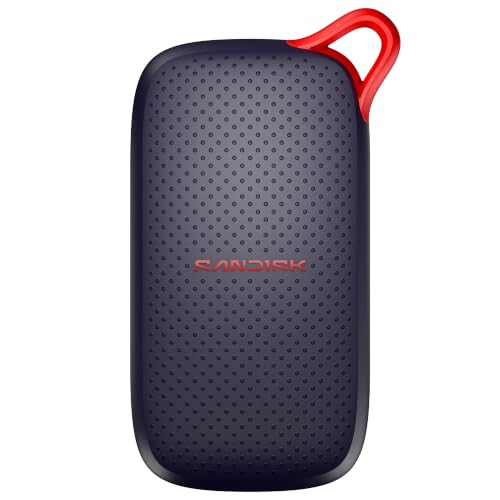
Strong Alternative
SanDisk Portable SSD 1TBDrop protection up to 2m.
Best for: Buyers who want drop protection up to 2m.
Check price for SanDisk Portable SSD 1TB on Amazon (opens in a new tab)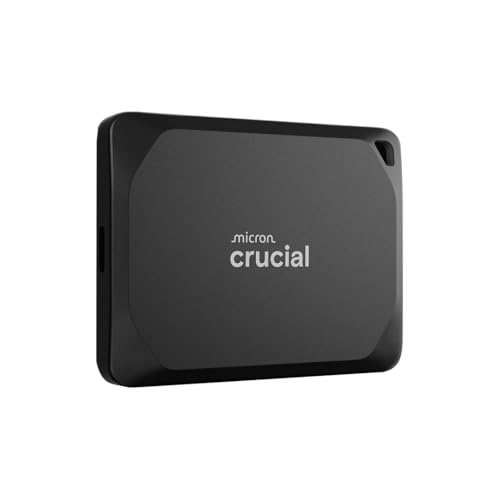
Fastest Rated Read Speed
Crucial X10 Pro Portable SSD 1TBThe fastest rated read speed here (2,100MB/s).
Best for: Buyers who put rated read speed first.
Check price for Crucial X10 Pro Portable SSD 1TB on Amazon (opens in a new tab)
Premium Pick
Seagate Ultra Touch SSD 1TBA fabric-covered palm-sized design at the highest price in the group.
Best for: Buyers for whom price is not the deciding factor, since the SSK 500GB costs less.
Check price for Seagate Ultra Touch SSD 1TB on Amazon (opens in a new tab)
Our Picks
Lowest Price Here1 of 5
SSK Portable SSD 500GB
SSK's 500GB SSD ships with both USB-C and USB-A cables and offers 1,050MB/s reads.
Best for
- Keeping the cost under $100.
Skip if
- Skip it if capacity matters most to you; the GARMESE offers 1TB.
Why we like it
It is the cheapest SSD here. It reads at up to 1,050MB/s over a 10Gbps USB-C link, fast enough for moving large project folders. Expect about 465GB to show in Windows, which is normal for a 500GB drive.
SLC caching keeps large transfers fast, and S.M.A.R.T. and TRIM support help it last. It reads at up to 1050MB/s and writes at up to 1000MB/s over 10Gbps USB. S.M.A.R.T. health reporting and TRIM help keep write speeds consistent over time.
Its 0.5TB capacity is the smallest in this group; the GARMESE leads at 1TB. Its 1,050MB/s rated read speed ranks third of 4 here, behind the X10 Pro (2,100MB/s) and ahead of the SanDisk Portable (1,000MB/s). It also offers an activity LED and an SLC cache for steady transfers. It undercut the GARMESE and every other pick on price at the time of writing.
Key specs
- Drive type
- SSD
- Capacity (as reviewed)
- 0.5TB
- Max read speed
- 1,050MB/s
- Connection
- USB 3.2 Gen 2 (USB-C and USB-A cables)
- Durability claim
- Not stated
- Security
- None stated
Pros
- Both USB-C and USB-A cables
- Activity LED
- SLC cache for steady transfers
- Rated read speed of 1,050MB/s, ahead of the SanDisk Portable
Cons
- Capacity trails the GARMESE (1TB)
The catch
The trade-off is capacity; for more, the GARMESE is rated for 1TB.
Also Consider2 of 5
GARMESE 1TB External SSD
GARMESE's SSD offers 2,000MB/s reads in a 33g body with a keychain hole.
Best for
- Buyers who want 33g body with a keychain hole.
Skip if
- Skip it if price comes first: the SSK 500GB cost less when we checked.
Why we like it
A USB-A adapter is included. It reads at up to 2,000MB/s over USB 3.2 Gen 2x2, which is twice a standard 10Gbps drive. Full speed needs a 20Gbps port.
It uses USB 3.2 Gen 2x2 for reads up to 2000MB/s and writes up to 1800MB/s, which needs a 20Gbps port. On capacity it ties with the SanDisk Portable, the X10 Pro and the Ultra Touch SSD at 1TB. On rated read speed it sits mid-pack at 2,000MB/s: the X10 Pro offers 2,100MB/s, and the SanDisk Portable comes in at 1,000MB/s.
You get a shock resistant durability claim here, which sets it apart from the SanDisk Portable and its a drops up to 2m durability claim. You also get 1,800MB/s rated writes. Its top speed needs a USB 3.2 Gen 2x2 (20Gbps) port; most laptops and all Macs run it at 10Gbps speeds instead. When we checked, only the SSK 500GB cost less, and the SanDisk Portable cost more.
Key specs
- Drive type
- SSD
- Capacity (as reviewed)
- 1TB
- Max read speed
- 2,000MB/s
- Connection
- USB 3.2 Gen 2x2 (USB-C, USB-A adapter)
- Durability claim
- Shock resistant
- Security
- None stated
Pros
- rated reads up to 2,000MB/s
- 33g body with a keychain hole
- 1,800MB/s rated writes
- Included USB-A adapter
Cons
- Costs more than the SSK 500GB at the time of writing
Strong Alternative3 of 5
SanDisk Portable SSD 1TB
SanDisk's plain Portable SSD offers 1,000MB/s reads and 2m drop protection in a slim body.
Best for
- Buyers who want drop protection up to 2m.
Skip if
- Skip it if rated read speed matters most to you; the X10 Pro offers 2,100MB/s.
Why we like it
It is the budget model below the Extreme. It reads at up to 1000MB/s, about five times a portable hard drive. With no moving parts it is drop-rated to 2 meters, and it is slim enough for a pocket.
It matches the GARMESE, the X10 Pro and the Ultra Touch SSD on capacity (1TB). Its 1,000MB/s rated read speed is the slowest in this group; the X10 Pro leads at 2,100MB/s. A USB-C connection is unique to it among these picks, while the Ultra Touch SSD uses a USB-C with USB-A adapter connection.
It is the only pick here with a drops up to 2m durability claim; the GARMESE has a shock resistant durability claim instead. It also offers driver-free USB-C setup. Its price falls between the GARMESE and the X10 Pro, based on our last check.
Key specs
- Drive type
- SSD
- Capacity (as reviewed)
- 1TB
- Max read speed
- 1,000MB/s
- Connection
- USB-C
- Durability claim
- Drops up to 2m
- Security
- None stated
Pros
- Drop protection up to 2m
- Driver-free USB-C setup
- Slim pocket body
- Capacity of 1TB, ahead of the SSK 500GB
Cons
- Rated read speed trails the X10 Pro (2,100MB/s)
- Costs more than the SSK 500GB at the time of writing
The catch
If rated read speed is your priority, the X10 Pro (2,100MB/s) is the stronger choice.
Fastest Rated Read Speed4 of 5
Crucial X10 Pro Portable SSD 1TB
Crucial's X10 Pro offers 2,100MB/s reads and 2,000MB/s writes with IP55 protection and a lanyard loop.
Best for
- Buyers who put rated read speed first.
Skip if
- Price-first buyers should look at the SSK 500GB, which cost less when we checked.
Why we like it
It suits creators with a 20Gbps port. It reads at up to 2,100MB/s and writes at 2,000MB/s, and it is rated IP55 with 7.5-foot drop resistance. Full speed needs a 20Gbps USB port.
It matches the GARMESE, the SanDisk Portable and the Ultra Touch SSD on capacity (1TB). A USB 3.2 Gen 2x2 (USB-C) connection is unique to it among these picks, while the Ultra Touch SSD uses a USB-C with USB-A adapter connection. You also get Acronis True Image and Mylio Photos+ trials.
Its top speed needs a USB 3.2 Gen 2x2 (20Gbps) port; most laptops and all Macs run it at 10Gbps speeds instead. Its price falls between the SanDisk Portable and the Ultra Touch SSD, based on our last check.
Key specs
- Drive type
- SSD
- Capacity (as reviewed)
- 1TB
- Max read speed
- 2,100MB/s
- Connection
- USB 3.2 Gen 2x2 (USB-C)
- Durability claim
- IP55, drops up to 7.5ft
- Security
- None stated
Pros
- rated reads up to 2,100MB/s
- 2,000MB/s rated writes
- Lanyard loop and activity light
- Acronis True Image and Mylio Photos+ trials
Cons
- Costs more than the SSK 500GB at the time of writing
Premium Pick5 of 5
Seagate Ultra Touch SSD 1TB
Seagate's Ultra Touch SSD is a palm-sized fabric-covered SSD with a USB-A adapter in the box.
Best for
- Buyers for whom price is not the deciding factor, since the SSK 500GB costs less.
Skip if
- Skip it if you need to know its rated read speed before buying; the maker doesn't publish one.
Why we like it
An Android app manages phone backups. Its fabric-covered shell is palm-sized, and it ships with a USB-A adapter and an Android app for phone backups. Some Macs need it reformatted first.
It includes a year of Mylio Create and two months of Adobe CC Photography. On capacity it ties with the GARMESE, the SanDisk Portable and the X10 Pro at 1TB. No other pick in this guide offers a USB-C with USB-A adapter connection; compare the SanDisk Portable, which has a USB-C connection.
At our last price check it topped the group, with the X10 Pro the nearest cheaper option. If you want a confirmed rated read speed, look to the X10 Pro instead: it offers 2,100MB/s, while this one gives no figure.
Key specs
- Drive type
- SSD
- Capacity (as reviewed)
- 1TB
- Connection
- USB-C with USB-A adapter
- Durability claim
- Not stated
- Security
- None stated
Pros
- Fabric-covered palm-sized design
- Included USB-A adapter
- Android app for phone content
- Capacity of 1TB, ahead of the SSK 500GB
Cons
- No published rated read speed
- Costs more than the SSK 500GB at the time of writing
How We Chose These Portable SSDs Under $500
Alex Morgan compared the manufacturer specifications, connectivity, warranty terms and compatibility of every pick. Figures come from the makers unless a third-party source is named; we did not test these products ourselves.
- How these picks were ranked
- We compared five drives on drive type, capacity, rated read speed and connection, using each maker's published specs. These are research figures, not bench results: 1 of 5 picks leave out rated read speed.
- The shared baseline
- All 5, from the SSK 500GB to the Ultra Touch SSD, state drive type, capacity and connection and share None stated security.
- Where the specs have gaps
- The Ultra Touch SSD gives no rated read speed; the SSK 500GB and the Ultra Touch SSD give no durability claim.
- Price range
- At our last check the picks ran from the SSK 500GB ($50 to $100) to the Ultra Touch SSD ($150 to $250).
What to Look for in a Portable SSD Under $500
Key buying criteria so you get the right fit the first time.
Capacity
Here capacity runs from 0.5TB on the SSK 500GB to 1TB on the GARMESE, a 100% spread. Start with the GARMESE if capacity decides it.
How much rated read speed you need
The X10 Pro tops rated read speed at 2,100MB/s and the SanDisk Portable sits lowest at 1,000MB/s. The GARMESE comes second at 2,000MB/s, in the same price tier as the X10 Pro. The Ultra Touch SSD gives no rated read speed figure, so 4 of 5 picks are compared here.
A small M.2 SSD next to an external drive enclosure Features beyond the spec table
The SanDisk Portable: driver-free USB-C setup. The X10 Pro: a lanyard loop and activity light. The Ultra Touch SSD: an included USB-A adapter.
Budget
$50 to $100 buys the SSK 500GB; $150 to $250 buys the GARMESE, the SanDisk Portable, the X10 Pro and the Ultra Touch SSD at our last check.
An M.2 2280 SSD held in a hand Match the pick to your priority
Keeping the cost under $100: the SSK 500GB. Buyers who put rated read speed first: the X10 Pro. Buyers for whom price is not the deciding factor, since the SSK 500GB costs less: the Ultra Touch SSD.
How to Choose a Portable SSD Under $500
By priority
| Priority | Consider | Why |
|---|---|---|
| Keeping the cost under $100 | SSK 500GB | Undercutting the GARMESE on price when we checked |
| Buyers who want 33g body with a keychain hole | GARMESE | A 33g body with a keychain hole |
| Buyers who want drop protection up to 2m | SanDisk Portable | Drop protection up to 2m |
| Buyers who put rated read speed first | X10 Pro | The fastest rated read speed here (2,100MB/s) |
| Buyers for whom price is not the deciding factor, since the SSK 500GB costs less | Ultra Touch SSD | A fabric-covered palm-sized design at the highest price in the group |
Scroll sideways to see every column.
Key specs side by side
The GARMESE leads on capacity at 1TB, ahead of the SanDisk Portable at 1TB. "Not listed" marks rated read speed where the Ultra Touch SSD leaves the figure out.
| Drive | Drive type | Capacity (as reviewed) | Max read speed | Connection |
|---|---|---|---|---|
| SSK 500GB | SSD | 0.5TB | 1,050MB/s | USB 3.2 Gen 2 (USB-C and USB-A cables) |
| GARMESE | SSD | 1TB | 2,000MB/s | USB 3.2 Gen 2x2 (USB-C, USB-A adapter) |
| SanDisk Portable | SSD | 1TB | 1,000MB/s | USB-C |
| X10 Pro | SSD | 1TB | 2,100MB/s | USB 3.2 Gen 2x2 (USB-C) |
| Ultra Touch SSD | SSD | 1TB | Not listed | USB-C with USB-A adapter |
Scroll sideways to see every column.
By price at the time of writing
At our last check the cheapest pick, the SSK 500GB, sat in the $50 to $100 tier, 2 tiers in all up to the Ultra Touch SSD at $150 to $250; Amazon prices move, so recheck before buying.
| Price tier | Drives |
|---|---|
| About $50 to $100 | SSK 500GB |
| About $150 to $250 | GARMESE, SanDisk Portable, X10 Pro, Ultra Touch SSD |
Frequently Asked Questions
Which has the fastest rated read speed: the X10 Pro or the GARMESE?
Between the top two, it is 2,100MB/s on the X10 Pro against 2,000MB/s on the GARMESE, a 5% difference. The SanDisk Portable is at the other end of this group with 1,000MB/s. No rated read speed figure is published for the Ultra Touch SSD, which leaves 4 of 5 picks ranked here.
Is the Ultra Touch SSD worth paying more than the SSK 500GB?
On paper it adds capacity (1TB against 0.5TB). The SSK 500GB sat in the $50 to $100 tier and the Ultra Touch SSD in the $150 to $250 tier when we checked, with 3 other picks between them; pay the difference only if capacity decides your purchase.
What makes the X10 Pro the Fastest Rated Read Speed?
The label rests on the fastest rated read speed here (2,100MB/s). The GARMESE is next on rated read speed at 2,000MB/s, so this pick's 2,100MB/s is 5% further out. The SSK 500GB, the cheapest pick, sat in the $50 to $100 tier against $150 to $250 here, without out-ranking it on any listed spec. It suits anyone who puts rated read speed first.
Beyond the specs, what sets the SSK 500GB and the GARMESE apart?
The SSK 500GB: both USB-C and USB-A cables. The GARMESE: a 33g body with a keychain hole. The SanDisk Portable: drop protection up to 2m.
Should I pick the SSK 500GB or the Ultra Touch SSD?
The SSK 500GB suits keeping the cost under $100; the Ultra Touch SSD suits buyers for whom price is not the deciding factor, since the SSK 500GB costs less.
Bottom Line
Our first pick is the SSK 500GB, chosen for undercutting the GARMESE on price when we checked. Look at the GARMESE for a 33g body with a keychain hole, the SanDisk Portable for drop protection up to 2m and the X10 Pro for the fastest rated read speed here (2,100MB/s) if those matter more to you.
Use the shortest cable that reaches; long cables can drop speed.
Related Guides
- Related guideThe Best External SSDs
- Related guideThe Best Portable SSD Drives
- Related guideThe Best External Storage for a Laptop: SSDs and Hard Drives
- Lower budgetThe Best Portable SSDs Under $300
- Similar guideThe Best Portable SSDs Under $100
- ExplainerPortable SSD vs external hard drive: which one for backups, games and carrying files
- ExplainerUSB speed names decoded for external SSDs: USB 3.2 Gen 2, USB4 and Thunderbolt
- Also see: ssds and storageDo You Need an M.2 SSD Heatsink?
- Similar guideThe Best Portable SSDs Under $120
- Topic hubAll external storage guides
About the author
PC Hardware Editor
Alex covers PC hardware, monitors, components, upgrades and peripherals for The PC Journal, with a focus on helping readers understand specifications, compatibility and meaningful product trade-offs.
Covers: Monitors, Graphics cards, Processors, PC components, Peripherals, Upgrades and compatibility
View all articles