
Buying Guide
The Best Mice for Precision
Five gaming mice compared, from the Strix Impact III Wireless to the Naga V3 Pro, with the trade-offs of each named.
By The PC Journal editorial team
12 min read5 products evaluated
High-end sensors track small movements cleanly at any speed. Every pick has a 26,000 DPI or higher sensor, ordered by DPI.
This is a research roundup, not a lab test: weight, max DPI and battery life come from each maker's published specs; a missing weight is flagged, not filled in, and no figure here comes from our own testing.
Quick Picks
Our 5 recommendations at a glance. Tap a pick for the full verdict.

Premium Pick
Razer Naga V3 Pro Wireless
Swappable side plates for MMO, MOBA and FPS layouts at the highest price in the group.
Best for: Buyers for whom price is not the deciding factor.
Our take Check price for Razer Naga V3 Pro Wireless (opens in a new tab)

Also Consider
Logitech G PRO X Superlight 2 Wireless Mouse
A Hero 2 sensor.
Best for: Buyers who want Hero 2 sensor.
Our take Check price for Logitech G PRO X Superlight 2 Wireless Mouse (opens in a new tab)

Strong Alternative
Logitech G PRO X2 Superstrike Wireless
Haptic click feedback.
Best for: Buyers who want haptic click feedback.
Our take Check price for Logitech G PRO X2 Superstrike Wireless (opens in a new tab)
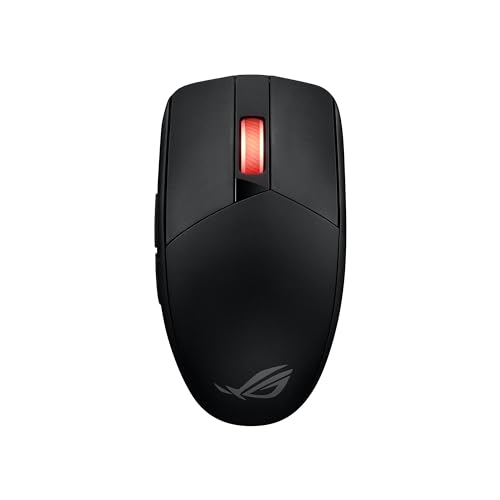
Longest Battery Life
ASUS ROG Strix Impact III Wireless
The longest battery life here (618 hours).
Best for: Buyers who put battery life first.
Our take Check price for ASUS ROG Strix Impact III Wireless (opens in a new tab)
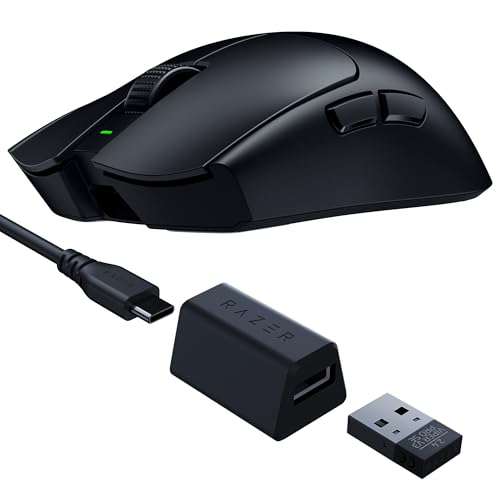
Lightest Mouse
Razer Viper V3 Pro SE Wireless Gaming Mouse
The lightest weight here (54g).
Best for: Fast flick aiming.
Our take Check price for Razer Viper V3 Pro SE Wireless Gaming Mouse (opens in a new tab)
Our Picks
Premium Pick1 of 5
Razer Naga V3 Pro Wireless on Amazon (opens in a new tab)
Razer's Naga V3 Pro swaps side plates for MMO, MOBA and FPS layouts.
Best for
- Buyers for whom price is not the deciding factor.
Skip if
- Its weight is not published, which rules it out if you need that number.
Why we like it
It has up to 280 hours on Bluetooth and a 50K sensor. Its Focus Pro 50K sensor reaches 50,000 DPI, and the HyperScroll Gen-2 wheel switches between tactile and free-spin modes automatically. Synapse remaps buttons on Windows.
Three magnetic side plates switch between 12, 6 and 2-button layouts, so one mouse covers MMO and FPS games. The HyperScroll Gen-2 wheel adds free-spin and Smart-Reel switching for long inventories. On battery life it sits mid-pack at 155 hours: the Strix Impact III Wireless runs for 618 hours, and the Viper V3 Pro SE comes in at 95 hours.
Keep the Naga V3 Pro on its dongle for games; Bluetooth is for a laptop. It was the highest-priced of the 5 picks at the time of writing, so the case for it rests on what it adds over the PRO X2 Superstrike and the rest. The maker doesn't give its weight; if that figure matters, the Viper V3 Pro SE weighs 54g.
Key dimensions & specs
- Max DPI: 50,000
- Battery life: 155 hours
- Connection: HyperSpeed 2.4GHz, Bluetooth
Pros
- Up to 155 hours per charge
- Dongle plus Bluetooth
- Swappable side plates for MMO, MOBA and FPS layouts
- Up to 280 hours on Bluetooth
Cons
- No published weight
- Costs more than the Strix Impact III Wireless at the time of writing
Also Consider2 of 5
Logitech G PRO X Superlight 2 Wireless Mouse on Amazon (opens in a new tab)
The Superlight 2 is Logitech's esports mouse: 60g, a Hero 2 sensor and Lightforce switches, with little else in the way.
Best for
- Buyers who want Hero 2 sensor.
Skip if
- Skip it if weight matters most to you; the Viper V3 Pro SE offers 54g.
Why we like it
Its zero-additive PTFE feet glide smoothly, and LIGHTFORCE hybrid switches give a tactile click. It polls at up to 8kHz, charges over USB-C and runs up to 95 hours per charge. The HERO 2 sensor tracks above 888 IPS at up to 44,000 DPI with no smoothing or acceleration.
On weight it trails the group at 60g, while the Viper V3 Pro SE weighs 54g. The PRO X Superlight 2's dongle works best on a front USB port or an extender near the mouse. It was priced above the Viper V3 Pro SE and below the PRO X2 Superstrike at the time of writing.
Key dimensions & specs
- Weight: 60g
- Max DPI: 44,000
- Connection: Lightspeed 2.4GHz
Pros
- Light 60g body
- Hero 2 sensor
- Lightforce hybrid optical-mechanical switches
Cons
- Weight trails the Viper V3 Pro SE (54g)
- No published battery life
- Costs more than the Strix Impact III Wireless at the time of writing
Strong Alternative3 of 5
Logitech G PRO X2 Superstrike Wireless on Amazon (opens in a new tab)
Logitech's PRO X2 Superstrike adds haptic click feedback and 8kHz wireless polling to the PRO shape.
Best for
- Buyers who want haptic click feedback.
Skip if
- Pass if a published weight matters; this one has none.
Why we like it
It uses a Hero 2 sensor. Logitech quotes 30ms faster clicks, with 10 levels of actuation point and 5 levels of rapid trigger to tune. Its haptic trigger system adds real-time click feedback, which is unusual in a gaming mouse.
The PRO X2 Superstrike's dongle works best on a front USB port or an extender near the mouse. Polling above 1,000Hz shortens battery life and needs a CPU with headroom. It was priced above the PRO X Superlight 2 and below the Naga V3 Pro at the time of writing. There is no published weight figure, whereas the Viper V3 Pro SE weighs 54g.
Key dimensions & specs
- Max DPI: 44,000
- Polling rate: 8,000Hz
- Connection: Lightspeed 2.4GHz
Pros
- 8,000Hz polling
- Haptic click feedback
- Hero 2 sensor
- 8kHz wireless polling
Cons
- No published weight
- No published battery life
- Costs more than the Strix Impact III Wireless at the time of writing
Longest Battery Life4 of 5
ASUS ROG Strix Impact III Wireless on Amazon (opens in a new tab)
ASUS's ROG Strix Impact III Wireless is a 57g ambidextrous mouse with replaceable switches.
Best for
- Buyers who put battery life first.
Skip if
- Choose another pick if you can't accept this: weight of 57g, behind the Viper V3 Pro SE (54g).
Why we like it
It has 618 hours of battery life. It weighs 57g without the battery, and the ROG Omni Receiver connects several devices through one dongle. On weight it sits mid-pack at 57g: the Viper V3 Pro SE weighs 54g, and the PRO X Superlight 2 comes in at 60g.
Nothing else here matches its 618 hours battery life; the Naga V3 Pro comes closest at 155 hours. You also get a 36K ROG AimPoint sensor. Keep the Strix Impact III Wireless on its dongle for games; Bluetooth is for a laptop.
No other pick here cost less at our last price check, and the Viper V3 Pro SE was closest. If you want a confirmed polling rate, look to the PRO X2 Superstrike instead: it offers 8,000Hz, while this one gives no figure.
Key dimensions & specs
- Weight: 57g
- Max DPI: 36,000
- Battery life: 618 hours
- Connection: 2.4GHz, Bluetooth
- Shape: Ambidextrous
Pros
- Light 57g body
- Up to 618 hours per charge
- Dongle plus Bluetooth
- Ambidextrous shape
Cons
- Weight of 57g, behind the Viper V3 Pro SE (54g)
Lightest Mouse5 of 5
Razer Viper V3 Pro SE Wireless Gaming Mouse on Amazon (opens in a new tab)
Razer's Viper V3 Pro SE is a 54g esports mouse with the Focus Pro 35K Gen-2 sensor, which tracks on glass and adjusts in 1-DPI steps.
Best for
- Fast flick aiming.
Skip if
- Skip it if battery life matters most to you; the Strix Impact III Wireless offers 618 hours.
Why we like it
It ships with a 1000Hz USB-A dongle and is rated for up to 95 hours per charge. On weight it leads this guide at 54g, ahead of the Strix Impact III Wireless (57g). Its 95 hours battery life is the shortest in this group; the Strix Impact III Wireless leads at 618 hours.
It also comes with 1-DPI step adjustments and Gen-3 optical switches rated for 90 million clicks. The Viper V3 Pro SE's dongle works best on a front USB port or an extender near the mouse. When we checked, only the Strix Impact III Wireless cost less, and the PRO X Superlight 2 cost more.
Key dimensions & specs
- Weight: 54g
- Max DPI: 35,000
- Battery life: 95 hours
- Polling rate: 1,000Hz
- Connection: HyperSpeed 2.4GHz (USB-A dongle)
Pros
- Light 54g body
- Focus Pro 35K Gen-2 sensor that tracks on glass
- 1-DPI step adjustments
- Gen-3 optical switches rated for 90 million clicks
Cons
- Battery life trails the Strix Impact III Wireless (618 hours)
- Costs more than the Strix Impact III Wireless at the time of writing
How We Chose These Mice for Precision
Each pick was assessed across 4 criteria weighted for real-world use.
- What we compared
- We compared five mice on weight, max DPI, battery life and polling rate, using each maker's published specs. We did not test them in-house.
- The shared baseline
- All 5, from the Naga V3 Pro to the Viper V3 Pro SE, state max DPI and connection.
- Where the specs have gaps
- The Naga V3 Pro and the PRO X2 Superstrike give no weight; the PRO X Superlight 2 and the PRO X2 Superstrike give no battery life.
- Price range
- At our last check the picks ran from the Strix Impact III Wireless ($50 to $100) to the Naga V3 Pro ($150 to $250).
What to Look for in a Mouse for Precision
Key buying criteria so you get the right fit the first time.
Weight
Here weight runs from 60g on the PRO X Superlight 2 to 54g on the Viper V3 Pro SE. For less, the Strix Impact III Wireless is the runner-up at 57g. No figure for the Naga V3 Pro and the PRO X2 Superstrike.
How much battery life you need
Here battery life runs from 95 hours on the Viper V3 Pro SE to 618 hours on the Strix Impact III Wireless. Start with the Strix Impact III Wireless if battery life decides it. No figure for the PRO X Superlight 2 and the PRO X2 Superstrike.
How much polling rate you need
Here polling rate runs from 1,000Hz on the Viper V3 Pro SE to 8,000Hz on the PRO X2 Superstrike. The PRO X2 Superstrike is the pick for polling rate. No figure for the Naga V3 Pro, the PRO X Superlight 2 and the Strix Impact III Wireless.
Fit and compatibility
Keep the Naga V3 Pro on its dongle for games; Bluetooth is for a laptop. The PRO X Superlight 2's dongle works best on a front USB port or an extender near the mouse.
Features beyond the spec table
The PRO X2 Superstrike: a Hero 2 sensor. The Strix Impact III Wireless: replaceable switches. The Viper V3 Pro SE: 1-DPI step adjustments.
High polling rates cost battery
4,000Hz and 8,000Hz modes cut reporting delay slightly but drain wireless batteries faster and use more CPU time.
How to Choose a Mouse for Precision
By priority
| Priority | Consider | Why |
|---|---|---|
| Buyers for whom price is not the deciding factor | Naga V3 Pro | Swappable side plates for MMO, MOBA and FPS layouts at the highest price in the group |
| Buyers who want Hero 2 sensor | PRO X Superlight 2 | A Hero 2 sensor |
| Buyers who want haptic click feedback | PRO X2 Superstrike | Haptic click feedback |
| Buyers who put battery life first | Strix Impact III Wireless | The longest battery life here (618 hours) |
| Fast flick aiming | Viper V3 Pro SE | The lightest weight here (54g) |
Scroll sideways to see every column.
Key specs side by side
The Viper V3 Pro SE leads on weight at 54g, ahead of the Strix Impact III Wireless at 57g. "Not listed" means the maker leaves that figure out.
| Mice | Weight | Max DPI | Battery life | Polling rate |
|---|---|---|---|---|
| Naga V3 Pro | Not listed | 50,000 | 155 hours | Not listed |
| PRO X Superlight 2 | 60g | 44,000 | Not listed | Not listed |
| PRO X2 Superstrike | Not listed | 44,000 | Not listed | 8,000Hz |
| Strix Impact III Wireless | 57g | 36,000 | 618 hours | Not listed |
| Viper V3 Pro SE | 54g | 35,000 | 95 hours | 1,000Hz |
Scroll sideways to see every column.
By price at the time of writing
The Strix Impact III Wireless was the lowest-priced pick and the Naga V3 Pro the highest when we checked; tiers move with Amazon pricing.
| Price tier | Mice |
|---|---|
| About $50 to $100 | Strix Impact III Wireless, Viper V3 Pro SE |
| About $100 to $150 | PRO X Superlight 2 |
| About $150 to $250 | PRO X2 Superstrike, Naga V3 Pro |
Frequently Asked Questions
Is the Viper V3 Pro SE ahead of the Strix Impact III Wireless on weight?
The Viper V3 Pro SE comes out best at 54g, with the Strix Impact III Wireless at 57g. The PRO X Superlight 2 is at the other end of this group with 60g. The Naga V3 Pro and the PRO X2 Superstrike don't state a figure, so they sit outside this comparison.
Which has the longest battery life: the Strix Impact III Wireless or the Naga V3 Pro?
The Strix Impact III Wireless leads at 618 hours, with the Naga V3 Pro at 155 hours. The Viper V3 Pro SE is at the other end of this group with 95 hours. The PRO X Superlight 2 and the PRO X2 Superstrike don't state a figure, so they sit outside this comparison.
How does the Viper V3 Pro SE compare with the PRO X2 Superstrike on polling rate?
The PRO X2 Superstrike leads at 8,000Hz, with the Viper V3 Pro SE at 1,000Hz. The Naga V3 Pro, the PRO X Superlight 2 and the Strix Impact III Wireless don't state a figure, so they sit outside this comparison.
Is the Naga V3 Pro worth paying more than the Strix Impact III Wireless?
On the figures both makers state, it adds little. It does not win everywhere: the Strix Impact III Wireless still leads on battery life (618 hours). The Strix Impact III Wireless was the lowest-priced pick when we checked, so pay the difference only if a feature outside the spec sheet matters to you.
What makes the Strix Impact III Wireless the Longest Battery Life?
It earns the label for the longest battery life here (618 hours). It suits anyone who put battery life first.
What should I check before buying the Viper V3 Pro SE?
The Viper V3 Pro SE's dongle works best on a front USB port or an extender near the mouse. In this guide it ranks fifth of 5, as our Lightest Mouse pick.
Bottom Line
Our first pick is the Naga V3 Pro, chosen for swappable side plates for MMO, MOBA and FPS layouts at the highest price in the group. Look at the PRO X Superlight 2 for a Hero 2 sensor, the PRO X2 Superstrike for haptic click feedback and the Strix Impact III Wireless for the longest battery life here (618 hours) if those matter more to you.
Most players use 400-1600 DPI; precision comes from the sensor, not the number.