
Buying Guide
The Best Mice for Beginners
We weighed five gaming mice on button count and programmable buttons, and the M612 costs the least.
By The PC Journal editorial team
12 min read5 products evaluated
A first gaming mouse should be affordable, comfortable and simple. Every pick cost $40 or less, ordered from the lowest price.
We ranked these gaming mice on programmable buttons, max DPI and connection using manufacturer specifications; we did not test these gaming mice ourselves, and where a maker leaves out programmable buttons, we say so.
Quick Picks
Our 5 recommendations at a glance. Tap a pick for the full verdict.

Lowest Price Here
Redragon M612 Wired RGB Gaming Mouse
The cheapest way into this group, below the E-YOOSO X-31.
Best for: Getting remappable buttons through Redragon software for the least money.
Our take Check price for Redragon M612 Wired RGB Gaming Mouse (opens in a new tab)

Also Consider
E-YOOSO X-31 Large Wireless Mouse
A large body with forward and back buttons.
Best for: Buyers who want large body with forward and back buttons.
Our take Check price for E-YOOSO X-31 Large Wireless Mouse (opens in a new tab)

Strong Alternative
Lenovo M210 RGB Wired Gaming Mouse
RGB lighting.
Best for: Buyers who want RGB lighting.
Our take Check price for Lenovo M210 RGB Wired Gaming Mouse (opens in a new tab)

Worth a Look
Redragon Large Wireless Gaming Mouse
Finger rests on both sides.
Best for: Buyers who want finger rests on both sides.
Our take Check price for Redragon Large Wireless Gaming Mouse (opens in a new tab)
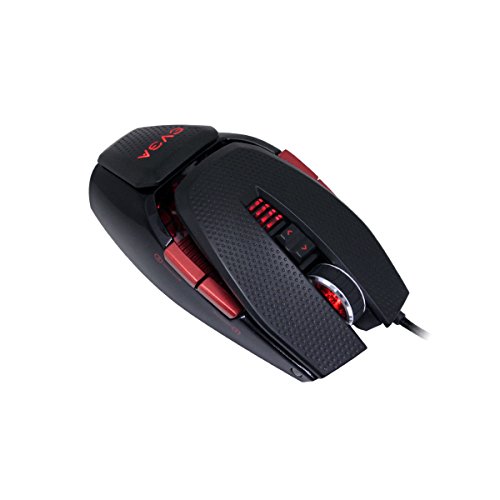
Most Buttons
EVGA X10 Wired Gaming Mouse
The most button count here (9).
Best for: MMO hotbars on the thumb.
Our take Check price for EVGA X10 Wired Gaming Mouse (opens in a new tab)
Our Picks
Lowest Price Here1 of 5
Redragon M612 Wired RGB Gaming Mouse on Amazon (opens in a new tab)
Redragon's M612 is a right-handed wired mouse with remappable buttons and RGB lighting.
Best for
- Getting remappable buttons through Redragon software for the least money.
Skip if
- Look at the other picks if you need a feature not covered above.
Why we like it
It is among the cheapest mice here. All 11 buttons can be reassigned, including a rapid-fire key, and five DPI levels run up to 4,000. The frosted coating helps grip.
Its frosted coating resists sweat, and the streamlined shape suits a claw grip. Five RGB modes can be turned off. It is the only pick here with a right-handed ergonomic shape; the EVGA X10 has an ambidextrous shape instead.
You also get RGB backlighting. It cost the least of the 5 picks at the time of writing, with the E-YOOSO X-31 the next step up. There is no published button count figure, whereas the EVGA X10 offers 9.
Key dimensions & specs
- Max DPI: 8,000
- Connection: Wired
- Shape: Right-handed ergonomic
Pros
- No battery to charge
- Remappable buttons through Redragon software
- RGB backlighting
- Low price even among budget wired mice
Also Consider2 of 5
E-YOOSO X-31 Large Wireless Mouse on Amazon (opens in a new tab)
E-YOOSO's X-31 is a large 2.4GHz mouse with forward and back buttons.
Best for
- Buyers who want large body with forward and back buttons.
Skip if
- Price-first buyers should look at the M612, which cost less when we checked.
Why we like it
It is shaped for large hands, with an anti-sweat, non-slip finish. Five DPI steps run up to 4,800, and the receiver stores inside the mouse. It works with Windows, macOS, Linux and ChromeOS, though the side buttons do not work on Mac.
The receiver reaches about 33 feet. The large contoured shell uses an anti-slip, anti-sweat material suited to big hands. It also offers a selectable 125Hz or 250Hz polling rate and the lowest price among the large mice here.
The nearest alternative on button count is the EVGA X10 at 9, against 6 here. When we checked, only the M612 cost less, and the Lenovo M210 cost more.
Key dimensions & specs
- Programmable buttons: 6
- Max DPI: 4,800
- Connection: 2.4GHz
- Shape: Right-handed, large
Pros
- Large body with forward and back buttons
- Selectable 125Hz or 250Hz polling rate
- The lowest price among the large mice here
Cons
- Costs more than the M612 at the time of writing
Strong Alternative3 of 5
Lenovo M210 RGB Wired Gaming Mouse on Amazon (opens in a new tab)
Lenovo's M210 is a 75g wired mouse with RGB and a DPI button.
Best for
- Buyers who want RGB lighting.
Skip if
- Price-first buyers should look at the M612, which cost less when we checked.
Why we like it
The maker specifies Windows and ChromeOS support. It polls at 1,000Hz with 300 IPS tracking, and its medium-large symmetrical shape suits a palm grip. Seven buttons are programmable.
You also get RGB lighting and a DPI button for quick sensitivity changes. Another plus is no battery to charge. Before buying, weigh one limit: costs more than the M612 at the time of writing.
When we checked, only the E-YOOSO X-31 and cheaper picks cost less, and the Redragon large cost more. If you want a confirmed button count, look to the EVGA X10 instead: it offers 9, while this one gives no figure.
Key dimensions & specs
- Weight: 75g
- Max DPI: 8,000
- Connection: Wired
Pros
- No battery to charge
- RGB lighting
- Support for Windows and ChromeOS
- DPI button for quick sensitivity changes
Cons
- Costs more than the M612 at the time of writing
Worth a Look4 of 5
Redragon Large Wireless Gaming Mouse on Amazon (opens in a new tab)
Redragon's large wireless mouse has finger rests on both sides and a 1000mAh battery.
Best for
- Buyers who want finger rests on both sides.
Skip if
- Skip it if price comes first: the M612 cost less when we checked.
Why we like it
It pairs with three Bluetooth devices. It is sized for medium to large hands and connects over Bluetooth, a USB receiver or a USB-C cable. Programmable buttons can be remapped in the software.
Its 1,000mAh battery and low-power chip give long runtimes at a 1,000Hz polling rate, and DPI runs up to 12,800. RGB lighting can be adjusted. Keep the Redragon large on its dongle for games; Bluetooth is for a laptop.
On price it sat fourth of 5, between the cheaper Lenovo M210 and the pricier EVGA X10, at the time of writing. The maker doesn't give its button count; if that figure matters, the EVGA X10 offers 9.
Key dimensions & specs
- Max DPI: 12,800
- Connection: 2.4GHz, Bluetooth, wired
- Shape: Right-handed, for big hands
Pros
- Dongle plus Bluetooth
- Finger rests on both sides
- Bluetooth pairing with 3 devices
- 1000mAh battery
Cons
- Costs more than the M612 at the time of writing
Most Buttons5 of 5
EVGA X10 Wired Gaming Mouse on Amazon (opens in a new tab)
EVGA's X10 is an ambidextrous wired mouse with a laser sensor and adjustable weights.
Best for
- MMO hotbars on the thumb.
Skip if
- Price-first buyers should look at the M612, which cost less when we checked.
Why we like it
It has nine buttons. Its height and weight systems adjust to your grip, Omron switches handle the clicks, and the software sets macros, profiles and on-screen display. The ambidextrous shape works for either hand, and on-the-fly DPI adjustment reaches 8,200.
Omron switches and a silver-coated cable round out the build. An ambidextrous shape is unique to it among these picks, while the M612 uses a right-handed ergonomic shape. It also brings no battery to charge. It was the highest-priced of the 5 picks at the time of writing, so the case for it rests on what it adds over the Redragon large and the rest.
Key dimensions & specs
- Programmable buttons: 9
- Max DPI: 8,200
- Connection: Wired
- Shape: Ambidextrous
Pros
- No battery to charge
- Ambidextrous shape
- Ambidextrous shape for left or right hands
- Laser sensor
Cons
- Costs more than the M612 at the time of writing
How We Chose These Mice for Beginners
Each pick was assessed across 4 criteria weighted for real-world use.
- The figures behind the order
- We set side by side five mice on button count, max DPI, connection and shape, using each maker's published specs. We did not test them in-house.
- What every pick has in common
- All 5, from the M612 to the EVGA X10, state max DPI and connection.
- Where the specs have gaps
- The M612, the Lenovo M210 and the Redragon large give no button count; the Lenovo M210 gives no shape.
- Price range
- From the M612 to the EVGA X10, all sat in the under $50 tier when we checked.
What to Look for in a Mouse for Beginners
Key buying criteria so you get the right fit the first time.
Button count across these picks
Here button count runs from 6 on the E-YOOSO X-31 to 9 on the EVGA X10. Start with the EVGA X10 if button count decides it. No figure for the M612, the Lenovo M210 and the Redragon large.
Extras that separate them
The Lenovo M210: support for Windows and ChromeOS. The Redragon large: Bluetooth pairing with 3 devices. The EVGA X10: a laser sensor.
Budget
All 5 sat in one tier when we checked, from the M612 at the low end to the EVGA X10 at the top, so decide on features first.
Start from what matters most
Getting remappable buttons through Redragon software for the least money: the M612. MMO hotbars on the thumb: the EVGA X10.
Shape and grip come first
Palm grips suit longer, higher-backed mice; claw and fingertip grips suit shorter, lighter shells. Ambidextrous shapes fit either hand but often have fewer side buttons.
How to Choose a Mouse for Beginners
By priority
| Priority | Consider | Why |
|---|---|---|
| Getting remappable buttons through Redragon software for the least money | M612 | The cheapest way into this group, below the E-YOOSO X-31 |
| Buyers who want large body with forward and back buttons | E-YOOSO X-31 | A large body with forward and back buttons |
| Buyers who want RGB lighting | Lenovo M210 | RGB lighting |
| Buyers who want finger rests on both sides | Redragon large | Finger rests on both sides |
| MMO hotbars on the thumb | EVGA X10 | The most button count here (9) |
Scroll sideways to see every column.
Key specs side by side
The EVGA X10 leads on button count at 9, ahead of the E-YOOSO X-31 at 6. "Not listed" means the maker leaves that figure out.
| Mice | Programmable buttons | Max DPI | Connection | Shape |
|---|---|---|---|---|
| M612 | Not listed | 8,000 | Wired | Right-handed ergonomic |
| E-YOOSO X-31 | 6 | 4,800 | 2.4GHz | Right-handed, large |
| Lenovo M210 | Not listed | 8,000 | Wired | Not listed |
| Redragon large | Not listed | 12,800 | 2.4GHz, Bluetooth, wired | Right-handed, for big hands |
| EVGA X10 | 9 | 8,200 | Wired | Ambidextrous |
Scroll sideways to see every column.
Frequently Asked Questions
Which has the most button count: the EVGA X10 or the E-YOOSO X-31?
The EVGA X10 leads at 9, with the E-YOOSO X-31 at 6. The M612, the Lenovo M210 and the Redragon large don't state a figure, so they sit outside this comparison.
Why is the EVGA X10 our Most Buttons pick?
It earns the label for the most button count here (9). It suits MMO hotbars on the thumb.
Will the Redragon large work with my setup?
Keep the Redragon large on its dongle for games; Bluetooth is for a laptop. In this guide it ranks fourth of 5.
What extras do the M612 and the E-YOOSO X-31 include?
The M612: remappable buttons through Redragon software. The E-YOOSO X-31: a large body with forward and back buttons. The Lenovo M210: RGB lighting.
Can an MMO mouse work for shooters?
It can, but the extra side buttons add weight and make it easy to press the wrong key.
Bottom Line
Our first pick is the M612, chosen for the cheapest way into this group, below the E-YOOSO X-31. Look at the E-YOOSO X-31 for a large body with forward and back buttons, the Lenovo M210 for RGB lighting and the Redragon large for finger rests on both sides if those matter more to you.
Start at 800 DPI and adjust in-game sensitivity.