
Buying Guide
The Best GPU Support Brackets
Seven anti-sag brackets for heavy graphics cards: freestanding stands, slot-mounted bars and a fan-mount brace.
By The PC Journal editorial team
13 min read7 products evaluated
Heavy graphics cards can sag in a horizontal slot over time. A support bracket holds the far end of the card level and takes strain off the PCIe slot.
We compared reach, mounting and lighting from each listing; we did not test these brackets. Measure the gap under your card before ordering.
Quick Picks
Our 7 recommendations at a glance. Tap a pick for the full verdict.
Best GPU Support Bracket
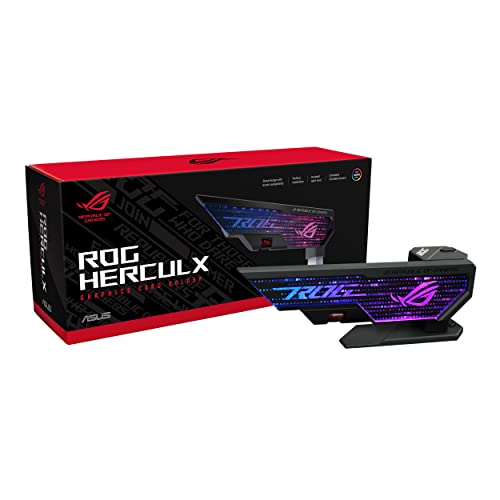
ASUS ROG Herculx GPU Anti-Sag Holder
A zinc-alloy stand that adjusts from 72 to 128mm without tools.
Best for: Heavy triple-fan cards.
Our take Check price for ASUS ROG Herculx GPU Anti-Sag Holder (opens in a new tab)

Best Magnetic ARGB Stand
EZDIY-FAB 5V ARGB GPU Support Stand
A magnetic base with a 67 to 106mm range.
Best for: Steel PSU shrouds.
Our take Check price for EZDIY-FAB 5V ARGB GPU Support Stand (opens in a new tab)
Best Slot-Mounted Bracket
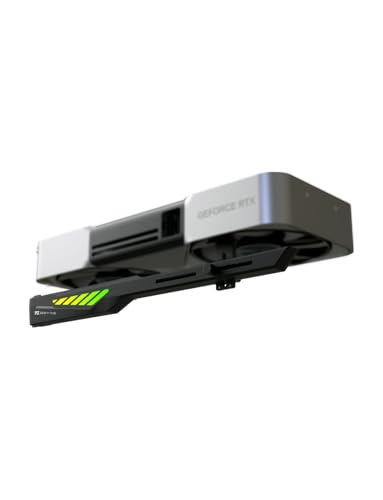
EZDIY-FAB VH90 Adjustable ARGB GPU Support Bracket
A rated load of 310mm and 1.2kg cards.
Best for: Cases without a PSU shroud.
Our take Check price for EZDIY-FAB VH90 Adjustable ARGB GPU Support Bracket (opens in a new tab)

Best Fan-Mount Brace
upHere Aluminum Dual Brace GPU Support Bracket (128mm)
Two support arms on a bottom fan mount.
Best for: Cases with a free bottom fan position.
Our take Check price for upHere Aluminum Dual Brace GPU Support Bracket (128mm) (opens in a new tab)
Best for Long Cards
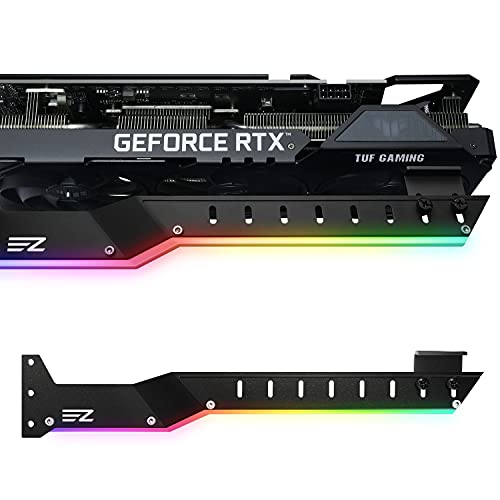
EZDIY-FAB 309EZ ARGB GPU Holder Brace
A lengthened, bent arm.
Best for: Cases with seven or more slots.
Our take Check price for EZDIY-FAB 309EZ ARGB GPU Holder Brace (opens in a new tab)

Best Short-Gap Stand
upHere GB49K GPU Support Stand (M, 49-80mm)
A 49 to 80mm range.
Best for: Cards close to the shroud.
Our take Check price for upHere GB49K GPU Support Stand (M, 49-80mm) (opens in a new tab)

Best Budget ARGB Brace
upHere G276ARGB GPU Brace
Adjustment for both card length and support position.
Best for: Budget RGB builds.
Our take Check price for upHere G276ARGB GPU Brace (opens in a new tab)
Our Picks
Best GPU Support Bracket1 of 7
ASUS ROG Herculx GPU Anti-Sag Holder on Amazon (opens in a new tab)
ASUS's ROG Herculx is a zinc-alloy stand that adjusts from 72 to 128mm with a wheel and release button, no tools needed.
Best for
- Heavy triple-fan cards.
Skip if
- If budget leads, the upHere GB49K was cheaper at our last price check.
Why we like it
It includes a spirit level and Aura Sync ARGB lighting. It matches the upHere dual brace on maximum support height (128mm). It shares a freestanding stand mounting with the EZDIY-FAB ARGB stand and upHere GB49K; the upHere G276ARGB goes with an adjustable bracket mounting.
A 72 to 128mm height range is unique to it among these picks, while the upHere GB49K uses a 49 to 80mm height range. You get a zinc alloy material here, which sets it apart from the EZDIY-FAB ARGB stand and its an aluminum alloy material. It also comes with a two-year warranty.
Measure from the PSU shroud or case floor to the underside of the card; this stand reaches 72 to 128mm. It was the most expensive pick when we checked, so weigh what it adds over the EZDIY-FAB VH90.
Key dimensions & specs
- Mounting: Freestanding stand
- Max support height: 128mm
- Height range: 72 to 128mm
- Material: Zinc alloy
- Lighting: Aura Sync ARGB
Pros
- A freestanding design that needs no screws or PCIe slot
- zinc alloy construction
- Aura Sync ARGB lighting
- Toolless setup with an adjustment wheel and release button
Cons
- Costs more than the upHere GB49K at the time of writing
Best Magnetic ARGB Stand2 of 7
EZDIY-FAB 5V ARGB GPU Support Stand on Amazon (opens in a new tab)
EZDIY-FAB's ARGB stand is a compact aluminum pillar that adjusts from 67 to 106mm.
Best for
- Steel PSU shrouds.
Skip if
- Skip it if price comes first: the upHere GB49K cost less when we checked.
Why we like it
A magnetic base holds it on a steel PSU shroud, and it lights from a 5V 3-pin header. On maximum support height it sits mid-pack at 106mm: the ROG Herculx comes in at 128mm, and the upHere GB49K comes in at 80mm. Like the ROG Herculx and upHere GB49K, it has a freestanding stand mounting, while the EZDIY-FAB VH90 uses a PCIe slot bracket mounting.
It is the only pick here with a 67 to 106mm height range; the ROG Herculx has a 72 to 128mm height range instead. Like the EZDIY-FAB 309EZ, it has an aluminum alloy material, while the upHere GB49K uses an aluminum material. You also get a compact, lightweight body.
Measure from the PSU shroud or case floor to the underside of the card; this stand reaches 67 to 106mm. It was priced above the upHere dual brace and below the upHere G276ARGB at the time of writing.
Key dimensions & specs
- Mounting: Freestanding stand
- Max support height: 106mm
- Height range: 67 to 106mm
- Material: Aluminum alloy
- Lighting: ARGB (5V 3-pin)
- Magnetic base: Yes
Pros
- A freestanding design that needs no screws or PCIe slot
- aluminum alloy construction
- ARGB (5V 3-pin) lighting
- A magnetic base that holds it on a steel shroud
Cons
- Costs more than the upHere GB49K at the time of writing
Best Slot-Mounted Bracket3 of 7
EZDIY-FAB VH90 Adjustable ARGB GPU Support Bracket on Amazon (opens in a new tab)
The EZDIY-FAB VH90 screws into the PCIe slot rail and supports cards up to 310mm and 1.2kg on a sliding rail.
Best for
- Cases without a PSU shroud.
Skip if
- Skip it if you need to know its maximum support height before buying; the maker doesn't publish one.
Why we like it
It adds a slot reinforcement plate and a metal knob to set the lift. Like the EZDIY-FAB 309EZ, it has a PCIe slot bracket mounting, while the EZDIY-FAB ARGB stand uses a freestanding stand mounting. It shares ARGB lighting with the EZDIY-FAB 309EZ; the upHere G276ARGB goes with ARGB (5V 3-pin) lighting.
It also comes with a front-mounted metal adjustment knob. It screws into the case's expansion-slot rail, so check that a free slot position sits below the card. The ARGB lead needs a 5V 3-pin header; do not connect it to a 12V 4-pin RGB header.
When we checked, only the EZDIY-FAB 309EZ and cheaper picks cost less, and the ROG Herculx cost more. If you want a confirmed maximum support height, look to the ROG Herculx instead: it comes in at 128mm, while this one gives no figure.
Key dimensions & specs
- Mounting: PCIe slot bracket
- Rated support: cards up to 310mm and 1.2kg
- Lighting: ARGB
Pros
- rated for cards up to 310mm and 1.2kg
- ARGB lighting
- Sliding rail with a lift mechanism
- PCIe slot reinforcement plate
Cons
- No published maximum support height
- Costs more than the upHere GB49K at the time of writing
Best Fan-Mount Brace4 of 7
upHere Aluminum Dual Brace GPU Support Bracket (128mm) on Amazon (opens in a new tab)
upHere's dual brace screws onto a bottom 120mm or 140mm fan position and pushes up with two rubber-padded arms.
Best for
- Cases with a free bottom fan position.
Skip if
- If budget leads, the upHere GB49K was cheaper at our last price check.
Why we like it
It reaches 128mm and has no lighting. Its dual-brace design supports heavy cards, it is CNC-machined from anodised aluminium, and it mounts on a bottom 120mm or 140mm fan. It matches the ROG Herculx on maximum support height (128mm).
A bottom fan mount mounting is unique to it among these picks, while the upHere G276ARGB uses an adjustable bracket mounting. It shares an aluminum material with the upHere GB49K; the EZDIY-FAB ARGB stand goes with an aluminum alloy material. On price it sat second of 7, between the cheaper upHere GB49K and the pricier EZDIY-FAB ARGB stand, at the time of writing.
Key dimensions & specs
- Mounting: Bottom fan mount
- Max support height: 128mm
- Material: Aluminum
- Lighting: None
Pros
- aluminum construction
- Two support arms for heavy cards
- Rubber pads on both arms
- Screws onto a 120mm or 140mm bottom fan position
Cons
- Costs more than the upHere GB49K at the time of writing
Best for Long Cards5 of 7
EZDIY-FAB 309EZ ARGB GPU Holder Brace on Amazon (opens in a new tab)
The EZDIY-FAB 309EZ is an aluminum slot bracket with a lengthened, bent arm for long cards.
Best for
- Cases with seven or more slots.
Skip if
- The maker gives no maximum support height, so look elsewhere if that figure decides it for you.
Why we like it
It includes two rubber pads for different cooler designs and fits cases with seven or more expansion slots. It shares a PCIe slot bracket mounting with the EZDIY-FAB VH90; the upHere dual brace goes with a bottom fan mount mounting. It shares an aluminum alloy material with the EZDIY-FAB ARGB stand; the upHere G276ARGB goes with an iron material.
Like the EZDIY-FAB VH90, it has ARGB lighting, while the ROG Herculx uses aura Sync ARGB lighting. It screws into the case's expansion-slot rail, so check that a free slot position sits below the card. The ARGB lead needs a 5V 3-pin header; do not connect it to a 12V 4-pin RGB header.
Its price falls between the upHere G276ARGB and the EZDIY-FAB VH90, based on our last check. Buyers who need a confirmed maximum support height should compare it with the ROG Herculx, which comes in at 128mm.
Key dimensions & specs
- Mounting: PCIe slot bracket
- Material: Aluminum alloy
- Lighting: ARGB
Pros
- aluminum alloy construction
- ARGB lighting
- Lengthened, bent arm for long cards
- Two rubber pads for different cooler designs
Cons
- No published maximum support height
- Costs more than the upHere GB49K at the time of writing
Best Short-Gap Stand6 of 7
upHere GB49K GPU Support Stand (M, 49-80mm) on Amazon (opens in a new tab)
upHere's GB49K is a small aluminum stand with tool-free telescopic height from 49 to 80mm and a magnetic base.
Best for
- Cards close to the shroud.
Skip if
- Skip it if maximum support height matters most to you; the ROG Herculx offers 128mm.
Why we like it
It suits cases where the card sits close to the shroud. On maximum support height it trails the group at 80mm, while the ROG Herculx comes in at 128mm. Like the ROG Herculx and EZDIY-FAB ARGB stand, it has a freestanding stand mounting, while the EZDIY-FAB 309EZ uses a PCIe slot bracket mounting.
No other pick in this guide offers a 49 to 80mm height range; compare the ROG Herculx, which has a 72 to 128mm height range. Like the upHere dual brace, it has an aluminum material, while the ROG Herculx uses a zinc alloy material. It also offers a scratch-proof pad.
Measure from the PSU shroud or case floor to the underside of the card; this stand reaches 49 to 80mm. No other pick here cost less at our last price check, and the upHere dual brace was closest.
Key dimensions & specs
- Mounting: Freestanding stand
- Max support height: 80mm
- Height range: 49 to 80mm
- Material: Aluminum
- Lighting: None
- Magnetic base: Yes
Pros
- A freestanding design that needs no screws or PCIe slot
- aluminum construction
- A magnetic base that holds it on a steel shroud
- Tool-free telescopic height adjustment
Cons
- Maximum support height trails the ROG Herculx (128mm)
Best Budget ARGB Brace7 of 7
upHere G276ARGB GPU Brace on Amazon (opens in a new tab)
The upHere G276ARGB is an iron brace that adjusts for both card length and support position, with 5V ARGB lighting.
Best for
- Budget RGB builds.
Skip if
- Skip it if you need to know its maximum support height before buying; the maker doesn't publish one.
Why we like it
It carries a 12-month warranty. No other pick in this guide offers an adjustable bracket mounting; compare the EZDIY-FAB VH90, which has a PCIe slot bracket mounting. It is the only pick here with an iron material; the EZDIY-FAB ARGB stand has an aluminum alloy material instead.
It shares ARGB (5V 3-pin) lighting with the EZDIY-FAB ARGB stand; the EZDIY-FAB VH90 goes with ARGB lighting. The ARGB lead needs a 5V 3-pin header; do not connect it to a 12V 4-pin RGB header. When we checked, only the EZDIY-FAB ARGB stand and cheaper picks cost less, and the EZDIY-FAB 309EZ cost more. If you want a confirmed maximum support height, look to the ROG Herculx instead: it comes in at 128mm, while this one gives no figure.
Key dimensions & specs
- Mounting: Adjustable bracket
- Material: Iron
- Lighting: ARGB (5V 3-pin)
Pros
- ARGB (5V 3-pin) lighting
- Adjustment for both card length and support position
- 12-month warranty
- Adjustable bracket mounting, the only one here
Cons
- No published maximum support height
- Costs more than the upHere GB49K at the time of writing
How We Chose These GPU Support Brackets
Each pick was assessed across 4 criteria weighted for real-world use.
- Lighting and wiring
- We checked lighting type and connector.
- Mounting
- We compared freestanding, slot-mounted and fan-mounted designs.
- Reach and adjustment
- We recorded each bracket's height range and how it adjusts.
- Build
- We noted material and any rated load or card-length rating.
What to Look for in a GPU Support Bracket
Key buying criteria so you get the right fit the first time.
Measure the gap first
A stand must reach from the PSU shroud or case floor to the bottom of the card. Measure that gap with the card installed and pick a bracket whose range covers it with room to adjust.
A vertical-mounted card needs no bracket.
Stand, slot bracket or fan mount
Freestanding stands are the simplest and move between cases. Slot-mounted bars screw into the expansion rail and support the card along its length. Fan-mount braces use a bottom fan position.
Pick the one your case layout allows.
Heavier cards need firmer support
Triple-fan cards at 300mm and longer put the most strain on the PCIe slot. Metal construction, a wide pad and a firm lock matter more than looks.
Support the card near its far end, away from the slot.
Keep clear of the card's fans
The support pad should touch the card's shroud or backplate edge, not a fan blade. Some brackets include pads of different sizes for different fan spacing.
Lighting adds a cable
ARGB brackets need a 5V 3-pin header or a controller. If your board's headers are already used, a plain metal stand avoids the wiring.
How to Choose a GPU Support Bracket
By priority
| Priority | Consider | Why |
|---|---|---|
| Heavy triple-fan cards | ROG Herculx | A zinc-alloy stand that adjusts from 72 to 128mm without tools |
| Steel PSU shrouds | EZDIY-FAB ARGB stand | A magnetic base with a 67 to 106mm range |
| Cases without a PSU shroud | EZDIY-FAB VH90 | A rated load of 310mm and 1.2kg cards |
| Cases with a free bottom fan position | upHere dual brace | Two support arms on a bottom fan mount |
| Cases with seven or more slots | EZDIY-FAB 309EZ | A lengthened, bent arm |
| Cards close to the shroud | upHere GB49K | A 49 to 80mm range |
| Budget RGB builds | upHere G276ARGB | Adjustment for both card length and support position |
Scroll sideways to see every column.
Key specs side by side
Figures as each maker states them.
| GPU Bracket | Mounting | Max support height | Height range | Material |
|---|---|---|---|---|
| ROG Herculx | Freestanding stand | 128mm | 72 to 128mm | Zinc alloy |
| EZDIY-FAB ARGB stand | Freestanding stand | 106mm | 67 to 106mm | Aluminum alloy |
| EZDIY-FAB VH90 | PCIe slot bracket | Not listed | Not listed | Not listed |
| upHere dual brace | Bottom fan mount | 128mm | Not listed | Aluminum |
| EZDIY-FAB 309EZ | PCIe slot bracket | Not listed | Not listed | Aluminum alloy |
| upHere GB49K | Freestanding stand | 80mm | 49 to 80mm | Aluminum |
| upHere G276ARGB | Adjustable bracket | Not listed | Not listed | Iron |
Scroll sideways to see every column.
Frequently Asked Questions
Do I need a GPU support bracket?
Not always. Heavy triple-fan cards in horizontal mounts sag over time, and a bracket reduces strain on the PCIe slot. Lighter dual-fan cards often need none.
How do I know what height I need?
Measure from where the stand will sit, usually the PSU shroud, to the underside of the card, and choose a range that covers it.
Can GPU sag damage my card?
Severe sag can stress the PCIe slot and the card's circuit board over time. A bracket keeps the card level.
Did my graphics card come with a support bracket?
Some high-end cards include one. Check the box and the maker's accessory list before buying another.
Do I need a bracket with a vertical GPU mount?
No. A vertical mount carries the card's weight through the riser bracket, so a sag bracket is not needed.
Bottom Line
The ASUS ROG Herculx is the best all-round stand, and the EZDIY-FAB ARGB stand holds on with a magnet. The VH90 and 309EZ mount in the slot rail, the upHere dual brace uses a fan mount, the GB49K suits short gaps, and the G276ARGB is the budget brace.