
Buying Guide
The Best Gaming Mice With Macro Buttons
Five gaming mice compared, from the Redragon wired MMO to the Redragon wireless MMO, with the trade-offs of each named.
By Alex Morgan, PC Hardware Editor
12 min read5 products evaluated

Ten or more buttons give room for macros in MMOs and MOBAs. Every pick has ten or more buttons, ordered from the lowest price.
This is a research roundup, not a lab test: programmable buttons, max DPI and connection come from each maker's published specs; a missing max DPI is flagged, not filled in, and no figure here comes from our own testing.
Quick Picks
Which of the 5 picks to look at first. Tap a name for the full analysis.

Most Buttons
Redragon Wired MMO Gaming MouseThe most button count here (19).
Best for: Macros and editing shortcuts.
Check price for Redragon Wired MMO Gaming Mouse on Amazon (opens in a new tab)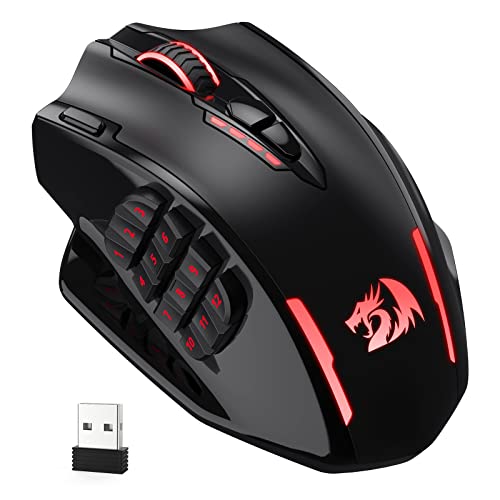
Also Consider
Redragon M913 Impact Elite Wireless MMO Mouse12 side buttons.
Best for: Buyers who want 12 side buttons.
Check price for Redragon M913 Impact Elite Wireless MMO Mouse on Amazon (opens in a new tab)
Strong Alternative
Razer Basilisk V3 Wired Gaming MouseA thumb rest built into the shell.
Best for: Buyers who want thumb rest built into the shell.
Check price for Razer Basilisk V3 Wired Gaming Mouse on Amazon (opens in a new tab)
Worth a Look
Logitech G502 Hero Wired MouseA Hero sensor.
Best for: Buyers who want Hero sensor.
Check price for Logitech G502 Hero Wired Mouse on Amazon (opens in a new tab)
Premium Pick
Redragon Wireless MMO Gaming MouseThe highest-priced pick here at the time of writing, with 16 macro-programmable buttons.
Best for: Buyers who want 16 macro-programmable buttons and can spend more than the G502 Hero costs.
Check price for Redragon Wireless MMO Gaming Mouse on Amazon (opens in a new tab)
Our Picks
Most Buttons1 of 5
Redragon Wired MMO Gaming Mouse
Redragon's wired MMO mouse has 19 programmable buttons and a 12400 DPI sensor.
Best for
- Macros and editing shortcuts.
Skip if
- Look at the other picks if you need a feature not covered above.
Why we like it
It never needs charging. Its 19 buttons can be remapped with macros and saved to five memory profiles. DPI adjusts from 100 to 12,400 and polling from 125Hz to 1,000Hz, and weights let you tune the balance.
Up to eight removable 2.4g weights tune the balance, and the sensor lists 40G acceleration. RGB offers four lighting modes, and twelve of the 19 buttons sit on the side. Its 19 button count is the most here; the M913 comes next at 16.
It also comes with no battery to charge. Side-button mapping is done in the maker's software, which runs on Windows. It undercut the M913 and every other pick on price at the time of writing.
Key specs
- Programmable buttons
- 19
- Max DPI
- 12,400
- Connection
- Wired
Pros
- 19 programmable buttons
- No battery to charge
- 12400 DPI sensor
- The most button count here (19)
Also Consider2 of 5
Redragon M913 Impact Elite Wireless MMO Mouse
Redragon's M913 is a 16-button wireless MMO mouse with 12 side buttons and a rechargeable battery.
Best for
- Buyers who want 12 side buttons.
Skip if
- Price-first buyers should look at the Redragon wired MMO, which cost less when we checked.
Why we like it
It is a low-cost wireless MMO option. It switches between 2.4GHz wireless and a USB-C cable, and its 12 side buttons suit MMO hotbars. The PixArt 3335 sensor handles the tracking.
Five onboard DPI steps run from 1,000 to 16,000, and all 16 buttons can be remapped. A low-power chip stretches battery life. A PixArt 3335 sensor handles tracking, and an eco mode stretches battery life.
Eco mode raises battery life from 45 hours with the backlight on to 80 hours, and the PixArt 3335 sensor registers clicks within 1ms. Side-button mapping is done in the maker's software, which runs on Windows. It was priced above the Redragon wired MMO and below the Basilisk V3 at the time of writing.
Key specs
- Programmable buttons
- 16
- Max DPI
- 16,000
- Connection
- 2.4GHz, wired
Pros
- 16 programmable buttons
- 12 side buttons
- Rechargeable battery
- Budget price for a wireless MMO mouse
Cons
- Costs more than the Redragon wired MMO at the time of writing
Strong Alternative3 of 5
Razer Basilisk V3 Wired Gaming Mouse
Razer's wired Basilisk V3 has a thumb rest built into the shell and a HyperScroll tilt wheel.
Best for
- Buyers who want thumb rest built into the shell.
Skip if
- Price-first buyers should look at the Redragon wired MMO, which cost less when we checked.
Why we like it
It has 11 buttons. Its 11 programmable buttons and thumb rest suit games with many binds. The HyperScroll wheel free-spins through long pages or switches to tactile steps for weapon swaps.
Razer Chroma lighting has 11 zones for effects that follow the scroll wheel and sides. A sculpted thumb rest supports the hand, and 11 programmable buttons take macros such as push-to-talk. It matches the G502 Hero on button count (11).
Another plus: no battery to charge. You also get this: chroma RGB underglow. It was priced above the M913 and below the G502 Hero at the time of writing.
Key specs
- Programmable buttons
- 11
- Max DPI
- 26,000
- Connection
- Wired
- Shape
- Right-handed ergonomic with thumb rest
Pros
- 11 programmable buttons
- No battery to charge
- Thumb rest built into the shell
- HyperScroll tilt wheel
Cons
- Costs more than the Redragon wired MMO at the time of writing
Worth a Look4 of 5
Logitech G502 Hero Wired Mouse
The G502 Hero is the wired classic, with 11 buttons and removable weights to tune the feel.
Best for
- Buyers who want Hero sensor.
Skip if
- Skip it if button count matters most to you; the Redragon wired MMO offers 19.
Why we like it
Its HERO sensor tracks up to 25,600 DPI, and five 3.6g weights tune the balance. Metal springs tension the main buttons. Five 3.6g weights let you tune the balance, and the scroll wheel switches into a hyper-fast mode.
The HERO sensor works with no smoothing, filtering or acceleration, and the left and right buttons use metal pivot hinges. LIGHTSYNC RGB is included and needs Logitech's software. It matches the Basilisk V3 on button count (11).
It was priced above the Basilisk V3 and below the Redragon wireless MMO at the time of writing. It gives ground on button count, where the Redragon wired MMO offers 19.
Key specs
- Programmable buttons
- 11
- Connection
- Wired
Pros
- 11 programmable buttons
- No battery to charge
- Hero sensor
- Adjustable weights
Cons
- Button count trails the Redragon wired MMO (19)
- Costs more than the Redragon wired MMO at the time of writing
Premium Pick5 of 5
Redragon Wireless MMO Gaming Mouse
Redragon's wireless MMO mouse has 16 programmable buttons and offers up to 70 hours per charge.
Best for
- Buyers who want 16 macro-programmable buttons and can spend more than the G502 Hero costs.
Skip if
- Skip it if this is a deal-breaker for you: shorter 70-hour battery.
Why we like it
The shape is right-handed. DPI adjusts from 100 to 16,000 and polling from 125Hz to 1,000Hz, and its 12 side buttons take macros. Four lighting modes can be switched on the fly.
Sixteen buttons can be remapped with macros, and five memory profiles store setups. A 1000mAh battery lasts over 70 hours with RGB off, and DPI adjusts from 100 to 16,000. On button count it ties with the M913 at 16.
Side-button mapping is done in the maker's software, which runs on Windows. It was the highest-priced of the 5 picks at the time of writing, so the case for it rests on what it adds over the G502 Hero and the rest.
Key specs
- Programmable buttons
- 16
- Max DPI
- 16,000
- Battery life
- 70 hours
- Connection
- 2.4GHz, wired
Pros
- 16 programmable buttons
- Up to 70 hours per charge
- Ergonomic right-handed shape
- The highest-priced pick here at the time of writing, with 16 macro-programmable buttons
Cons
- Shorter 70-hour battery
- Costs more than the Redragon wired MMO at the time of writing
How We Chose These Gaming Mice With Macro Buttons
Alex Morgan compared the manufacturer specifications, connectivity, warranty terms and compatibility of every pick. Figures come from the makers unless a third-party source is named; we did not test these products ourselves.
- The figures behind the order
- We compared five mice on button count, max DPI and connection as the makers state them. Nothing was tested in-house; 2 of the 3 fields compared are stated for every pick, while max DPI has gaps.
- The shared baseline
- All 5, from the Redragon wired MMO to the Redragon wireless MMO, state button count and connection.
- Where the specs have gaps
- The G502 Hero gives no max DPI.
- Price range
- From the Redragon wired MMO to the Redragon wireless MMO, all sat in the under $50 tier when we checked.
What to Look for in a Gaming Mouse With Macro Buttons
Key buying criteria so you get the right fit the first time.
Button count
The Redragon wired MMO tops button count at 19 and the G502 Hero sits lowest at 11. The Redragon wired MMO is the pick for button count.
Features beyond the spec table
The Basilisk V3: a HyperScroll tilt wheel. The G502 Hero: adjustable weights. The Redragon wireless MMO: up to 70 hours per charge.
A hand next to a black wireless mouse on a blue mousepad Budget
Price does little to separate these 5: the Redragon wired MMO through the Redragon wireless MMO all landed in the under $50 tier, which leaves button count to decide it.
Match the pick to your priority
Macros and editing shortcuts: the Redragon wired MMO. Buyers who want 16 macro-programmable buttons and can spend more than the G502 Hero costs: the Redragon wireless MMO.

A hand holding a light-blue mouse on a red mousepad DPI figures past 20,000 do not matter much
Most players use 400 to 3,200 DPI. Very high maximums are marketing; sensor consistency matters more.
How to Choose a Gaming Mouse With Macro Buttons
By priority
| Priority | Consider | Why |
|---|---|---|
| Macros and editing shortcuts | Redragon wired MMO | The most button count here (19) |
| Buyers who want 12 side buttons | M913 | 12 side buttons |
| Buyers who want thumb rest built into the shell | Basilisk V3 | A thumb rest built into the shell |
| Buyers who want Hero sensor | G502 Hero | A Hero sensor |
| Buyers who want 16 macro-programmable buttons and can spend more than the G502 Hero costs | Redragon wireless MMO | The highest-priced pick here at the time of writing, with 16 macro-programmable buttons |
Scroll sideways to see every column.
Key specs side by side
The Redragon wired MMO leads on button count at 19, ahead of the M913 at 16. "Not listed" marks max DPI where the G502 Hero leaves the figure out.
| Mice | Programmable buttons | Max DPI | Connection |
|---|---|---|---|
| Redragon wired MMO | 19 | 12,400 | Wired |
| M913 | 16 | 16,000 | 2.4GHz, wired |
| Basilisk V3 | 11 | 26,000 | Wired |
| G502 Hero | 11 | Not listed | Wired |
| Redragon wireless MMO | 16 | 16,000 | 2.4GHz, wired |
Scroll sideways to see every column.
Frequently Asked Questions
Which has the most button count: the Redragon wired MMO or the M913?
Between the top two, it is 19 on the Redragon wired MMO against 16 on the M913, a 19% difference. The G502 Hero closes the ranking at 11.
Is the Redragon wireless MMO worth paying more than the Redragon wired MMO?
The Redragon wireless MMO matches or trails the Redragon wired MMO on button count. The Redragon wired MMO leads on button count (19). Both sat in the under $50 tier when we checked, so choose on the features you need.
What makes the Redragon wired MMO the Most Buttons?
The label rests on the most button count here (19). The M913 is next on button count at 16, so this pick's 19 is 19% further out. It is aimed at macros and editing shortcuts.
Beyond the specs, what sets the Redragon wired MMO and the M913 apart?
The Redragon wired MMO: 19 macro-programmable buttons. The M913: 12 side buttons. The Basilisk V3: a thumb rest built into the shell.
Should I pick the Redragon wired MMO or the Redragon wireless MMO?
The Redragon wired MMO suits macros and editing shortcuts; the Redragon wireless MMO suits buyers who want 16 macro-programmable buttons and can spend more than the G502 Hero costs.
Bottom Line
Our first pick is the Redragon wired MMO. Look at the M913 for 12 side buttons, the Basilisk V3 for a thumb rest built into the shell and the G502 Hero for a Hero sensor if those matter more to you.
Group macros by function so you can find them by feel.
Related Guides
- Related guideThe Best Gaming Mice Right Now
- Related guideThe Best Wireless Gaming Mice for Every Grip and Budget
- Related guideThe Best FPS Gaming Mice
- Lower budgetThe Best Budget Gaming Mice
- Similar guideThe Best PC Mice for Gaming
- ExplainerHow to Choose a Gaming Mouse
- ExplainerMouse polling rate and DPI: what each number changes
- Also see: mouse pads and desk matsMouse Pad Features Explained: What Is Worth Paying For?
- Similar guideThe Best MMO Gaming Mouse
- Topic hubAll mice guides
About the author
PC Hardware Editor
Alex covers PC hardware, monitors, components, upgrades and peripherals for The PC Journal, with a focus on helping readers understand specifications, compatibility and meaningful product trade-offs.
Covers: Monitors, Graphics cards, Processors, PC components, Peripherals, Upgrades and compatibility
View all articles