
Buying Guide
The Best 8000Hz Gaming Mice
From the Pulsefire Haste 2 to the ROG Harpe II Ace: three gaming mice ranked on weight and polling rate, with who should skip each one.
By Alex Morgan, PC Hardware Editor
11 min read3 products evaluated

8000Hz polling cuts input delay to a fraction of a millisecond on high-refresh monitors. Every pick supports 8000Hz, ordered from the lightest.
We sorted these picks by weight, max DPI and polling rate, working from the makers' own data; nothing here was tested in-house, and if a maker skips weight, the guide says so.
Quick Picks
Which of the 3 picks to look at first. Tap a name for the full analysis.
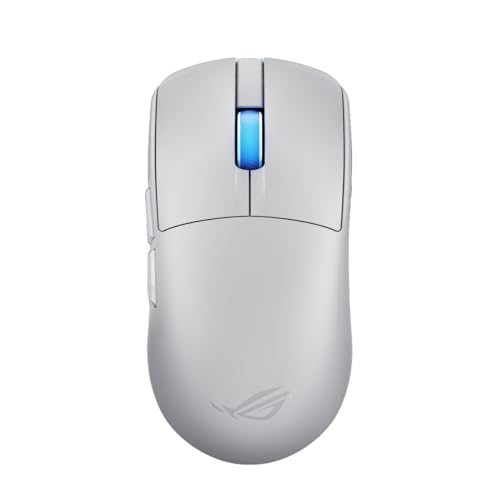
Lightest Mouse
ASUS ROG Harpe II AceThe lightest weight here (48g).
Best for: Fast flick aiming.
Check price for ASUS ROG Harpe II Ace on Amazon (opens in a new tab)
Lowest Price Here
HyperX Pulsefire Haste 2 Wired Gaming MouseUndercutting the Sabre v2 PRO on price when we checked.
Best for: Spending as little as possible, with the Sabre v2 PRO the next step up.
Check price for HyperX Pulsefire Haste 2 Wired Gaming Mouse on Amazon (opens in a new tab)
Well-Rounded Choice
Corsair Sabre v2 PRO Wireless MouseThe Sabre v2 PRO is built around polling rate: 8,000Hz, a 33,000 DPI sensor and dongle, Bluetooth and wired modes.
Best for: Buyers who want up to 120 hours per charge.
Check price for Corsair Sabre v2 PRO Wireless Mouse on Amazon (opens in a new tab)
| Pick | Why it stands out | Best for | Check price |
|---|---|---|---|
| The lightest weight here (48g). | Fast flick aiming. | Check price for ASUS ROG Harpe II Ace on Amazon (opens in a new tab) |
| Undercutting the Sabre v2 PRO on price when we checked. | Spending as little as possible, with the Sabre v2 PRO the next step up. | Check price for HyperX Pulsefire Haste 2 Wired Gaming Mouse on Amazon (opens in a new tab) |
| The Sabre v2 PRO is built around polling rate: 8,000Hz, a 33,000 DPI sensor and dongle, Bluetooth and wired modes. | Buyers who want up to 120 hours per charge. | Check price for Corsair Sabre v2 PRO Wireless Mouse on Amazon (opens in a new tab) |
Our Picks
Lightest Mouse1 of 3
ASUS ROG Harpe II Ace
The ROG Harpe II Ace is built around track-on-glass sensing.
Best for
- Fast flick aiming.
Skip if
- Skip it if price comes first: the Pulsefire Haste 2 cost less when we checked.
Why we like it
On the spec sheet, it weighs 48g and offers a 42,000 max DPI. You get a wireless connection here, which sets it apart from the Pulsefire Haste 2 and its a wired connection. The ROG Harpe II Ace's dongle works best on a front USB port or an extender near the mouse.
Polling above 1,000Hz shortens battery life and needs a CPU with headroom. It makes the most sense for fast flick aiming, since it offers the lightest weight here (48g). Only the Sabre v2 PRO came close to it on price at the time of writing; it cost the most of the 3 picks.
Key specs
- Weight
- 48g
- Max DPI
- 42,000
- Polling rate
- 8,000Hz
- Connection
- Wireless
Pros
- Light 48g body
- 8,000Hz polling
- Track-on-glass sensing
- Wireless connection, the only one here
Cons
- Costs more than the Pulsefire Haste 2 at the time of writing
Lowest Price Here2 of 3
HyperX Pulsefire Haste 2 Wired Gaming Mouse
HyperX's wired Pulsefire Haste 2 weighs 53g and reaches 8000Hz polling.
Best for
- Spending as little as possible, with the Sabre v2 PRO the next step up.
Skip if
- Pass on it if weight of 53g, behind the ROG Harpe II Ace (48g) rules it out for your setup.
Why we like it
Grip tape is included. It weighs 53g with a solid shell rather than holes, and the HyperX 26K sensor tracks up to 26,000 DPI. The wired cable keeps it simple.
Its paracord-style HyperFlex 2 cable reduces drag, and it polls at up to 8,000Hz, reporting every 0.125ms. You get a wired connection here, which sets it apart from the ROG Harpe II Ace and its a wireless connection. Polling above 1,000Hz shortens battery life and needs a CPU with headroom.
It cost the least of the 3 picks at the time of writing, with the Sabre v2 PRO the next step up. What it gives up: weight of 53g, behind the ROG Harpe II Ace (48g); by contrast, the ROG Harpe II Ace weighs 48g.
Key specs
- Weight
- 53g
- Max DPI
- 26,000
- Polling rate
- 8,000Hz
- Connection
- Wired
Pros
- Light 53g body
- 8,000Hz polling
- No battery to charge
- Four pieces of included grip tape
Cons
- Weight of 53g, behind the ROG Harpe II Ace (48g)
Well-Rounded Choice3 of 3
Corsair Sabre v2 PRO Wireless Mouse
The Sabre v2 PRO is built around polling rate: 8,000Hz, a 33,000 DPI sensor and dongle, Bluetooth and wired modes.
Best for
- Buyers who want up to 120 hours per charge.
Skip if
- Skip it if you need to know its weight before buying; the maker doesn't publish one.
Why we like it
Its magnesium alloy shell keeps weight down, and 8,000Hz polling works both wired and over SLIPSTREAM wireless. The sensor tracks at up to 750 IPS with 50G acceleration, well beyond most players' swipes. It uses Corsair's MARKSMAN S sensor, and the 120-hour battery figure applies with 2.4GHz at 1kHz polling.
Reaching 8,000Hz depends on your CPU. Polling above 1,000Hz shortens battery life and needs a CPU with headroom. When we checked, only the Pulsefire Haste 2 cost less, and the ROG Harpe II Ace cost more. If you want a confirmed weight, look to the ROG Harpe II Ace instead: it weighs 48g, while this one gives no figure.
Key specs
- Max DPI
- 33,000
- Battery life
- 120 hours
- Polling rate
- 8,000Hz
- Connection
- Slipstream 2.4GHz, Bluetooth, wired
Pros
- Up to 120 hours per charge
- 8,000Hz polling
- Dongle plus Bluetooth
Cons
- No published weight
- Costs more than the Pulsefire Haste 2 at the time of writing
How We Chose These 8000Hz Gaming Mice
Alex Morgan compared the manufacturer specifications, connectivity, warranty terms and compatibility of every pick. Figures come from the makers unless a third-party source is named; we did not test these products ourselves.

- What we compared
- We lined up three mice on weight, max DPI, polling rate and connection from manufacturer specifications. We did not test them in-house, and weight is missing for at least one pick.
- The shared baseline
- All 3, from the ROG Harpe II Ace to the Sabre v2 PRO, state max DPI, polling rate and connection.
- Where the specs have gaps
- The Sabre v2 PRO gives no weight.
- Price range
- At our last check the picks ran from the Pulsefire Haste 2 (under $50) to the ROG Harpe II Ace ($100 to $150).
What to Look for in a 8000Hz Gaming Mouse
Key buying criteria so you get the right fit the first time.
Weight
The ROG Harpe II Ace tops weight at 48g and the Pulsefire Haste 2 sits lowest at 53g. The ROG Harpe II Ace is the pick for weight. The Sabre v2 PRO gives no weight figure, so 2 of 3 picks are compared here.
Fit and compatibility
The ROG Harpe II Ace's dongle works best on a front USB port or an extender near the mouse. Keep the Sabre v2 PRO on its dongle for games; Bluetooth is for a laptop.
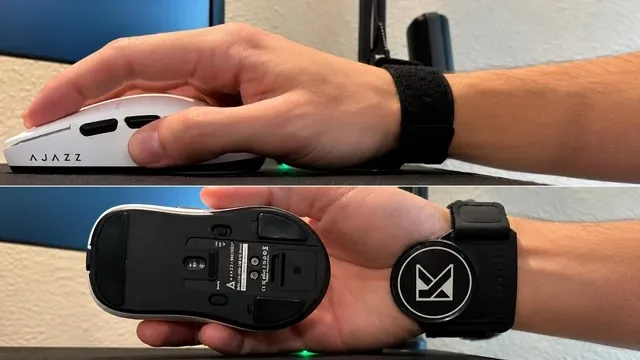
A hand on a white gaming mouse, and the same mouse shown from below Features beyond the spec table
The ROG Harpe II Ace: track-on-glass sensing. The Pulsefire Haste 2: a 26K sensor.
Where your budget lands
Under $50 buys the Pulsefire Haste 2; $50 to $100 buys the Sabre v2 PRO; $100 to $150 buys the ROG Harpe II Ace at our last check.
A hand next to a black wireless mouse on a blue mousepad Match the pick to your priority
Fast flick aiming: the ROG Harpe II Ace. Spending as little as possible, with the Sabre v2 PRO the next step up: the Pulsefire Haste 2.
How to Choose a 8000Hz Gaming Mouse
By priority
| Priority | Consider | Why |
|---|---|---|
| Fast flick aiming | ROG Harpe II Ace | The lightest weight here (48g) |
| Spending as little as possible, with the Sabre v2 PRO the next step up | Pulsefire Haste 2 | Undercutting the Sabre v2 PRO on price when we checked |
Scroll sideways to see every column.
Key specs side by side
The ROG Harpe II Ace leads on weight at 48g, ahead of the Pulsefire Haste 2 at 53g. "Not listed" marks weight where the Sabre v2 PRO leaves the figure out.
| Mice | Weight | Max DPI | Polling rate | Connection |
|---|---|---|---|---|
| ROG Harpe II Ace | 48g | 42,000 | 8,000Hz | Wireless |
| Pulsefire Haste 2 | 53g | 26,000 | 8,000Hz | Wired |
| Sabre v2 PRO | Not listed | 33,000 | 8,000Hz | Slipstream 2.4GHz, Bluetooth, wired |
Scroll sideways to see every column.
By price at the time of writing
At our last check the cheapest pick, the Pulsefire Haste 2, sat in the under $50 tier, 3 tiers in all up to the ROG Harpe II Ace at $100 to $150; Amazon prices move, so recheck before buying.
| Price tier | Mice |
|---|---|
| Under $50 | Pulsefire Haste 2 |
| About $50 to $100 | Sabre v2 PRO |
| About $100 to $150 | ROG Harpe II Ace |
Frequently Asked Questions
Which has the lightest weight: the ROG Harpe II Ace or the Pulsefire Haste 2?
Between the top two, it is 48g on the ROG Harpe II Ace against 53g on the Pulsefire Haste 2, a 9% difference. The Sabre v2 PRO is left out of this ranking because its weight isn't stated; 2 of 3 picks are ranked.
Is the ROG Harpe II Ace worth paying more than the Pulsefire Haste 2?
On paper it adds weight (48g against 53g). The Pulsefire Haste 2 sat in the under $50 tier and the ROG Harpe II Ace in the $100 to $150 tier when we checked, with 1 other pick between them; pay the difference only if weight decides your purchase.
What makes the ROG Harpe II Ace the Lightest Mouse?
It carries the badge for the lightest weight here (48g). The Pulsefire Haste 2 is next on weight at 53g, so this pick's 48g is 9% further out. The Pulsefire Haste 2, the cheapest pick, sat in the under $50 tier against $100 to $150 here, without out-ranking it on any listed spec. It is aimed at fast flick aiming.
What should I check before buying the Sabre v2 PRO?
Keep the Sabre v2 PRO on its dongle for games; Bluetooth is for a laptop. In this guide it ranks third of 3.
Beyond the specs, what sets the ROG Harpe II Ace and the Pulsefire Haste 2 apart?
The ROG Harpe II Ace: track-on-glass sensing. The Pulsefire Haste 2: four pieces of included grip tape.
Bottom Line
Our first pick is the ROG Harpe II Ace. Look at the Pulsefire Haste 2 for undercutting the Sabre v2 PRO on price when we checked if those matter more to you.
8000Hz uses more CPU; drop to 2000Hz if games stutter.
Related Guides
- Related guideThe Best Gaming Mice Right Now
- Related guideThe Best Wireless Gaming Mice for Every Grip and Budget
- Related guideThe Best FPS Gaming Mice
- Lower budgetThe Best Budget Gaming Mice
- Similar guideThe Best PC Mice for Gaming
- ExplainerHow to Choose a Gaming Mouse
- ExplainerMouse polling rate and DPI: what each number changes
- Also see: mouse pads and desk matsMouse Pad Features Explained: What Is Worth Paying For?
- Similar guideThe Best MMO Gaming Mouse
- Topic hubAll mice guides
About the author
PC Hardware Editor
Alex covers PC hardware, monitors, components, upgrades and peripherals for The PC Journal, with a focus on helping readers understand specifications, compatibility and meaningful product trade-offs.
Covers: Monitors, Graphics cards, Processors, PC components, Peripherals, Upgrades and compatibility
View all articles