
Buying Guide
The Best Curved 4K Monitors for Gaming
We weighed three monitors on refresh rate and screen size; the MPG 321CURX has the highest refresh rate, and the Odyssey G7 37 costs the least.
By The PC Journal editorial team
11 min read3 products evaluated
4K needs a strong GPU for games, but it gives the sharpest desktop at this size. Every monitor here is 4K, is curved and refreshes at 120Hz or more, ordered by refresh rate.
We ranked these monitors on refresh rate, resolution and size using manufacturer specifications; we did not test these monitors ourselves, and where a maker leaves out HDR, we say so.
Quick Picks
Our 3 recommendations at a glance. Tap a pick for the full verdict.
Fastest Refresh
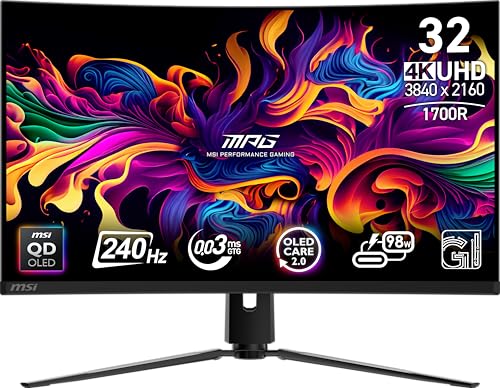
MSI MPG 321CURX QD-OLED
The highest refresh rate here (240Hz).
Best for: Esports players with a GPU that can feed high frame rates.
Our take Check price for MSI MPG 321CURX QD-OLED (opens in a new tab)

Largest Screen Size
Samsung Odyssey G7 (G75F) 37-inch
The largest screen size here (37 inches).
Best for: Buyers who put screen size first.
Our take Check price for Samsung Odyssey G7 (G75F) 37-inch (opens in a new tab)

Also Consider
Samsung Odyssey Neo G7 32-inch
A Mini LED backlight Samsung calls Quantum Matrix.
Best for: Buyers who want Mini LED backlight Samsung calls Quantum Matrix.
Our take Check price for Samsung Odyssey Neo G7 32-inch (opens in a new tab)
| Pick | Why it’s here | Best for | Price |
|---|---|---|---|
| The highest refresh rate here (240Hz). | Esports players with a GPU that can feed high frame rates. | Check price for MSI MPG 321CURX QD-OLED (opens in a new tab) |
| The largest screen size here (37 inches). | Buyers who put screen size first. | Check price for Samsung Odyssey G7 (G75F) 37-inch (opens in a new tab) |
| A Mini LED backlight Samsung calls Quantum Matrix. | Buyers who want Mini LED backlight Samsung calls Quantum Matrix. | Check price for Samsung Odyssey Neo G7 32-inch (opens in a new tab) |
Our Picks
Fastest Refresh1 of 3
MSI MPG 321CURX QD-OLED on Amazon (opens in a new tab)
The MPG 321CURX stands out for a 1700R curve, and it adds a 98W USB-C port and KVM switch.
Best for
- Esports players with a GPU that can feed high frame rates.
Skip if
- Worth skipping when oLED burn-in risk with static desktop element is a problem.
Why we like it
It also offers a 240Hz refresh rate and offers a 32 inches screen size. Nothing else here matches its 240Hz refresh rate; the Odyssey G7 37 comes closest at 165Hz. It matches the Odyssey Neo G7 on screen size (32 inches).
Reaching 240Hz at 4K needs DisplayPort 1.4 with DSC or HDMI 2.1 on your graphics card, and a GPU able to render well above 100fps at 4K. Leave the maker's pixel-refresh routines enabled and hide static taskbars to limit burn-in risk. G-SYNC Compatible works on NVIDIA cards over DisplayPort, and FreeSync covers AMD cards. At our last price check it topped the group, with the Odyssey Neo G7 the nearest cheaper option.
Key dimensions & specs
- Refresh rate: 240Hz
- Resolution: 3840x2160 (4K)
- Size: 32 inches
- Panel: QD-OLED
- Response: 0.03ms
- HDR: DisplayHDR True Black 400
- Adaptive sync: G-SYNC Compatible
- USB-C: Yes
Pros
- a 240Hz refresh rate for fast motion
- 4K resolution for sharp text and detail
- a QD-OLED panel with per-pixel contrast
- DisplayHDR True Black 400 certification
Cons
- OLED burn-in risk with static desktop elements
- Costs more than the Odyssey G7 37 at the time of writing
Largest Screen Size2 of 3
Samsung Odyssey G7 (G75F) 37-inch on Amazon (opens in a new tab)
Samsung's Odyssey G7 37 is a 37-inch 4K screen at 165Hz with DisplayHDR 600.
Best for
- Buyers who put screen size first.
Skip if
- Pass on it if refresh rate of 165Hz, behind the MPG 321CURX (240Hz rules it out for your setup.
Why we like it
It sits between a 32-inch monitor and a TV in size. On refresh rate it ties with the Odyssey Neo G7 at 165Hz. Its 37 inches screen size is the largest here; the MPG 321CURX comes next at 32 inches.
It also comes with a 37-inch 1000R curve. Reaching 165Hz at 4K needs DisplayPort 1.4 with DSC or HDMI 2.1 on your graphics card, and a GPU able to render well above 100fps at 4K. It cost the least of the 3 picks at the time of writing, with the Odyssey Neo G7 the next step up. What it gives up: refresh rate of 165Hz, behind the MPG 321CURX (240Hz); by contrast, the MPG 321CURX offers 240Hz.
Key dimensions & specs
- Refresh rate: 165Hz
- Resolution: 3840x2160 (4K)
- Size: 37 inches
- Response: 1ms
- HDR: DisplayHDR 600
Pros
- 165Hz for smoother motion than a 60Hz office screen
- 4K resolution for sharp text and detail
- DisplayHDR 600 certification
- 37-inch 1000R curve
Cons
- Refresh rate of 165Hz, behind the MPG 321CURX (240Hz)
Also Consider3 of 3
Samsung Odyssey Neo G7 32-inch on Amazon (opens in a new tab)
Samsung's Odyssey Neo G7 uses a Mini LED backlight behind a 32-inch 4K screen at 165Hz.
Best for
- Buyers who want Mini LED backlight Samsung calls Quantum Matrix.
Skip if
- Skip it if refresh rate matters most to you; the MPG 321CURX offers 240Hz.
Why we like it
The 1000R curve is steep for a 16:9 monitor, and its Quantum HDR2000 label is Samsung's own rating rather than a VESA tier. It reaches 2,000 nits peak with Quantum HDR 2000, and CoreSync lighting on the back matches on-screen colours. The 1000R curve fills your view.
It matches the Odyssey G7 37 on refresh rate (165Hz). On screen size it ties with the MPG 321CURX at 32 inches. Reaching 165Hz at 4K needs DisplayPort 1.4 with DSC or HDMI 2.1 on your graphics card, and a GPU able to render well above 100fps at 4K.
G-SYNC Compatible works on NVIDIA cards over DisplayPort, and FreeSync covers AMD cards. Its price falls between the Odyssey G7 37 and the MPG 321CURX, based on our last check. If refresh rate is your priority, the MPG 321CURX (240Hz) is the stronger choice.
Key dimensions & specs
- Refresh rate: 165Hz
- Resolution: 3840x2160 (4K)
- Size: 32 inches
- Response: 1ms
- Adaptive sync: G-SYNC Compatible, FreeSync Premium Pro
Pros
- 165Hz for smoother motion than a 60Hz office screen
- 4K resolution for sharp text and detail
- G-SYNC Compatible, FreeSync Premium Pro to reduce screen tearing
- Mini LED backlight Samsung calls Quantum Matrix
Cons
- Refresh rate trails the MPG 321CURX (240Hz)
- Screen size trails the Odyssey G7 37 (37 inches)
- Costs more than the Odyssey G7 37 at the time of writing
How We Chose These Curved 4K Monitors for Gaming
Each pick was assessed across 4 criteria weighted for real-world use.
- How these picks were ranked
- We set side by side three monitors on refresh rate, resolution, screen size and response from manufacturer specifications. Nothing was tested in-house; 4 of the 6 fields compared are stated for every pick, while HDR and adaptive sync have gaps.
- What every pick has in common
- All 3, from the MPG 321CURX to the Odyssey Neo G7, state refresh rate, resolution and screen size and share 3840x2160 (4K) resolution.
- Where the specs have gaps
- The Odyssey Neo G7 gives no HDR; the Odyssey G7 37 gives no adaptive sync.
- Price range
- From the Odyssey G7 37 to the MPG 321CURX, all sat in the $500 to $1000 tier when we checked.
What to Look for in a Curved 4K Monitor for Gaming
Key buying criteria so you get the right fit the first time.
Refresh rate across these picks
The MPG 321CURX tops refresh rate at 240Hz and the Odyssey Neo G7 sits lowest at 165Hz. The MPG 321CURX is the pick for refresh rate.
How much screen size you need
Here screen size runs from 32 inches on the Odyssey Neo G7 to 37 inches on the Odyssey G7 37, a 16% spread. Start with the Odyssey G7 37 if screen size decides it.
HDR
The MPG 321CURX lists DisplayHDR True Black 400; the Odyssey G7 37 lists DisplayHDR 600. Settling HDR first narrows 2 picks to 1 or 1.
Extras that separate them
The MPG 321CURX: a 98W USB-C port and KVM switch. The Odyssey G7 37: 4K at 165Hz. The Odyssey Neo G7: a 1000R curved screen.
Budget
All 3 sat in the $500 to $1000 tier when we checked, from the Odyssey G7 37 at the low end to the MPG 321CURX at the top, so decide on features first.
How to Choose a Curved 4K Monitor for Gaming
By priority
| Priority | Consider | Why |
|---|---|---|
| Esports players with a GPU that can feed high frame rates | MPG 321CURX | The highest refresh rate here (240Hz) |
| Buyers who put screen size first | Odyssey G7 37 | The largest screen size here (37 inches) |
| Buyers who want Mini LED backlight Samsung calls Quantum Matrix | Odyssey Neo G7 | A Mini LED backlight Samsung calls Quantum Matrix |
Scroll sideways to see every column.
Key specs side by side
The MPG 321CURX leads on refresh rate at 240Hz, ahead of the Odyssey G7 37 at 165Hz.
| Monitor | Refresh rate | Resolution | Size | Response |
|---|---|---|---|---|
| MPG 321CURX | 240Hz | 3840x2160 (4K) | 32 inches | 0.03ms |
| Odyssey G7 37 | 165Hz | 3840x2160 (4K) | 37 inches | 1ms |
| Odyssey Neo G7 | 165Hz | 3840x2160 (4K) | 32 inches | 1ms |
Scroll sideways to see every column.
Frequently Asked Questions
Is the MPG 321CURX ahead of the Odyssey G7 37 on refresh rate?
The MPG 321CURX leads at 240Hz, with the Odyssey G7 37 at 165Hz.
How does the MPG 321CURX compare with the Odyssey G7 37 on screen size?
Between the top two, it is 37 inches on the Odyssey G7 37 against 32 inches on the MPG 321CURX, a 16% difference.
What does the MPG 321CURX add over the Odyssey G7 37?
The spec sheets show refresh rate (240Hz against 165Hz) in its favour. It does not win everywhere: the Odyssey G7 37 still leads on screen size (37 inches). Both sat in the $500 to $1000 tier when we checked, so the gains in refresh rate cost little extra by tier.
Why is the Odyssey G7 37 our Largest Screen Size pick?
It earns the label for the largest screen size here (37 inches). On screen size it leads the MPG 321CURX, 37 inches against 32 inches, a 16% margin. It suits anyone who puts screen size first.
Do the MPG 321CURX and the Odyssey G7 37 differ on response?
The MPG 321CURX uses 0.03ms; the Odyssey G7 37 and the Odyssey Neo G7 use 1ms.
What extras do the MPG 321CURX and the Odyssey G7 37 include?
The MPG 321CURX: a 1700R curve. The Odyssey G7 37: a 37-inch 1000R curve. The Odyssey Neo G7: a Mini LED backlight Samsung calls Quantum Matrix.
Bottom Line
Our first pick is the MPG 321CURX. Look at the Odyssey G7 37 for the largest screen size here (37 inches) and the Odyssey Neo G7 for a Mini LED backlight Samsung calls Quantum Matrix if those matter more to you.
Use the cable in the box; older cables can cap the refresh rate.