
Buying Guide
The Best 80 Plus Gold Power Supplies
Six 80 Plus Gold units from 650W to 1200W with native 12V-2x6 cables, compared on warranty, connectors and price.
By The PC Journal editorial team
12 min read6 products evaluated
80 Plus Gold is the most common efficiency tier for gaming PCs, and prices have fallen far enough that it rarely makes sense to buy lower. Warranty length and connectors now separate the units.
We compared wattage, efficiency ratings, connectors and warranty from each listing; we did not load-test these units.
Quick Picks
Our 6 recommendations at a glance. Tap a pick for the full verdict.

Best 750W Gold
ASRock Phantom Gaming PG-750G
A 10-year warranty with Cybenetics Platinum.
Best for: Most gaming PCs.
Our take Check price for ASRock Phantom Gaming PG-750G (opens in a new tab)
Most 16-Pin Cables
MSI MPG A1000GS PCIE5 II
Two 12V-2x6 connectors at 1000W.
Best for: High-end GPUs.
Our take Check price for MSI MPG A1000GS PCIE5 II (opens in a new tab)

Best 650W Gold
MONTECH Century II 650W
650W with a 10-year warranty and Zero Fan mode.
Best for: Mid-range builds.
Our take Check price for MONTECH Century II 650W (opens in a new tab)
Best 1200W Gold
ASRock Steel Legend SL-1200G
1200W with a 10-year warranty.
Best for: Flagship builds.
Our take Check price for ASRock Steel Legend SL-1200G (opens in a new tab)

Best 850W Gold
Thermaltake Toughpower GT 850W
850W Gold with a Smart Zero Fan mode.
Best for: Mid-to-high-end builds.
Our take Check price for Thermaltake Toughpower GT 850W (opens in a new tab)
Best Budget Gold
darkFlash DG750
A 140mm body with a native 12V-2x6 cable.
Best for: Keeping cost down.
Our take Check price for darkFlash DG750 (opens in a new tab)
| Pick | Why it’s here | Best for | Price |
|---|---|---|---|
| A 10-year warranty with Cybenetics Platinum. | Most gaming PCs. | Check price for ASRock Phantom Gaming PG-750G (opens in a new tab) |
| Two 12V-2x6 connectors at 1000W. | High-end GPUs. | Check price for MSI MPG A1000GS PCIE5 II (opens in a new tab) |
| 650W with a 10-year warranty and Zero Fan mode. | Mid-range builds. | Check price for MONTECH Century II 650W (opens in a new tab) |
| 1200W with a 10-year warranty. | Flagship builds. | Check price for ASRock Steel Legend SL-1200G (opens in a new tab) |
| 850W Gold with a Smart Zero Fan mode. | Mid-to-high-end builds. | Check price for Thermaltake Toughpower GT 850W (opens in a new tab) |
| A 140mm body with a native 12V-2x6 cable. | Keeping cost down. | Check price for darkFlash DG750 (opens in a new tab) |
Our Picks
Best 750W Gold1 of 6
ASRock Phantom Gaming PG-750G on Amazon (opens in a new tab)
ASRock's Phantom Gaming PG-750G has a 90-degree 12V-2x6 cable with a temperature sensor, braided cables and a 10-year warranty.
Best for
- Most gaming PCs.
Skip if
- If budget leads, the darkFlash DG750 was cheaper at our last price check.
Why we like it
It is 150mm deep and rated Cybenetics Platinum. It is fully modular with braided cables and a 90-degree PCIe 5.1 connector that has a temperature sensor. ASRock rates its efficiency 2% above the Gold standard.
It matches the darkFlash DG750 on rated output (750W). It matches the MONTECH Century II 650W, the ASRock Steel Legend SL-1200G, the Thermaltake Toughpower GT 850W and the darkFlash DG750 on native 12V-2x6 cable count (1). On warranty it ties with the MSI MPG A1000GS PCIE5 II, the MONTECH Century II 650W and the ASRock Steel Legend SL-1200G at 10 years.
The ASRock Phantom Gaming PG-750G comes with a native 12V-2x6 cable, so a 16-pin card plugs in without an adapter. At 150mm deep, compare it with your case's PSU clearance before buying. It was priced above the MONTECH Century II 650W and below the Thermaltake Toughpower GT 850W at the time of writing.
Key dimensions & specs
- Wattage: 750W
- Native 12V-2x6 cables: 1
- Warranty: 10 years
- Depth: 150mm
- 80 Plus rating: Gold
- Cybenetics rating: Platinum
- ATX version: ATX 3.1
- Form factor: ATX
- Cabling: Fully modular
- Colour: Black
Pros
- A 750W rating
- A native 12V-2x6 cable for 16-pin cards
- A 10-year warranty
- ATX 3.1 compliance
Cons
- Costs more than the darkFlash DG750 at the time of writing
Most 16-Pin Cables2 of 6
MSI MPG A1000GS PCIE5 II on Amazon (opens in a new tab)
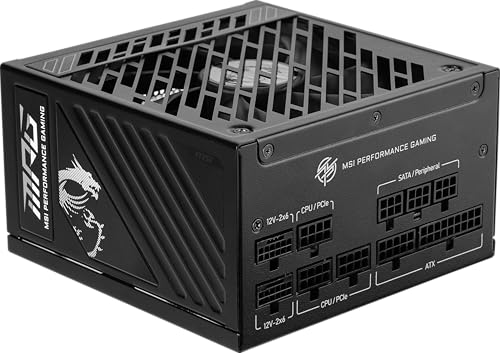
MSI's MPG A1000GS PCIE5 II is the only 1000W unit here with two native 12V-2x6 cables, and it adds three PCIe 8-pin connectors.
Best for
- High-end GPUs.
Skip if
- Price-first buyers should look at the darkFlash DG750, which cost less when we checked.
Why we like it
MSI backs it with a 10-year warranty and 105°C capacitors throughout. Its embossed jacket cables bend easily, and eight protections guard the system. MSI lists RTX 50 series support.
Its 1000W rated output ranks second of 6 here, behind the ASRock Steel Legend SL-1200G (1200W) and ahead of the MONTECH Century II 650W (650W). Nothing else here matches its 2 native 12V-2x6 cable count; the ASRock Phantom Gaming PG-750G comes closest at 1. No depth is rated for the MSI MPG A1000GS PCIE5 II, so check the maker's page against your case's PSU bay.
When we checked, only the Thermaltake Toughpower GT 850W and cheaper picks cost less, and the ASRock Steel Legend SL-1200G cost more. If you want a confirmed depth, look to the darkFlash DG750 instead: it comes in at 140mm, while this one gives no figure.
Key dimensions & specs
- Wattage: 1000W
- Native 12V-2x6 cables: 2
- PCIe 8-pin connectors: 3
- Warranty: 10 years
- 80 Plus rating: Gold
- ATX version: ATX 3.1
- Form factor: ATX
- Cabling: Fully modular
- Colour: Black
Pros
- 1000W of rated output for high-power cards
- 2 native 12V-2x6 cables
- A 10-year warranty
- ATX 3.1 compliance
Cons
- Costs more than the darkFlash DG750 at the time of writing
Best 650W Gold3 of 6
MONTECH Century II 650W on Amazon (opens in a new tab)
Montech's Century II 650W brings a native 12V-2x6 cable, fully modular cables and a 10-year warranty to a low-cost 80 Plus Gold unit.
Best for
- Mid-range builds.
Skip if
- Skip it if rated output matters most to you; the ASRock Steel Legend SL-1200G offers 1200W.
Why we like it
Its 135mm FDB fan has a zero RPM mode, and it uses 100% Japanese capacitors. Its 650W rated output is the lowest in this group; the ASRock Steel Legend SL-1200G leads at 1200W. It matches the ASRock Phantom Gaming PG-750G, the ASRock Steel Legend SL-1200G, the Thermaltake Toughpower GT 850W and the darkFlash DG750 on native 12V-2x6 cable count (1).
On warranty it ties with the ASRock Phantom Gaming PG-750G, the MSI MPG A1000GS PCIE5 II and the ASRock Steel Legend SL-1200G at 10 years. The MONTECH Century II 650W comes with a native 12V-2x6 cable, so a 16-pin card plugs in without an adapter. No depth is rated for the MONTECH Century II 650W, so check the maker's page against your case's PSU bay.
Key dimensions & specs
- Wattage: 650W
- Native 12V-2x6 cables: 1
- Warranty: 10 years
- 80 Plus rating: Gold
- ATX version: ATX 3.1
- Form factor: ATX
- Cabling: Fully modular
- Fan: 135mm
- Fan stop: Yes
- Colour: Black
Pros
- A 650W rating
- A native 12V-2x6 cable for 16-pin cards
- A 10-year warranty
- ATX 3.1 compliance
Cons
- Rated output trails the ASRock Steel Legend SL-1200G (1200W)
- Costs more than the darkFlash DG750 at the time of writing
Best 1200W Gold4 of 6
ASRock Steel Legend SL-1200G on Amazon (opens in a new tab)
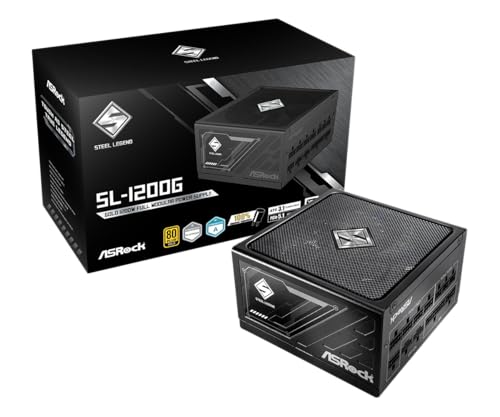
ASRock's SL-1200G pairs 80 Plus Gold with a Cybenetics Platinum rating and a LAMBDA A noise certification.
Best for
- Flagship builds.
Skip if
- Price-first buyers should look at the darkFlash DG750, which cost less when we checked.
Why we like it
It is fully modular, ATX 3.1 and covered for 10 years. It uses 100% Japanese capacitors for longevity and stable output. Check your case and component specifications before buying.
Nothing else here matches its 1200W rated output; the MSI MPG A1000GS PCIE5 II comes closest at 1000W. On native 12V-2x6 cable count it ties with the ASRock Phantom Gaming PG-750G, the MONTECH Century II 650W, the Thermaltake Toughpower GT 850W and the darkFlash DG750 at 1. It matches the ASRock Phantom Gaming PG-750G, the MSI MPG A1000GS PCIE5 II and the MONTECH Century II 650W on warranty (10 years).
You also get a 5V boost function for stable standby voltage. It was the highest-priced of the 6 picks at the time of writing, so the case for it rests on what it adds over the MSI MPG A1000GS PCIE5 II and the rest. The maker doesn't give its depth; if that figure matters, the darkFlash DG750 comes in at 140mm.
Key dimensions & specs
- Wattage: 1200W
- Native 12V-2x6 cables: 1
- Warranty: 10 years
- 80 Plus rating: Gold
- Cybenetics rating: Platinum
- ATX version: ATX 3.1
- Form factor: ATX
- Cabling: Fully modular
- Fan: 135mm
- Colour: Black
Pros
- 1200W of rated output for high-power cards
- A native 12V-2x6 cable for 16-pin cards
- A 10-year warranty
- ATX 3.1 compliance
Cons
- Costs more than the darkFlash DG750 at the time of writing
Best 850W Gold5 of 6
Thermaltake Toughpower GT 850W on Amazon (opens in a new tab)
Thermaltake's Toughpower GT 850W is a fully modular ATX 3.1 unit with a native 12V-2x6 cable, a single high-amperage 12V rail and a Smart Zero Fan mode.
Best for
- Mid-to-high-end builds.
Skip if
- Look at the others if this bothers you: a shorter 5-year warranty.
Why we like it
Smart Zero Fan keeps the fan off at low load, and its low-profile flat black cables are easy to route. It is 80 Plus Gold rated at up to 90% efficiency. On rated output it sits mid-pack at 850W: the ASRock Steel Legend SL-1200G offers 1200W, and the MONTECH Century II 650W comes in at 650W.
On native 12V-2x6 cable count it ties with the ASRock Phantom Gaming PG-750G, the MONTECH Century II 650W, the ASRock Steel Legend SL-1200G and the darkFlash DG750 at 1. It matches the darkFlash DG750 on warranty (5 years). The Thermaltake Toughpower GT 850W comes with a native 12V-2x6 cable, so a 16-pin card plugs in without an adapter.
Its price falls between the ASRock Phantom Gaming PG-750G and the MSI MPG A1000GS PCIE5 II, based on our last check. Buyers who need a confirmed depth should compare it with the darkFlash DG750, which comes in at 140mm.
Key dimensions & specs
- Wattage: 850W
- Native 12V-2x6 cables: 1
- Warranty: 5 years
- 80 Plus rating: Gold
- ATX version: ATX 3.1
- Form factor: ATX
- Cabling: Fully modular
- Fan stop: Yes
- Colour: Black
Pros
- A 850W rating
- A native 12V-2x6 cable for 16-pin cards
- ATX 3.1 compliance
- Fully modular cables
Cons
- A shorter 5-year warranty
- Costs more than the darkFlash DG750 at the time of writing
Best Budget Gold6 of 6
darkFlash DG750 on Amazon (opens in a new tab)
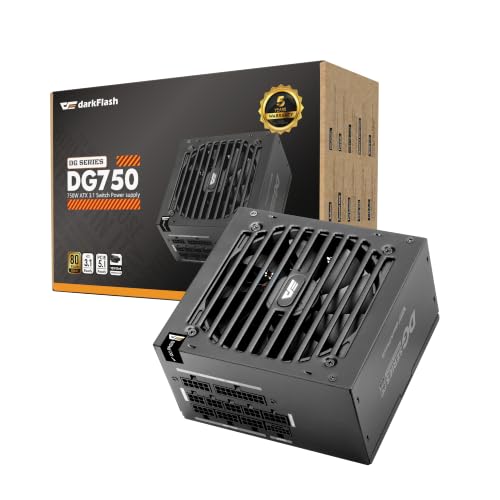
darkFlash's DG750 is a 140mm-deep 80 Plus Gold unit with a native 12V-2x6 cable and a hydraulic-bearing fan.
Best for
- Keeping cost down.
Skip if
- Skip it if this is a deal-breaker for you: a shorter 5-year warranty.
Why we like it
Its warranty is 5 years. It is fully modular with a quiet HDB fan, 80 Plus Gold rated, and backed by a 5-year limited warranty. Its fully modular cables reduce clutter for first-time builders.
On rated output it ties with the ASRock Phantom Gaming PG-750G at 750W. On native 12V-2x6 cable count it ties with the ASRock Phantom Gaming PG-750G, the MONTECH Century II 650W, the ASRock Steel Legend SL-1200G and the Thermaltake Toughpower GT 850W at 1. It matches the Thermaltake Toughpower GT 850W on warranty (5 years).
It also comes with a 140mm body that leaves room for cables. The darkFlash DG750 comes with a native 12V-2x6 cable, so a 16-pin card plugs in without an adapter. It was the cheapest of the group when we checked; the MONTECH Century II 650W was the next step up. If native 12V-2x6 cable count is your priority, the MSI MPG A1000GS PCIE5 II (2) is the stronger choice.
Key dimensions & specs
- Wattage: 750W
- Native 12V-2x6 cables: 1
- Warranty: 5 years
- Depth: 140mm
- 80 Plus rating: Gold
- ATX version: ATX 3.1
- Form factor: ATX
- Cabling: Fully modular
- Colour: Black
Pros
- A 750W rating
- A native 12V-2x6 cable for 16-pin cards
- A short 140mm body
- ATX 3.1 compliance
Cons
- A shorter 5-year warranty
- Native 12V-2x6 cable count trails the MSI MPG A1000GS PCIE5 II (2)
- Warranty trails the ASRock Phantom Gaming PG-750G (10 years)
How We Chose
Each pick was assessed across 4 criteria weighted for real-world use.
- Wattage
- We compared rated output with NVIDIA's or AMD's recommended system power for the card.
- Connectors
- We recorded native 12V-2x6 cables and PCIe 8-pin connectors where the listing states them.
- Standards
- We noted ATX version, 80 Plus and Cybenetics ratings.
- Price
- We grouped picks by price at the time of writing.
What to Look for in an 80 Plus Gold PSUs
Key buying criteria so you get the right fit the first time.
Compare efficiency ratings
80 Plus and Cybenetics ratings describe how much power turns into heat. Gold is the usual target for a gaming PC; Platinum and Titanium run cooler and cost more.
Use the warranty as a quality signal
Long warranties of seven to twelve years show how long a maker expects a unit to last. A power supply often moves from one build to the next, so the warranty matters.
Match the power connector
Most RTX 40 and RTX 50 cards use a single 16-pin 12V-2x6 (12VHPWR) plug, while many Radeon cards use two or three 8-pin plugs. A native cable avoids bulky adapters.
Push the 16-pin plug fully home and avoid a sharp bend right at the connector.
Start from the card maker's PSU figure
NVIDIA and AMD publish a recommended total system power for each card, and partner cards often state their own. Treat that figure as the floor, then add headroom for a high-power CPU.
More wattage than you need does not harm anything; it mostly costs money.
Prefer ATX 3.1
ATX 3.1 units are designed for the brief power spikes modern graphics cards produce and ship with the revised 12V-2x6 connector. Older units can still work, but check the maker's guidance for your card.
Check depth and cabling
Deeper units can clash with drive cages or front radiators. Fully modular cables make routing easier in tight cases.
How to Choose an 80 Plus Gold PSUs
By priority
| Priority | Consider | Why |
|---|---|---|
| Most gaming PCs | ASRock Phantom Gaming PG-750G | A 10-year warranty with Cybenetics Platinum |
| High-end GPUs | MSI MPG A1000GS PCIE5 II | Two 12V-2x6 connectors at 1000W |
| Mid-range builds | MONTECH Century II 650W | 650W with a 10-year warranty and Zero Fan mode |
| Flagship builds | ASRock Steel Legend SL-1200G | 1200W with a 10-year warranty |
| Mid-to-high-end builds | Thermaltake Toughpower GT 850W | 850W Gold with a Smart Zero Fan mode |
| Keeping cost down | darkFlash DG750 | A 140mm body with a native 12V-2x6 cable |
Scroll sideways to see every column.
Key specs side by side
Figures as each maker states them.
| Power supplie | Wattage | Native 12V-2x6 cables | Warranty | Depth |
|---|---|---|---|---|
| ASRock Phantom Gaming PG-750G | 750W | 1 | 10 years | 150mm |
| MSI MPG A1000GS PCIE5 II | 1000W | 2 | 10 years | Not listed |
| MONTECH Century II 650W | 650W | 1 | 10 years | Not listed |
| ASRock Steel Legend SL-1200G | 1200W | 1 | 10 years | Not listed |
| Thermaltake Toughpower GT 850W | 850W | 1 | 5 years | Not listed |
| darkFlash DG750 | 750W | 1 | 5 years | 140mm |
Scroll sideways to see every column.
By price at the time of writing
Prices change often; these tiers reflect Amazon prices when this guide was updated.
| Price tier | Power supplies |
|---|---|
| About $50 to $100 | darkFlash DG750, MONTECH Century II 650W, ASRock Phantom Gaming PG-750G, Thermaltake Toughpower GT 850W |
| About $100 to $150 | MSI MPG A1000GS PCIE5 II, ASRock Steel Legend SL-1200G |
Frequently Asked Questions
How much headroom should I leave above the recommended wattage?
The card maker's figure already covers a typical system. Add 100 to 150W if you run a high-power CPU or plan a bigger card later.
Can I reuse the power supply from my old PC?
Only if it meets the card's wattage and connector needs and is still under warranty or in good health. Very old units lack modern connectors.
Can I use the 16-pin adapter that came with my graphics card?
Yes, if it is the maker's own adapter and every 8-pin plug on it is connected. A native 12V-2x6 cable is tidier and has fewer joins.
Does a Platinum unit save much on electricity?
Only a little for most gaming PCs. The main gains are less heat and often a quieter fan.
Can I use an SFX power supply?
Yes, if the case supports SFX and the unit meets the wattage and connector needs of your card. SFX units cost more per watt.
Is an ATX 3.0 power supply still fine?
Generally yes. ATX 3.1 mainly revises the connector to 12V-2x6 and relaxes some spike requirements; check your unit's cable is rated for your card.
Bottom Line
ASRock's PG-750G is the best Gold unit for most builds, and MSI's A1000GS PCIE5 II suits cards that need two 16-pin cables. Montech's Century II 650W suits mid-range builds, and darkFlash's DG750 keeps costs down.