
Buying Guide
The Best 27-Inch Curved Gaming Monitors
Three monitors compared, from the EDA270U to the XG27WCMS, with the trade-offs of each named.
By The PC Journal editorial team
11 min read3 products evaluated
27-inch screens fit a standard desk depth, but resolution changes how close you can sit. Every monitor here measures about 27 inches, is curved and refreshes at 120Hz or more, ordered by refresh rate.
This is a research roundup, not a lab test: refresh rate, resolution and size come from each maker's published specs; gaps in the specs are flagged, not filled in, and no figure here comes from our own testing.
Quick Picks
Our 3 recommendations at a glance. Tap a pick for the full verdict.

VA Panel
AOC C27G4ZH Curved
A VA panel.
Best for: Buyers who want a VA panel.
Our take Check price for AOC C27G4ZH Curved (opens in a new tab)
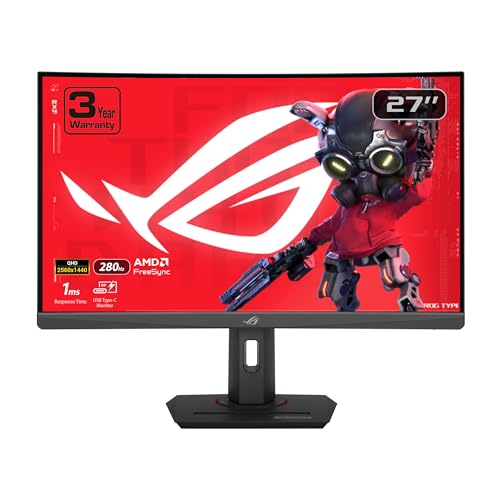
Premium Pick
ASUS ROG Strix XG27WCMS Curved
The highest-priced pick here at the time of writing, with a curved 1440p panel overclocked to 280Hz.
Best for: Buyers who want the most complete package.
Our take Check price for ASUS ROG Strix XG27WCMS Curved (opens in a new tab)

Lowest Price Here
Acer Nitro EDA270U Curved
The lowest price of the group at our last check.
Best for: Keeping the budget tight.
Our take Check price for Acer Nitro EDA270U Curved (opens in a new tab)
| Pick | Why it’s here | Best for | Price |
|---|---|---|---|
| A VA panel. | Buyers who want a VA panel. | Check price for AOC C27G4ZH Curved (opens in a new tab) |
| The highest-priced pick here at the time of writing, with a curved 1440p panel overclocked to 280Hz. | Buyers who want the most complete package. | Check price for ASUS ROG Strix XG27WCMS Curved (opens in a new tab) |
| The lowest price of the group at our last check. | Keeping the budget tight. | Check price for Acer Nitro EDA270U Curved (opens in a new tab) |
Our Picks
VA Panel1 of 3
AOC C27G4ZH Curved on Amazon (opens in a new tab)
AOC's C27G4ZH curves a 27-inch 1080p VA panel and runs it at 280Hz on a height, tilt and swivel stand.
Best for
- Buyers who want a VA panel.
Skip if
- Look at the others if this bothers you: a VA panel that can smear dark transitions.
Why we like it
It trades resolution for speed. It refreshes at 280Hz with a 0.3ms response time. The 1500R curve wraps the image around your view.
The 1500R curve keeps the corners of the 27-inch panel in view. It matches the XG27WCMS on refresh rate (280Hz). It is the only pick here with a 1920x1080 (1080p) resolution; the XG27WCMS has a 2560x1440 (1440p) resolution instead.
It also offers VESA mounting. At 1080p, 280Hz is within reach of mid-range graphics cards in esports titles; use DisplayPort if your card's HDMI port is older. Its price falls between the EDA270U and the XG27WCMS, based on our last check.
Key dimensions & specs
- Refresh rate: 280Hz
- Resolution: 1920x1080 (1080p)
- Size: 27 inches
- Panel: VA
- Response: 0.3ms
- HDR: HDR
- Stand: height, tilt and swivel
Pros
- a 280Hz refresh rate for fast motion
- a stand with height, tilt and swivel
- 280Hz on a 1500R curve
- Height-adjustable stand
Cons
- a VA panel that can smear dark transitions
- Costs more than the EDA270U at the time of writing
Premium Pick2 of 3
ASUS ROG Strix XG27WCMS Curved on Amazon (opens in a new tab)
ASUS's XG27WCMS curves a 27-inch 1440p panel and overclocks it to 280Hz.
Best for
- Buyers who want the most complete package.
Skip if
- Skip it if price comes first: the EDA270U cost less when we checked.
Why we like it
USB-C input and a three-year warranty are listed. It matches the C27G4ZH on refresh rate (280Hz). Like the EDA270U, it has a 2560x1440 (1440p) resolution, while the C27G4ZH uses a 1920x1080 (1080p) resolution.
To see 280Hz at 1440p, connect over DisplayPort or HDMI 2.1; older HDMI 2.0 ports cap the refresh rate lower. G-SYNC Compatible works on NVIDIA cards over DisplayPort, and FreeSync covers AMD cards. It also brings 95% DCI-P3 colour coverage. It was the highest-priced of the 3 picks at the time of writing, so the case for it rests on what it adds over the C27G4ZH and the rest.
Key dimensions & specs
- Refresh rate: 280Hz
- Resolution: 2560x1440 (1440p)
- Size: 27 inches
- HDR: HDR
- Color gamut: 95% DCI-P3
- Adaptive sync: G-SYNC Compatible
- USB-C: Yes
- Warranty: 3-year
Pros
- a 280Hz refresh rate for fast motion
- 1440p resolution, sharper than 1080p at 27 inches
- 95% DCI-P3 colour coverage
- G-SYNC Compatible to reduce screen tearing
Cons
- Costs more than the EDA270U at the time of writing
Lowest Price Here3 of 3
Acer Nitro EDA270U Curved on Amazon (opens in a new tab)
The EDA270U stands out for a 1500R curve, and it adds two 2W speakers.
Best for
- Keeping the budget tight.
Skip if
- Skip it if refresh rate matters most to you; the C27G4ZH offers 280Hz.
Why we like it
It also offers a 180Hz refresh rate and offers a 27 inches screen size. The 27-inch 1440p panel curves at 1500R and refreshes at 180Hz with FreeSync Premium. It adds two 2W speakers, a zero-frame design and a 75x75mm VESA mount.
On refresh rate it trails the group at 180Hz, while the C27G4ZH offers 280Hz. It shares a 2560x1440 (1440p) resolution with the XG27WCMS; the C27G4ZH goes with a 1920x1080 (1080p) resolution. It also offers 1440p at a budget price tier. It cost the least of the 3 picks at the time of writing, with the C27G4ZH the next step up.
Key dimensions & specs
- Refresh rate: 180Hz
- Resolution: 2560x1440 (1440p)
- Size: 27 inches
- HDR: HDR
Pros
- 180Hz for smoother motion than a 60Hz office screen
- 1440p resolution, sharper than 1080p at 27 inches
- 1500R curve
- Two 2W speakers
Cons
- Refresh rate trails the C27G4ZH (280Hz)
How We Chose These 27-Inch Curved Gaming Monitors
Each pick was assessed across 4 criteria weighted for real-world use.
- The figures behind the order
- We set side by side three monitors on refresh rate, resolution, screen size and HDR from manufacturer specifications. We did not test them in-house.
- The shared baseline
- All 3, from the C27G4ZH to the EDA270U, state refresh rate, resolution and screen size.
- Who each pick suits
- The C27G4ZH for a VA panel; the XG27WCMS for the highest-priced pick here at the time of writing, with a curved 1440p panel overclocked to 280Hz; the EDA270U for the lowest price of the group at our last check.
- Price range
- At our last check the picks ran from the EDA270U ($150 to $250) to the XG27WCMS ($250 to $500).
What to Look for in a 27-Inch Curved Gaming Monitor
Key buying criteria so you get the right fit the first time.
Refresh rate across these picks
Here refresh rate runs from 180Hz on the EDA270U to 280Hz on the C27G4ZH. The C27G4ZH is the pick for refresh rate.
Features beyond the spec table
The C27G4ZH: a height-adjustable stand. The XG27WCMS: USB-C input. The EDA270U: two 2W speakers.
Budget
$150 to $250 buys the EDA270U and the C27G4ZH; $250 to $500 buys the XG27WCMS at our last check.
Match the pick to your priority
Buyers who want a VA panel: the C27G4ZH. Buyers who want the most complete package: the XG27WCMS. Keeping the budget tight: the EDA270U.
Size for your desk distance
24 to 25 inches suits 1080p and competitive play at a typical desk. 27 inches pairs well with 1440p and 4K; 32 inches suits 4K at a deeper desk.
How to Choose a 27-Inch Curved Gaming Monitor
By priority
| Priority | Consider | Why |
|---|---|---|
| Buyers who want a VA panel | C27G4ZH | A VA panel |
| Buyers who want the most complete package | XG27WCMS | The highest-priced pick here at the time of writing, with a curved 1440p panel overclocked to 280Hz |
| Keeping the budget tight | EDA270U | The lowest price of the group at our last check |
Scroll sideways to see every column.
Key specs side by side
The C27G4ZH leads on refresh rate at 280Hz, ahead of the XG27WCMS at 280Hz.
| Monitor | Refresh rate | Resolution | Size | HDR |
|---|---|---|---|---|
| C27G4ZH | 280Hz | 1920x1080 (1080p) | 27 inches | HDR |
| XG27WCMS | 280Hz | 2560x1440 (1440p) | 27 inches | HDR |
| EDA270U | 180Hz | 2560x1440 (1440p) | 27 inches | HDR |
Scroll sideways to see every column.
By price at the time of writing
The EDA270U was the lowest-priced pick and the XG27WCMS the highest when we checked; tiers move with Amazon pricing.
| Price tier | Monitors |
|---|---|
| About $150 to $250 | EDA270U, C27G4ZH |
| About $250 to $500 | XG27WCMS |
Frequently Asked Questions
Is the XG27WCMS worth paying more than the EDA270U?
On paper it adds refresh rate (280Hz against 180Hz). The EDA270U was the lowest-priced pick when we checked, so pay the difference only if those gains matter to you.
What makes the C27G4ZH the VA Panel?
It earns the label for a VA panel. It suits anyone who wants a VA panel.
Do the C27G4ZH and the XG27WCMS differ on resolution?
The C27G4ZH uses 1920x1080 (1080p); the XG27WCMS and the EDA270U use 2560x1440 (1440p).
Beyond the specs, what sets the C27G4ZH and the XG27WCMS apart?
The C27G4ZH: 280Hz on a 1500R curve. The XG27WCMS: a curved 1440p panel overclocked to 280Hz. The EDA270U: a 1500R curve.
Should I pick the C27G4ZH or the EDA270U?
The C27G4ZH suits buyers who want a VA panel; the EDA270U suits keeping the budget tight.
Bottom Line
Our first pick is the C27G4ZH, chosen for a VA panel. Look at the XG27WCMS for the highest-priced pick here at the time of writing, with a curved 1440p panel overclocked to 280Hz and the EDA270U for the lowest price of the group at our last check if those matter more to you.
Check that your GPU has the port the monitor needs for its full refresh rate.