
Buying Guide
The Best $1000 Home Theater PC Build
Six parts for a home theater PC, each checked against the others for socket, memory, power and case fit.
By The PC Journal editorial team
12 min read6 products evaluated
A home theater PC is judged by what it connects to the television, so this build uses the Ryzen 7 8700G's integrated graphics instead of a card, in a compact case with a Mini-ITX board. Every part is on AM5 with DDR5, the Jonsbo D31 Mesh lists support for an ATX or SFX power supply, and the build adds no graphics card.
Six parts, 7 checks and one total: the set landed between $950 and $1,000 at the time of writing. The checks cover CPU socket, memory type and memory kit and the rest of the table below, using maker figures rather than our own tests.
Quick Picks
Our 6 recommendations at a glance. Tap a pick for the full verdict.

Processor
AMD Ryzen 7 8700G
AMD's fastest integrated graphics in a desktop chip at launch.
Best for: Buyers assembling a home theater PC who care about AMD's fastest integrated graphics in a desktop chip at launch.
Our take Check price for AMD Ryzen 7 8700G (opens in a new tab)

Motherboard
ASRock B650I Lightning WiFi
PCIe 5.0 M.2 slot.
Best for: Buyers assembling a home theater PC who care about PCIe 5.0 M.2 slot.
Our take Check price for ASRock B650I Lightning WiFi (opens in a new tab)

Memory
Patriot Viper Venom 16GB (2x8GB) DDR5-6000 CL36
Plain heatspreader with no lighting.
Best for: Buyers assembling a home theater PC who care about plain heatspreader with no lighting.
Our take Check price for Patriot Viper Venom 16GB (2x8GB) DDR5-6000 CL36 (opens in a new tab)

Storage
Patriot Viper VP4300 Lite 1TB
PCIe Gen4 x4 drive.
Best for: Buyers assembling a home theater PC who care about PCIe Gen4 x4 drive.
Our take Check price for Patriot Viper VP4300 Lite 1TB (opens in a new tab)
Power Supply
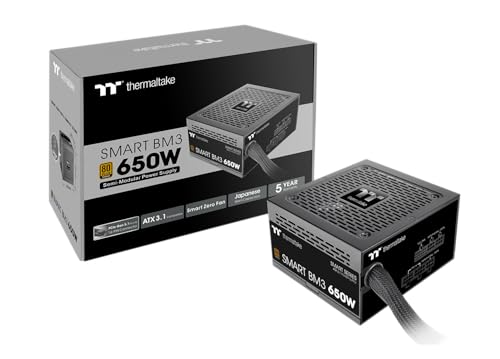
Thermaltake Smart BM3 650W
Japanese 105°C main capacitor.
Best for: Buyers assembling a home theater PC who care about japanese 105°C main capacitor.
Our take Check price for Thermaltake Smart BM3 650W (opens in a new tab)

Case
JONSBO D31 MESH
GPU room of 330mm to 400mm depending on layout.
Best for: Buyers assembling a home theater PC who care about GPU room of 330mm to 400mm depending on layout.
Our take Check price for JONSBO D31 MESH (opens in a new tab)
| Pick | Why it’s here | Best for | Price |
|---|---|---|---|
| AMD's fastest integrated graphics in a desktop chip at launch. | Buyers assembling a home theater PC who care about AMD's fastest integrated graphics in a desktop chip at launch. | Check price for AMD Ryzen 7 8700G (opens in a new tab) |
| PCIe 5.0 M.2 slot. | Buyers assembling a home theater PC who care about PCIe 5.0 M.2 slot. | Check price for ASRock B650I Lightning WiFi (opens in a new tab) |
| Plain heatspreader with no lighting. | Buyers assembling a home theater PC who care about plain heatspreader with no lighting. | Check price for Patriot Viper Venom 16GB (2x8GB) DDR5-6000 CL36 (opens in a new tab) |
| PCIe Gen4 x4 drive. | Buyers assembling a home theater PC who care about PCIe Gen4 x4 drive. | Check price for Patriot Viper VP4300 Lite 1TB (opens in a new tab) |
| Japanese 105°C main capacitor. | Buyers assembling a home theater PC who care about japanese 105°C main capacitor. | Check price for Thermaltake Smart BM3 650W (opens in a new tab) |
| GPU room of 330mm to 400mm depending on layout. | Buyers assembling a home theater PC who care about GPU room of 330mm to 400mm depending on layout. | Check price for JONSBO D31 MESH (opens in a new tab) |
Our Picks
Processor1 of 6
AMD Ryzen 7 8700G on Amazon (opens in a new tab)
The Ryzen 7 8700G stands out for AMD's fastest integrated graphics in a desktop chip at launch, and it adds a Wraith Spire cooler in the box.
Best for
- Buyers assembling a home theater PC who care about AMD's fastest integrated graphics in a desktop chip at launch.
Skip if
- Skip it if you would rather put that 26% of the budget elsewhere.
Why we like it
It also offers a 5.1GHz boost clock and offers an 8 cores core count.
The Ryzen 7 8700G brings 8 cores and 16 threads and a 5.1GHz maximum boost, and it accounts for 26% of the parts total. A cooler comes in the box, so the build adds none. Its integrated graphics drive the monitor, so no graphics card is needed.
Both the Ryzen 7 8700G and the B650I Lightning are AM5, so the chip fits the board without adapters. A newer processor on an older board can need a BIOS update, so the support list is worth a look. The Viper Venom 16GB is a DDR5 kit, the type both the B650I Lightning (DDR5) and the Ryzen 7 8700G (DDR5) accept. A kit of the other generation would not physically fit the board. The Ryzen 7 8700G lists integrated graphics, so the monitor plugs into the motherboard's video output and the build needs no graphics card. Check that the board's HDMI or DisplayPort matches your monitor. To spend less, the Ryzen 5 8600G is 6 cores against 8, roughly 29% cheaper than the Ryzen 7 8700G; the board, memory and cooler rows still hold.
Key dimensions & specs
- Max boost: 5.1GHz
- Cores / threads: 8 cores
- Threads: 16
- Socket: AM5
- Memory: DDR5
- Cooler in box: Yes
- Integrated graphics: Yes
Pros
- Wraith Stealth cooler in the box
- Integrated graphics for display output without a graphics card
- AMD's fastest integrated graphics in a desktop chip at launch
- Wraith Spire cooler in the box
Cons
- At 26% of the parts total, a swap here moves the whole budget
- Every figure comes from the maker's listing, not from our own testing
Motherboard2 of 6
ASRock B650I Lightning WiFi on Amazon (opens in a new tab)
The B650I Lightning uses the older B650 chipset at a lower price, keeping a PCIe 5.0 M.2 slot and Wi-Fi 6E.
Best for
- Buyers assembling a home theater PC who care about PCIe 5.0 M.2 slot.
Skip if
- Skip it if this is a dealbreaker: only 2 M.2 slots.
Why we like it
It suits budget small builds with a mid-range CPU.
For 17% of the parts total, the B650I Lightning adds Mini-ITX size, 2 M.2 slots, Wi-Fi 6E and 2.5GbE LAN on the AM5 socket, and only DDR5 sticks fit its slots.
Both the Ryzen 7 8700G and the B650I Lightning are AM5, so the chip fits the board without adapters. A newer processor on an older board can need a BIOS update, so the support list is worth a look. The Viper Venom 16GB is a DDR5 kit, the type both the B650I Lightning (DDR5) and the Ryzen 7 8700G (DDR5) accept. A kit of the other generation would not physically fit the board. 2 M.2 slots on the B650I Lightning means the VP4300 Lite 1TB plugs in without an adapter, with a slot spare for later; check the manual for the slot that gets the fastest lanes.
Key dimensions & specs
- M.2 slots: 2
- Wired LAN: 2.5Gbps
- Wi-Fi: Wi-Fi 6E
- Power stages: 8+2+1
- Form factor: Mini-ITX
- Socket: AM5
Pros
- PCIe 5.0 M.2 slot
- The older B650 chipset at a lower price
- Passes 4 compatibility checks that name it in this build
- Takes 17% of the parts total, and every figure it is checked on is stated in its listing
Cons
- Only 2 M.2 slots
- Wi-Fi 6E rather than Wi-Fi 7
Memory3 of 6
Patriot Viper Venom 16GB (2x8GB) DDR5-6000 CL36 on Amazon (opens in a new tab)
What the Viper Venom 16GB brings to the table is a plain heatspreader with no lighting.
Best for
- Buyers assembling a home theater PC who care about plain heatspreader with no lighting.
Skip if
- Skip it if 16GB leaves less headroom than 32GB for heavy browser or creative work.
Why we like it
It also offers a CL36 CAS latency and offers a 6000MT/s rated speed.
16GB, DDR5, 6000MT/s and CL36, sold as two sticks, accounts for 24% of the parts total and shows how pricey DDR5 is right now.
The Viper Venom 16GB is a DDR5 kit, the type both the B650I Lightning (DDR5) and the Ryzen 7 8700G (DDR5) accept. A kit of the other generation would not physically fit the board. 16GB arrives as two sticks in the Viper Venom 16GB kit; the B650I Lightning manual shows which two slots to fill so the memory runs in dual-channel. A step up is the Viper Elite 5: 32GB at 6000MT/s, roughly 96% dearer than the Viper Venom 16GB; the memory-type check still passes.
Key dimensions & specs
- CAS latency: CL36
- Rated speed: 6000MT/s
- Capacity: 16GB (2 sticks)
- Memory type: DDR5
Pros
- 6000MT/s, the usual sweet spot for AM5
- Plain heatspreader with no lighting
- Passes 2 compatibility checks that name it in this build
- Takes 24% of the parts total, and every figure it is checked on is stated in its listing
Cons
- 16GB leaves less headroom than 32GB for heavy browser or creative work
- At 24% of the parts total, a swap here moves the whole budget
Storage4 of 6
Patriot Viper VP4300 Lite 1TB on Amazon (opens in a new tab)
What the VP4300 Lite 1TB brings to the table is a PCIe Gen4 x4 drive.
Best for
- Buyers assembling a home theater PC who care about PCIe Gen4 x4 drive.
Skip if
- Skip it if the listing does not say whether the drive has a DRAM cache.
Why we like it
It also is rated for 1TB.
The VP4300 Lite 1TB offers 1TB and PCIe 4.0 and takes 18% of the parts total.
2 M.2 slots on the B650I Lightning means the VP4300 Lite 1TB plugs in without an adapter, with a slot spare for later; check the manual for the slot that gets the fastest lanes. A step up is the P310 2TB: 2TB on PCIe 4.0, roughly 43% dearer than the VP4300 Lite 1TB; it uses the same M.2 slot as the current drive.
Key dimensions & specs
- Interface: PCIe 4.0 x4
- Capacity: 1TB
- Price tier at the time of writing: $100 to $250
Pros
- PCIe Gen4 x4 drive
- Passes the one compatibility check that names it in this build
- Takes 18% of the parts total, and every figure it is checked on is stated in its listing
Cons
- The listing does not say whether the drive has a DRAM cache
- At 18% of the parts total, a swap here moves the whole budget
Power Supply5 of 6
Thermaltake Smart BM3 650W on Amazon (opens in a new tab)
The Thermaltake Smart BM3 650W stands out for Japanese 105°C main capacitor, and it adds semi-modular cables: fixed main cables, detachable extras.
Best for
- Buyers assembling a home theater PC who care about japanese 105°C main capacitor.
Skip if
- Skip it if this is a dealbreaker: A shorter 5-year warranty.
Why we like it
It also offers a 650W rated output and offers a 5 years warranty.
The Thermaltake Smart BM3 650W is 650W, Bronze rated, ATX 3.1, ATX format and semi-modular cables and takes 6% of the parts total.
The Thermaltake Smart BM3 650W is a ATX unit and the D31 Mesh lists ATX or SFX, so the supply has a mount within the 220mm length limit. By price it is the sixth largest of the six parts ($50 to $100 when we checked), which is about 6% of the total.
Key dimensions & specs
- Wattage: 650W
- Warranty: 5 years
- 80 Plus rating: Bronze
- ATX version: ATX 3.1
- Form factor: ATX
- Cabling: Semi-modular
- Fan: 120mm
- Fan stop: Yes
- Colour: Black
Pros
- A 650W rating
- ATX 3.1 compliance
- A fan that stops at low load
- Japanese 105°C main capacitor
Cons
- A shorter 5-year warranty
- Only 80 Plus Bronze efficiency
- Cables that do not fully detach take more routing work in a small case
Case6 of 6
JONSBO D31 MESH on Amazon (opens in a new tab)
The D31 Mesh takes ATX or SFX power supplies up to 220mm long and a 168mm tower cooler.
Best for
- Buyers assembling a home theater PC who care about GPU room of 330mm to 400mm depending on layout.
Skip if
- Skip it if the listing gives no graphics card length limit.
Why we like it
Its GPU limit runs from 330mm to 400mm depending on how you lay out the case.
The D31 Mesh lists room for mATX, ITX boards and coolers up to 168mm tall and takes 8% of the parts total.
The B650I Lightning is a Mini-ITX board and the D31 Mesh lists mATX, ITX, so the board mounts on the standoffs without adapters. The Thermaltake Smart BM3 650W is a ATX unit and the D31 Mesh lists ATX or SFX, so the supply has a mount within the 220mm length limit.
Key dimensions & specs
- Max CPU cooler height: 168mm
- Max PSU length: 220mm
- Motherboards: mATX, ITX
- PSU type: ATX or SFX
Pros
- Takes tower air coolers up to 168mm tall
- GPU room of 330mm to 400mm depending on layout
- Mesh front
- Outer dimensions of 205 x 363 x 452mm
Cons
- The listing gives no graphics card length limit
- At 8% of the parts total, a swap here moves the whole budget
How We Chose
Each pick was assessed across 4 criteria weighted for real-world use.
- Compatibility rules
- The set was tested on paper against 7 rules (CPU socket, memory type, memory kit, M.2 slot for the SSD, board size in the case, display output without a graphics card and power supply format) and passes all of them.
- Price at the time of writing
- The parts landed between $950 and $1,000 together, inside the $1,000 tier. Prices change daily, so the total can drift.
- Maker figures, not testing
- The inputs are listing specifications and chip-maker power recommendations; we have not built this machine or measured it.
- Headroom
- The Thermaltake Smart BM3 650W is 650W for a system without a graphics card, well above what its parts draw.
What to Look for in a $1000 Home Theater PC Build
Key buying criteria so you get the right fit the first time.
Platform and upgrade path
Ryzen 7 8700G and B650I Lightning use AM5 with DDR5 memory. AM5 has taken several processor generations, so a later Ryzen can drop into the same board after a BIOS update. Among the 16GB kits we reviewed, the typical DDR5 kit cost about 2.3 times the typical DDR4 kit at the time of writing.
Power supply sizing
The Thermaltake Smart BM3 650W is 650W. With integrated graphics and no card, the processor and drives are the only sizeable loads, so the supply has room to spare.
Case fit
The B650I Lightning is a Mini-ITX board and the D31 Mesh lists mATX, ITX, so the board mounts on the standoffs without adapters.
Cooling
The Ryzen 7 8700G includes a cooler in the box, which is enough at its rated power; add a tower cooler later only if fan noise bothers you.
Storage
The VP4300 Lite 1TB is PCIe 4.0 x4 and the B650I Lightning has 2 M.2 slots, so a second drive fits later.
Where the money goes
The three largest lines are processor (26%), memory (24%) and storage (18%).
How to Choose a $1000 Home Theater PC Build
Compatibility check
We ran 7 checks on these six parts, and the $1000 Home Theater PC Build passes every one using the figures in the makers' listings. Every row rests on a figure the listings state.
| Check | Parts | Result |
|---|---|---|
| CPU socket | Ryzen 7 8700G + B650I Lightning | Both use AM5. |
| Memory type | Viper Venom 16GB + B650I Lightning + Ryzen 7 8700G | DDR5 on all three. |
| Memory kit | Viper Venom 16GB | 16GB in two sticks. |
| M.2 slot for the SSD | VP4300 Lite 1TB + B650I Lightning | 2 M.2 slots on the board. |
| Board size in the case | B650I Lightning + D31 Mesh | Mini-ITX board; the case lists mATX, ITX. |
| Display output without a graphics card | Ryzen 7 8700G | Integrated graphics listed. |
| Power supply format | Thermaltake Smart BM3 650W + D31 Mesh | ATX unit; the case lists ATX or SFX. |
Scroll sideways to see every column.
Listings can be wrong or incomplete, so treat each row as a first filter and confirm the BIOS version and clearances on the makers' pages.
Where the budget goes
Together the parts landed between $950 and $1,000 at the time of writing, inside the $1,000 tier.
| Part | Pick | Share of parts total | Price tier at the time of writing |
|---|---|---|---|
| Processor | Ryzen 7 8700G | 26% | $250 to $500 |
| Motherboard | B650I Lightning | 17% | $100 to $250 |
| Memory | Viper Venom 16GB | 24% | $100 to $250 |
| Storage | VP4300 Lite 1TB | 18% | $100 to $250 |
| Power Supply | Thermaltake Smart BM3 650W | 6% | $50 to $100 |
| Case | D31 Mesh | 8% | $50 to $100 |
Scroll sideways to see every column.
Swap options that stay compatible
Each swap below was re-run through the same checks, so it fits the rest of this build without a new case, board or power supply.
| If you want to | Swap in | What changes |
|---|---|---|
| Spend less on the processor | Ryzen 5 8600G | 6 cores against 8, roughly 29% cheaper than the Ryzen 7 8700G; the board, memory and cooler rows still hold |
| Spend more on the processor | Ryzen 9 7900 | 12 cores against 8, roughly 34% dearer than the Ryzen 7 8700G; the socket, memory and cooler checks still pass |
| Move to 32GB of memory | Viper Elite 5 | 32GB at 6000MT/s, roughly 96% dearer than the Viper Venom 16GB; the memory-type check still passes |
| Double the storage to 2TB | P310 2TB | 2TB on PCIe 4.0, roughly 43% dearer than the VP4300 Lite 1TB; it uses the same M.2 slot as the current drive |
Scroll sideways to see every column.
Frequently Asked Questions
Is the Thermaltake Smart BM3 650W enough without a graphics card?
Yes, with room to spare: the Thermaltake Smart BM3 650W is 650W and this build draws power mainly through the processor and drives.
Do I need to buy a CPU cooler?
No. The Ryzen 7 8700G includes a cooler in the box, and the build uses it.
Why DDR5 and 16GB of memory?
The Viper Venom 16GB is a DDR5 kit, the type both the B650I Lightning (DDR5) and the Ryzen 7 8700G (DDR5) accept. A kit of the other generation would not physically fit the board. Among the 16GB kits we reviewed, the typical DDR5 kit cost about 2.3 times the typical DDR4 kit at the time of writing.
Can I upgrade this build later?
AM5 has taken several processor generations, so a later Ryzen can drop into the same board after a BIOS update. The D31 Mesh has the clearances listed above, and the B650I Lightning has 2 M.2 slots.
What is not included in the total?
Count the six parts in this guide and nothing else: no operating system, display, keyboard or mouse, and no tax or shipping.
Bottom Line
Our $1,000 build centres on integrated graphics, the Ryzen 7 8700G and the D31 Mesh; it relies on integrated graphics and spends on a 1TB drive for a local media library.
Check the television's HDMI input and the motherboard's HDMI output together: 4K output at higher refresh rates depends on matching HDMI versions, and the listings differ.