
Buying Guide
The Best Compact Wireless Gaming Keyboards
We weighed five keyboards on battery life and layout; the ROG Azoth has the longest battery life, and the K724 PRO costs the least.
By The PC Journal editorial team
12 min read5 products evaluated
A compact wireless board frees desk space and cables. Every pick is wireless with a 60%, 65%, 68-key or 75% layout, ordered by battery life.
We ranked these keyboards on layout, switches and connection using manufacturer specifications; we did not test these keyboards ourselves, and where a maker leaves out battery life, we say so.
Quick Picks
Our 5 recommendations at a glance. Tap a pick for the full verdict.

Longest Battery Life
ASUS ROG Azoth Wireless
The longest battery life here (2000 hours).
Best for: Buyers who put battery life first.
Our take Check price for ASUS ROG Azoth Wireless (opens in a new tab)

Also Consider
Keychron K2 Ultra 8K
8000Hz polling in wired and 2.4GHz modes.
Best for: Buyers who want 8000Hz polling in wired and 2.4GHz modes.
Our take Check price for Keychron K2 Ultra 8K (opens in a new tab)

MLX Red Linear Switches
Corsair K65 Plus Wireless 75% Keyboard
MLX Red linear switches.
Best for: Buyers who want MLX Red linear switches.
Our take Check price for Corsair K65 Plus Wireless 75% Keyboard (opens in a new tab)
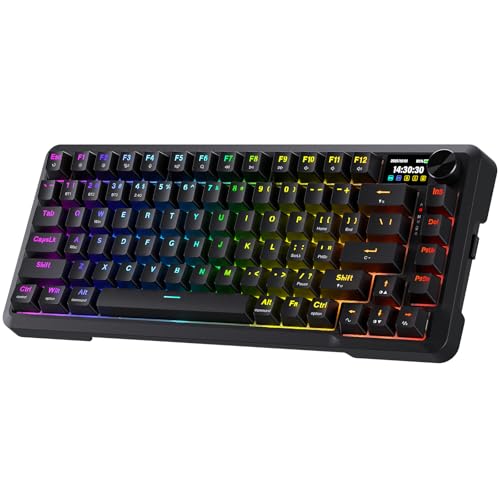
Lowest Price Here
Redragon K724 PRO Wireless
The lowest price among these keyboards at the time of writing.
Best for: Keeping the budget tight.
Our take Check price for Redragon K724 PRO Wireless (opens in a new tab)

Strong Alternative
AULA F75 HE Wireless
A 4000mAh battery.
Best for: Buyers who want 4000mAh battery.
Our take Check price for AULA F75 HE Wireless (opens in a new tab)
| Pick | Why it’s here | Best for | Price |
|---|---|---|---|
| The longest battery life here (2000 hours). | Buyers who put battery life first. | Check price for ASUS ROG Azoth Wireless (opens in a new tab) |
| 8000Hz polling in wired and 2.4GHz modes. | Buyers who want 8000Hz polling in wired and 2.4GHz modes. | Check price for Keychron K2 Ultra 8K (opens in a new tab) |
| MLX Red linear switches. | Buyers who want MLX Red linear switches. | Check price for Corsair K65 Plus Wireless 75% Keyboard (opens in a new tab) |
| The lowest price among these keyboards at the time of writing. | Keeping the budget tight. | Check price for Redragon K724 PRO Wireless (opens in a new tab) |
| A 4000mAh battery. | Buyers who want 4000mAh battery. | Check price for AULA F75 HE Wireless (opens in a new tab) |
Our Picks
Longest Battery Life1 of 5
ASUS ROG Azoth Wireless on Amazon (opens in a new tab)
The ROG Azoth is ASUS's enthusiast 75% board: gasket-mounted with three layers of foam, hot-swappable, and wireless over 2.4GHz or Bluetooth.
Best for
- Buyers who put battery life first.
Skip if
- Price-first buyers should look at the K724 PRO, which cost less when we checked.
Why we like it
A small OLED display shows settings and battery. Its 2000 hours battery life is the longest here; the K2 Ultra comes next at 760 hours. Like the K2 Ultra and K65 Plus Wireless, it has a 75% layout, while the K724 PRO uses a 75% (81 keys) layout.
It is the only pick here with double-shot PBT keycaps; the K2 Ultra has PBT keycaps instead. It also comes with a hot-swap PCB with a switch and keycap kit. Use the ROG Azoth's dongle or cable for games; Bluetooth suits a laptop or tablet. It was the most expensive pick when we checked, so weigh what it adds over the K65 Plus Wireless.
Key dimensions & specs
- Layout: 75%
- Switches: ROG NX Snow linear or NX Storm clicky
- Connection: 2.4GHz, Bluetooth, wired
- Battery life: 2000 hours
- Keycaps: Double-shot PBT
Pros
- Compact 75% layout
- ROG NX Snow linear or NX Storm clicky switches
- Dongle, Bluetooth and wired modes
- Up to 2000 hours per charge
Cons
- Costs more than the K724 PRO at the time of writing
Also Consider2 of 5
Keychron K2 Ultra 8K on Amazon (opens in a new tab)
Keychron's K2 Ultra reaches 8000Hz polling on both wired and 2.4GHz and uses an aluminum frame.
Best for
- Buyers who want 8000Hz polling in wired and 2.4GHz modes.
Skip if
- If budget leads, the K724 PRO was cheaper at our last price check.
Why we like it
The sockets take 3-pin and 5-pin switches. Its 760 hours battery life ranks second of 3 here, behind the ROG Azoth (2000 hours) and ahead of the K65 Plus Wireless (266 hours). It shares a 75% layout with the ROG Azoth and K65 Plus Wireless; the F75 HE goes with a 75% (80 keys) layout.
Keychron Apex Red linear switches is unique to it among these picks, while the K724 PRO uses lubed linear switches. It shares PBT keycaps with the K65 Plus Wireless; the ROG Azoth goes with double-shot PBT keycaps. Use the K2 Ultra's dongle or cable for games; Bluetooth suits a laptop or tablet.
High polling rates use more CPU time; drop to 1,000Hz if an older system stutters. When we checked, only the F75 HE and cheaper picks cost less, and the K65 Plus Wireless cost more.
Key dimensions & specs
- Layout: 75%
- Switches: Keychron Apex Red linear
- Connection: 2.4GHz, Bluetooth, wired
- Polling rate: 8,000Hz
- Battery life: 760 hours
- Keycaps: PBT
Pros
- Compact 75% layout
- Keychron Apex Red linear switches
- Dongle, Bluetooth and wired modes
- 8,000Hz polling
Cons
- Costs more than the K724 PRO at the time of writing
MLX Red Linear Switches3 of 5
Corsair K65 Plus Wireless 75% Keyboard on Amazon (opens in a new tab)
The K65 Plus Wireless is the long-distance runner: a 75% layout, MLX Red switches and a 266 hours per charge.
Best for
- Buyers who want MLX Red linear switches.
Skip if
- Skip it if battery life matters most to you; the ROG Azoth offers 2000 hours.
Why we like it
Its pre-lubricated MLX Red linear switches feel smooth, and it runs up to 266 hours per charge with RGB off. Connections over 2.4GHz, Bluetooth or USB use AES encryption. Its 266 hours battery life is the shortest in this group; the ROG Azoth leads at 2000 hours.
It shares a 75% layout with the ROG Azoth and K2 Ultra; the F75 HE goes with a 75% (80 keys) layout. MLX Red linear switches is unique to it among these picks, while the F75 HE uses hall effect magnetic switches. It shares PBT keycaps with the K2 Ultra; the ROG Azoth goes with double-shot PBT keycaps.
It also comes with a gasket-mounted design. Use the K65 Plus Wireless's dongle or cable for games; Bluetooth suits a laptop or tablet. When we checked, only the K2 Ultra and cheaper picks cost less, and the ROG Azoth cost more.
Key dimensions & specs
- Layout: 75%
- Switches: MLX Red linear
- Connection: Slipstream 2.4GHz, Bluetooth, wired
- Battery life: 266 hours
- Keycaps: PBT
Pros
- Compact 75% layout
- MLX Red linear switches
- Dongle, Bluetooth and wired modes
- Up to 266 hours per charge
Cons
- Battery life trails the ROG Azoth (2000 hours)
- Costs more than the K724 PRO at the time of writing
Lowest Price Here4 of 5
Redragon K724 PRO Wireless on Amazon (opens in a new tab)
Redragon's K724 PRO adds a built-in screen and knob to a gasket-mounted 75% board.
Best for
- Keeping the budget tight.
Skip if
- Skip it if you need to know its battery life before buying; the maker doesn't publish one.
Why we like it
The maker specifies five layers of noise dampening. A TFT screen shows battery and connection status and can run custom GIFs, next to a control knob. It switches between three connection modes without re-pairing.
You get a 75% (81 keys) layout here, which sets it apart from the F75 HE and its a 75% (80 keys) layout. Lubed linear switches is unique to it among these picks, while the K65 Plus Wireless uses MLX Red linear switches. Use the K724 PRO's dongle or cable for games; Bluetooth suits a laptop or tablet.
No other pick here cost less at our last price check, and the F75 HE was closest. If you want a confirmed battery life, look to the ROG Azoth instead: it runs for 2000 hours, while this one gives no figure.
Key dimensions & specs
- Layout: 75% (81 keys)
- Switches: Lubed linear
- Connection: 2.4GHz, Bluetooth, wired
Pros
- Compact 75% (81 keys) layout
- Lubed linear switches
- Dongle, Bluetooth and wired modes
- Built-in screen and knob
Cons
- No published battery life
Strong Alternative5 of 5
AULA F75 HE Wireless on Amazon (opens in a new tab)
AULA's F75 HE brings Hall effect switches to a tri-mode 75% board with a 4000mAh battery and a knob.
Best for
- Buyers who want 4000mAh battery.
Skip if
- Its battery life is not published, which rules it out if you need that number.
Why we like it
The switches are hot-swappable. No other pick in this guide offers a 75% (80 keys) layout; compare the K65 Plus Wireless, which has a 75% layout. It is the only pick here with hall effect magnetic switches; the K724 PRO has lubed linear switches instead.
Use the F75 HE's dongle or cable for games; Bluetooth suits a laptop or tablet. Adjusting actuation needs the maker's software or web tool on Windows. On price it sat second of 5, between the cheaper K724 PRO and the pricier K2 Ultra, at the time of writing. The maker doesn't give its battery life; if that figure matters, the ROG Azoth runs for 2000 hours.
Key dimensions & specs
- Layout: 75% (80 keys)
- Switches: Hall effect magnetic
- Connection: 2.4GHz, Bluetooth, wired
Pros
- Compact 75% (80 keys) layout
- Magnetic Hall effect switches
- Dongle, Bluetooth and wired modes
- 4000mAh battery
Cons
- No published battery life
- Costs more than the K724 PRO at the time of writing
How We Chose These Compact Wireless Gaming Keyboards
Each pick was assessed across 4 criteria weighted for real-world use.
- The figures behind the order
- We set side by side five keyboards on layout, switches, connection and battery life from manufacturer specifications. We did not test them in-house.
- What every pick has in common
- All 5, from the ROG Azoth to the F75 HE, state layout, switches and connection.
- Where the specs have gaps
- The K724 PRO and the F75 HE give no battery life; the K724 PRO and the F75 HE give no keycaps.
- Price range
- At our last check the picks ran from the K724 PRO ($50 to $100) to the ROG Azoth ($150 to $250).
What to Look for in a Compact Wireless Gaming Keyboard
Key buying criteria so you get the right fit the first time.
Battery life
Here battery life runs from 266 hours on the K65 Plus Wireless to 2000 hours on the ROG Azoth. The K2 Ultra comes second for less money. No figure for the K724 PRO and the F75 HE.
Keycaps
The ROG Azoth lists Double-shot PBT; the K2 Ultra and the K65 Plus Wireless list PBT.
Setup checks
Use the ROG Azoth's dongle or cable for games; Bluetooth suits a laptop or tablet.
Extras that separate them
The K65 Plus Wireless: a gasket-mounted design. The K724 PRO: a gasket mount. The F75 HE: a control knob.
Budget
$50 to $100 buys the K724 PRO and the F75 HE; $100 to $150 buys the K2 Ultra; $150 to $250 buys the K65 Plus Wireless and the ROG Azoth at our last check.
How to Choose a Compact Wireless Gaming Keyboard
By priority
| Priority | Consider | Why |
|---|---|---|
| Buyers who put battery life first | ROG Azoth | The longest battery life here (2000 hours) |
| Buyers who want 8000Hz polling in wired and 2.4GHz modes | K2 Ultra | 8000Hz polling in wired and 2.4GHz modes |
| Buyers who want MLX Red linear switches | K65 Plus Wireless | MLX Red linear switches |
| Keeping the budget tight | K724 PRO | The lowest price among these keyboards at the time of writing |
| Buyers who want 4000mAh battery | F75 HE | A 4000mAh battery |
Scroll sideways to see every column.
Key specs side by side
The ROG Azoth leads on battery life at 2000 hours, ahead of the K2 Ultra at 760 hours. "Not listed" means the maker leaves that figure out.
| Keyboard | Layout | Switches | Connection | Battery life |
|---|---|---|---|---|
| ROG Azoth | 75% | ROG NX Snow linear or NX Storm clicky | 2.4GHz, Bluetooth, wired | 2000 hours |
| K2 Ultra | 75% | Keychron Apex Red linear | 2.4GHz, Bluetooth, wired | 760 hours |
| K65 Plus Wireless | 75% | MLX Red linear | Slipstream 2.4GHz, Bluetooth, wired | 266 hours |
| K724 PRO | 75% (81 keys) | Lubed linear | 2.4GHz, Bluetooth, wired | Not listed |
| F75 HE | 75% (80 keys) | Hall effect magnetic | 2.4GHz, Bluetooth, wired | Not listed |
Scroll sideways to see every column.
By price at the time of writing
The K724 PRO was the lowest-priced pick and the ROG Azoth the highest when we checked; tiers move with Amazon pricing.
| Price tier | Keyboards |
|---|---|
| About $50 to $100 | K724 PRO, F75 HE |
| About $100 to $150 | K2 Ultra |
| About $150 to $250 | K65 Plus Wireless, ROG Azoth |
Frequently Asked Questions
Is the ROG Azoth ahead of the K2 Ultra on battery life?
The ROG Azoth leads at 2000 hours, with the K2 Ultra at 760 hours. The K65 Plus Wireless is at the other end of this group with 266 hours. The K724 PRO and the F75 HE don't state a figure, so they sit outside this comparison.
Why is the K65 Plus Wireless our MLX Red Linear Switches pick?
It earns the label for MLX Red linear switches. It suits anyone who wants MLX Red linear switches.
Do the ROG Azoth and the K724 PRO differ on layout?
The ROG Azoth, the K2 Ultra and the K65 Plus Wireless use 75%; the K724 PRO uses 75% (81 keys); the F75 HE uses 75% (80 keys).
Will the K724 PRO work with my setup?
Use the K724 PRO's dongle or cable for games; Bluetooth suits a laptop or tablet. In this guide it ranks fourth of 5, as our Lowest Price Here pick.
What extras do the ROG Azoth and the K2 Ultra include?
The ROG Azoth: a silicone gasket mount with three layers of foam. The K2 Ultra: 8000Hz polling in wired and 2.4GHz modes. The K65 Plus Wireless: a gasket-mounted design.
Bottom Line
Our first pick is the ROG Azoth, chosen for the longest battery life here (2000 hours). Look at the K2 Ultra for 8000Hz polling in wired and 2.4GHz modes, the K65 Plus Wireless for MLX Red linear switches and the K724 PRO for the lowest price among these keyboards at the time of writing if those matter more to you.
Check that arrow keys exist if you use them.