
Buying Guide
The Best Wireless Earbuds for Gaming
Five headsets ranked on battery life and connection; the KASOTT YX37 is the cheapest route in.
By The PC Journal editorial team
12 min read5 products evaluated
Ordinary Bluetooth earbuds add delay that you notice in games, so look for a 2.4GHz dongle or a stated low-latency mode. Every pair here is a true wireless set that lists a 2.4GHz dongle or a low-latency or gaming mode.
Rankings weigh battery life, connection and design as the makers state them; if a maker skips microphone, the guide says so rather than guess, since we have not benched them.
Quick Picks
Our 5 recommendations at a glance. Tap a pick for the full verdict.

Also Consider
SteelSeries Arctis GameBuds (Xbox, PC, PS5, Switch)
A Qi charging case with 3 extra charges for up to 40 hours.
Best for: Buyers who want Qi charging case with 3 extra charges for up to 40 hours.
Our take Check price for SteelSeries Arctis GameBuds (Xbox, PC, PS5, Switch) (opens in a new tab)
Premium Pick
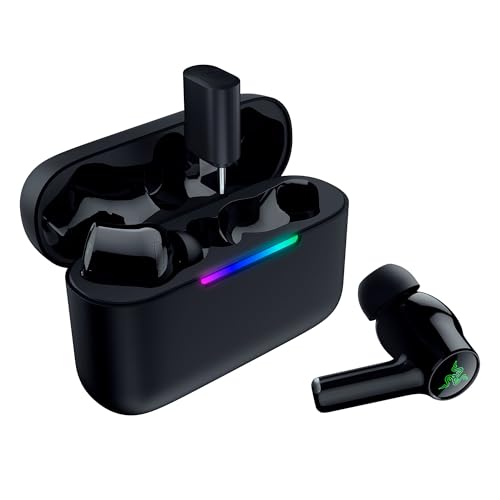
Razer Hammerhead V3 Wireless
The top of this price range, adding a title that lists PCs, PlayStation 5 and Steam Deck over 2.4GHz.
Best for: Spending more than the Arctis GameBuds costs for the fullest feature set in this group.
Our take Check price for Razer Hammerhead V3 Wireless (opens in a new tab)

Lowest Price Here
KASOTT GameMaster Buds YX37
The lowest price among these headsets at the time of writing.
Best for: Buyers who would rather put the savings elsewhere than into the Middle Rabbit SW4 Pro.
Our take Check price for KASOTT GameMaster Buds YX37 (opens in a new tab)
Strong Alternative
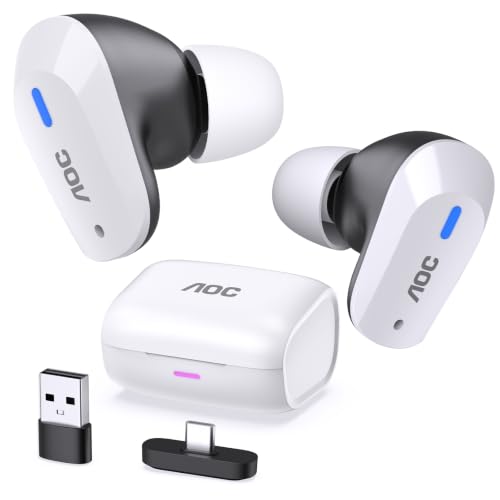
AOC Wireless Gaming Earbuds ACT3512
A 20ms low-latency figure over the 2.4GHz dongle.
Best for: Buyers who want 20ms low-latency figure over the 2.4GHz dongle.
Our take Check price for AOC Wireless Gaming Earbuds ACT3512 (opens in a new tab)

Worth a Look
Middle Rabbit SW4 Pro
The LC3 codec over 2.4GHz with a 20ms low-latency figure.
Best for: Buyers who want LC3 codec over 2.4GHz with a 20ms low-latency figure.
Our take Check price for Middle Rabbit SW4 Pro (opens in a new tab)
| Pick | Why it’s here | Best for | Price |
|---|---|---|---|
| A Qi charging case with 3 extra charges for up to 40 hours. | Buyers who want Qi charging case with 3 extra charges for up to 40 hours. | Check price for SteelSeries Arctis GameBuds (Xbox, PC, PS5, Switch) (opens in a new tab) |
| The top of this price range, adding a title that lists PCs, PlayStation 5 and Steam Deck over 2.4GHz. | Spending more than the Arctis GameBuds costs for the fullest feature set in this group. | Check price for Razer Hammerhead V3 Wireless (opens in a new tab) |
| The lowest price among these headsets at the time of writing. | Buyers who would rather put the savings elsewhere than into the Middle Rabbit SW4 Pro. | Check price for KASOTT GameMaster Buds YX37 (opens in a new tab) |
| A 20ms low-latency figure over the 2.4GHz dongle. | Buyers who want 20ms low-latency figure over the 2.4GHz dongle. | Check price for AOC Wireless Gaming Earbuds ACT3512 (opens in a new tab) |
| The LC3 codec over 2.4GHz with a 20ms low-latency figure. | Buyers who want LC3 codec over 2.4GHz with a 20ms low-latency figure. | Check price for Middle Rabbit SW4 Pro (opens in a new tab) |
Our Picks
Also Consider1 of 5
SteelSeries Arctis GameBuds (Xbox, PC, PS5, Switch) on Amazon (opens in a new tab)
The Arctis GameBuds stands out for a Qi charging case with 3 extra charges for up to 40 hours, and it adds 4-mic hybrid ANC with a transparency mode.
Best for
- Buyers who want Qi charging case with 3 extra charges for up to 40 hours.
Skip if
- Worth skipping when shorter 10-hour battery is a problem.
Why we like it
It also runs for up to 10 hours. It matches the Razer Hammerhead V3 on battery life (10 hours). It also offers 100+ game audio presets in the Arctis Companion app and IP55 water resistance.
On a PC, use the 2.4GHz dongle for games and keep Bluetooth for a phone, since Bluetooth adds latency. Before buying, weigh one limit: costs more than the KASOTT YX37 at the time of writing. When we checked, only the AOC ACT3512 and cheaper picks cost less, and the Razer Hammerhead V3 cost more.
Key dimensions & specs
- Battery life: 10 hours
- Connection: 2.4GHz, Bluetooth 5.3
- Design: In-ear (true wireless)
Pros
- Dual wireless: dongle plus Bluetooth
- Qi charging case with 3 extra charges for up to 40 hours
- 4-mic hybrid ANC with a transparency mode
- 100+ game audio presets in the Arctis Companion app
Cons
- Shorter 10-hour battery
- Costs more than the KASOTT YX37 at the time of writing
Premium Pick2 of 5
Razer Hammerhead V3 Wireless on Amazon (opens in a new tab)
The Razer Hammerhead V3 stands out for a title that lists PCs, PlayStation 5 and Steam Deck over 2.4GHz, and it adds a removable dongle on a HyperSpeed charging case with USB-C passthrough.
Best for
- Spending more than the Arctis GameBuds costs for the fullest feature set in this group.
Skip if
- Skip it if this is a deal-breaker for you: shorter 10-hour battery.
Why we like it
It also runs for up to 10 hours. On battery life it ties with the Arctis GameBuds at 10 hours. It also offers 30 more hours from the case and IPX4 water resistance and THX Spatial Audio on Windows 11.
On a PC, use the 2.4GHz dongle for games and keep Bluetooth for a phone, since Bluetooth adds latency. Before buying, weigh one limit: costs more than the KASOTT YX37 at the time of writing. It was the most expensive pick when we checked, so weigh what it adds over the Arctis GameBuds.
Key dimensions & specs
- Battery life: 10 hours
- Connection: 2.4GHz HyperSpeed, Bluetooth
- Design: In-ear (true wireless)
Pros
- Dual wireless: dongle plus Bluetooth
- Title that lists PCs, PlayStation 5 and Steam Deck over 2.4GHz
- Removable dongle on a HyperSpeed charging case with USB-C passthrough
- 30 more hours from the case and IPX4 water resistance
Cons
- Shorter 10-hour battery
- Costs more than the KASOTT YX37 at the time of writing
Lowest Price Here3 of 5
KASOTT GameMaster Buds YX37 on Amazon (opens in a new tab)
What the KASOTT YX37 brings to the table is a 30ms low-latency figure, plus active noise cancellation.
Best for
- Buyers who would rather put the savings elsewhere than into the Middle Rabbit SW4 Pro.
Skip if
- Pass on it if shorter 8-hour battery rules it out for your setup.
Why we like it
It also runs for up to 8 hours and offers a 13mm driver size. It matches the AOC ACT3512 on battery life (8 hours). It also offers a charging case with an LED battery display.
On a PC, use the 2.4GHz dongle for games and keep Bluetooth for a phone, since Bluetooth adds latency. It connects over USB, which also handles the audio processing on your PC. It cost the least of the 5 picks at the time of writing, with the Middle Rabbit SW4 Pro the next step up. What it gives up: battery life of 8 hours, behind the Arctis GameBuds (10 hours); by contrast, the Arctis GameBuds runs for 10 hours.
Key dimensions & specs
- Battery life: 8 hours
- Driver size: 13mm
- Connection: 2.4GHz USB-C dongle, Bluetooth 5.4
- Design: In-ear (true wireless)
Pros
- Dual wireless: dongle plus Bluetooth
- 30ms low-latency figure
- Active noise cancellation
- Charging case with an LED battery display
Cons
- Shorter 8-hour battery
- Battery life of 8 hours, behind the Arctis GameBuds (10 hours)
Strong Alternative4 of 5
AOC Wireless Gaming Earbuds ACT3512 on Amazon (opens in a new tab)
The AOC ACT3512 stands out for a 20ms low-latency figure over the 2.4GHz dongle, and it adds a built-in hardware audio amplifier.
Best for
- Buyers who want 20ms low-latency figure over the 2.4GHz dongle.
Skip if
- Look at the others if this bothers you: shorter 8-hour battery.
Why we like it
It also runs for up to 8 hours. On battery life it ties with the KASOTT YX37 at 8 hours. It also comes with 32 hours with the case and a USB-C to USB-A adapter in the box.
On a PC, use the 2.4GHz dongle for games and keep Bluetooth for a phone, since Bluetooth adds latency. It connects over USB, which also handles the audio processing on your PC. On price it sat third of 5, between the cheaper Middle Rabbit SW4 Pro and the pricier Arctis GameBuds, at the time of writing.
Key dimensions & specs
- Battery life: 8 hours
- Connection: 2.4GHz USB-C dongle, Bluetooth
- Design: In-ear (true wireless)
- Microphone: Silicon noise-canceling
Pros
- Dual wireless: dongle plus Bluetooth
- 20ms low-latency figure over the 2.4GHz dongle
- Built-in hardware audio amplifier
- 32 hours with the case
Cons
- Shorter 8-hour battery
- Costs more than the KASOTT YX37 at the time of writing
Worth a Look5 of 5
Middle Rabbit SW4 Pro on Amazon (opens in a new tab)
The Middle Rabbit SW4 Pro stands out for the LC3 codec over 2.4GHz with a 20ms low-latency figure, and it adds four EQ modes including Footstep Boost.
Best for
- Buyers who want LC3 codec over 2.4GHz with a 20ms low-latency figure.
Skip if
- Pass on it if shorter 6-hour battery rules it out for your setup.
Why we like it
It also runs for up to 6 hours. On battery life it trails the group at 6 hours, while the Arctis GameBuds runs for 10 hours. It also offers a case with 3 extra full recharges and a 1-year warranty.
On a PC, use the 2.4GHz dongle for games and keep Bluetooth for a phone, since Bluetooth adds latency. Its price falls between the KASOTT YX37 and the AOC ACT3512, based on our last check.
Key dimensions & specs
- Battery life: 6 hours
- Connection: 2.4GHz dongle, Bluetooth
- Design: In-ear (true wireless)
- Microphone: Four built-in
Pros
- Dual wireless: dongle plus Bluetooth
- The LC3 codec over 2.4GHz with a 20ms low-latency figure
- Four EQ modes including Footstep Boost
- Case with 3 extra full recharges
Cons
- Shorter 6-hour battery
- Battery life trails the Arctis GameBuds (10 hours)
- Costs more than the KASOTT YX37 at the time of writing
How We Chose These Wireless Earbuds for Gaming
Each pick was assessed across 4 criteria weighted for real-world use.
- The figures behind the order
- We set side by side five headsets on battery life, connection, design and microphone, using each maker's published specs. We did not test them in-house, and microphone is missing for at least one pick.
- What every pick has in common
- All 5, from the Arctis GameBuds to the Middle Rabbit SW4 Pro, state battery life, connection and design and share In-ear (true wireless) design.
- Where the specs have gaps
- The Arctis GameBuds, the Razer Hammerhead V3 and the KASOTT YX37 give no microphone.
- Price range
- At our last check the picks ran from the KASOTT YX37 (under $50) to the Razer Hammerhead V3 ($100 to $150).
What to Look for in Wireless Earbuds for Gaming
Key buying criteria so you get the right fit the first time.
How much battery life you need
The Arctis GameBuds tops battery life at 10 hours and the Middle Rabbit SW4 Pro sits lowest at 6 hours; 2 picks share the top figure. The Arctis GameBuds is the pick for battery life.
Extras that separate them
The KASOTT YX37: active noise cancellation. The AOC ACT3512: a built-in hardware audio amplifier. The Middle Rabbit SW4 Pro: four EQ modes including Footstep Boost.
How much to spend
Under $50 buys the KASOTT YX37 and the Middle Rabbit SW4 Pro; $50 to $100 buys the AOC ACT3512; $100 to $150 buys the Arctis GameBuds and the Razer Hammerhead V3 at our last check.
Start from what matters most
Spending more than the Arctis GameBuds costs for the fullest feature set in this group: the Razer Hammerhead V3. Buyers who would rather put the savings elsewhere than into the Middle Rabbit SW4 Pro: the KASOTT YX37.
Pick the connection first
A 2.4GHz dongle gives the lowest latency for games; Bluetooth is convenient for phones but lags for shooters. Wired headsets have no latency or battery concerns.
If you play on a console as well as a PC, check which connections each platform supports before buying.
How to Choose Wireless Earbuds for Gaming
By priority
| Priority | Consider | Why |
|---|---|---|
| Buyers who want Qi charging case with 3 extra charges for up to 40 hours | Arctis GameBuds | A Qi charging case with 3 extra charges for up to 40 hours |
| Spending more than the Arctis GameBuds costs for the fullest feature set in this group | Razer Hammerhead V3 | The top of this price range, adding a title that lists PCs, PlayStation 5 and Steam Deck over 2.4GHz |
| Buyers who would rather put the savings elsewhere than into the Middle Rabbit SW4 Pro | KASOTT YX37 | The lowest price among these headsets at the time of writing |
| Buyers who want 20ms low-latency figure over the 2.4GHz dongle | AOC ACT3512 | A 20ms low-latency figure over the 2.4GHz dongle |
| Buyers who want LC3 codec over 2.4GHz with a 20ms low-latency figure | Middle Rabbit SW4 Pro | The LC3 codec over 2.4GHz with a 20ms low-latency figure |
Scroll sideways to see every column.
Key specs side by side
The Arctis GameBuds leads on battery life at 10 hours, ahead of the Razer Hammerhead V3 at 10 hours. "Not listed" marks microphone where the Arctis GameBuds, the Razer Hammerhead V3 and the KASOTT YX37 leave the figure out.
| Headset | Battery life | Connection | Design | Microphone |
|---|---|---|---|---|
| Arctis GameBuds | 10 hours | 2.4GHz, Bluetooth 5.3 | In-ear (true wireless) | Not listed |
| Razer Hammerhead V3 | 10 hours | 2.4GHz HyperSpeed, Bluetooth | In-ear (true wireless) | Not listed |
| KASOTT YX37 | 8 hours | 2.4GHz USB-C dongle, Bluetooth 5.4 | In-ear (true wireless) | Not listed |
| AOC ACT3512 | 8 hours | 2.4GHz USB-C dongle, Bluetooth | In-ear (true wireless) | Silicon noise-canceling |
| Middle Rabbit SW4 Pro | 6 hours | 2.4GHz dongle, Bluetooth | In-ear (true wireless) | Four built-in |
Scroll sideways to see every column.
By price at the time of writing
The KASOTT YX37 was the lowest-priced pick (under $50) and the Razer Hammerhead V3 the highest ($100 to $150) when we checked; tiers move with Amazon pricing.
| Price tier | Headsets |
|---|---|
| Under $50 | KASOTT YX37, Middle Rabbit SW4 Pro |
| About $50 to $100 | AOC ACT3512 |
| About $100 to $150 | Arctis GameBuds, Razer Hammerhead V3 |
Frequently Asked Questions
What does the Razer Hammerhead V3 add over the KASOTT YX37?
The spec sheets show battery life (10 hours against 8 hours) in its favour. On our last price check the KASOTT YX37 was in the under $50 tier and the Razer Hammerhead V3 in the $100 to $150 tier, with 3 other picks between them; pay the difference only if battery life decides your purchase.
Why is the KASOTT YX37 our Lowest Price Here pick?
It earns the label for the lowest price among these headsets at the time of writing. It is aimed at anyone who would rather put the savings elsewhere than into the Middle Rabbit SW4 Pro.
Do the AOC ACT3512 and the Middle Rabbit SW4 Pro differ on microphone?
The AOC ACT3512 uses silicon noise-canceling; the Middle Rabbit SW4 Pro uses four built-in. The Arctis GameBuds, the Razer Hammerhead V3 and the KASOTT YX37 have no microphone listed, so 2 of 5 picks are covered here.
What extras do the Arctis GameBuds and the Razer Hammerhead V3 include?
The Arctis GameBuds: a Qi charging case with 3 extra charges for up to 40 hours. The Razer Hammerhead V3: a title that lists PCs, PlayStation 5 and Steam Deck over 2.4GHz. The KASOTT YX37: a 30ms low-latency figure.
Who should choose the Razer Hammerhead V3?
The Razer Hammerhead V3 carries our Premium Pick label for the top of this price range, adding a title that lists PCs, PlayStation 5 and Steam Deck over 2.4GHz. It ranks second of 5 here and sat in the $100 to $150 tier at our last price check; it suits spending more than the Arctis GameBuds costs for the fullest feature set in this group.
Bottom Line
Our first pick is the Arctis GameBuds, chosen for a Qi charging case with 3 extra charges for up to 40 hours. Look at the Razer Hammerhead V3 for the top of this price range, adding a title that lists PCs, PlayStation 5 and Steam Deck over 2.4GHz, the KASOTT YX37 for the lowest price among these headsets at the time of writing and the AOC ACT3512 for a 20ms low-latency figure over the 2.4GHz dongle if those matter more to you.
Latency figures come from the makers; test the pair in the game you play, and keep the dongle plugged in for the low-latency mode.