
Buying Guide
The Best USB4 Docks for Gaming Handhelds
We compared gaming handheld docks by charging wattage matched to Turbo Modes, HDMI refresh rate, and cooling, since underpowered charging hurts performance.
By The PC Journal editorial team
8 min read4 products evaluated
Docking a Steam Deck, ROG Ally, Legion Go, or similar handheld to a TV involves more than just an HDMI port, since the dock's charging wattage needs to match the handheld's specific Turbo or performance modes to avoid battery drain during demanding games.
We compared this lineup on charging wattage matched to named performance modes, HDMI refresh rate, and cooling design, since a dock without adequate charging can leave a handheld's battery draining even while plugged in during graphically intensive sessions.
Quick Picks
Our 4 recommendations at a glance. Tap a pick for the full verdict.
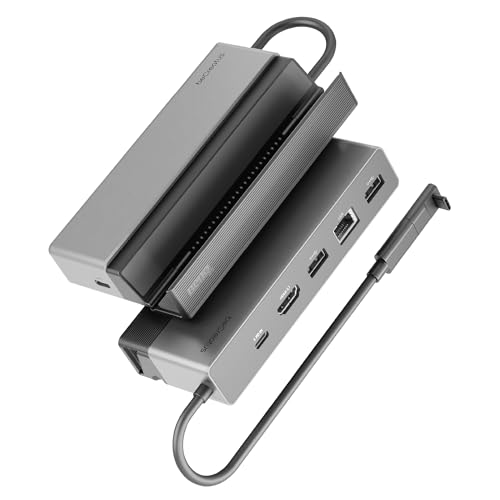
Top Pick
BenQ GR10 USB4 Gaming Docking Station
This dock's HDMI 2.1 output specifically supports 1080p@360Hz, 4K@120Hz, or 8K@60Hz with HDR10, genuinely higher refresh rate ceilings than the HDMI 2.0-based picks in this comparison, letting a Steam Deck or ROG Ally output lag-free high-refresh gameplay to a compatible TV or monitor.
Best for: buyers who want the highest HDMI refresh rate ceiling for lag-free high-refresh gameplay
Our take Check price for BenQ GR10 USB4 Gaming Docking Station (opens in a new tab)

Best Turbo Mode Charging
JSAUX 4-in-1 Docking Station for Gaming Handhelds
This dock specifically states it fully supports named Turbo Modes across multiple handheld brands: ROG Ally and Ally X's 30W Turbo Mode, ROG Xbox Ally series' 25W and 35W Turbo Modes, and full-speed charging for Legion Go, Steam Deck, and MSI Claw, a level of named performance-mode compatibility disclosure none of the other picks in this comparison match.
Best for: buyers who want charging specifically matched to named Turbo Mode wattages at the lowest price
Our take Check price for JSAUX 4-in-1 Docking Station for Gaming Handhelds (opens in a new tab)

Best Portable Design
Razer Handheld Dock Chroma
This dock's collapsible design is specifically built for gamers on the go, with a solid aluminum chassis geared to withstand travel wear and tear while remaining lightweight and portable, a genuinely different design priority than the more permanent desk-oriented docks in this comparison.
Best for: buyers who want a genuinely portable, travel-friendly dock with an adjustable stand
Our take Check price for Razer Handheld Dock Chroma (opens in a new tab)

Best Cooling
Handheld Gaming Console Dock with Dual RGB Fans
This dock's dual 5cm diameter fans are specifically larger than the standard 2cm fans typical of competing docks, delivering more airflow to prevent thermal throttling and extend battery lifespan during intense gaming sessions, with a rear switch to disable the fans in cooler environments.
Best for: buyers who want the most active cooling to prevent thermal throttling during intense sessions
Our take Check price for Handheld Gaming Console Dock with Dual RGB Fans (opens in a new tab)
| Pick | Why it’s here | Best for | Price |
|---|---|---|---|
| This dock's HDMI 2.1 output specifically supports 1080p@360Hz, 4K@120Hz, or 8K@60Hz with HDR10, genuinely higher refresh rate ceilings than the HDMI 2.0-based picks in this comparison, letting a Steam Deck or ROG Ally output lag-free high-refresh gameplay to a compatible TV or monitor. | buyers who want the highest HDMI refresh rate ceiling for lag-free high-refresh gameplay | Check price for BenQ GR10 USB4 Gaming Docking Station (opens in a new tab) |
| This dock specifically states it fully supports named Turbo Modes across multiple handheld brands: ROG Ally and Ally X's 30W Turbo Mode, ROG Xbox Ally series' 25W and 35W Turbo Modes, and full-speed charging for Legion Go, Steam Deck, and MSI Claw, a level of named performance-mode compatibility disclosure none of the other picks in this comparison match. | buyers who want charging specifically matched to named Turbo Mode wattages at the lowest price | Check price for JSAUX 4-in-1 Docking Station for Gaming Handhelds (opens in a new tab) |
| This dock's collapsible design is specifically built for gamers on the go, with a solid aluminum chassis geared to withstand travel wear and tear while remaining lightweight and portable, a genuinely different design priority than the more permanent desk-oriented docks in this comparison. | buyers who want a genuinely portable, travel-friendly dock with an adjustable stand | Check price for Razer Handheld Dock Chroma (opens in a new tab) |
| This dock's dual 5cm diameter fans are specifically larger than the standard 2cm fans typical of competing docks, delivering more airflow to prevent thermal throttling and extend battery lifespan during intense gaming sessions, with a rear switch to disable the fans in cooler environments. | buyers who want the most active cooling to prevent thermal throttling during intense sessions | Check price for Handheld Gaming Console Dock with Dual RGB Fans (opens in a new tab) |
Our Picks
Top Pick1 of 4
BenQ GR10 USB4 Gaming Docking Station on Amazon (opens in a new tab)
This dock's HDMI 2.1 output specifically supports 1080p@360Hz, 4K@120Hz, or 8K@60Hz with HDR10, genuinely higher refresh rate ceilings than the HDMI 2.0-based picks in this comparison, letting a Steam Deck or ROG Ally output lag-free high-refresh gameplay to a compatible TV or monitor.
Best for
- buyers who want the highest HDMI refresh rate ceiling for lag-free high-refresh gameplay
Skip if
- Skip it if no HDMI CEC support, per the manufacturer's own note.
Why we like it
Its 2.5Gb Ethernet specifically supports stable streaming through Moonlight and GeForce NOW for cloud gaming scenarios. Compared to the Razer pick below, this one's 2-in-1 stand design flips down to place the handheld flat on a TV stand or flips up to save desk space in a compact vertical position. Its aluminum alloy shell is specifically designed to prevent performance crashes from overheating during extended gaming sessions. Best for buyers who want the highest HDMI refresh rate ceiling for lag-free high-refresh gameplay.
Key dimensions & specs
- HDMI 2.1, up to 4K@120Hz or 1080p@360Hz
- 2.5Gb Ethernet, 100W Power Delivery
- 2-in-1 flip stand design, aluminum cooling shell
Pros
- HDMI 2.1 supports up to 4K@120Hz, highest refresh ceiling here
- 2.5Gb Ethernet specifically supports Moonlight and GeForce NOW streaming
- 2-in-1 flip stand adapts to flat or vertical placement
Cons
- No HDMI CEC support, per the manufacturer's own note
- 100W adapter recommended separately for optimal performance
Best Turbo Mode Charging2 of 4
JSAUX 4-in-1 Docking Station for Gaming Handhelds on Amazon (opens in a new tab)
This dock specifically states it fully supports named Turbo Modes across multiple handheld brands: ROG Ally and Ally X's 30W Turbo Mode, ROG Xbox Ally series' 25W and 35W Turbo Modes, and full-speed charging for Legion Go, Steam Deck, and MSI Claw, a level of named performance-mode compatibility disclosure none of the other picks in this comparison match.
Best for
- buyers who want charging specifically matched to named Turbo Mode wattages at the lowest price
Skip if
- Skip it if not compatible with the Nintendo Switch 2, per the manufacturer's own note.
Why we like it
Its widened, raised base is specifically designed to accommodate handhelds with protruding grips. Compared to the pricier BenQ pick above, this one is the lowest price in this comparison by a wide margin while still delivering 4K@60Hz or 2K@120Hz HDMI output and 100W charging. Its listing explicitly notes it is not compatible with the Nintendo Switch 2. Best for buyers who want charging specifically matched to named Turbo Mode wattages at the lowest price.
Key dimensions & specs
- 4K@60Hz or 2K@120Hz HDMI output
- 100W charging, matched to named Turbo Modes
- Widened base for handhelds with protruding grips
Pros
- Lowest price in this comparison by a wide margin
- Explicitly matches charging to named Turbo Mode wattages per handheld brand
- Widened, raised base fits handhelds with protruding grips
Cons
- Not compatible with the Nintendo Switch 2, per the manufacturer's own note
- Only 2 USB 2.0 ports versus the higher port counts on pricier picks
Best Portable Design3 of 4
Razer Handheld Dock Chroma on Amazon (opens in a new tab)
This dock's collapsible design is specifically built for gamers on the go, with a solid aluminum chassis geared to withstand travel wear and tear while remaining lightweight and portable, a genuinely different design priority than the more permanent desk-oriented docks in this comparison.
Best for
- buyers who want a genuinely portable, travel-friendly dock with an adjustable stand
Skip if
- Skip it if hDMI 2.0 caps refresh rate lower than the BenQ pick's HDMI 2.1.
Why we like it
Its adjustable hinge lets you use the dock as a display stand for a smartphone or tablet as well, adjustable between 45 and 75 degree viewing angles.
Key dimensions & specs
- 6-port design: HDMI 2.0, 3x USB-A, Ethernet
- 100W Power Delivery with passthrough charging
- Adjustable 45/75 degree hinge, Razer Chroma RGB
Pros
- Collapsible, travel-friendly aluminum design
- Adjustable hinge doubles as a phone or tablet stand
- 2-year manufacturer warranty backs the build
Cons
- HDMI 2.0 caps refresh rate lower than the BenQ pick's HDMI 2.1
- RGB lighting adds a feature some buyers may not need
Best Cooling4 of 4
Handheld Gaming Console Dock with Dual RGB Fans on Amazon (opens in a new tab)
This dock's dual 5cm diameter fans are specifically larger than the standard 2cm fans typical of competing docks, delivering more airflow to prevent thermal throttling and extend battery lifespan during intense gaming sessions, with a rear switch to disable the fans in cooler environments.
Best for
- buyers who want the most active cooling to prevent thermal throttling during intense sessions
Skip if
- Skip it if device thickness must be under 27cm for proper fit.
Why we like it
Its 12-in-1 port design includes 3x USB 3.0, 3x USB 2.0, Gigabit Ethernet, and 100W PD charging with 40Gbps data transfer. Compared to the other picks in this comparison, this one specifically includes a sacrificial Type-C adapter designed to absorb wear and tear instead of your handheld's original port, a genuinely distinct protective feature. Its listing also specifically discloses Nintendo Switch 1 and 2 compatibility with the caveat that data ports are limited by Nintendo's own manufacturer design. Best for buyers who want the most active cooling to prevent thermal throttling during intense sessions.
Key dimensions & specs
- Dual 5cm cooling fans with rear on/off switch
- 12-in-1 design, 3x USB 3.0 + 3x USB 2.0
- Sacrificial Type-C adapter protects the console's original port
Pros
- Larger 5cm cooling fans specifically prevent thermal throttling
- Sacrificial Type-C adapter protects the handheld's original port from wear
- Broad compatibility including Nintendo Switch 1 and 2
Cons
- Device thickness must be under 27cm for proper fit
- Switch 1/2 data ports are limited by Nintendo's own design, per the listing
How We Chose These USB4 Docks for Gaming Handhelds
Each pick was assessed across 5 criteria weighted for real-world use.
- Turbo Mode Charging Compatibility
- Compared charging wattage against each handheld brand's named performance modes.
- HDMI Refresh Rate
- Compared HDMI 2.0 versus HDMI 2.1 maximum refresh rate ceilings.
- Cooling Design
- Compared active fan cooling against passive aluminum heat dissipation.
- Portability
- Compared collapsible travel designs against permanent desk-oriented docks.
- Handheld Compatibility Range
- Compared stated compatibility across Steam Deck, ROG Ally, Legion Go, and Nintendo Switch.
What to Look for in a USB4 Dock for Gaming Handhelds
Key buying criteria so you get the right fit the first time.
A Dock's Charging Wattage Must Match Your Specific Handheld's Named Performance Mode, Not Just a Generic Wattage Figure
The JSAUX pick specifically states it fully supports ROG Ally and Ally X's 30W Turbo Mode and ROG Xbox Ally's 25W and 35W Turbo Modes by name, meaning the dock's charging circuit was validated against those exact performance profiles rather than just claiming a generic '100W charging' figure that might not sustain the handheld's actual peak power draw during demanding games. This matters directly if you regularly use your handheld's highest performance mode for graphically intensive titles, where undersized charging can cause the battery to drain even while connected, and matters less if you typically play in a lower, more power-efficient mode. Check whether a dock's listing specifically names your exact handheld model and performance mode rather than assuming any dock claiming sufficient wattage will sustain your device's peak power draw.
HDMI 2.1 Unlocks Meaningfully Higher Refresh Rates Than HDMI 2.0 for TV Gaming
The BenQ GR10's HDMI 2.1 port specifically supports up to 4K@120Hz or 1080p@360Hz, while the Razer and JSAUX picks' HDMI 2.0 ports cap out at lower refresh rates, a real difference that matters if you're connecting to a high-refresh-rate gaming TV or monitor and want to actually use its full refresh capability. This matters significantly for competitive or fast-paced games where smooth, high-refresh gameplay is noticeable, and matters less if you're connecting to a standard 60Hz television. Check the specific HDMI version (2.0 versus 2.1) stated in a dock's listing rather than assuming any HDMI port supports the same maximum refresh rate.
A Sacrificial Type-C Adapter Protects Your Handheld's Original Port From Repeated Docking Wear
The Dual RGB Fans dock specifically includes a sacrificial Type-C adapter designed to absorb the physical wear from repeated plugging and unplugging, protecting your handheld's built-in USB-C port, which is typically expensive or difficult to repair if it wears out or breaks, from taking that wear directly. This matters if you dock and undock your handheld frequently, where repeated connector stress is a real long-term risk to the device's built-in port, and matters less if you rarely undock the device once connected. Check whether a dock includes this kind of protective sacrificial connector if you plan to dock and undock your handheld frequently.
Active Fan Cooling Prevents Thermal Throttling During Extended High-Intensity Gaming Sessions
The Dual RGB Fans dock's two 5cm diameter cooling fans, specifically larger than the standard 2cm fans on competing docks, deliver more airflow to prevent thermal throttling, a real performance issue where a handheld reduces its own clock speed to manage heat during sustained demanding gameplay. This matters if you play graphically intensive games for extended sessions where heat buildup is a genuine concern, and matters less for shorter or less demanding gaming sessions where thermal throttling rarely becomes an issue. Check whether a dock includes active fan cooling versus relying purely on passive heat dissipation if your typical gaming sessions are long and graphically demanding.
Not Every Dock Supports Every Handheld, Including Explicit Nintendo Switch Exclusions
The JSAUX pick specifically states it is not compatible with the Nintendo Switch 2, while the Dual RGB Fans dock specifically discloses Nintendo Switch 1 and 2 compatibility but notes that data ports are limited by Nintendo's own manufacturer design, meaning even 'compatible' docks may have functional limitations specific to certain handhelds. This matters directly based on which specific handheld you own, where assuming universal compatibility across all gaming handhelds could lead to a purchase that doesn't fully work with your device. Check a dock's specific stated compatibility list for your exact handheld model and generation before assuming broad handheld dock compatibility applies universally.
How to Choose a USB4 Dock for Gaming Handhelds
By Primary Need
| If you mainly need | Recommended pick |
|---|---|
| The highest HDMI refresh rate for lag-free gaming | BenQ GR10 USB4 Gaming Docking Station |
| Charging matched to specific Turbo Modes at the lowest price | JSAUX 4-in-1 Docking Station |
| A genuinely portable, travel-friendly dock | Razer Handheld Dock Chroma |
| Maximum active cooling to prevent throttling | Handheld Gaming Console Dock with Dual RGB Fans |
By Budget
| Price range | Recommended pick |
|---|---|
| Under $21 | JSAUX 4-in-1 ($20.89) |
| Under $43 | Dual RGB Fans Dock ($42.70) |
| Under $80 | Razer Handheld Dock Chroma ($79.99) |
| Under $110 | BenQ GR10 ($109.00) |
Home Desk Dock vs Travel-Friendly Dock
- Home desk dock (BenQ GR10, RGB Fans dock)
- Prioritizes maximum refresh rate and cooling for a permanent TV or desk setup, at the cost of a bulkier, less portable design.
- Travel-friendly dock (Razer Handheld Dock Chroma)
- Prioritizes a collapsible, lightweight design for gaming on the go, trading some cooling and refresh-rate ceiling for portability.
If the dock lives permanently connected to your TV, the BenQ or RGB Fans docks maximize performance. If you travel with your handheld regularly, the Razer's collapsible design is worth the tradeoff.
By Handheld Brand and Turbo Mode
| Your handheld | Recommended pick |
|---|---|
| ROG Ally/Ally X or ROG Xbox Ally series | JSAUX 4-in-1, specifically matched to named Turbo Mode wattages |
| Steam Deck, Legion Go, or MSI Claw | Any of the four picks support full-speed charging |
For Cloud Gaming and Streaming Specifically
- Look for
- A dock with fast wired Ethernet (2.5Gb or better) specifically to minimize latency and stuttering during cloud gaming sessions like Moonlight or GeForce NOW.
- In this comparison
- The BenQ GR10 specifically states its 2.5Gb Ethernet supports stable streaming with Moonlight and GeForce NOW.
When to Spend More
- Spend more if
- You want the highest HDMI refresh rate for lag-free high-refresh gameplay on a TV, where the BenQ GR10's HDMI 2.1 justifies its $109.00 price.
- Save if
- You want charging specifically matched to your handheld's Turbo Mode at the lowest price, where the JSAUX dock delivers that for $20.89.
Frequently Asked Questions
Will the JSAUX dock fully charge my ROG Ally X while gaming in Turbo Mode?
Yes, the listing specifically states full support for the ROG Ally and Ally X's 30W Turbo Mode, though using the manufacturer-recommended 100W charger is necessary to unlock this maximum performance potential.
What's the most common mistake buyers make when choosing a gaming handheld dock?
Buying based on port count or price alone without confirming the dock's charging wattage actually matches their specific handheld's named performance or Turbo Mode, then experiencing battery drain during intensive gaming sessions despite being plugged in.
Is the BenQ GR10 worth the extra cost over the JSAUX dock if I mainly play on a standard 60Hz TV?
If your TV is a standard 60Hz display, the JSAUX dock's 4K@60Hz output already matches your TV's capability at a much lower price, making the BenQ's higher HDMI 2.1 refresh rate ceiling less relevant unless you upgrade to a high-refresh-rate display later.
How do I know if my handheld will fit properly in the Dual RGB Fans dock?
The listing specifically states your device thickness must be under 27cm for a proper fit, so checking your specific handheld's dimensions against this stated limit before purchase is worth doing.
Can I use these docks with a Nintendo Switch or Switch 2?
Compatibility varies by pick: the JSAUX dock explicitly excludes the Nintendo Switch 2, while the Dual RGB Fans dock supports both Switch 1 and 2 for video output, though data ports are limited by Nintendo's own manufacturer design on Switch models.
Do I need a separate power adapter for these docks, or is one included?
Checking each specific listing's included accessories is worth doing, since several of these docks recommend or require a separately purchased 100W USB-C power adapter to achieve their stated maximum charging and performance capability.
Bottom Line
Start with the BenQ GR10 USB4 Gaming Docking Station, our Top Pick, then compare it with the other picks on the spec that matters most to you.