
Buying Guide
The Best USB-C Monitors Under $300
We weighed three monitors on refresh rate and screen size; the XG27WCMS has the highest refresh rate, and the TECLAST 16 costs the least.
By The PC Journal editorial team
11 min read3 products evaluated
Under $300, the trade-offs are sharper, so it helps to know which spec you can give up. Every monitor here cost $300 or less when we checked and accepts video over USB-C, ordered by refresh rate.
Rankings weigh refresh rate, resolution and size as the makers state them; we did not test these monitors ourselves, and if a maker skips adaptive sync, the guide says so.
Quick Picks
Our 3 recommendations at a glance. Tap a pick for the full verdict.
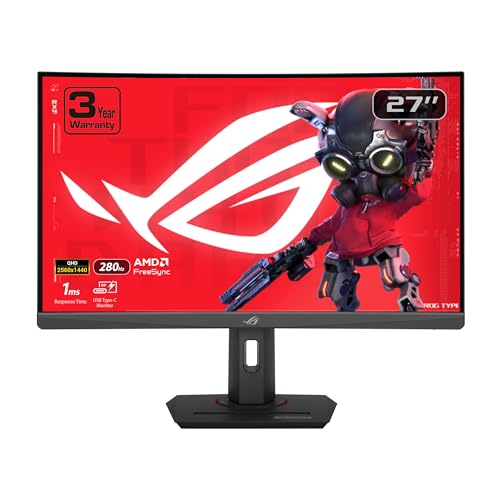
Fastest Refresh
ASUS ROG Strix XG27WCMS Curved
The highest refresh rate here (280Hz).
Best for: Esports players with a GPU that can feed high frame rates.
Our take Check price for ASUS ROG Strix XG27WCMS Curved (opens in a new tab)

Also Consider
ARZOPA Z3FC 16.1-inch 2.5K 180Hz Portable
400 nits brightness.
Best for: Buyers who want 400 nits brightness.
Our take Check price for ARZOPA Z3FC 16.1-inch 2.5K 180Hz Portable (opens in a new tab)

Lowest Price Here
TECLAST 16-inch 144Hz Portable
Undercutting the ARZOPA Z3FC on price when we checked.
Best for: Getting 144Hz with FreeSync for the least money.
Our take Check price for TECLAST 16-inch 144Hz Portable (opens in a new tab)
| Pick | Why it’s here | Best for | Price |
|---|---|---|---|
| The highest refresh rate here (280Hz). | Esports players with a GPU that can feed high frame rates. | Check price for ASUS ROG Strix XG27WCMS Curved (opens in a new tab) |
| 400 nits brightness. | Buyers who want 400 nits brightness. | Check price for ARZOPA Z3FC 16.1-inch 2.5K 180Hz Portable (opens in a new tab) |
| Undercutting the ARZOPA Z3FC on price when we checked. | Getting 144Hz with FreeSync for the least money. | Check price for TECLAST 16-inch 144Hz Portable (opens in a new tab) |
Our Picks
Fastest Refresh1 of 3
ASUS ROG Strix XG27WCMS Curved on Amazon (opens in a new tab)
ASUS's XG27WCMS curves a 27-inch 1440p panel and overclocks it to 280Hz.
Best for
- Esports players with a GPU that can feed high frame rates.
Skip if
- Skip it if price comes first: the TECLAST 16 cost less when we checked.
Why we like it
USB-C input and a three-year warranty are listed. On refresh rate it leads this guide at 280Hz, ahead of the ARZOPA Z3FC (180Hz). Its 27 inches screen size is the largest here; the ARZOPA Z3FC comes next at 16.1 inches.
It shares a 2560x1440 (1440p) resolution with the ARZOPA Z3FC; the TECLAST 16 goes with a 1920x1200 resolution. A 95% DCI-P3 color gamut is unique to it among these picks, while the TECLAST 16 uses a 100% sRGB color gamut. To see 280Hz at 1440p, connect over DisplayPort or HDMI 2.1; older HDMI 2.0 ports cap the refresh rate lower.
G-SYNC Compatible works on NVIDIA cards over DisplayPort, and FreeSync covers AMD cards. At our last price check it topped the group, with the ARZOPA Z3FC the nearest cheaper option.
Key dimensions & specs
- Refresh rate: 280Hz
- Resolution: 2560x1440 (1440p)
- Size: 27 inches
- HDR: HDR
- Color gamut: 95% DCI-P3
- Adaptive sync: G-SYNC Compatible
- USB-C: Yes
- Warranty: 3-year
Pros
- a 280Hz refresh rate for fast motion
- 1440p resolution, sharper than 1080p at 27 inches
- 95% DCI-P3 colour coverage
- G-SYNC Compatible to reduce screen tearing
Cons
- Costs more than the TECLAST 16 at the time of writing
Also Consider2 of 3
ARZOPA Z3FC 16.1-inch 2.5K 180Hz Portable on Amazon (opens in a new tab)
ARZOPA's Z3FC raises a 16.1-inch portable to 2560x1440 at 180Hz with 400 nits of listed brightness.
Best for
- Buyers who want 400 nits brightness.
Skip if
- If budget leads, the TECLAST 16 was cheaper at our last price check.
Why we like it
It is the sharpest and fastest portable here. Its 180Hz refresh rate ranks second of 3 here, behind the XG27WCMS (280Hz) and ahead of the TECLAST 16 (144Hz). On screen size it sits mid-pack at 16.1 inches: the XG27WCMS comes in at 27 inches, and the TECLAST 16 comes in at 16 inches.
Like the XG27WCMS, it has a 2560x1440 (1440p) resolution, while the TECLAST 16 uses a 1920x1200 resolution. It is the only pick here with a 107% sRGB color gamut; the XG27WCMS has a 95% DCI-P3 color gamut instead. It also comes with two USB-C ports and mini HDMI and a listing that names PS5, Xbox and Steam Deck. Its price falls between the TECLAST 16 and the XG27WCMS, based on our last check.
Key dimensions & specs
- Refresh rate: 180Hz
- Resolution: 2560x1440 (1440p)
- Size: 16.1 inches
- Color gamut: 107% sRGB
- USB-C: Yes
Pros
- 180Hz for smoother motion than a 60Hz office screen
- 1440p resolution, sharper than 1080p at 27 inches
- 107% sRGB colour coverage
- a USB-C input for laptops
Cons
- Costs more than the TECLAST 16 at the time of writing
Lowest Price Here3 of 3
TECLAST 16-inch 144Hz Portable on Amazon (opens in a new tab)
TECLAST's 16-inch portable runs 1920x1200 at 144Hz with 100% sRGB coverage and FreeSync.
Best for
- Getting 144Hz with FreeSync for the least money.
Skip if
- Skip it if refresh rate matters most to you; the XG27WCMS offers 280Hz.
Why we like it
It combines a taller screen with a high refresh rate. Its 16-inch 1920x1200 panel runs at 144Hz with 100% sRGB, and one USB-C cable carries video and power. HDMI covers consoles.
On refresh rate it trails the group at 144Hz, while the XG27WCMS offers 280Hz. Its 16 inches screen size is the smallest in this group; the XG27WCMS leads at 27 inches. A 1920x1200 resolution is unique to it among these picks, while the ARZOPA Z3FC uses a 2560x1440 (1440p) resolution.
A 100% sRGB color gamut is unique to it among these picks, while the ARZOPA Z3FC uses a 107% sRGB color gamut. No other pick here cost less at our last price check, and the ARZOPA Z3FC was closest. Refresh rate is its weakest area, and the XG27WCMS covers it better at 280Hz.
Key dimensions & specs
- Refresh rate: 144Hz
- Resolution: 1920x1200
- Size: 16 inches
- Panel: IPS
- Color gamut: 100% sRGB
- Adaptive sync: FreeSync
- USB-C: Yes
Pros
- 144Hz for smoother motion than a 60Hz office screen
- an IPS panel with wide viewing angles
- 100% sRGB colour coverage
- FreeSync to reduce screen tearing
Cons
- Refresh rate trails the XG27WCMS (280Hz)
- Screen size trails the XG27WCMS (27 inches)
How We Chose These USB-C Monitors Under $300
Each pick was assessed across 4 criteria weighted for real-world use.
- The figures behind the order
- We compared three monitors on refresh rate, resolution, screen size and color gamut as the makers state them. We did not test them in-house.
- What every pick has in common
- All 3, from the XG27WCMS to the TECLAST 16, state refresh rate, resolution and screen size and share USB-C.
- Where the specs have gaps
- The ARZOPA Z3FC gives no adaptive sync.
- Price range
- At our last check the picks ran from the TECLAST 16 ($50 to $100) to the XG27WCMS ($250 to $500).
What to Look for in a USB-C Monitor Under $300
Key buying criteria so you get the right fit the first time.
Refresh rate
Here refresh rate runs from 144Hz on the TECLAST 16 to 280Hz on the XG27WCMS. The ARZOPA Z3FC comes second for less money.
Screen size across these picks
Here screen size runs from 16 inches on the TECLAST 16 to 27 inches on the XG27WCMS. For less, the ARZOPA Z3FC is the runner-up at 16.1 inches.
Color gamut
The XG27WCMS lists 95% DCI-P3; the ARZOPA Z3FC lists 107% sRGB; the TECLAST 16 lists 100% sRGB. Settle this first, then compare prices.
Adaptive sync
The XG27WCMS lists G-SYNC Compatible; the TECLAST 16 lists FreeSync. Settle this first, then compare prices.
Extras that separate them
The XG27WCMS: USB-C input. The ARZOPA Z3FC: two USB-C ports and mini HDMI. The TECLAST 16: USB-C single-cable video and power.
How to Choose a USB-C Monitor Under $300
By priority
| Priority | Consider | Why |
|---|---|---|
| Esports players with a GPU that can feed high frame rates | XG27WCMS | The highest refresh rate here (280Hz) |
| Buyers who want 400 nits brightness | ARZOPA Z3FC | 400 nits brightness |
| Getting 144Hz with FreeSync for the least money | TECLAST 16 | Undercutting the ARZOPA Z3FC on price when we checked |
Scroll sideways to see every column.
Key specs side by side
The XG27WCMS leads on refresh rate at 280Hz, ahead of the ARZOPA Z3FC at 180Hz.
| Monitor | Refresh rate | Resolution | Size | Color gamut |
|---|---|---|---|---|
| XG27WCMS | 280Hz | 2560x1440 (1440p) | 27 inches | 95% DCI-P3 |
| ARZOPA Z3FC | 180Hz | 2560x1440 (1440p) | 16.1 inches | 107% sRGB |
| TECLAST 16 | 144Hz | 1920x1200 | 16 inches | 100% sRGB |
Scroll sideways to see every column.
By price at the time of writing
The TECLAST 16 was the lowest-priced pick and the XG27WCMS the highest when we checked; tiers move with Amazon pricing.
| Price tier | Monitors |
|---|---|
| About $50 to $100 | TECLAST 16 |
| About $100 to $150 | ARZOPA Z3FC |
| About $250 to $500 | XG27WCMS |
Frequently Asked Questions
Which has the highest refresh rate: the XG27WCMS or the ARZOPA Z3FC?
The XG27WCMS leads at 280Hz, with the ARZOPA Z3FC at 180Hz. The TECLAST 16 is at the other end of this group with 144Hz.
Is the XG27WCMS ahead of the ARZOPA Z3FC on screen size?
The XG27WCMS leads at 27 inches, with the ARZOPA Z3FC at 16.1 inches. The TECLAST 16 is at the other end of this group with 16 inches.
What does the XG27WCMS add over the TECLAST 16?
On paper it adds refresh rate (280Hz against 144Hz) and screen size (27 inches against 16 inches). The TECLAST 16 was the lowest-priced pick when we checked, so pay the difference only if those gains matter to you.
Why is the XG27WCMS our Fastest Refresh pick?
It earns the label for the highest refresh rate here (280Hz). It suits esports players with a GPU that can feed high frame rates.
Do the XG27WCMS and the TECLAST 16 differ on resolution?
The XG27WCMS and the ARZOPA Z3FC use 2560x1440 (1440p); the TECLAST 16 uses 1920x1200.
What extras do the XG27WCMS and the ARZOPA Z3FC include?
The XG27WCMS: a curved 1440p panel overclocked to 280Hz. The ARZOPA Z3FC: 400 nits brightness. The TECLAST 16: 144Hz with FreeSync.
Bottom Line
Our first pick is the XG27WCMS. Look at the ARZOPA Z3FC for 400 nits brightness and the TECLAST 16 for undercutting the ARZOPA Z3FC on price when we checked if those matter more to you.
Set the refresh rate in Windows display settings; many screens start at 60Hz.