
Buying Guide
The Best Travel Mechanical Keyboard
Five keyboards compared, from the KN85 to the F75 HE, with the trade-offs of each named.
By The PC Journal editorial team
12 min read5 products evaluated
A travel mechanical keyboard needs a small layout and a wireless connection. Every pick here is a 60% to 75% board that works without a cable.
This is a research roundup, not a lab test: layout, switches and connection come from each maker's published specs; a missing switches is flagged, not filled in, and no figure here comes from our own testing.
Quick Picks
Our 5 recommendations at a glance. Tap a pick for the full verdict.

PBT Keycaps
Kisnt KN85 Wireless
PBT keycaps.
Best for: Buyers who want PBT keycaps.
Our take Check price for Kisnt KN85 Wireless (opens in a new tab)

Also Consider
Redragon K673 PRO Wireless
A gasket mount.
Best for: Buyers who want gasket mount.
Our take Check price for Redragon K673 PRO Wireless (opens in a new tab)
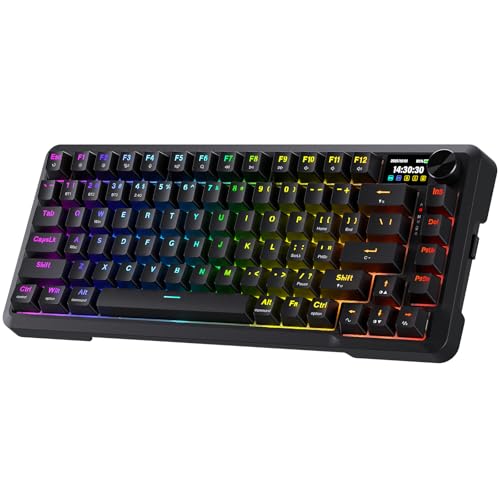
Lubed Linear Switches
Redragon K724 PRO Wireless
Lubed linear switches.
Best for: Buyers who want lubed linear switches.
Our take Check price for Redragon K724 PRO Wireless (opens in a new tab)

Strong Alternative
AULA F75 Pro Wireless
A 4000mAh battery.
Best for: Buyers who want 4000mAh battery.
Our take Check price for AULA F75 Pro Wireless (opens in a new tab)

Premium Pick
AULA F75 HE Wireless
The highest-priced pick here at the time of writing, with a 4000mAh battery.
Best for: Buyers who want the most complete package.
Our take Check price for AULA F75 HE Wireless (opens in a new tab)
| Pick | Why it’s here | Best for | Price |
|---|---|---|---|
| PBT keycaps. | Buyers who want PBT keycaps. | Check price for Kisnt KN85 Wireless (opens in a new tab) |
| A gasket mount. | Buyers who want gasket mount. | Check price for Redragon K673 PRO Wireless (opens in a new tab) |
| Lubed linear switches. | Buyers who want lubed linear switches. | Check price for Redragon K724 PRO Wireless (opens in a new tab) |
| A 4000mAh battery. | Buyers who want 4000mAh battery. | Check price for AULA F75 Pro Wireless (opens in a new tab) |
| The highest-priced pick here at the time of writing, with a 4000mAh battery. | Buyers who want the most complete package. | Check price for AULA F75 HE Wireless (opens in a new tab) |
Our Picks
PBT Keycaps1 of 5
Kisnt KN85 Wireless on Amazon (opens in a new tab)
Kisnt's KN85 is a tri-mode 75% board with pre-lubed linears, PBT caps and a 4000mAh battery.
Best for
- Buyers who want PBT keycaps.
Skip if
- Look at the other picks if you need a feature not covered above.
Why we like it
It switches between Windows and Mac modes. Its 75% layout keeps the F-row and arrows in 85 keys, and it connects over USB-C, 2.4GHz or Bluetooth to three devices. The gasket mount softens typing noise.
It uses pre-lubed Bsun linear switches at 45-50gf, and the hot-swap sockets take 3-pin and 5-pin switches. PBT keycaps resist shine. Warm RGB lighting glows around the keys and case edges, and every key is programmable.
It shares a 75% layout with the F75 Pro; the K724 PRO goes with a 75% (81 keys) layout. Use the KN85's dongle or cable for games; Bluetooth suits a laptop or tablet.
Key dimensions & specs
- Layout: 75%
- Switches: Bsun linear, pre-lubed
- Connection: 2.4GHz, Bluetooth, wired
- Keycaps: PBT
Pros
- Compact 75% layout
- Bsun linear, pre-lubed switches
- Dongle, Bluetooth and wired modes
- PBT keycaps resist shine
Also Consider2 of 5
Redragon K673 PRO Wireless on Amazon (opens in a new tab)
Redragon's K673 PRO is a gasket-mounted tri-mode 75% board with a scroll knob.
Best for
- Buyers who want gasket mount.
Skip if
- Look at the other picks if you need a feature not covered above.
Why we like it
The sockets take 3-pin and 5-pin switches. A single knob handles volume and backlight brightness, and it switches between USB-C, Bluetooth and 2.4GHz without re-pairing. Five layers of dampening give a quieter, cushioned feel.
Redragon's software lets you design lighting effects and program macros with custom keybinds. Adjustable RGB brightness suits a dark room. The socket accepts common switches, so you can change the feel later without buying a new board.
Like the K724 PRO, it has a 75% (81 keys) layout, while the F75 Pro uses a 75% layout. Use the K673 PRO's dongle or cable for games; Bluetooth suits a laptop or tablet.
Key dimensions & specs
- Layout: 75% (81 keys)
- Connection: 2.4GHz, Bluetooth, wired
Pros
- Compact 75% (81 keys) layout
- Dongle, Bluetooth and wired modes
- Gasket mount
- Scroll knob
Lubed Linear Switches3 of 5
Redragon K724 PRO Wireless on Amazon (opens in a new tab)
Redragon's K724 PRO adds a built-in screen and knob to a gasket-mounted 75% board.
Best for
- Buyers who want lubed linear switches.
Skip if
- Skip it if price comes first: the KN85 cost less when we checked.
Why we like it
The maker specifies five layers of noise dampening. A TFT screen shows battery and connection status and can run custom GIFs, next to a control knob. It switches between three connection modes without re-pairing.
Like the K673 PRO, it has a 75% (81 keys) layout, while the F75 Pro uses a 75% layout. It is the only pick here with lubed linear switches; the F75 Pro has LEOBOG Reaper pre-lubed switches instead. Use the K724 PRO's dongle or cable for games; Bluetooth suits a laptop or tablet. On price it sat third of 5, between the cheaper K673 PRO and the pricier F75 Pro, at the time of writing.
Key dimensions & specs
- Layout: 75% (81 keys)
- Switches: Lubed linear
- Connection: 2.4GHz, Bluetooth, wired
Pros
- Compact 75% (81 keys) layout
- Lubed linear switches
- Dongle, Bluetooth and wired modes
- Built-in screen and knob
Cons
- Costs more than the KN85 at the time of writing
Strong Alternative4 of 5
AULA F75 Pro Wireless on Amazon (opens in a new tab)
AULA's F75 Pro is a tri-mode 75% board with pre-lubed switches, a 4000mAh battery and hot-swap sockets.
Best for
- Buyers who want 4000mAh battery.
Skip if
- If budget leads, the KN85 was cheaper at our last price check.
Why we like it
The maker specifies PlayStation and Xbox support. It connects over Bluetooth, 2.4GHz or USB to up to five devices, and hot-swap sockets take 3-pin or 5-pin switches. Beginners can change switches without soldering.
Its side-printed PBT keycaps use double-shot moulding, and 16 lighting presets cover most looks. Like the KN85, it has a 75% layout, while the K724 PRO uses a 75% (81 keys) layout. It is the only pick here with LEOBOG Reaper pre-lubed switches; the K724 PRO has lubed linear switches instead.
Use the F75 Pro's dongle or cable for games; Bluetooth suits a laptop or tablet. On price it sat fourth of 5, between the cheaper K724 PRO and the pricier F75 HE, at the time of writing.
Key dimensions & specs
- Layout: 75%
- Switches: LEOBOG Reaper pre-lubed
- Connection: 2.4GHz, Bluetooth, wired
Pros
- Compact 75% layout
- Dongle, Bluetooth and wired modes
- 4000mAh battery
- Hot-swap for 3-pin and 5-pin switches
Cons
- Costs more than the KN85 at the time of writing
Premium Pick5 of 5
AULA F75 HE Wireless on Amazon (opens in a new tab)
AULA's F75 HE brings Hall effect switches to a tri-mode 75% board with a 4000mAh battery and a knob.
Best for
- Buyers who want the most complete package.
Skip if
- Skip it if price comes first: the KN85 cost less when we checked.
Why we like it
The switches are hot-swappable. You get a 75% (80 keys) layout here, which sets it apart from the F75 Pro and its a 75% layout. Hall effect magnetic switches is unique to it among these picks, while the F75 Pro uses LEOBOG Reaper pre-lubed switches.
Use the F75 HE's dongle or cable for games; Bluetooth suits a laptop or tablet. Adjusting actuation needs the maker's software or web tool on Windows. Worth noting too: control knob.
It makes the most sense for buyers who want the most complete package, since it offers the highest-priced pick here at the time of writing, with a 4000mAh battery. At our last price check it topped the group, with the F75 Pro the nearest cheaper option.
Key dimensions & specs
- Layout: 75% (80 keys)
- Switches: Hall effect magnetic
- Connection: 2.4GHz, Bluetooth, wired
Pros
- Compact 75% (80 keys) layout
- Magnetic Hall effect switches
- Dongle, Bluetooth and wired modes
- 4000mAh battery
Cons
- Costs more than the KN85 at the time of writing
How We Chose
Each pick was assessed across 4 criteria weighted for real-world use.
- Build
- We noted keycap material, frame material and extra controls such as knobs or screens.
- Layout and switches
- We recorded the layout, the switch type and whether the switches are mechanical, magnetic or membrane.
- Polling rate
- We recorded polling rates where listings state them.
- Connection
- We checked wired, dongle and Bluetooth options and rated battery life.
What to Look for in a Travel Mechanical Keyboard
Key buying criteria so you get the right fit the first time.
Choose the layout before the switch
Full-size boards keep the number pad; tenkeyless drops it and gives the mouse more room. 75% and 65% boards keep arrows in a tighter frame, while 60% boards move arrows and F-keys to a function layer.
Wired, dongle or Bluetooth
A 2.4GHz dongle is fine for games; Bluetooth adds latency and suits typing on other devices. Wired boards never need charging.
Keycap material lasts longer than lighting
PBT keycaps resist the shine that ABS caps develop. Double-shot legends do not wear off.
Hot-swap sockets allow switch changes
Hot-swappable boards let you pull and replace switches without soldering. Check whether the sockets take 3-pin or 5-pin switches.
Polling rate is a small factor
1,000Hz is enough for most players. 8,000Hz cuts reporting delay further, but the gain is small and uses more CPU time.
Linear, tactile or magnetic
Linear switches travel smoothly, tactile switches have a bump, and clicky switches add a click. Hall effect switches read a magnet, so actuation can be adjusted and rapid trigger resets a key as soon as it rises.
How to Choose a Travel Mechanical Keyboard
By priority
| Priority | Consider | Why |
|---|---|---|
| Buyers who want PBT keycaps | KN85 | PBT keycaps |
| Buyers who want gasket mount | K673 PRO | A gasket mount |
| Buyers who want lubed linear switches | K724 PRO | Lubed linear switches |
| Buyers who want 4000mAh battery | F75 Pro | A 4000mAh battery |
| Buyers who want the most complete package | F75 HE | The highest-priced pick here at the time of writing, with a 4000mAh battery |
Scroll sideways to see every column.
Key specs side by side
Figures as each maker states them.
| Keyboard | Layout | Switches | Connection |
|---|---|---|---|
| KN85 | 75% | Bsun linear, pre-lubed | 2.4GHz, Bluetooth, wired |
| K673 PRO | 75% (81 keys) | Not listed | 2.4GHz, Bluetooth, wired |
| K724 PRO | 75% (81 keys) | Lubed linear | 2.4GHz, Bluetooth, wired |
| F75 Pro | 75% | LEOBOG Reaper pre-lubed | 2.4GHz, Bluetooth, wired |
| F75 HE | 75% (80 keys) | Hall effect magnetic | 2.4GHz, Bluetooth, wired |
Scroll sideways to see every column.
By price at the time of writing
Prices change often; these tiers reflect Amazon prices when this guide was updated.
| Price tier | Keyboards |
|---|---|
| Under $50 | KN85, K673 PRO |
| About $50 to $100 | K724 PRO, F75 Pro, F75 HE |
Frequently Asked Questions
Which pick costs the least here?
The KN85. It undercut the K673 PRO when we checked, while the F75 HE cost the most of the group.
Is a wireless keyboard slower?
Not over a 2.4GHz dongle for most players. Bluetooth adds more latency and is better kept for other devices.
Do I need 8,000Hz polling?
No. It is a marginal gain on top of 1,000Hz and can cost battery life and CPU time.
Do Hall effect switches help in games?
Adjustable actuation and rapid trigger help most in fast strafing games. In slower games the difference is small.
Do these keyboards need software?
They work without it, but lighting, macros and actuation settings usually need the maker's app.
Bottom Line
Our first pick is the KN85, chosen for PBT keycaps. Look at the K673 PRO for a gasket mount, the K724 PRO for lubed linear switches and the F75 Pro for a 4000mAh battery if those matter more to you.
Bluetooth pairing with several devices helps when you move between a laptop and a tablet.