
Buying Guide
The Best Small Gaming Mice
Five small mice between 49g and about 100g.
By Alex Morgan, PC Hardware Editor
12 min read5 products evaluated

A small mouse clears desk space and suits claw grips. These five use compact or mini shells.
We compared weight, shape and connection from each listing.
Quick Picks
Which of the 5 picks to look at first. Tap a name for the full analysis.

Best Mini Shape
Glorious Model O 2 Mini Wired Gaming MouseA symmetrical mini shell for any grip.
Best for: Claw grips.
Check price for Glorious Model O 2 Mini Wired Gaming Mouse on Amazon (opens in a new tab)
Best Light Wireless
Attack Shark X3 Wireless Gaming Mouse49g tri-mode.
Best for: Fast aiming.
Check price for Attack Shark X3 Wireless Gaming Mouse on Amazon (opens in a new tab)
Best Battery
Logitech G305 Lightspeed Wireless Mouse250 hours of listed battery life.
Best for: Rare battery swaps.
Check price for Logitech G305 Lightspeed Wireless Mouse on Amazon (opens in a new tab)
Best Budget Wireless
Redragon M725 Wireless Gaming Mouse49g with onboard modes.
Best for: Tight budgets.
Check price for Redragon M725 Wireless Gaming Mouse on Amazon (opens in a new tab)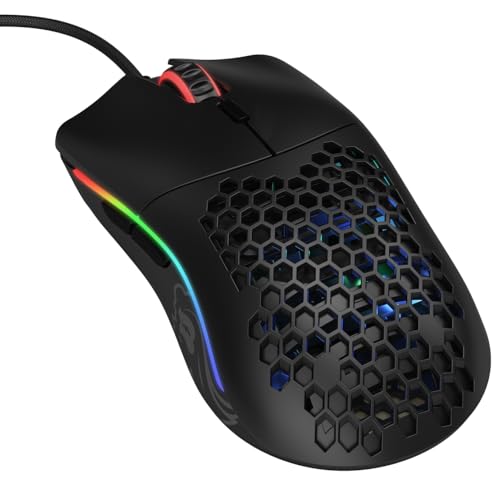
Most Buttons
Glorious Model O- (Minus) Wired Gaming MouseThe most button count here (6).
Best for: MMO hotbars on the thumb.
Check price for Glorious Model O- (Minus) Wired Gaming Mouse on Amazon (opens in a new tab)
| Pick | Why it stands out | Best for | Check price |
|---|---|---|---|
| A symmetrical mini shell for any grip. | Claw grips. | Check price for Glorious Model O 2 Mini Wired Gaming Mouse on Amazon (opens in a new tab) |
| 49g tri-mode. | Fast aiming. | Check price for Attack Shark X3 Wireless Gaming Mouse on Amazon (opens in a new tab) |
| 250 hours of listed battery life. | Rare battery swaps. | Check price for Logitech G305 Lightspeed Wireless Mouse on Amazon (opens in a new tab) |
| 49g with onboard modes. | Tight budgets. | Check price for Redragon M725 Wireless Gaming Mouse on Amazon (opens in a new tab) |
| The most button count here (6). | MMO hotbars on the thumb. | Check price for Glorious Model O- (Minus) Wired Gaming Mouse on Amazon (opens in a new tab) |
Our Picks
Best Mini Shape1 of 5
Glorious Model O 2 Mini Wired Gaming Mouse
Glorious's Model O 2 Mini is a 49g symmetrical wired mouse with a 26K sensor.
Best for
- Claw grips.
Skip if
- Price-first buyers should look at the M725, which cost less when we checked.
Why we like it
Glorious lists it for palm, claw and fingertip grips. It weighs 49g in a compact symmetrical shape for palm, claw or fingertip grips. The wired design avoids charging.
Glorious rates its switches for 80 million clicks, and the sensor includes Motion Sync. Six programmable buttons cover the usual binds without adding weight. It matches the Attack Shark X3 and the M725 on weight (49g).
Like the Model O-, it has a wired connection, while the G305 uses a lightspeed 2.4GHz connection. Its price falls between the Attack Shark X3 and the Model O-, based on our last check. Buyers who need a confirmed button count should compare it with the Model O-, which offers 6.
Key specs
- Weight
- 49g
- Max DPI
- 26,000
- Connection
- Wired
- Shape
- Symmetrical, compact
Pros
- Light 49g body
- No battery to charge
- Symmetrical shape Glorious lists for palm, claw and fingertip grips
- 26K optical sensor
Cons
- Costs more than the M725 at the time of writing
Best Light Wireless2 of 5
Attack Shark X3 Wireless Gaming Mouse
Attack Shark's X3 is a 49g tri-mode mouse with a PAW3395 sensor.
Best for
- Fast aiming.
Skip if
- Skip it if price comes first: the M725 cost less when we checked.
Why we like it
Lift-off distance and polling are set in software. It weighs 49g and connects over Bluetooth 5.2, 2.4GHz or a cable, and the PAW3395 sensor reaches 26,000 DPI. It suits fast aim games on a budget.
On weight it ties with the Model O 2 Mini and the M725 at 49g. It also offers Kailh GM 8.0 switches rated for 80 million clicks. Keep the Attack Shark X3 on its dongle for games; Bluetooth is for a laptop.
It was priced above the G305 and below the Model O 2 Mini at the time of writing. There is no published button count figure, whereas the Model O- offers 6.
Key specs
- Weight
- 49g
- Max DPI
- 26,000
- Battery life
- 200 hours
- Connection
- 2.4GHz, Bluetooth, wired
Pros
- Light 49g body
- Up to 200 hours per charge
- Dongle plus Bluetooth
- PixArt PAW3395 sensor
Cons
- Costs more than the M725 at the time of writing
Best Battery3 of 5
Logitech G305 Lightspeed Wireless Mouse
The G305 is the cheapest Lightspeed mouse and still one of the best values in wireless gaming mice, with a 250 hours on one AA.
Best for
- Rare battery swaps.
Skip if
- Pass if a published weight matters; this one has none.
Why we like it
The HERO sensor is up to 10 times more power efficient than earlier sensors, which stretches battery life, and the receiver stores inside the mouse. LIGHTSPEED wireless reports at 1ms. You get a lightspeed 2.4GHz connection here, which sets it apart from the Model O- and its a wired connection.
You also get runs on a single AA battery. The G305's dongle works best on a front USB port or an extender near the mouse. It was priced above the M725 and below the Attack Shark X3 at the time of writing. There is no published weight figure, whereas the Model O 2 Mini weighs 49g.
Key specs
- Max DPI
- 12,000
- Battery life
- 250 hours
- Connection
- Lightspeed 2.4GHz
Pros
- Up to 250 hours per charge
- Hero sensor
- Runs on a single AA battery
- Lightspeed 2.4GHz connection, the only one here
Cons
- No published weight
- Costs more than the M725 at the time of writing
Best Budget Wireless4 of 5
Redragon M725 Wireless Gaming Mouse
Redragon's M725 is a 49g symmetrical tri-mode mouse with a honeycomb shell.
Best for
- Tight budgets.
Skip if
- Skip it if this is a deal-breaker for you: button count of 5, behind the Model O- (6).
Why we like it
It stores five configuration modes onboard. On weight it ties with the Model O 2 Mini and the Attack Shark X3 at 49g. It also comes with tri-mode connection at a budget price.
Keep the M725 on its dongle for games; Bluetooth is for a laptop. Another plus: light 49g body. Worth noting: symmetrical shape, the only one here.
The nearest alternative on button count is the Model O- at 6, against 5 here. No other pick here cost less at our last price check, and the G305 was closest. If you want a confirmed battery life, look to the G305 instead: it runs for 250 hours, while this one gives no figure.
Key specs
- Weight
- 49g
- Programmable buttons
- 5
- Max DPI
- 8,000
- Connection
- 2.4GHz, Bluetooth, wired
- Shape
- Symmetrical
Pros
- Light 49g body
- Dongle plus Bluetooth
- Honeycomb shell
- 5 onboard configuration modes
Cons
- Button count of 5, behind the Model O- (6)
Most Buttons5 of 5
Glorious Model O- (Minus) Wired Gaming Mouse
The Model O- shrinks Glorious's ambidextrous shape to a size listed for medium and small hands.
Best for
- MMO hotbars on the thumb.
Skip if
- Skip it if weight matters most to you; the Model O 2 Mini offers 49g.
Why we like it
It weighs 58g. Its PTFE skates glide smoothly, and lift-off distance is under 0.7mm. Omron switches are rated for 20 million clicks.
Its paracord-style Ascended cable is light enough to feel close to wireless. Pure PTFE Glorious Skates help it glide, and the shape works in either hand. Its 58g weight is the heaviest in this group; the Model O 2 Mini leads at 49g.
Like the Model O 2 Mini, it has a wired connection, while the G305 uses a lightspeed 2.4GHz connection. It also comes with a honeycomb shell and a flexible braided cable. It was the highest-priced of the 5 picks at the time of writing, so the case for it rests on what it adds over the Model O 2 Mini and the rest.
Key specs
- Weight
- 58g
- Programmable buttons
- 6
- Connection
- Wired
- Shape
- Ambidextrous, compact
Pros
- Light 58g body
- No battery to charge
- Ambidextrous shape
- Size Glorious lists for medium and small hands
Cons
- Weight trails the Model O 2 Mini (49g)
- Costs more than the M725 at the time of writing
The catch
The trade-off is weight; for more, the Model O 2 Mini weighs 49g.
How We Chose These Small Gaming Mice
Alex Morgan compared the manufacturer specifications, connectivity, warranty terms and compatibility of every pick. Figures come from the makers unless a third-party source is named; we did not test these products ourselves.

- What we compared
- We lined up five mice on weight, button count, max DPI and battery life, using each maker's published specs. We did not test them in-house, and weight and button count are missing for at least one pick.
- What every pick has in common
- All 5, from the Model O 2 Mini to the Model O-, state connection.
- Where the specs have gaps
- The G305 gives no weight; the Model O 2 Mini, the Attack Shark X3 and the G305 give no button count.
- Price range
- From the M725 to the Model O-, all sat in the under $50 tier when we checked.
What to Look for in a Small Gaming Mouse
Key buying criteria so you get the right fit the first time.
How much weight you need
Here weight runs from 58g on the Model O- to 49g on the Model O 2 Mini, a 16% spread. The Attack Shark X3 comes second at 49g, in the same price tier as the Model O 2 Mini. The G305 gives no weight figure, so 4 of 5 picks are compared here.
Button count
Across these 2 picks button count spans 5 (the M725) to 6 (the Model O-). If button count is your first filter, the Model O- sets the ceiling at 6. The Model O 2 Mini, the Attack Shark X3 and the G305 give no button count figure, so 2 of 5 picks are compared here.
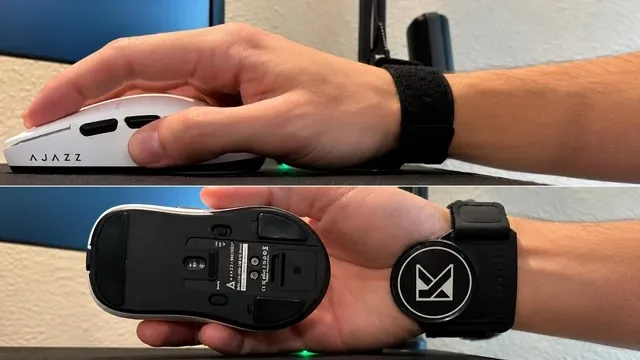
A hand on a white gaming mouse, and the same mouse shown from below Battery life across these picks
Across these 2 picks battery life spans 200 hours (the Attack Shark X3) to 250 hours (the G305). The G305 is the pick for battery life. The Model O 2 Mini, the M725 and the Model O- give no battery life figure, so 2 of 5 picks are compared here.
What to check at home
Keep the Attack Shark X3 on its dongle for games; Bluetooth is for a laptop. The G305's dongle works best on a front USB port or an extender near the mouse.
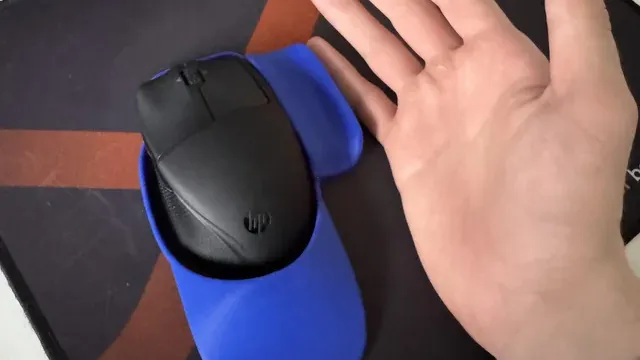
A hand next to a black wireless mouse on a blue mousepad Extras that separate them
The G305: runs on a single AA battery. The M725: 5 onboard configuration modes. The Model O-: a honeycomb shell.
How to Choose a Small Gaming Mouse
By priority
| Priority | Consider | Why |
|---|---|---|
| Claw grips | Model O 2 Mini | A symmetrical mini shell for any grip |
| Fast aiming | Attack Shark X3 | 49g tri-mode |
| Rare battery swaps | G305 | 250 hours of listed battery life |
| Tight budgets | M725 | 49g with onboard modes |
| MMO hotbars on the thumb | Model O- | The most button count here (6) |
Scroll sideways to see every column.
Key specs side by side
The Model O 2 Mini leads on weight at 49g, ahead of the Attack Shark X3 at 49g. "Not listed" marks weight where the G305 leaves the figure out.
| Mice | Weight | Programmable buttons | Max DPI | Battery life |
|---|---|---|---|---|
| Model O 2 Mini | 49g | Not listed | 26,000 | Not listed |
| Attack Shark X3 | 49g | Not listed | 26,000 | 200 hours |
| G305 | Not listed | Not listed | 12,000 | 250 hours |
| M725 | 49g | 5 | 8,000 | Not listed |
| Model O- | 58g | 6 | Not listed | Not listed |
Scroll sideways to see every column.
Frequently Asked Questions
Which has the most button count: the Model O- or the M725?
Between the top two, it is 6 on the Model O- against 5 on the M725, a 20% difference. The Model O 2 Mini, the Attack Shark X3 and the G305 are left out of this ranking because their button count isn't stated; 2 of 5 picks are ranked.
Is the G305 ahead of the Attack Shark X3 on battery life?
The G305 tops battery life at 250 hours; the Attack Shark X3 follows at 200 hours, 25% apart. No battery life figure is published for the Model O 2 Mini, the M725 and the Model O-, which leaves 2 of 5 picks ranked here.
What does the Model O- add over the M725?
On paper it adds button count (6 against 5). It does not win everywhere: the M725 still leads on weight (49g). Both sat in the under $50 tier when we checked, so the gains in button count cost little extra by tier.
Why is the Attack Shark X3 our Best Light Wireless pick?
It earns the label for 49g tri-mode. It suits fast aiming.
Will the M725 work with my setup?
Keep the M725 on its dongle for games; Bluetooth is for a laptop. In this guide it ranks fourth of 5, as our Best Budget Wireless pick, and third of 4 on weight (49g).
What extras do the Model O 2 Mini and the Attack Shark X3 include?
The Model O 2 Mini: a symmetrical shape Glorious lists for palm, claw and fingertip grips. The Attack Shark X3: a PixArt PAW3395 sensor. The G305: a Hero sensor.
Bottom Line
Glorious's Model O 2 Mini is the pick for a 49g compact shell. Attack Shark's X3 is the wireless 49g option, and Logitech's G305 leads on battery.
Related Guides
- Related guideThe Best Gaming Mice Under $50
- Related guideThe Best Gaming Mice Under $75
- Related guideThe Best Logitech Gaming Mice
- Lower budgetThe Best Budget Gaming Mice
- Similar guideThe Best Gaming Mice for Small Hands
- ExplainerHow to Choose a Gaming Mouse
- ExplainerMouse polling rate and DPI: what each number changes
- Also see: mouse pads and desk matsHow to Choose a Mouse Pad for Gaming and Work
- Similar guideThe Best Gaming Mice Right Now
- Topic hubAll mice guides
About the author
PC Hardware Editor
Alex covers PC hardware, monitors, components, upgrades and peripherals for The PC Journal, with a focus on helping readers understand specifications, compatibility and meaningful product trade-offs.
Covers: Monitors, Graphics cards, Processors, PC components, Peripherals, Upgrades and compatibility
View all articles