
Buying Guide
The Best Redragon Keyboard and Mouse Sets
Redragon's combo range spans low-profile sets, tri-mode full-size sets and a keyboard with a screen. These five cover it.
By The PC Journal editorial team
12 min read5 products evaluated
Redragon sells more keyboard and mouse sets than most gaming brands, and the range is wide. This guide picks five that cover distinct needs: a full-size tri-mode set, a compact 75% set, two low-profile sets and a flagship with a TFT screen.
Every pick is a Redragon product, compared on its Amazon listing.
Quick Picks
Our 5 recommendations at a glance. Tap a pick for the full verdict.

Best Redragon for Most
Redragon S101M-KS Wireless Keyboard and Mouse Combo
Tri-mode with 10 media keys and 7 mouse buttons.
Best for: Everyday gaming and work
Our take Check price for Redragon S101M-KS Wireless Keyboard and Mouse Combo (opens in a new tab)

Most Features
Redragon K719 PRO Anime Keyboard and Mouse Combo
Built-in TFT screen and gasket mount.
Best for: Enthusiasts
Our take Check price for Redragon K719 PRO Anime Keyboard and Mouse Combo (opens in a new tab)
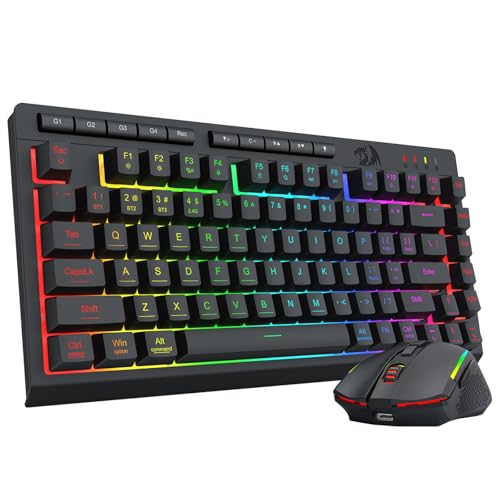
Largest Battery
Redragon 75% Tri-Mode Wireless Keyboard and Mouse Combo
4000mAh keyboard battery.
Best for: Rarely charging
Our take Check price for Redragon 75% Tri-Mode Wireless Keyboard and Mouse Combo (opens in a new tab)
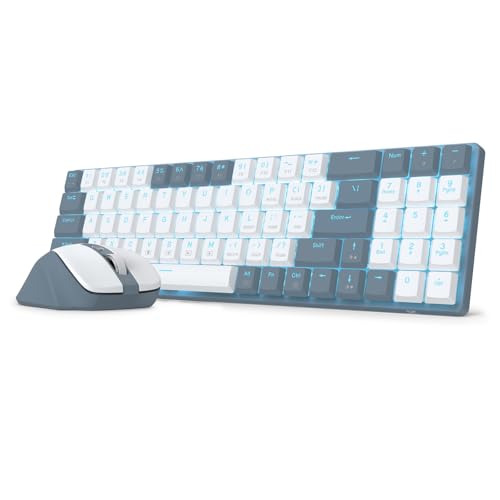
Best Low-Profile Mechanical
Redragon BS8773 Low-Profile Mechanical Keyboard and Mouse
Low-profile red switches at 30g.
Best for: Light typists
Our take Check price for Redragon BS8773 Low-Profile Mechanical Keyboard and Mouse (opens in a new tab)

Best Low-Profile with Numpad
Redragon BS7552 Low-Profile Wireless Keyboard and Mouse
98 keys in a low-profile frame.
Best for: Spreadsheets and a pink desk
Our take Check price for Redragon BS7552 Low-Profile Wireless Keyboard and Mouse (opens in a new tab)
Our Picks
Best Redragon for Most1 of 5
Redragon S101M-KS Wireless Keyboard and Mouse Combo on Amazon (opens in a new tab)
Redragon's S101M-KS is a tri-mode full-size set with 10 media keys and a seven-button mouse.
Best for
- Everyday gaming and work
Skip if
- Price-first buyers should look at the BS8773, which cost less when we checked.
Why we like it
Polling runs from 125 to 1000Hz. On maximum mouse sensitivity it sits mid-pack at 4,800 DPI: the Redragon 75% combo offers 12,800 DPI, and the BS8773 comes in at 2,400 DPI. A seven-button gaming mouse mouse or pointer is unique to it among these picks, while the Redragon 75% combo uses a rechargeable gaming mouse mouse or pointer.
It is the only pick here with backlit lighting; the K719 PRO combo has RGB lighting instead. The receiver is USB-A; a USB-C-only laptop needs an adapter or hub. On price it sat fourth of 5, between the cheaper BS7552 and the pricier K719 PRO combo, at the time of writing.
Key dimensions & specs
- Connection: Tri-mode: 2.4GHz, Bluetooth, wired
- Max mouse DPI: 4,800 DPI
- Keyboard layout: Full-size with 10 multimedia keys
- Mouse or pointer: Seven-button gaming mouse
- Lighting: Backlit
Pros
- more than one way to connect
- 10 multimedia keys
- Seven remappable mouse buttons
- Mouse polling from 125 to 1000Hz
Cons
- Costs more than the BS8773 at the time of writing
Most Features2 of 5
Redragon K719 PRO Anime Keyboard and Mouse Combo on Amazon (opens in a new tab)
The K719 PRO combo pairs a gasket-mount tri-mode keyboard with a built-in TFT screen and a nine-button 8000 DPI mouse.
Best for
- Enthusiasts
Skip if
- Price-first buyers should look at the BS8773, which cost less when we checked.
Why we like it
It is the most elaborate Redragon set here. The keyboard's TFT screen shows battery, connection and custom GIFs, and both devices connect over USB-C, Bluetooth or 2.4GHz. It suits a themed desk as much as daily typing.
On maximum mouse sensitivity it sits mid-pack at 8,000 DPI: the Redragon 75% combo offers 12,800 DPI, and the BS8773 comes in at 2,400 DPI. You get a nine-button gaming mouse mouse or pointer here, which sets it apart from the BS7552 and its a wireless mouse mouse or pointer. Like the Redragon 75% combo, it has RGB lighting, while the S101M-KS uses backlit lighting.
The receiver is USB-A; a USB-C-only laptop needs an adapter or hub. It was the most expensive pick when we checked, so weigh what it adds over the S101M-KS.
Key dimensions & specs
- Connection: Tri-mode: 2.4GHz, Bluetooth, wired
- Max mouse DPI: 8,000 DPI
- Keyboard layout: Gasket-mount mechanical with TFT screen
- Mouse or pointer: Nine-button gaming mouse
- Lighting: RGB
Pros
- more than one way to connect
- Built-in TFT screen
- Gasket-mount keyboard
- Nine-button 8000 DPI mouse
Cons
- Costs more than the BS8773 at the time of writing
Largest Battery3 of 5
Redragon 75% Tri-Mode Wireless Keyboard and Mouse Combo on Amazon (opens in a new tab)
This Redragon 75% tri-mode set offers a 4000mAh keyboard battery and a mouse that reaches 12,800 DPI in software.
Best for
- Rarely charging
Skip if
- Skip it if price comes first: the BS8773 cost less when we checked.
Why we like it
It suits a compact desk. On maximum mouse sensitivity it leads this guide at 12,800 DPI, ahead of the K719 PRO combo (8,000 DPI). No other pick in this guide offers a 75% keyboard layout; compare the BS7552, which has a 98-key low-profile keyboard layout.
A rechargeable gaming mouse mouse or pointer is unique to it among these picks, while the K719 PRO combo uses a nine-button gaming mouse mouse or pointer. Like the K719 PRO combo, it has RGB lighting, while the BS8773 uses blue backlight lighting. The receiver is USB-A; a USB-C-only laptop needs an adapter or hub.
There is no dedicated number pad, which matters if you enter figures often. On price it sat second of 5, between the cheaper BS8773 and the pricier BS7552, at the time of writing.
Key dimensions & specs
- Connection: Tri-mode: 2.4GHz, Bluetooth, wired
- Max mouse DPI: 12,800 DPI
- Keyboard layout: 75%
- Mouse or pointer: Rechargeable gaming mouse
- Lighting: RGB
Pros
- more than one way to connect
- 4000mAh keyboard battery
- 700mAh mouse battery
- Mouse sensitivity from 100 to 12,800 DPI by software
Cons
- Costs more than the BS8773 at the time of writing
Best Low-Profile Mechanical4 of 5
Redragon BS8773 Low-Profile Mechanical Keyboard and Mouse on Amazon (opens in a new tab)
Redragon's BS8773 is a 78-key low-profile mechanical set with red switches at a 30g minimum actuation.
Best for
- Light typists
Skip if
- Skip it if maximum mouse sensitivity matters most to you; the Redragon 75% combo offers 12,800 DPI.
Why we like it
Its mouse steps up to 2400 DPI. Its 2,400 DPI maximum mouse sensitivity is the lowest in this group; the Redragon 75% combo leads at 12,800 DPI. Like the BS7552, it has a wireless mouse mouse or pointer, while the Redragon 75% combo uses a rechargeable gaming mouse mouse or pointer.
You get blue backlight lighting here, which sets it apart from the BS7552 and its white backlight lighting. The receiver is USB-A; a USB-C-only laptop needs an adapter or hub. It cost the least of the 5 picks at the time of writing, with the Redragon 75% combo the next step up.
Key dimensions & specs
- Connection: 2.4GHz USB receiver
- Max mouse DPI: 2,400 DPI
- Keyboard layout: 78-key low-profile mechanical
- Mouse or pointer: Wireless mouse
- Lighting: Blue backlight
Pros
- Low-profile red switches with a 30g minimum actuation
- 78-key layout
- Mouse steps from 800 to 2400 DPI
- Blue backlight lighting, the only one here
Cons
- Maximum mouse sensitivity trails the Redragon 75% combo (12,800 DPI)
Best Low-Profile with Numpad5 of 5
Redragon BS7552 Low-Profile Wireless Keyboard and Mouse on Amazon (opens in a new tab)
Redragon's BS7552 is a pink 98-key low-profile set with a white backlight.
Best for
- Spreadsheets and a pink desk
Skip if
- Skip it if price comes first: the BS8773 cost less when we checked.
Why we like it
It keeps a number pad in a compact footprint. On maximum mouse sensitivity it sits mid-pack at 4,000 DPI: the Redragon 75% combo offers 12,800 DPI, and the BS8773 comes in at 2,400 DPI. It is the only pick here with a 98-key low-profile keyboard layout; the Redragon 75% combo has a 75% keyboard layout instead.
It shares a wireless mouse mouse or pointer with the BS8773; the S101M-KS goes with a seven-button gaming mouse mouse or pointer. No other pick in this guide offers white backlight lighting; compare the Redragon 75% combo, which has RGB lighting. The receiver is USB-A; a USB-C-only laptop needs an adapter or hub.
Key dimensions & specs
- Connection: 2.4GHz USB receiver
- Max mouse DPI: 4,000 DPI
- Keyboard layout: 98-key low-profile
- Mouse or pointer: Wireless mouse
- Lighting: White backlight
Pros
- 98-key low-profile layout with number pad
- Pink finish
- Mouse sensitivity from 400 to 4000 DPI
- Maximum mouse sensitivity of 4,000 DPI, ahead of the BS8773
Cons
- Costs more than the BS8773 at the time of writing
How We Chose
Each pick was assessed across 4 criteria weighted for real-world use.
- Power
- We compared listed battery ratings or rechargeable capacity.
- Layout and mouse
- We noted the keyboard layout, number pad and mouse shape.
- Connection
- We recorded each set's receiver, Bluetooth or wired connection.
- Extras
- We checked hotkeys, lighting, anti-ghosting and noise claims in each listing.
What to Look for in a Redragon Keyboard and Mouse Sets
Key buying criteria so you get the right fit the first time.
Receiver, Bluetooth or cable
A USB receiver pairs out of the box and works in the BIOS; Bluetooth frees a port but needs the PC to support it. Tri-mode sets add a cable for charging and play.
Match the connection to the ports your PC or laptop actually has.
Full-size or compact
A full-size board keeps the number pad for spreadsheets. A 60% to 75% board frees room for wide mouse sweeps, which matters more in games than in office work.
Battery rating and power type
AA and AAA sets list battery life in months; rechargeable sets list hours or days per charge. Long ratings suit office desks, while rechargeable sets suit people who would rather plug in than buy batteries.
What gaming sets add
Gaming combos add higher-DPI sensors, anti-ghosting and lighting. They do not make a mouse or keyboard better at office work, and budget gaming sets use membrane or budget switches.
Check the mouse shape
Many combo mice are small and ambidextrous. If you have large hands or want side buttons, check the mouse description; a right-handed contoured mouse or one with more buttons may suit you better.
Key and click noise
Membrane and silent-switch sets are quieter than mechanical blue or red switches. If you share a room or take calls, look for sets that name a silent or low-noise design.
How to Choose a Redragon Keyboard and Mouse Sets
By priority
| Priority | Consider | Why |
|---|---|---|
| Everyday gaming and work | S101M-KS | Tri-mode with 10 media keys and 7 mouse buttons |
| Enthusiasts | K719 PRO combo | Built-in TFT screen and gasket mount |
| Rarely charging | Redragon 75% combo | 4000mAh keyboard battery |
| Light typists | BS8773 | Low-profile red switches at 30g |
| Spreadsheets and a pink desk | BS7552 | 98 keys in a low-profile frame |
Scroll sideways to see every column.
Key specs side by side
Figures as each maker states them.
| Combo | Connection | Max mouse DPI | Keyboard layout | Mouse or pointer |
|---|---|---|---|---|
| S101M-KS | Tri-mode: 2.4GHz, Bluetooth, wired | 4,800 DPI | Full-size with 10 multimedia keys | Seven-button gaming mouse |
| K719 PRO combo | Tri-mode: 2.4GHz, Bluetooth, wired | 8,000 DPI | Gasket-mount mechanical with TFT screen | Nine-button gaming mouse |
| Redragon 75% combo | Tri-mode: 2.4GHz, Bluetooth, wired | 12,800 DPI | 75% | Rechargeable gaming mouse |
| BS8773 | 2.4GHz USB receiver | 2,400 DPI | 78-key low-profile mechanical | Wireless mouse |
| BS7552 | 2.4GHz USB receiver | 4,000 DPI | 98-key low-profile | Wireless mouse |
Scroll sideways to see every column.
By price at the time of writing
Prices change often; these tiers reflect Amazon prices when this guide was updated.
| Price tier | Combos |
|---|---|
| Under $50 | BS8773, Redragon 75% combo, BS7552 |
| About $50 to $100 | S101M-KS, K719 PRO combo |
Frequently Asked Questions
Rechargeable or disposable batteries?
Disposable AA and AAA sets run for months and swap in seconds. Rechargeable sets avoid buying batteries but need a cable every few days to weeks, depending on lighting.
Do wireless combos lag?
For typing and everyday use, input delay from a 2.4GHz receiver is not noticeable for most people. Bluetooth can take a moment to wake after sleep.
Will a Windows combo work on a Mac?
Basic typing and pointing usually work. Some Windows keys map differently, and software may be Windows-only.
Is a wireless combo fine for gaming?
For casual play, a 2.4GHz receiver is fine. Competitive players often prefer a dedicated gaming mouse with a higher polling rate.
Can I replace just the mouse later?
Yes. Any mouse works alongside the keyboard; you simply lose the shared receiver for the new mouse.
Do the keyboard and mouse share one receiver?
In most receiver-based combos, yes; the listing usually says one receiver pairs both. Keep it safe, since replacements are brand-specific.
Bottom Line
The S101M-KS is the safe Redragon pick for most desks. Choose the K719 PRO for the most features, the 75% tri-mode set for battery capacity, the BS8773 for low-profile mechanical keys, and the BS7552 for a pink low-profile set with a number pad.