
Buying Guide
The Best Rapid Trigger Keyboards
Five keyboards compared, from the MonsGeek FUN60 Pro to the WIN60 HE PRO, with the trade-offs of each named.
By The PC Journal editorial team
12 min read5 products evaluated
Rapid trigger resets a key as soon as it moves back up instead of at a fixed point, which only works on Hall effect or other magnetic-sensor switches. Every keyboard here uses magnetic switches and lists rapid trigger in its description.
We sorted these picks by layout, switches and connection, working from the makers' own data; any figure a maker omits is noted as missing, and no figure here comes from our own testing.
Quick Picks
Our 5 recommendations at a glance. Tap a pick for the full verdict.

Lowest Price Here
MonsGeek FUN60 Pro
Undercutting the EK60 HE on price when we checked.
Best for: Spending as little as possible, with the EK60 HE the next step up.
Our take Check price for MonsGeek FUN60 Pro (opens in a new tab)

Also Consider
DAREU EK60 HE Magnetic Keyboard
Adjustable rapid trigger.
Best for: Buyers who want adjustable rapid trigger.
Our take Check price for DAREU EK60 HE Magnetic Keyboard (opens in a new tab)

Strong Alternative
AULA WIN60 HE Magnetic Keyboard
Rapid trigger with adjustable actuation.
Best for: Buyers who want rapid trigger with adjustable actuation.
Our take Check price for AULA WIN60 HE Magnetic Keyboard (opens in a new tab)

Worth a Look
Attack Shark X68 HE
Dynamic keystrokes with up to 4 actions per key.
Best for: Buyers who want dynamic keystrokes with up to 4 actions per key.
Our take Check price for Attack Shark X68 HE (opens in a new tab)
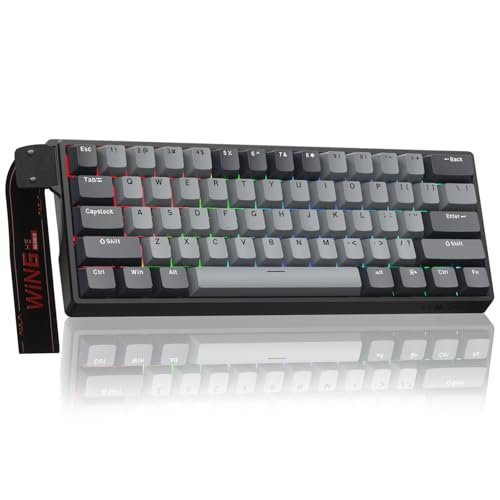
Premium Pick
AULA WIN60 HE PRO Magnetic Keyboard
The top of this price range, adding rapid trigger with adjustable actuation.
Best for: Spending more than the X68 HE costs for the fullest feature set in this group.
Our take Check price for AULA WIN60 HE PRO Magnetic Keyboard (opens in a new tab)
| Pick | Why it’s here | Best for | Price |
|---|---|---|---|
| Undercutting the EK60 HE on price when we checked. | Spending as little as possible, with the EK60 HE the next step up. | Check price for MonsGeek FUN60 Pro (opens in a new tab) |
| Adjustable rapid trigger. | Buyers who want adjustable rapid trigger. | Check price for DAREU EK60 HE Magnetic Keyboard (opens in a new tab) |
| Rapid trigger with adjustable actuation. | Buyers who want rapid trigger with adjustable actuation. | Check price for AULA WIN60 HE Magnetic Keyboard (opens in a new tab) |
| Dynamic keystrokes with up to 4 actions per key. | Buyers who want dynamic keystrokes with up to 4 actions per key. | Check price for Attack Shark X68 HE (opens in a new tab) |
| The top of this price range, adding rapid trigger with adjustable actuation. | Spending more than the X68 HE costs for the fullest feature set in this group. | Check price for AULA WIN60 HE PRO Magnetic Keyboard (opens in a new tab) |
Our Picks
Lowest Price Here1 of 5
MonsGeek FUN60 Pro on Amazon (opens in a new tab)
The MonsGeek FUN60 Pro stands out for rapid trigger down to 0.005mm in 0.005mm steps, and it adds compatibility with five third-party magnetic switches.
Best for
- Spending as little as possible, with the EK60 HE the next step up.
Skip if
- Skip it if this is a deal-breaker for you: no dedicated arrow keys or function row.
Why we like it
It also offers an 8,000Hz polling rate. You also get dynamic keystroke, toggle key and mod-tap functions and ARGB with individually controlled LEDs. The MonsGeek FUN60 Pro needs a free USB port, so check cable length to your case or monitor hub.
High polling rates use more CPU time; drop to 1,000Hz if an older system stutters. Small layouts move keys to a function layer, so check the legend for arrows and F-keys. It undercut the EK60 HE and every other pick on price at the time of writing.
Key dimensions & specs
- Layout: 60%
- Switches: SP magnetic
- Connection: Wired
- Polling rate: 8,000Hz
Pros
- Compact 60% layout
- 8,000Hz polling
- Rapid trigger down to 0.005mm in 0.005mm steps
- Compatibility with five third-party magnetic switches
Cons
- No dedicated arrow keys or function row
- Wired only
Also Consider2 of 5
DAREU EK60 HE Magnetic Keyboard on Amazon (opens in a new tab)
DAREU's EK60 HE pairs Hall effect switches with 8000Hz polling and a web driver that supports macOS.
Best for
- Buyers who want adjustable rapid trigger.
Skip if
- Worth skipping when no dedicated arrow keys or function row is a problem.
Why we like it
It is priced near $35 at the time of writing. It also comes with adjustable rapid trigger. The EK60 HE needs a free USB port, so check cable length to your case or monitor hub.
High polling rates use more CPU time; drop to 1,000Hz if an older system stutters. Small layouts move keys to a function layer, so check the legend for arrows and F-keys. Adjusting actuation needs the maker's software or web tool on Windows.
You also get this: 8,000Hz polling. When we checked, only the MonsGeek FUN60 Pro cost less, and the WIN60 HE cost more.
Key dimensions & specs
- Layout: 60%
- Switches: Hall effect magnetic
- Connection: Wired
- Polling rate: 8,000Hz
Pros
- Compact 60% layout
- Magnetic Hall effect switches
- 8,000Hz polling
- Adjustable rapid trigger
Cons
- No dedicated arrow keys or function row
- Wired only
- Costs more than the MonsGeek FUN60 Pro at the time of writing
Strong Alternative3 of 5
AULA WIN60 HE Magnetic Keyboard on Amazon (opens in a new tab)
AULA's WIN60 HE puts Hall effect switches, rapid trigger and 8000Hz polling in a wired 60% board.
Best for
- Buyers who want rapid trigger with adjustable actuation.
Skip if
- Choose another pick if you can't accept this: no dedicated arrow keys or function row.
Why we like it
It is one of the cheapest ways into magnetic switches. Rapid Trigger works at a 0.02mm step, and a web-based driver configures it from any device. Lighting shines through PBT keycaps.
You also get rapid trigger with adjustable actuation. The WIN60 HE needs a free USB port, so check cable length to your case or monitor hub. High polling rates use more CPU time; drop to 1,000Hz if an older system stutters.
Small layouts move keys to a function layer, so check the legend for arrows and F-keys. Adjusting actuation needs the maker's software or web tool on Windows. On price it sat third of 5, between the cheaper EK60 HE and the pricier X68 HE, at the time of writing.
Key dimensions & specs
- Layout: 60%
- Switches: Hall effect magnetic
- Connection: Wired
- Polling rate: 8,000Hz
Pros
- Compact 60% layout
- Magnetic Hall effect switches
- 8,000Hz polling
- Rapid trigger with adjustable actuation
Cons
- No dedicated arrow keys or function row
- Wired only
- Costs more than the MonsGeek FUN60 Pro at the time of writing
Worth a Look4 of 5
Attack Shark X68 HE on Amazon (opens in a new tab)
Attack Shark's X68 HE adds dynamic keystrokes, up to four actions per key, to rapid trigger in a 68-key frame.
Best for
- Buyers who want dynamic keystrokes with up to 4 actions per key.
Skip if
- Pass on it if wired only rules it out for your setup.
Why we like it
It sits near $40 at the time of writing. A 65% (68 keys) layout is unique to it among these picks, while the EK60 HE uses a 60% layout. You also get an adjustable actuation point.
The X68 HE needs a free USB port, so check cable length to your case or monitor hub. High polling rates use more CPU time; drop to 1,000Hz if an older system stutters. Small layouts move keys to a function layer, so check the legend for arrows and F-keys.
Adjusting actuation needs the maker's software or web tool on Windows. Another plus: magnetic Hall effect switches.
Key dimensions & specs
- Layout: 65% (68 keys)
- Switches: Hall effect magnetic
- Connection: Wired
- Polling rate: 8,000Hz
Pros
- Compact 65% (68 keys) layout
- Magnetic Hall effect switches
- 8,000Hz polling
- Dynamic keystrokes with up to 4 actions per key
Cons
- Wired only
- Costs more than the MonsGeek FUN60 Pro at the time of writing
Premium Pick5 of 5
AULA WIN60 HE PRO Magnetic Keyboard on Amazon (opens in a new tab)
The WIN60 HE PRO keeps the WIN60 HE's magnetic switches and 8000Hz polling and adds under-LED lighting.
Best for
- Spending more than the X68 HE costs for the fullest feature set in this group.
Skip if
- Choose another pick if you can't accept this: no dedicated arrow keys or function row.
Why we like it
The switches are hot-swappable. It also comes with rapid trigger with adjustable actuation. The WIN60 HE PRO needs a free USB port, so check cable length to your case or monitor hub.
High polling rates use more CPU time; drop to 1,000Hz if an older system stutters. Small layouts move keys to a function layer, so check the legend for arrows and F-keys. Adjusting actuation needs the maker's software or web tool on Windows.
It was the highest-priced of the 5 picks at the time of writing, so the case for it rests on what it adds over the X68 HE and the rest. The trade-off is polling rate; for more, the MonsGeek FUN60 Pro offers 8,000Hz.
Key dimensions & specs
- Layout: 60%
- Switches: Hall effect magnetic
- Connection: Wired
- Polling rate: 8,000Hz
Pros
- Compact 60% layout
- Magnetic Hall effect switches
- 8,000Hz polling
- Rapid trigger with adjustable actuation
Cons
- No dedicated arrow keys or function row
- Wired only
- Costs more than the MonsGeek FUN60 Pro at the time of writing
How We Chose These Rapid Trigger Keyboards
Each pick was assessed across 4 criteria weighted for real-world use.
- How these picks were ranked
- We compared five keyboards on layout, switches, connection and polling rate, using each maker's published specs. These are research figures, not bench results, and every compared field is stated for all 5 picks.
- The shared baseline
- All 5, from the MonsGeek FUN60 Pro to the WIN60 HE PRO, state layout, switches and connection and share Wired connection.
- Who each pick suits
- The MonsGeek FUN60 Pro for undercutting the EK60 HE on price when we checked; the EK60 HE for adjustable rapid trigger; the WIN60 HE for rapid trigger with adjustable actuation.
- Price range
- From the MonsGeek FUN60 Pro to the WIN60 HE PRO, all sat in the under $50 tier when we checked.
What to Look for in a Rapid Trigger Keyboard
Key buying criteria so you get the right fit the first time.
Switches
The MonsGeek FUN60 Pro lists SP magnetic; the EK60 HE, the WIN60 HE, the X68 HE and the WIN60 HE PRO list hall effect magnetic. Sort out switches before price: it splits 5 stated picks into groups of 4 and 1.
Setup checks
The MonsGeek FUN60 Pro needs a free USB port, so check cable length to your case or monitor hub.
Features beyond the spec table
The EK60 HE: a web driver that supports macOS. The WIN60 HE: hot-swappable magnetic switches. The X68 HE: rapid trigger.
How much to spend
Price does little to separate these 5: the MonsGeek FUN60 Pro through the WIN60 HE PRO all landed in the under $50 tier, which leaves features to decide it.
Match the pick to your priority
Spending as little as possible, with the EK60 HE the next step up: the MonsGeek FUN60 Pro. Spending more than the X68 HE costs for the fullest feature set in this group: the WIN60 HE PRO.
How to Choose a Rapid Trigger Keyboard
By priority
| Priority | Consider | Why |
|---|---|---|
| Spending as little as possible, with the EK60 HE the next step up | MonsGeek FUN60 Pro | Undercutting the EK60 HE on price when we checked |
| Buyers who want adjustable rapid trigger | EK60 HE | Adjustable rapid trigger |
| Buyers who want rapid trigger with adjustable actuation | WIN60 HE | Rapid trigger with adjustable actuation |
| Buyers who want dynamic keystrokes with up to 4 actions per key | X68 HE | Dynamic keystrokes with up to 4 actions per key |
| Spending more than the X68 HE costs for the fullest feature set in this group | WIN60 HE PRO | The top of this price range, adding rapid trigger with adjustable actuation |
Scroll sideways to see every column.
Key specs side by side
The MonsGeek FUN60 Pro, the EK60 HE and the rest, as their makers list them.
| Keyboard | Layout | Switches | Connection | Polling rate |
|---|---|---|---|---|
| MonsGeek FUN60 Pro | 60% | SP magnetic | Wired | 8,000Hz |
| EK60 HE | 60% | Hall effect magnetic | Wired | 8,000Hz |
| WIN60 HE | 60% | Hall effect magnetic | Wired | 8,000Hz |
| X68 HE | 65% (68 keys) | Hall effect magnetic | Wired | 8,000Hz |
| WIN60 HE PRO | 60% | Hall effect magnetic | Wired | 8,000Hz |
Scroll sideways to see every column.
Frequently Asked Questions
What makes the MonsGeek FUN60 Pro the Lowest Price Here?
It carries the badge for undercutting the EK60 HE on price when we checked. It is aimed at spending as little as possible, with the EK60 HE the next step up.
Do the MonsGeek FUN60 Pro and the X68 HE differ on layout?
The MonsGeek FUN60 Pro, the EK60 HE, the WIN60 HE and the WIN60 HE PRO use 60%; the X68 HE uses 65% (68 keys).
What should I check before buying the WIN60 HE PRO?
The WIN60 HE PRO needs a free USB port, so check cable length to your case or monitor hub. In this guide it ranks fifth of 5, as our Premium Pick.
Beyond the specs, what sets the MonsGeek FUN60 Pro and the EK60 HE apart?
The MonsGeek FUN60 Pro: rapid trigger down to 0.005mm in 0.005mm steps. The EK60 HE: adjustable rapid trigger. The WIN60 HE: rapid trigger with adjustable actuation.
Who should choose the WIN60 HE PRO?
The WIN60 HE PRO carries our Premium Pick label for the top of this price range, adding rapid trigger with adjustable actuation. It ranks fifth of 5 here and sat in the under $50 tier at our last price check; it suits spending more than the X68 HE costs for the fullest feature set in this group.
Bottom Line
Our first pick is the MonsGeek FUN60 Pro, chosen for undercutting the EK60 HE on price when we checked. Look at the EK60 HE for adjustable rapid trigger, the WIN60 HE for rapid trigger with adjustable actuation and the X68 HE for dynamic keystrokes with up to 4 actions per key if those matter more to you.
Rapid trigger is set in the maker's software or web tool, so check that it supports your operating system before you buy.