
Buying Guide
The Best Power Supplies for RTX 5060 Ti
Five power supplies compared, from the darkFlash DG750 to the CORSAIR RM750e White, with the trade-offs of each named.
By The PC Journal editorial team
12 min read5 products evaluated
NVIDIA recommends a 600W power supply for the RTX 5060 Ti, so 650W to 750W leaves room for the rest of the build. Every pick is an ATX unit of 650W to 750W that cost $100 or less, ordered from the lowest price.
Our comparison rests on published figures for wattage, native 12V-2x6 cables and warranty; where a maker leaves out native 12V-2x6 cables, we say so, and no figure here comes from our own testing.
Quick Picks
Our 5 recommendations at a glance. Tap a pick for the full verdict.
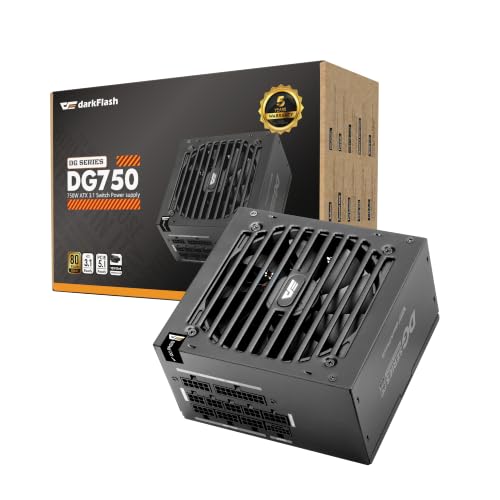
Lowest Price Here
darkFlash DG750
A lower price than the Thermaltake Smart BM3 650W and the rest when we checked.
Best for: Spending as little as possible, with the Thermaltake Smart BM3 650W the next step up.
Our take Check price for darkFlash DG750 (opens in a new tab)
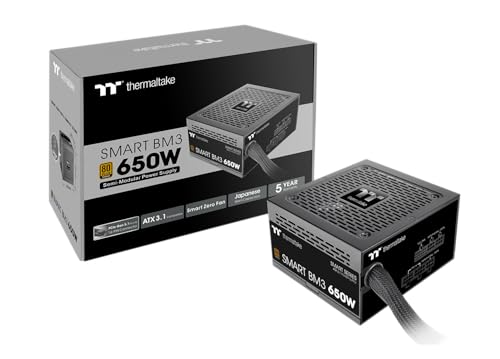
Semi-modular Cabling
Thermaltake Smart BM3 650W
A semi-modular cabling.
Best for: Buyers who want a semi-modular cabling.
Our take Check price for Thermaltake Smart BM3 650W (opens in a new tab)

Also Consider
SAMA GT750
Japanese capacitors with an LLC and DC-DC design.
Best for: Buyers who want Japanese capacitors with an LLC and DC-DC design.

Longest Warranty
MONTECH Century II 650W
The longest warranty here (10 years).
Best for: Buyers who put warranty first.
Our take Check price for MONTECH Century II 650W (opens in a new tab)
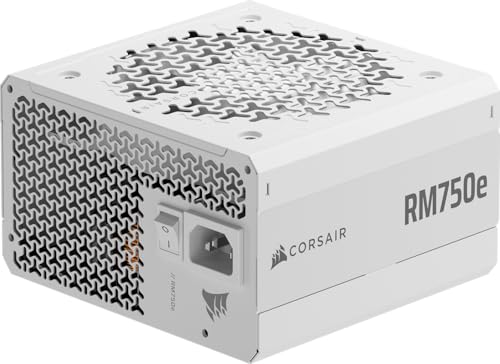
Premium Pick
CORSAIR RM750e White (ATX 3.1)
The top of this price range, adding white housing with matching white cables.
Best for: Spending more than the MONTECH Century II 650W costs for the fullest feature set in this group.
Our take Check price for CORSAIR RM750e White (ATX 3.1) (opens in a new tab)
| Pick | Why it’s here | Best for | Price |
|---|---|---|---|
| A lower price than the Thermaltake Smart BM3 650W and the rest when we checked. | Spending as little as possible, with the Thermaltake Smart BM3 650W the next step up. | Check price for darkFlash DG750 (opens in a new tab) |
| A semi-modular cabling. | Buyers who want a semi-modular cabling. | Check price for Thermaltake Smart BM3 650W (opens in a new tab) |
| Japanese capacitors with an LLC and DC-DC design. | Buyers who want Japanese capacitors with an LLC and DC-DC design. | Check price for SAMA GT750 (opens in a new tab) |
| The longest warranty here (10 years). | Buyers who put warranty first. | Check price for MONTECH Century II 650W (opens in a new tab) |
| The top of this price range, adding white housing with matching white cables. | Spending more than the MONTECH Century II 650W costs for the fullest feature set in this group. | Check price for CORSAIR RM750e White (ATX 3.1) (opens in a new tab) |
Our Picks
Lowest Price Here1 of 5
darkFlash DG750 on Amazon (opens in a new tab)
darkFlash's DG750 is a 140mm-deep 80 Plus Gold unit with a native 12V-2x6 cable and a hydraulic-bearing fan.
Best for
- Spending as little as possible, with the Thermaltake Smart BM3 650W the next step up.
Skip if
- Skip it if this is a deal-breaker for you: a shorter 5-year warranty.
Why we like it
Its warranty is 5 years. It is fully modular with a quiet HDB fan, 80 Plus Gold rated, and backed by a 5-year limited warranty. Its fully modular cables reduce clutter for first-time builders.
On rated output it ties with the SAMA GT750 and the CORSAIR RM750e White at 750W. It matches the Thermaltake Smart BM3 650W on warranty (5 years). It shares a gold 80 plus rating with the MONTECH Century II 650W; the Thermaltake Smart BM3 650W goes with a bronze 80 plus rating.
It also comes with a 140mm body that leaves room for cables. The darkFlash DG750 comes with a native 12V-2x6 cable, so a 16-pin card plugs in without an adapter. It undercut the Thermaltake Smart BM3 650W and every other pick on price at the time of writing. The main gap: warranty of 5 years, behind the MONTECH Century II 650W (10 years). If that matters, the MONTECH Century II 650W offers 10 years.
Key dimensions & specs
- Wattage: 750W
- Native 12V-2x6 cables: 1
- Warranty: 5 years
- Depth: 140mm
- 80 Plus rating: Gold
- ATX version: ATX 3.1
- Form factor: ATX
- Cabling: Fully modular
- Colour: Black
Pros
- A 750W rating
- A native 12V-2x6 cable for 16-pin cards
- A short 140mm body
- ATX 3.1 compliance
Cons
- A shorter 5-year warranty
- Warranty of 5 years, behind the MONTECH Century II 650W (10 years)
Semi-modular Cabling2 of 5
Thermaltake Smart BM3 650W on Amazon (opens in a new tab)
The Thermaltake Smart BM3 650W stands out for Japanese 105°C main capacitor, and it adds semi-modular cables: fixed main cables, detachable extras.
Best for
- Buyers who want a semi-modular cabling.
Skip if
- Pass on it if a shorter 5-year warranty rules it out for your setup.
Why we like it
It also offers a 650W rated output and offers a 5 years warranty. It is 80 Plus Bronze and ATX 3.1 compliant for PCIe Gen 5 cards, with industrial-grade protections built in. On rated output it ties with the MONTECH Century II 650W at 650W.
It matches the darkFlash DG750 on warranty (5 years). You get a bronze 80 plus rating here, which sets it apart from the MONTECH Century II 650W and its a gold 80 plus rating. No other pick in this guide offers semi-modular cabling; compare the MONTECH Century II 650W, which has fully modular cabling.
On price it sat second of 5, between the cheaper darkFlash DG750 and the pricier SAMA GT750, at the time of writing. The maker doesn't give its native 12V-2x6 cable count; if that figure matters, the darkFlash DG750 offers 1.
Key dimensions & specs
- Wattage: 650W
- Warranty: 5 years
- 80 Plus rating: Bronze
- ATX version: ATX 3.1
- Form factor: ATX
- Cabling: Semi-modular
- Fan: 120mm
- Fan stop: Yes
- Colour: Black
Pros
- A 650W rating
- ATX 3.1 compliance
- A fan that stops at low load
- Japanese 105°C main capacitor
Cons
- A shorter 5-year warranty
- Only 80 Plus Bronze efficiency
- No published native 12V-2x6 cable count
Also Consider3 of 5
SAMA GT750 on Amazon (opens in a new tab)
SAMA's GT750 uses Japanese capacitors with an LLC and DC-DC design, a native 12V-2x6 cable and an ECO silent mode for low loads.
Best for
- Buyers who want Japanese capacitors with an LLC and DC-DC design.
Skip if
- Its warranty is not published, which rules it out if you need that number.
Why we like it
Its ECO silent mode keeps the 120mm FDB fan quiet at low load, and Japanese capacitors with LLC and DC-DC topology support long-term stability. Embossed modular cables are easier to route. Its embossed modular cables improve airflow and make routing simpler.
On rated output it ties with the darkFlash DG750 and the CORSAIR RM750e White at 750W. The SAMA GT750 comes with a native 12V-2x6 cable, so a 16-pin card plugs in without an adapter. No depth is rated for the SAMA GT750, so check the maker's page against your case's PSU bay.
On price it sat third of 5, between the cheaper Thermaltake Smart BM3 650W and the pricier MONTECH Century II 650W, at the time of writing. The maker doesn't give its warranty; if that figure matters, the MONTECH Century II 650W offers 10 years.
Key dimensions & specs
- Wattage: 750W
- Native 12V-2x6 cables: 1
- Cybenetics rating: Gold
- ATX version: ATX 3.1
- Form factor: ATX
- Cabling: Fully modular
- Fan: 120mm
- Fan stop: Yes
- Colour: Black
Pros
- A 750W rating
- A native 12V-2x6 cable for 16-pin cards
- ATX 3.1 compliance
- Fully modular cables
Cons
- No published warranty
- Costs more than the darkFlash DG750 at the time of writing
Longest Warranty4 of 5
MONTECH Century II 650W on Amazon (opens in a new tab)
Montech's Century II 650W brings a native 12V-2x6 cable, fully modular cables and a 10-year warranty to a low-cost 80 Plus Gold unit.
Best for
- Buyers who put warranty first.
Skip if
- Skip it if rated output matters most to you; the darkFlash DG750 offers 750W.
Why we like it
Its 135mm FDB fan has a zero RPM mode, and it uses 100% Japanese capacitors. It matches the Thermaltake Smart BM3 650W on rated output (650W). On warranty it leads this guide at 10 years, ahead of the darkFlash DG750 (5 years).
Like the darkFlash DG750, it has a gold 80 plus rating, while the Thermaltake Smart BM3 650W uses a bronze 80 plus rating. The MONTECH Century II 650W comes with a native 12V-2x6 cable, so a 16-pin card plugs in without an adapter. No depth is rated for the MONTECH Century II 650W, so check the maker's page against your case's PSU bay.
It was priced above the SAMA GT750 and below the CORSAIR RM750e White at the time of writing. It gives ground on rated output, where the darkFlash DG750 offers 750W.
Key dimensions & specs
- Wattage: 650W
- Native 12V-2x6 cables: 1
- Warranty: 10 years
- 80 Plus rating: Gold
- ATX version: ATX 3.1
- Form factor: ATX
- Cabling: Fully modular
- Fan: 135mm
- Fan stop: Yes
- Colour: Black
Pros
- A 650W rating
- A native 12V-2x6 cable for 16-pin cards
- A 10-year warranty
- ATX 3.1 compliance
Cons
- Rated output trails the darkFlash DG750 (750W)
- Costs more than the darkFlash DG750 at the time of writing
Premium Pick5 of 5
CORSAIR RM750e White (ATX 3.1) on Amazon (opens in a new tab)
What the CORSAIR RM750e White brings to the table is white housing with matching white cables, plus 105°C-rated capacitors.
Best for
- Spending more than the MONTECH Century II 650W costs for the fullest feature set in this group.
Skip if
- Pass if a published native 12V-2x6 cable count matters; this one has none.
Why we like it
It also offers a 750W rated output and offers a 120mm fan. It is Intel ATX 3.1 certified, handles 2x GPU transient spikes, and supports Modern Standby for fast wake times. The fully modular cables keep builds tidy.
It uses 105°C-rated capacitors for steady power. No other pick in this guide offers a white colour; compare the SAMA GT750, which has a black colour. The CORSAIR RM750e White has no stated native 12V-2x6 cable; confirm the cable kit before pairing it with a 16-pin card.
No depth is rated for the CORSAIR RM750e White, so check the maker's page against your case's PSU bay. Only the MONTECH Century II 650W came close to it on price at the time of writing; it cost the most of the 5 picks. There is no published native 12V-2x6 cable count figure, whereas the darkFlash DG750 offers 1.
Key dimensions & specs
- Wattage: 750W
- ATX version: ATX 3.1
- Form factor: ATX
- Cabling: Fully modular
- Fan: 120mm
- Colour: White
Pros
- A 750W rating
- ATX 3.1 compliance
- Fully modular cables
- White housing with matching white cables
Cons
- No published native 12V-2x6 cable count
- No published warranty
- Costs more than the darkFlash DG750 at the time of writing
How We Chose These Power Supplies for RTX 5060 Ti
Each pick was assessed across 4 criteria weighted for real-world use.
- How these picks were ranked
- We compared five power supplies on rated output, native 12V-2x6 cable count, warranty and 80 Plus rating as the makers state them. Nothing was tested in-house; 5 of the 10 fields compared are stated for every pick, while native 12V-2x6 cable count and warranty have gaps.
- The shared baseline
- All 5, from the darkFlash DG750 to the CORSAIR RM750e White, state rated output, ATX version and form factor and share ATX 3.1 ATX version.
- Where the specs have gaps
- The Thermaltake Smart BM3 650W and the CORSAIR RM750e White give no native 12V-2x6 cable count; the SAMA GT750 and the CORSAIR RM750e White give no warranty.
- Price range
- From the darkFlash DG750 to the CORSAIR RM750e White, all sat in the $50 to $100 tier when we checked.
What to Look for in Power Supplies for RTX 5060 Ti
Key buying criteria so you get the right fit the first time.
Rated output
Across these 5 picks rated output spans 650W (the MONTECH Century II 650W) to 750W (the darkFlash DG750). The darkFlash DG750 is the pick for rated output.
How much warranty you need
Here warranty runs from 5 years on the Thermaltake Smart BM3 650W to 10 years on the MONTECH Century II 650W, a 100% spread. If warranty is your first filter, the MONTECH Century II 650W sets the ceiling at 10 years. The SAMA GT750 and the CORSAIR RM750e White give no warranty figure, so 3 of 5 picks are compared here.
Cabling
The darkFlash DG750, the SAMA GT750, the MONTECH Century II 650W and the CORSAIR RM750e White list Fully modular; the Thermaltake Smart BM3 650W lists Semi-modular. Settling cabling first narrows 5 picks to 4 or 1.
Fit and compatibility
The darkFlash DG750 comes with a native 12V-2x6 cable, so a 16-pin card plugs in without an adapter. The Thermaltake Smart BM3 650W has no stated native 12V-2x6 cable; confirm the cable kit before pairing it with a 16-pin card.
Features beyond the spec table
The SAMA GT750: an ECO silent mode for low load. The MONTECH Century II 650W: a 135mm fan with a zero-RPM mode. The CORSAIR RM750e White: 105°C-rated capacitors.
How to Choose Power Supplies for RTX 5060 Ti
By priority
| Priority | Consider | Why |
|---|---|---|
| Spending as little as possible, with the Thermaltake Smart BM3 650W the next step up | darkFlash DG750 | A lower price than the Thermaltake Smart BM3 650W and the rest when we checked |
| Buyers who want a semi-modular cabling | Thermaltake Smart BM3 650W | A semi-modular cabling |
| Buyers who want Japanese capacitors with an LLC and DC-DC design | SAMA GT750 | Japanese capacitors with an LLC and DC-DC design |
| Buyers who put warranty first | MONTECH Century II 650W | The longest warranty here (10 years) |
| Spending more than the MONTECH Century II 650W costs for the fullest feature set in this group | CORSAIR RM750e White | The top of this price range, adding white housing with matching white cables |
Scroll sideways to see every column.
Key specs side by side
The darkFlash DG750 leads on rated output at 750W, ahead of the SAMA GT750 at 750W. "Not listed" marks native 12V-2x6 cable count where the Thermaltake Smart BM3 650W and the CORSAIR RM750e White leave the figure out.
| Power supplie | Wattage | Native 12V-2x6 cables | Warranty | 80 Plus rating |
|---|---|---|---|---|
| darkFlash DG750 | 750W | 1 | 5 years | Gold |
| Thermaltake Smart BM3 650W | 650W | Not listed | 5 years | Bronze |
| SAMA GT750 | 750W | 1 | Not listed | Not listed |
| MONTECH Century II 650W | 650W | 1 | 10 years | Gold |
| CORSAIR RM750e White | 750W | Not listed | Not listed | Not listed |
Scroll sideways to see every column.
Frequently Asked Questions
How does the darkFlash DG750 compare with the MONTECH Century II 650W on warranty?
Between the top two, it is 10 years on the MONTECH Century II 650W against 5 years on the darkFlash DG750, a 100% difference. The SAMA GT750 and the CORSAIR RM750e White are left out of this ranking because their warranty isn't stated; 3 of 5 picks are ranked.
What makes the Thermaltake Smart BM3 650W the Semi-modular Cabling?
The label rests on a semi-modular cabling. It gives up rated output (650W against 750W) to the darkFlash DG750, the cheapest pick. It is aimed at anyone who wants a semi-modular cabling.
Do the darkFlash DG750 and the Thermaltake Smart BM3 650W differ on 80 Plus rating?
The darkFlash DG750 and the MONTECH Century II 650W use Gold; the Thermaltake Smart BM3 650W uses bronze. The makers of the SAMA GT750 and the CORSAIR RM750e White don't state 80 Plus rating, so 3 of 5 picks are covered here.
What should I check before buying the SAMA GT750?
The SAMA GT750 comes with a native 12V-2x6 cable, so a 16-pin card plugs in without an adapter. No depth is rated for the SAMA GT750, so check the maker's page against your case's PSU bay. In this guide it ranks third of 5, and second of 5 on rated output (750W).
Beyond the specs, what sets the darkFlash DG750 and the Thermaltake Smart BM3 650W apart?
The darkFlash DG750: a 140mm body that leaves room for cables. The Thermaltake Smart BM3 650W: Japanese 105°C main capacitor. The SAMA GT750: Japanese capacitors with an LLC and DC-DC design.
Bottom Line
Our first pick is the darkFlash DG750, chosen for a lower price than the Thermaltake Smart BM3 650W and the rest when we checked. Look at the Thermaltake Smart BM3 650W for a semi-modular cabling, the SAMA GT750 for Japanese capacitors with an LLC and DC-DC design and the MONTECH Century II 650W for the longest warranty here (10 years) if those matter more to you.
Check whether your card uses an 8-pin or a 16-pin connector before you order.