
Buying Guide
The Best PC Liquid Cooling Systems
Six all-in-one liquid coolers from 240mm to 420mm, so you can match the radiator to your case and CPU.
By The PC Journal editorial team
12 min read6 products evaluated
An all-in-one liquid cooler moves CPU heat to a radiator, so the case's radiator support sets what fits. Larger radiators suit hotter chips; 240mm units suit smaller cases and cooler CPUs.
We compared radiator size, fans and cabling from each listing; we did not test these coolers.
Quick Picks
Our 6 recommendations at a glance. Tap a pick for the full verdict.

Largest Radiator
ARCTIC Liquid Freezer III Pro 420 A-RGB
A 420mm radiator with 140mm fans and a VRM fan.
Best for: The hottest CPUs in large cases.
Our take Check price for ARCTIC Liquid Freezer III Pro 420 A-RGB (opens in a new tab)

Best 360mm ARGB System
ARCTIC Liquid Freezer III Pro 360 A-RGB
A 360mm radiator with a VRM fan and ARGB fans.
Best for: RGB builds with hot CPUs.
Our take Check price for ARCTIC Liquid Freezer III Pro 360 A-RGB (opens in a new tab)

Best Plain 360mm
Cooler Master 360L Core ARGB
A 360mm radiator for AM5 and LGA1851.
Best for: Builds that skip software.
Our take Check price for Cooler Master 360L Core ARGB (opens in a new tab)

Best Budget 360mm
ID-COOLING FX360 PRO
A 360mm radiator with 120mm fans.
Best for: 360mm cooling on a budget.
Our take Check price for ID-COOLING FX360 PRO (opens in a new tab)

Best 280mm Option
be quiet! Pure Loop 3 280mm
A 280mm radiator with daisy-chained PWM fans.
Best for: Cases with 140mm mounts.
Our take Check price for be quiet! Pure Loop 3 280mm (opens in a new tab)
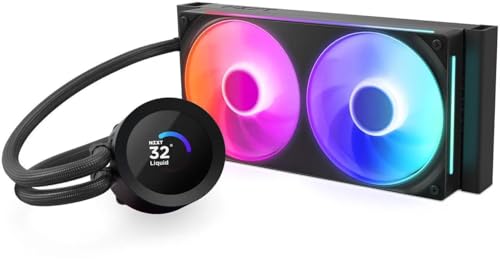
Best 240mm With LCD
NZXT Kraken Plus 240 RGB
A 240mm radiator with a 1.54-inch LCD.
Best for: Smaller cases.
Our take Check price for NZXT Kraken Plus 240 RGB (opens in a new tab)
Our Picks
Largest Radiator1 of 6
ARCTIC Liquid Freezer III Pro 420 A-RGB on Amazon (opens in a new tab)
The Liquid Freezer III Pro 420 uses three 140mm fans on a larger radiator.
Best for
- The hottest CPUs in large cases.
Skip if
- Price-first buyers should look at the FX360 PRO, which cost less when we checked.
Why we like it
Check that your case offers 420mm radiator support. Its 420mm radiator uses 140mm P14 PRO fans, and an integrated VRM fan cools the power stage. A contact frame for LGA1851 and LGA1700 is included.
It also offers native offset mounting. Check that your case offers 420mm radiator support at the front or top, and allow for the radiator's thickness plus fans above the motherboard's heatsinks. It supports both AM5 and Intel LGA1851.
Worth noting too: fan cables routed inside the tube sleeving. On price it sat fourth of 6, between the cheaper Liquid Freezer III Pro 360 A-RGB and the pricier Kraken Plus 240, at the time of writing.
Key dimensions & specs
- Fan size: 140mm
- VRM fan: Yes
- Cabling: Fan cables routed inside the tube sleeving
- Sockets named: AM5, AM4, LGA1851, LGA1700
Pros
- Built-in fan that cools the motherboard's power stages
- Fan cables routed inside the tube sleeving
- Mounts on both AM5 and Intel LGA1851
- P14 PRO fans
Cons
- Costs more than the FX360 PRO at the time of writing
Best 360mm ARGB System2 of 6
ARCTIC Liquid Freezer III Pro 360 A-RGB on Amazon (opens in a new tab)
The Liquid Freezer III Pro 360 A-RGB is the lit version of ARCTIC's thick-radiator 360, with the same VRM fan and offset mounting.
Best for
- RGB builds with hot CPUs.
Skip if
- Price-first buyers should look at the FX360 PRO, which cost less when we checked.
Why we like it
An integrated VRM fan cools the motherboard power stage, and the offset cold plate targets the CPU hotspot. The A-RGB P12 PRO fans add lighting without losing airflow. The contact frame spreads pressure evenly on Intel LGA1851 and LGA1700 chips.
Its fan cables run inside the tube sleeve, so only one cable reaches the motherboard. The P12 PRO fans spin faster than the standard P12 when needed. Check that your case offers 360mm radiator support at the front or top, and allow for the radiator's thickness plus fans above the motherboard's heatsinks.
It supports both AM5 and Intel LGA1851. On price it sat third of 6, between the cheaper 360L Core and the pricier Liquid Freezer III Pro 420, at the time of writing.
Key dimensions & specs
- Fan size: 120mm
- VRM fan: Yes
- Cabling: Fan cables routed inside the tube sleeving
- Sockets named: AM5, AM4, LGA1851, LGA1700
Pros
- Built-in fan that cools the motherboard's power stages
- Fan cables routed inside the tube sleeving
- Mounts on both AM5 and Intel LGA1851
- P12 PRO A-RGB fans
Cons
- Costs more than the FX360 PRO at the time of writing
Best Plain 360mm3 of 6
Cooler Master 360L Core ARGB on Amazon (opens in a new tab)
The 360L Core uses Cooler Master's dual-chamber pump and includes CryoFuze paste.
Best for
- Builds that skip software.
Skip if
- Skip it if price comes first: the FX360 PRO cost less when we checked.
Why we like it
Its frosted fan blades spread ARGB light evenly, and the PWM blade design improves airflow and pressure. The minimalist pump cap keeps the look clean. Check that your case offers 360mm radiator support at the front or top, and allow for the radiator's thickness plus fans above the motherboard's heatsinks.
It supports both AM5 and Intel LGA1851. Before buying, weigh one limit: costs more than the FX360 PRO at the time of writing. Its price falls between the FX360 PRO and the Liquid Freezer III Pro 360 A-RGB, based on our last check.
Key dimensions & specs
- Fan size: 120mm
- Sockets named: AM5, AM4, LGA1851, LGA1700
Pros
- Mounts on both AM5 and Intel LGA1851
- Gen S dual-chamber pump
- CryoFuze paste in the box
- A 360mm radiator for AM5 and LGA1851
Cons
- Costs more than the FX360 PRO at the time of writing
Best Budget 360mm4 of 6
ID-COOLING FX360 PRO on Amazon (opens in a new tab)
The FX360 PRO is ID-COOLING's budget 360 rated at 350W.
Best for
- 360mm cooling on a budget.
Skip if
- Look at the other picks if you need a feature not covered above.
Why we like it
ID-COOLING rates it for 350W, and its three 120mm fans move up to 82.5 CFM. The all-black finish suits dark cases. Its fans daisy-chain to each other, which cuts down on cables to the motherboard.
The fans are rated at 2.55mmH2O static pressure. It also comes with simple fan cable management. Check that your case offers 360mm radiator support at the front or top, and allow for the radiator's thickness plus fans above the motherboard's heatsinks.
It supports both AM5 and Intel LGA1851. It cost the least of the 6 picks at the time of writing, with the 360L Core the next step up.
Key dimensions & specs
- Fan size: 120mm
- Sockets named: AM5, AM4, LGA1851, LGA1700
Pros
- Mounts on both AM5 and Intel LGA1851
- 350W rating
- Simple fan cable management
- A 360mm radiator with 120mm fans
Best 280mm Option5 of 6
be quiet! Pure Loop 3 280mm on Amazon (opens in a new tab)
The Pure Loop 3 280 is be quiet!'s low-noise take, with Pure Wings 3 fans that daisy-chain and a PWM pump.
Best for
- Cases with 140mm mounts.
Skip if
- Skip it if price comes first: the FX360 PRO cost less when we checked.
Why we like it
It suits quiet builds that skip RGB software. Its PWM pump has a six-pole motor for low vibration, and flexible sleeved tubes make mounting simple. Check that your case offers 280mm radiator support at the front or top, and allow for the radiator's thickness plus fans above the motherboard's heatsinks.
The maker doesn't spell out LGA1851 mounting, so confirm it on the maker's site for a Core Ultra build. Only the Kraken Plus 240 came close to it on price at the time of writing; it cost the most of the 6 picks.
Key dimensions & specs
- Fan size: 140mm
- Cabling: Daisy-chained PWM fans
- Sockets named: AM5, AM4, Intel
Pros
- Daisy-chained PWM fans
- PWM pump with a six-pole motor
- Pure Wings 3 fans
- A 280mm radiator with daisy-chained PWM fans
Cons
- Costs more than the FX360 PRO at the time of writing
Best 240mm With LCD6 of 6
NZXT Kraken Plus 240 RGB on Amazon (opens in a new tab)
The Kraken Plus 240 brings NZXT's 1.54-inch LCD pump head to a 240mm radiator for smaller cases.
Best for
- Smaller cases.
Skip if
- Look at the others if this bothers you: lighting and display control need NZXT CAM.
Why we like it
Its 1.54-inch LCD shows temperatures, GIFs or Spotify, and the RGB Core fan frame installs with four screws and one cable. NZXT's Turbine pump targets high flow. Check that your case offers 240mm radiator support at the front or top, and allow for the radiator's thickness plus fans above the motherboard's heatsinks.
It supports both AM5 and Intel LGA1851. Plan to install NZXT CAM for lighting and display control; fan and pump speed can also run from the motherboard's headers. When we checked, only the Liquid Freezer III Pro 420 and cheaper picks cost less, and the Pure Loop 3 280 cost more.
Key dimensions & specs
- Fan size: 120mm
- Pump display: 1.54-inch
- Software: NZXT CAM
- Sockets named: AM5, AM4, LGA1851, LGA1700
Pros
- 1.54-inch pump-head display for temperatures or images
- Mounts on both AM5 and Intel LGA1851
- NZXT's Turbine pump
- RGB fans
Cons
- Lighting and display control need NZXT CAM
- Costs more than the FX360 PRO at the time of writing
How We Chose These PC Cooling Systems
Each pick was assessed across 4 criteria weighted for real-world use.
- Fit and mounting
- We checked radiator size and listed socket support, including AM5 and LGA1851.
- Extras
- We recorded pump displays, VRM fans and zero RPM modes where listed.
- Setup
- We compared cabling, hubs and the software each unit needs.
- Pump and fans
- We noted listed pump and fan speeds and fan size.
What to Look for in a PC Cooling System
Key buying criteria so you get the right fit the first time.
Confirm radiator support in your case
Cases list which radiator sizes fit at the front, top and side. A top mount also has to clear the motherboard's heatsinks and tall RAM.
Check the case's clearance figure for radiator plus fans.
Match radiator size to the CPU
A 240mm radiator handles most gaming CPUs. 280mm and 360mm units give more headroom for 170W chips and let fans run slower.
Count the cables and headers
Some AIOs daisy-chain fans or run everything through one hub; others need several fan headers and a USB header. Check what your motherboard has free.
AIOs have a finite life
Pumps and coolant age over years of use. Warranty length is a fair guide to how long the maker expects the unit to last.
Mount the pump below the radiator's top
Air collects at the highest point of the loop. Keep the radiator's top edge above the pump, or tubes-down at the front, to avoid pump noise and wear.
Software is optional but useful
LCD screens and lighting usually need the maker's software. Pump and fan speeds can run from motherboard headers instead.
How to Choose a PC Cooling System
By priority
| Priority | Consider | Why |
|---|---|---|
| The hottest CPUs in large cases | Liquid Freezer III Pro 420 | A 420mm radiator with 140mm fans and a VRM fan |
| RGB builds with hot CPUs | Liquid Freezer III Pro 360 A-RGB | A 360mm radiator with a VRM fan and ARGB fans |
| Builds that skip software | 360L Core | A 360mm radiator for AM5 and LGA1851 |
| 360mm cooling on a budget | FX360 PRO | A 360mm radiator with 120mm fans |
| Cases with 140mm mounts | Pure Loop 3 280 | A 280mm radiator with daisy-chained PWM fans |
| Smaller cases | Kraken Plus 240 | A 240mm radiator with a 1.54-inch LCD |
Scroll sideways to see every column.
Key specs side by side
Figures as each maker states them.
| AIO cooler | Fan size | VRM fan | Cabling | Sockets named |
|---|---|---|---|---|
| Liquid Freezer III Pro 420 | 140mm | Yes | Fan cables routed inside the tube sleeving | AM5, AM4, LGA1851, LGA1700 |
| Liquid Freezer III Pro 360 A-RGB | 120mm | Yes | Fan cables routed inside the tube sleeving | AM5, AM4, LGA1851, LGA1700 |
| 360L Core | 120mm | Not listed | Not listed | AM5, AM4, LGA1851, LGA1700 |
| FX360 PRO | 120mm | Not listed | Not listed | AM5, AM4, LGA1851, LGA1700 |
| Pure Loop 3 280 | 140mm | Not listed | Daisy-chained PWM fans | AM5, AM4, Intel |
| Kraken Plus 240 | 120mm | Not listed | Not listed | AM5, AM4, LGA1851, LGA1700 |
Scroll sideways to see every column.
Frequently Asked Questions
Should the radiator be at the front or top?
Either works. Top-mounted exhausts keep warm air out of the case; front-mounted intake gives the CPU cooler air. Keep the pump below the radiator's top.
Where do I plug in the pump?
Use the motherboard's AIO_PUMP or CPU_FAN header, set to full speed or DC mode as the maker recommends.
Does an AIO need maintenance?
Only dusting the radiator. The loop is sealed and is not meant to be refilled.
Is an LCD pump head worth it?
Only for looks or quick temperature readouts. It does not change cooling performance.
Is an AIO better than an air cooler?
For CPUs rated at 170W or more, a 280mm or 360mm AIO usually runs cooler or quieter. For 65W to 120W chips, a good dual-tower air cooler is often just as effective.
Do AIO coolers leak?
Leaks are rare with current sealed units, and several makers cover damage under warranty. Check the terms for your model.
Bottom Line
The Arctic Liquid Freezer III Pro 420 suits the hottest CPUs in large cases, and the 360 A-RGB version adds lighting. The 360L Core and FX360 PRO are plain 360mm options, the Pure Loop 3 280 suits 140mm mounts, and the Kraken Plus 240 fits smaller cases.