
Buying Guide
The Best Mouse Bungees
Five bungees with weighted, adhesive and clamp-grip designs.
By The PC Journal editorial team
12 min read5 products evaluated
A bungee lifts a wired mouse cable off the pad. These five differ in how they hold the cable and stay put.
Weights and dimensions come from the makers' specifications.
Quick Picks
Our 5 recommendations at a glance. Tap a pick for the full verdict.

Best Weighted
Razer Mouse Bungee V3 Chroma
An adjustable arm on a weighted base.
Best for: Moving setups.
Our take Check price for Razer Mouse Bungee V3 Chroma (opens in a new tab)

Best Adhesive
Pulsar Micro Bungee ES
3M VHB adhesive with spares.
Best for: Fixed setups.
Our take Check price for Pulsar Micro Bungee ES (opens in a new tab)

Best Cable Clamp
Endgame Gear MB1 Mouse Bungee
A clamp that tightens on the cable.
Best for: Thick cables.
Our take Check price for Endgame Gear MB1 Mouse Bungee (opens in a new tab)
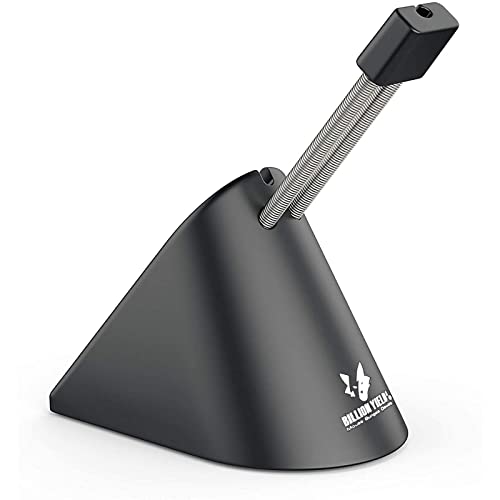
Tallest Arm
Sisyphy Gaming Mouse Bungee
An arm that extends up to 3 inches.
Best for: High pads.
Our take Check price for Sisyphy Gaming Mouse Bungee (opens in a new tab)

Heaviest
SteelSeries Mouse Bungee
A 263g body.
Best for: Stable placement.
Our take Check price for SteelSeries Mouse Bungee (opens in a new tab)
| Pick | Why it’s here | Best for | Price |
|---|---|---|---|
| An adjustable arm on a weighted base. | Moving setups. | Check price for Razer Mouse Bungee V3 Chroma (opens in a new tab) |
| 3M VHB adhesive with spares. | Fixed setups. | Check price for Pulsar Micro Bungee ES (opens in a new tab) |
| A clamp that tightens on the cable. | Thick cables. | Check price for Endgame Gear MB1 Mouse Bungee (opens in a new tab) |
| An arm that extends up to 3 inches. | High pads. | Check price for Sisyphy Gaming Mouse Bungee (opens in a new tab) |
| A 263g body. | Stable placement. | Check price for SteelSeries Mouse Bungee (opens in a new tab) |
Our Picks
Best Weighted1 of 5
Razer Mouse Bungee V3 Chroma on Amazon (opens in a new tab)
Razer's Bungee V3 Chroma pairs an adjustable spring arm with a weighted base.
Best for
- Moving setups.
Skip if
- Price-first buyers should look at the Pulsar Micro Bungee, which cost less when we checked.
Why we like it
Chroma RGB lights the base. An adjustable spring arm is unique to it among these picks, while the MB1 uses a height-adjustable arm. Chroma RGB extras is unique to it among these picks, while the MB1 uses anti-slip feet extras.
A bungee helps only with a wired mouse; if you plan to go wireless, the Bungee V3 Chroma will sit idle. Before buying, weigh one limit: costs more than the Pulsar Micro Bungee at the time of writing. At our last price check it topped the group, with the SteelSeries bungee the nearest cheaper option. If you want a confirmed weight, look to the SteelSeries bungee instead: it weighs 263g, while this one gives no figure.
Key dimensions & specs
- Arm: Adjustable spring
- Base: Weighted, non-slip feet
- Extras: Chroma RGB
Pros
- Adjustable spring arm
- Weighted base with non-slip feet
- Chroma RGB lighting
- Chroma RGB extras, the only one here
Cons
- Costs more than the Pulsar Micro Bungee at the time of writing
Best Adhesive2 of 5
Pulsar Micro Bungee ES on Amazon (opens in a new tab)
Pulsar's Micro Bungee ES sticks down with 3M VHB adhesive and holds the cable on a flexible silicone arm.
Best for
- Fixed setups.
Skip if
- Look at the other picks if you need a feature not covered above.
Why we like it
Spare adhesive is included. You get a flexible silicone arm here, which sets it apart from the MB1 and its a height-adjustable arm. No other pick in this guide offers a 3M VHB adhesive base; compare the MB1, which has a clamp base.
You get spare adhesive extras here, which sets it apart from the MB1 and its anti-slip feet extras. A bungee helps only with a wired mouse; if you plan to go wireless, the Pulsar Micro Bungee will sit idle. The Pulsar Micro Bungee sticks down, so pick its spot before removing the backing.
It cost the least of the 5 picks at the time of writing, with the MB1 the next step up. There is no published weight figure, whereas the SteelSeries bungee weighs 263g.
Key dimensions & specs
- Arm: Flexible silicone
- Base: 3M VHB adhesive
- Extras: Spare adhesive
Pros
- Flexible silicone arm
- 3M VHB adhesive
- Spare adhesive in the pack
- Spare adhesive extras, the only one here
Best Cable Clamp3 of 5
Endgame Gear MB1 Mouse Bungee on Amazon (opens in a new tab)
Endgame Gear's MB1 clamps onto the cable and adjusts in height.
Best for
- Thick cables.
Skip if
- Skip it if price comes first: the Pulsar Micro Bungee cost less when we checked.
Why we like it
Anti-slip feet hold it in place. No other pick in this guide offers a height-adjustable arm; compare the Bungee V3 Chroma, which has an adjustable spring arm. A clamp base is unique to it among these picks, while the SteelSeries bungee uses a weighted base.
No other pick in this guide offers anti-slip feet extras; compare the Bungee V3 Chroma, which has chroma RGB extras. A bungee helps only with a wired mouse; if you plan to go wireless, the MB1 will sit idle. Check the MB1's clamp fits your desk edge.
On price it sat second of 5, between the cheaper Pulsar Micro Bungee and the pricier Sisyphy, at the time of writing. The maker doesn't give its weight; if that figure matters, the SteelSeries bungee weighs 263g.
Key dimensions & specs
- Arm: Height-adjustable
- Base: Clamp
- Extras: Anti-slip feet
Pros
- Adjustable arm height
- Clamp that tightens on the cable
- Anti-slip feet
- Clamp base, the only one here
Cons
- Costs more than the Pulsar Micro Bungee at the time of writing
Tallest Arm4 of 5
Sisyphy Gaming Mouse Bungee on Amazon (opens in a new tab)
Sisyphy's bungee has a spring arm that extends up to 3 inches.
Best for
- High pads.
Skip if
- Skip it if price comes first: the Pulsar Micro Bungee cost less when we checked.
Why we like it
The 7 oz base sits on rubber feet. A flexible rubber clip holds the cable in three positions to remove drag. It is compact enough for most desks.
It measures about 2.5 by 3.8 inches, so it fits most desks. A bungee helps only with a wired mouse; if you plan to go wireless, the Sisyphy will sit idle. Worth noting too: rubber footing.
The nearest alternative on weight is the SteelSeries bungee at 263g, against 198g here. Before buying, weigh one limit: costs more than the Pulsar Micro Bungee at the time of writing.
Key dimensions & specs
- Arm: Height-adjustable spring, up to 3 in
- Base: Weighted, rubber feet
- Weight: 198g
Pros
- Spring arm that extends up to 3 inches
- 7 oz weighted base
- Rubber footing
Cons
- Costs more than the Pulsar Micro Bungee at the time of writing
Heaviest5 of 5
SteelSeries Mouse Bungee on Amazon (opens in a new tab)
SteelSeries's bungee weighs 263g in a 63 x 97 x 88mm body.
Best for
- Stable placement.
Skip if
- Skip it if price comes first: the Pulsar Micro Bungee cost less when we checked.
Why we like it
It is the heaviest here. A rubber clip holds different cable sizes, and a weighted base with rubber feet keeps it steady. You get a weighted base here, which sets it apart from the MB1 and its a clamp base.
A bungee helps only with a wired mouse; if you plan to go wireless, the SteelSeries bungee will sit idle. It makes the most sense for stable placement, since it offers a 263g body. Before buying, weigh one limit: costs more than the Pulsar Micro Bungee at the time of writing. Its price falls between the Sisyphy and the Bungee V3 Chroma, based on our last check.
Key dimensions & specs
- Base: Weighted
- Weight: 263g
Pros
- 263g body
- 63 x 97 x 88mm size
- Heaviest weight of the picks (263g)
- Weighted base, the only one here
Cons
- Costs more than the Pulsar Micro Bungee at the time of writing
How We Chose These Mouse Bungees
Each pick was assessed across 4 criteria weighted for real-world use.
- Arm
- We noted spring and height-adjustable arms.
- Base
- We noted weighted, adhesive or clamp bases.
- Weight
- We recorded listed weights.
- Extras
- We noted lighting and USB ports.
What to Look for in a Mouse Bungee
Key buying criteria so you get the right fit the first time.
Worth it only for wired mice
A bungee holds the cable up so it does not drag on the pad. Braided or stiff cables benefit most.
Weighted, adhesive or clamp base
Weighted bases can move around the desk. Adhesive bases stay put but are fixed. Clamps sit at the edge.
Spring arm height
The arm should hold the cable just above the pad. Adjustable arms suit different desk layouts.
Place it behind and to the side
Most players place it behind the mouse pad, slightly toward the monitor, so the cable has slack.
Footprint
Compact bungees fit between keyboard and pad; larger ones add USB ports or lights.
How to Choose a Mouse Bungee
By priority
| Priority | Consider | Why |
|---|---|---|
| Moving setups | Bungee V3 Chroma | An adjustable arm on a weighted base |
| Fixed setups | Pulsar Micro Bungee | 3M VHB adhesive with spares |
| Thick cables | MB1 | A clamp that tightens on the cable |
| High pads | Sisyphy | An arm that extends up to 3 inches |
| Stable placement | SteelSeries bungee | A 263g body |
Scroll sideways to see every column.
Key specs side by side
Figures as each maker states them.
| Mouse Bungee | Arm | Base | Weight | Extras |
|---|---|---|---|---|
| Bungee V3 Chroma | Adjustable spring | Weighted, non-slip feet | Not listed | Chroma RGB |
| Pulsar Micro Bungee | Flexible silicone | 3M VHB adhesive | Not listed | Spare adhesive |
| MB1 | Height-adjustable | Clamp | Not listed | Anti-slip feet |
| Sisyphy | Height-adjustable spring, up to 3 in | Weighted, rubber feet | 198g | Not listed |
| SteelSeries bungee | Not listed | Weighted | 263g | Not listed |
Scroll sideways to see every column.
Frequently Asked Questions
Are adhesive bungees permanent?
They are meant to stay. Some packs include spare adhesive for moving it once.
Where do I put a mouse bungee?
Behind the pad and slightly toward the screen, with a little slack in the cable.
Do I need a mouse bungee?
Only with a wired mouse whose cable drags or snags. Lightweight paracord-style cables need it less.
Does a bungee help a wireless mouse?
Only when charging it with a cable while you play.
Does it work with thick cables?
Most clips hold standard gaming cables. Check the grip if your cable is unusually thick.
Bottom Line
Razer's Bungee V3 Chroma is the pick for an adjustable arm on a weighted base. Pulsar's Micro Bungee ES stays fixed with adhesive, and Sisyphy's arm extends furthest.