
Buying Guide
The Best Motherboards for the Intel Core i9-13900K
Six Z790 boards for the 24-core Core i9-13900K compared on power stages, M.2 slots and connectivity.
By The PC Journal editorial team
12 min read6 products evaluated
The Core i9-13900K has 24 cores and the highest power draw in the 13th Gen range. Strong power stages and the latest BIOS microcode matter more than extras.
We compared 6 boards for it. This is a research-based comparison built from maker specifications and retailer listings; we did not test these parts ourselves.
Quick Picks
Our 6 recommendations at a glance. Tap a pick for the full verdict.

Strongest Power
ASUS ROG Strix Z790-E Gaming WiFi
An 18+1 layout, five M.2 slots and Thunderbolt 4 support.
Best for: Sustained all-core work.
Our take Check price for ASUS ROG Strix Z790-E Gaming WiFi (opens in a new tab)

Best Value
MSI MAG Z790 Tomahawk MAX WiFi
A 16+1+1 layout, five M.2 slots and Wi-Fi 7.
Best for: Most 13900K builds.
Our take Check price for MSI MAG Z790 Tomahawk MAX WiFi (opens in a new tab)

Best 80A Board
MSI PRO Z790-A WiFi II
80A power stages at a mid-range price.
Best for: Balancing power and price.
Our take Check price for MSI PRO Z790-A WiFi II (opens in a new tab)

Solid Alternative
ASUS Z790 Gaming WIFI7
The Z790 Gaming WIFI7 offers a 14+1 layout and Wi-Fi 7, but only 1Gbps Ethernet.
Best for: Buyers who want wi-fi 7 built in.
Our take Check price for ASUS Z790 Gaming WIFI7 (opens in a new tab)
Worth Considering
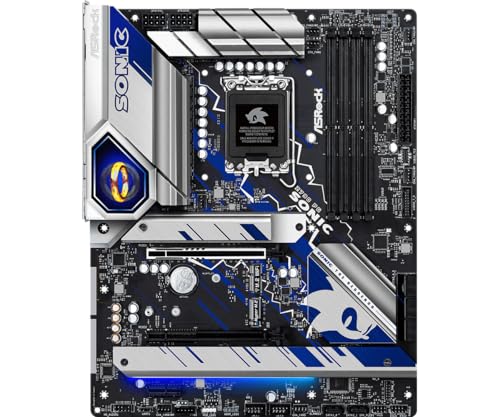
ASRock Z790 PG Sonic
The Z790 PG Sonic offers a 14+1+1 layout and Killer 2.5Gbps Ethernet under a Sonic-themed design.
Best for: Buyers who want 14+1+1 power stage layout.
Our take Check price for ASRock Z790 PG Sonic (opens in a new tab)

Well-Rounded Choice
ASUS Z790 MAX Gaming WIFI7
The Z790 MAX Gaming WIFI7 offers a 14+1 layout, Wi-Fi 7 and a USB 20Gbps port, with 1Gbps Ethernet.
Best for: Buyers who want wi-fi 7 built in.
Our take Check price for ASUS Z790 MAX Gaming WIFI7 (opens in a new tab)
| Pick | Why it’s here | Best for | Price |
|---|---|---|---|
| An 18+1 layout, five M.2 slots and Thunderbolt 4 support. | Sustained all-core work. | Check price for ASUS ROG Strix Z790-E Gaming WiFi (opens in a new tab) |
| A 16+1+1 layout, five M.2 slots and Wi-Fi 7. | Most 13900K builds. | Check price for MSI MAG Z790 Tomahawk MAX WiFi (opens in a new tab) |
| 80A power stages at a mid-range price. | Balancing power and price. | Check price for MSI PRO Z790-A WiFi II (opens in a new tab) |
| The Z790 Gaming WIFI7 offers a 14+1 layout and Wi-Fi 7, but only 1Gbps Ethernet. | Buyers who want wi-fi 7 built in. | Check price for ASUS Z790 Gaming WIFI7 (opens in a new tab) |
| The Z790 PG Sonic offers a 14+1+1 layout and Killer 2.5Gbps Ethernet under a Sonic-themed design. | Buyers who want 14+1+1 power stage layout. | Check price for ASRock Z790 PG Sonic (opens in a new tab) |
| The Z790 MAX Gaming WIFI7 offers a 14+1 layout, Wi-Fi 7 and a USB 20Gbps port, with 1Gbps Ethernet. | Buyers who want wi-fi 7 built in. | Check price for ASUS Z790 MAX Gaming WIFI7 (opens in a new tab) |
Our Picks
Strongest Power1 of 6
ASUS ROG Strix Z790-E Gaming WiFi on Amazon (opens in a new tab)
The Strix Z790-E offers an 18+1 layout, five M.2 slots and Thunderbolt 4 support.
Best for
- Sustained all-core work.
Skip if
- Skip it if this is a deal-breaker for you: wi-Fi 6E rather than Wi-Fi 7.
Why we like it
It is the premium LGA1700 board here. It matches the Z790 Tomahawk MAX on M.2 slot count (5). It matches the Z790 Tomahawk MAX, the PRO Z790-A II and the Z790 PG Sonic on wired network speed (2.5Gbps).
Like the PRO Z790-A II, it has a wi-Fi 6E, while the Z790 Gaming WIFI7 uses a wi-Fi 7. It is the only pick here with 18+1 power stages; the Z790 Tomahawk MAX has 16+1+1 power stages instead. You also get a PCIe 5.0 M.2 slot and a front-panel USB 3.2 port.
It uses Intel's LGA1700 socket for 12th, 13th and 14th Gen Core processors; check the CPU support list for the BIOS version your chip needs, since early boards shipped before 14th Gen launched. At our last price check it topped the group, with the Z790 MAX Gaming the nearest cheaper option.
Key dimensions & specs
- M.2 slots: 5
- Wired LAN: 2.5Gbps
- Wi-Fi: Wi-Fi 6E
- Power stages: 18+1
- Form factor: ATX
- Socket: LGA1700
- Memory type: DDR5
- Chipset: Z790
Pros
- 5 M.2 slots for SSD expansion
- 18+1 power stage layout
- PCIe 5.0 M.2 slot
- Thunderbolt 4 support
Cons
- Wi-Fi 6E rather than Wi-Fi 7
- Costs more than the Z790 PG Sonic at the time of writing
Best Value2 of 6
MSI MAG Z790 Tomahawk MAX WiFi on Amazon (opens in a new tab)
The Z790 Tomahawk MAX offers five M.2 slots, Wi-Fi 7 and a 16+1+1 layout.
Best for
- Most 13900K builds.
Skip if
- Skip it if price comes first: the Z790 PG Sonic cost less when we checked.
Why we like it
It is the most complete Z790 board for its price here. On M.2 slot count it ties with the Strix Z790-E at 5. On wired network speed it ties with the Strix Z790-E, the PRO Z790-A II and the Z790 PG Sonic at 2.5Gbps.
It shares a wi-Fi 7 with the Z790 Gaming WIFI7 and Z790 MAX Gaming; the PRO Z790-A II goes with a wi-Fi 6E. You get 16+1+1 power stages here, which sets it apart from the Z790 MAX Gaming and its 14+1 power stages. It also offers Bluetooth 5.4 alongside Wi-Fi 7 and a PCIe 5.0 graphics slot.
It uses Intel's LGA1700 socket for 12th, 13th and 14th Gen Core processors; check the CPU support list for the BIOS version your chip needs, since early boards shipped before 14th Gen launched. On price it sat third of 6, between the cheaper Z790 Gaming WIFI7 and the pricier PRO Z790-A II, at the time of writing.
Key dimensions & specs
- M.2 slots: 5
- Wired LAN: 2.5Gbps
- Wi-Fi: Wi-Fi 7
- Power stages: 16+1+1
- Form factor: ATX
- Socket: LGA1700
- Memory type: DDR5
- Chipset: Z790
Pros
- 5 M.2 slots for SSD expansion
- Wi-Fi 7 built in
- 16+1+1 power stage layout
- Bluetooth 5.4 alongside Wi-Fi 7
Cons
- Costs more than the Z790 PG Sonic at the time of writing
Best 80A Board3 of 6
MSI PRO Z790-A WiFi II on Amazon (opens in a new tab)
The PRO Z790-A WiFi II offers four Gen4 M.2 slots and 80A power stages.
Best for
- Balancing power and price.
Skip if
- Skip it if this is a deal-breaker for you: wi-Fi 6E rather than Wi-Fi 7.
Why we like it
Wi-Fi 6E is its only step back. It has four Gen4 M.2 slots with Shield Frozr, Wi-Fi 6E with BT 5.3 and a 20Gbps rear USB-C port. On M.2 slot count it sits mid-pack at 4: the Strix Z790-E offers 5, and the Z790 MAX Gaming comes in at 3.
On wired network speed it ties with the Strix Z790-E, the Z790 Tomahawk MAX and the Z790 PG Sonic at 2.5Gbps. It shares a wi-Fi 6E with the Strix Z790-E; the Z790 MAX Gaming goes with a wi-Fi 7. It also comes with memory support to DDR5-7800 (OC).
It uses Intel's LGA1700 socket for 12th, 13th and 14th Gen Core processors; check the CPU support list for the BIOS version your chip needs, since early boards shipped before 14th Gen launched. Its price falls between the Z790 Tomahawk MAX and the Z790 MAX Gaming, based on our last check.
Key dimensions & specs
- M.2 slots: 4
- Wired LAN: 2.5Gbps
- Wi-Fi: Wi-Fi 6E
- Form factor: ATX
- Socket: LGA1700
- Memory type: DDR5
- Chipset: Z790
Pros
- 4 M.2 slots for SSD expansion
- 80A SPS power stages
- Memory support to DDR5-7800 (OC)
- Wired network speed of 2.5Gbps, ahead of the Z790 Gaming WIFI7
Cons
- Wi-Fi 6E rather than Wi-Fi 7
- Costs more than the Z790 PG Sonic at the time of writing
Solid Alternative4 of 6
ASUS Z790 Gaming WIFI7 on Amazon (opens in a new tab)
The Z790 Gaming WIFI7 offers a 14+1 layout and Wi-Fi 7, but only 1Gbps Ethernet.
Best for
- Buyers who want wi-fi 7 built in.
Skip if
- Price-first buyers should look at the Z790 PG Sonic, which cost less when we checked.
Why we like it
It suits wireless desks. On M.2 slot count it ties with the Z790 MAX Gaming at 3. On wired network speed it ties with the Z790 MAX Gaming at 1Gbps.
It shares a wi-Fi 7 with the Z790 Tomahawk MAX and Z790 MAX Gaming; the PRO Z790-A II goes with a wi-Fi 6E. It shares 14+1 power stages with the Z790 MAX Gaming; the Z790 Tomahawk MAX goes with 16+1+1 power stages. It also comes with a rear USB 3.2 Gen 2x2 Type-C port and a front USB-C header.
It uses Intel's LGA1700 socket for 12th, 13th and 14th Gen Core processors; check the CPU support list for the BIOS version your chip needs, since early boards shipped before 14th Gen launched. On price it sat second of 6, between the cheaper Z790 PG Sonic and the pricier Z790 Tomahawk MAX, at the time of writing.
Key dimensions & specs
- M.2 slots: 3
- Wired LAN: 1Gbps
- Wi-Fi: Wi-Fi 7
- Power stages: 14+1
- Form factor: ATX
- Socket: LGA1700
- Memory type: DDR5
- Chipset: Z790
Pros
- Wi-Fi 7 built in
- 14+1 power stage layout
- Rear USB 3.2 Gen 2x2 Type-C port
- Front USB-C header
Cons
- Costs more than the Z790 PG Sonic at the time of writing
Worth Considering5 of 6
ASRock Z790 PG Sonic on Amazon (opens in a new tab)
The Z790 PG Sonic offers a 14+1+1 layout and Killer 2.5Gbps Ethernet under a Sonic-themed design.
Best for
- Buyers who want 14+1+1 power stage layout.
Skip if
- Its M.2 slot count is not published, which rules it out if you need that number.
Why we like it
The maker doesn't state Wi-Fi. On wired network speed it ties with the Strix Z790-E, the Z790 Tomahawk MAX and the PRO Z790-A II at 2.5Gbps. You get 14+1+1 power stages here, which sets it apart from the Z790 MAX Gaming and its 14+1 power stages.
It uses Intel's LGA1700 socket for 12th, 13th and 14th Gen Core processors; check the CPU support list for the BIOS version your chip needs, since early boards shipped before 14th Gen launched. It undercut the Z790 Gaming WIFI7 and every other pick on price at the time of writing. The maker doesn't give its M.2 slot count; if that figure matters, the Strix Z790-E offers 5.
Key dimensions & specs
- Wired LAN: 2.5Gbps
- Power stages: 14+1+1
- Socket: LGA1700
- Memory type: DDR5
- Chipset: Z790
Pros
- 14+1+1 power stage layout
- Killer 2.5G Ethernet
- Sonic-themed design
- Wired network speed of 2.5Gbps, ahead of the Z790 Gaming WIFI7
Cons
- No published M.2 slot count
Well-Rounded Choice6 of 6
ASUS Z790 MAX Gaming WIFI7 on Amazon (opens in a new tab)
The Z790 MAX Gaming WIFI7 offers a 14+1 layout, Wi-Fi 7 and a USB 20Gbps port, with 1Gbps Ethernet.
Best for
- Buyers who want wi-fi 7 built in.
Skip if
- Skip it if M.2 slot count matters most to you; the Strix Z790-E offers 5.
Why we like it
It suits wireless desks. It matches the Z790 Gaming WIFI7 on M.2 slot count (3). Like the Z790 Gaming WIFI7, it has 14+1 power stages, while the Z790 PG Sonic uses 14+1+1 power stages.
It also offers a PCIe 5.0 graphics slot. It uses Intel's LGA1700 socket for 12th, 13th and 14th Gen Core processors; check the CPU support list for the BIOS version your chip needs, since early boards shipped before 14th Gen launched. Check the manual for which M.2 slots share lanes with SATA ports or the second PCIe slot before filling them all.
When we checked, only the PRO Z790-A II and cheaper picks cost less, and the Strix Z790-E cost more. M.2 slot count is its weakest area, and the Strix Z790-E covers it better at 5.
Key dimensions & specs
- M.2 slots: 3
- Wired LAN: 1Gbps
- Wi-Fi: Wi-Fi 7
- Power stages: 14+1
- Form factor: ATX
- Socket: LGA1700
- Memory type: DDR5
- Chipset: Z790
Pros
- Wi-Fi 7 built in
- 14+1 power stage layout
- Rear USB 20Gbps Type-C port
- PCIe 5.0 graphics slot
Cons
- M.2 slot count trails the Strix Z790-E (5)
- Wired network speed trails the Strix Z790-E (2.5Gbps)
- Costs more than the Z790 PG Sonic at the time of writing
How We Chose These Core i9-13900K Motherboards
Each pick was assessed across 4 criteria weighted for real-world use.
- Storage
- We counted listed M.2 slots and PCIe 5.0 support.
- Connectivity
- We compared Wi-Fi, wired LAN speed and USB4.
- Power delivery
- We noted power stage layouts where the maker lists them.
- Platform
- We checked socket, chipset and form factor from each listing.
What to Look for in a Core i9-13900K Motherboard
Key buying criteria so you get the right fit the first time.
Power delivery for Core i7 and i9
Core i7 and i9 chips draw far more power under all-core load than a Core i5. Boards with more and stronger power stages hold boost clocks with less heat; check the power stage layout before pairing one with a budget board.
Confirm BIOS support for 14th Gen
Boards made before 14th Gen launched may need a BIOS update to run a 14th Gen chip, and Intel's microcode updates for 13th and 14th Gen stability arrive through BIOS releases. Update to the latest BIOS before daily use.
Count M.2 slots
Most games now install to NVMe drives. Count how many M.2 slots you need now and later, and check which ones share lanes with other ports.
Z-series for K chips, B-series for the rest
Z790 and Z890 boards let you overclock an unlocked K processor and usually carry stronger power delivery. B760 boards run the same chips at stock settings for less money.
A Core i5-13400F or 14400F loses nothing on a B760 board.
Check DDR4 or DDR5 before you buy
LGA1700 boards come in DDR4 and DDR5 versions that look alike; the model name usually carries D4 for DDR4. Buy the board that matches the memory you plan to use.
Check the rear and front I/O
Count USB ports you use every day and confirm a front USB-C header if your case has a USB-C port. Thunderbolt ports matter only for Thunderbolt docks and drives.
How to Choose a Core i9-13900K Motherboard
By priority
| Priority | Consider | Why |
|---|---|---|
| Sustained all-core work | Strix Z790-E | An 18+1 layout, five M.2 slots and Thunderbolt 4 support |
| Most 13900K builds | Z790 Tomahawk MAX | A 16+1+1 layout, five M.2 slots and Wi-Fi 7 |
| Balancing power and price | PRO Z790-A II | 80A power stages at a mid-range price |
Scroll sideways to see every column.
Key specs side by side
Figures as each maker states them.
| Board | M.2 slots | Wired LAN | Wi-Fi | Power stages |
|---|---|---|---|---|
| Strix Z790-E | 5 | 2.5Gbps | Wi-Fi 6E | 18+1 |
| Z790 Tomahawk MAX | 5 | 2.5Gbps | Wi-Fi 7 | 16+1+1 |
| PRO Z790-A II | 4 | 2.5Gbps | Wi-Fi 6E | Not listed |
| Z790 Gaming WIFI7 | 3 | 1Gbps | Wi-Fi 7 | 14+1 |
| Z790 PG Sonic | Not listed | 2.5Gbps | Not listed | 14+1+1 |
| Z790 MAX Gaming | 3 | 1Gbps | Wi-Fi 7 | 14+1 |
Scroll sideways to see every column.
By price at the time of writing
Prices change often; these tiers reflect Amazon prices when this guide was updated.
| Price tier | Boards |
|---|---|
| About $150 to $250 | Z790 PG Sonic, Z790 Gaming WIFI7, Z790 Tomahawk MAX, PRO Z790-A II, Z790 MAX Gaming |
| About $250 to $500 | Strix Z790-E |
Frequently Asked Questions
What size motherboard should I buy?
ATX fits most mid-towers and has the most slots. Micro-ATX suits smaller cases with fewer expansion needs.
Do I need a Z790 board for a Core i7-14700K?
Only to overclock it or to get stronger power delivery. A good B760 board runs a 14700K at stock settings, though the cheapest boards may lower its sustained boost.
Can I use DDR4 on an LGA1700 board?
Only on a DDR4 version of the board. DDR4 and DDR5 slots are keyed differently, so a board takes one type or the other.
Will these boards take Core Ultra processors?
Z890 and B860 boards use LGA1851 for Core Ultra 200S. LGA1700 boards (Z790, B760) take 12th to 14th Gen chips only.
Is built-in Wi-Fi worth it?
Yes if you cannot run a cable. Otherwise wired Ethernet is more consistent.
Should I fill all four memory slots?
Two sticks usually run faster and more reliably on DDR5. Buy a two-stick kit with the capacity you need.
Bottom Line
The Strix Z790-E has the strongest listed power layout here. The Z790 Tomahawk MAX and PRO Z790-A WiFi II cost less, and the Gaming WIFI7 suits wireless desks.