
Buying Guide
The Best Monitors Under $80
We weighed five monitors on refresh rate and screen size; the Sceptre E225W has the highest refresh rate, and it also costs the least.
By The PC Journal editorial team
12 min read5 products evaluated
Under $80 a desktop monitor is a 21.5 to 24 inch 1080p panel, with refresh rates from 75Hz to 180Hz. Every monitor cost 80 or less when we checked and lists its size, resolution and refresh rate.
Rankings weigh refresh rate, resolution and size as the makers state them; we did not test these monitors ourselves, and if a maker skips panel, the guide says so.
Quick Picks
Our 5 recommendations at a glance. Tap a pick for the full verdict.

Fastest Refresh
Sceptre E225W-FW144 22-inch
The highest refresh rate here (144Hz).
Best for: Esports players with a GPU that can feed high frame rates.
Our take Check price for Sceptre E225W-FW144 22-inch (opens in a new tab)

Also Consider
Acer SB223Q J0bi
A ZeroFrame near bezel-less design.
Best for: Buyers who want ZeroFrame near bezel-less design.
Our take Check price for Acer SB223Q J0bi (opens in a new tab)
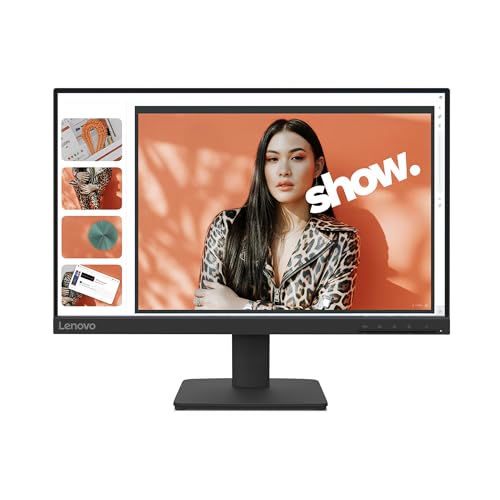
IPS Panel
Lenovo L22-4e
An IPS panel.
Best for: Buyers who want an IPS panel.

Strong Alternative
Philips 221V8LB 22-inch
Adaptive-Sync to keep frames smooth.
Best for: Buyers who want Adaptive-Sync to keep frames smooth.
Our take Check price for Philips 221V8LB 22-inch (opens in a new tab)

Largest Screen Size
Philips 241V8LB 24-inch
The largest screen size here (23.8 inches).
Best for: Buyers who put screen size first.
Our take Check price for Philips 241V8LB 24-inch (opens in a new tab)
| Pick | Why it’s here | Best for | Price |
|---|---|---|---|
| The highest refresh rate here (144Hz). | Esports players with a GPU that can feed high frame rates. | Check price for Sceptre E225W-FW144 22-inch (opens in a new tab) |
| A ZeroFrame near bezel-less design. | Buyers who want ZeroFrame near bezel-less design. | Check price for Acer SB223Q J0bi (opens in a new tab) |
| An IPS panel. | Buyers who want an IPS panel. | Check price for Lenovo L22-4e (opens in a new tab) |
| Adaptive-Sync to keep frames smooth. | Buyers who want Adaptive-Sync to keep frames smooth. | Check price for Philips 221V8LB 22-inch (opens in a new tab) |
| The largest screen size here (23.8 inches). | Buyers who put screen size first. | Check price for Philips 241V8LB 24-inch (opens in a new tab) |
Our Picks
Fastest Refresh1 of 5
Sceptre E225W-FW144 22-inch on Amazon (opens in a new tab)
The Sceptre E225W is built around HDMI and DisplayPort inputs, with built-in speakers on top.
Best for
- Esports players with a GPU that can feed high frame rates.
Skip if
- Skip it if this is a deal-breaker for you: screen size of 22 inches, behind the Philips 241V8LB (23.8 inches).
Why we like it
On the spec sheet, it offers a 144Hz refresh rate and offers a 22 inches screen size. Its 144Hz refresh rate is the highest here; the Acer SB223Q comes next at 120Hz. Its 22 inches screen size ranks second of 5 here, behind the Philips 241V8LB (23.8 inches) and ahead of the Philips 221V8LB (21.5 inches).
It also comes with Blue-Light Shift and a near bezel-free design. At 1080p, 144Hz is within reach of mid-range graphics cards in esports titles; use DisplayPort if your card's HDMI port is older. No other pick here cost less at our last price check, and the Acer SB223Q was closest.
Key dimensions & specs
- Refresh rate: 144Hz
- Resolution: 1920x1080 (1080p)
- Size: 22 inches
Pros
- 144Hz for smoother motion than a 60Hz office screen
- HDMI and DisplayPort inputs
- Built-in speakers
- Blue-Light Shift
Cons
- Screen size of 22 inches, behind the Philips 241V8LB (23.8 inches)
Also Consider2 of 5
Acer SB223Q J0bi on Amazon (opens in a new tab)
What the Acer SB223Q brings to the table is a ZeroFrame near bezel-less design, plus Adaptive-Sync support.
Best for
- Buyers who want ZeroFrame near bezel-less design.
Skip if
- Price-first buyers should look at the Sceptre E225W, which cost less when we checked.
Why we like it
It also offers a 120Hz refresh rate and offers a 21.5 inches screen size. Acer lists the panel as 1920x1080 in a 16:9 shape, and the near-borderless ZeroFrame design lets you place two screens side by side for an almost uninterrupted view. Adaptive-Sync support helps match the refresh rate to your graphics card.
On refresh rate it sits mid-pack at 120Hz: the Sceptre E225W offers 144Hz, and the Philips 241V8LB comes in at 100Hz. It matches the Lenovo L22-4e and the Philips 221V8LB on screen size (21.5 inches). When we checked, only the Sceptre E225W cost less, and the Lenovo L22-4e cost more.
Key dimensions & specs
- Refresh rate: 120Hz
- Resolution: 1920x1080 (1080p)
- Size: 21.5 inches
- Response: 1ms
Pros
- ZeroFrame near bezel-less design
- Adaptive-Sync support
- Refresh rate of 120Hz, ahead of the Lenovo L22-4e
Cons
- Costs more than the Sceptre E225W at the time of writing
IPS Panel3 of 5
Lenovo L22-4e on Amazon (opens in a new tab)
The Lenovo L22-4e is built around a 4ms response time in extreme mode, with a 1300:1 contrast ratio on top.
Best for
- Buyers who want an IPS panel.
Skip if
- Look at the others if this bothers you: a 100Hz refresh rate that suits work more than fast games.
Why we like it
On the spec sheet, it offers a 100Hz refresh rate and offers a 21.5 inches screen size. It matches the Philips 221V8LB and the Philips 241V8LB on refresh rate (100Hz). On screen size it ties with the Acer SB223Q and the Philips 221V8LB at 21.5 inches.
No other pick in this guide offers an IPS panel; compare the Philips 221V8LB, which has a VA panel. It also comes with VESA wall-mount support. Another plus: an IPS panel with wide viewing angles.
Worth noting: 99% sRGB colour coverage. Before buying, weigh one limit: costs more than the Sceptre E225W at the time of writing.
Key dimensions & specs
- Refresh rate: 100Hz
- Resolution: 1920x1080 (1080p)
- Size: 21.5 inches
- Panel: IPS
- Color gamut: 99% sRGB
- Stand: Tilt only
Pros
- an IPS panel with wide viewing angles
- 99% sRGB colour coverage
- 4ms response time in extreme mode
- 1300:1 contrast ratio
Cons
- a 100Hz refresh rate that suits work more than fast games
- Costs more than the Sceptre E225W at the time of writing
Strong Alternative4 of 5
Philips 221V8LB 22-inch on Amazon (opens in a new tab)
What the Philips 221V8LB brings to the table is Adaptive-Sync to keep frames smooth, plus a 178-degree viewing angle.
Best for
- Buyers who want Adaptive-Sync to keep frames smooth.
Skip if
- Pass on it if a 100Hz refresh rate that suits work more than fast games rules it out for your setup.
Why we like it
It also offers a 100Hz refresh rate and offers a 21.5 inches screen size. On refresh rate it ties with the Lenovo L22-4e and the Philips 241V8LB at 100Hz. It matches the Acer SB223Q and the Lenovo L22-4e on screen size (21.5 inches).
It shares a VA panel with the Philips 241V8LB; the Lenovo L22-4e goes with an IPS panel. You also get a 21.5-inch viewable area. When we checked, only the Lenovo L22-4e and cheaper picks cost less, and the Philips 241V8LB cost more. Screen size is its weakest area, and the Philips 241V8LB covers it better at 23.8 inches.
Key dimensions & specs
- Refresh rate: 100Hz
- Resolution: 1920x1080 (1080p)
- Size: 21.5 inches
- Panel: VA
Pros
- Adaptive-Sync to keep frames smooth
- 178-degree viewing angle
- 21.5-inch viewable area
Cons
- a 100Hz refresh rate that suits work more than fast games
- a VA panel that can smear dark transitions
- Screen size trails the Philips 241V8LB (23.8 inches)
Largest Screen Size5 of 5
Philips 241V8LB 24-inch on Amazon (opens in a new tab)
The Philips 241V8LB stands out for a 178-degree viewing angle, and it adds an EasyRead mode for long documents.
Best for
- Buyers who put screen size first.
Skip if
- Worth skipping when a 100Hz refresh rate that suits work more than fast games is a problem.
Why we like it
It also offers a 100Hz refresh rate and offers a 23.8 inches screen size. On refresh rate it ties with the Lenovo L22-4e and the Philips 221V8LB at 100Hz. Nothing else here matches its 23.8 inches screen size; the Sceptre E225W comes closest at 22 inches.
It shares a VA panel with the Philips 221V8LB; the Lenovo L22-4e goes with an IPS panel. It also offers a bezel-free look on three sides. Only the Philips 221V8LB came close to it on price at the time of writing; it cost the most of the 5 picks. It gives ground on refresh rate, where the Sceptre E225W offers 144Hz.
Key dimensions & specs
- Refresh rate: 100Hz
- Resolution: 1920x1080 (1080p)
- Size: 23.8 inches
- Panel: VA
Pros
- 178-degree viewing angle
- EasyRead mode for long documents
- Bezel-free look on three sides
- Largest screen size of the picks (23.8 inches)
Cons
- a 100Hz refresh rate that suits work more than fast games
- a VA panel that can smear dark transitions
- Refresh rate trails the Sceptre E225W (144Hz)
How We Chose These Monitors Under $80
Each pick was assessed across 4 criteria weighted for real-world use.
- What we compared
- We set side by side five monitors on refresh rate, resolution, screen size and panel, using each maker's published specs. We did not test them in-house, and panel is missing for at least one pick.
- What every pick has in common
- All 5, from the Sceptre E225W to the Philips 241V8LB, state refresh rate, resolution and screen size and share 1920x1080 (1080p) resolution.
- Where the specs have gaps
- The Sceptre E225W and the Acer SB223Q give no panel.
- Price range
- From the Sceptre E225W to the Philips 241V8LB, all sat in the $50 to $100 tier when we checked.
What to Look for in a Monitor Under $80
Key buying criteria so you get the right fit the first time.
Refresh rate
Here refresh rate runs from 100Hz on the Philips 241V8LB to 144Hz on the Sceptre E225W, a 44% spread. If refresh rate is your first filter, the Sceptre E225W sets the ceiling at 144Hz.
Screen size across these picks
Across these 5 picks screen size spans 21.5 inches (the Philips 221V8LB) to 23.8 inches (the Philips 241V8LB). For less, the Sceptre E225W is the runner-up at 22 inches.
Extras that separate them
The Lenovo L22-4e: a 1300:1 contrast ratio. The Philips 221V8LB: a 178-degree viewing angle. The Philips 241V8LB: an EasyRead mode for long documents.
Budget
All 5 sat in the $50 to $100 tier when we checked, from the Sceptre E225W at the low end to the Philips 241V8LB at the top, so decide on features first.
Start from what matters most
Esports players with a GPU that can feed high frame rates: the Sceptre E225W. Buyers who want an IPS panel: the Lenovo L22-4e. Buyers who put screen size first: the Philips 241V8LB.
How to Choose a Monitor Under $80
By priority
| Priority | Consider | Why |
|---|---|---|
| Esports players with a GPU that can feed high frame rates | Sceptre E225W | The highest refresh rate here (144Hz) |
| Buyers who want ZeroFrame near bezel-less design | Acer SB223Q | A ZeroFrame near bezel-less design |
| Buyers who want an IPS panel | Lenovo L22-4e | An IPS panel |
| Buyers who want Adaptive-Sync to keep frames smooth | Philips 221V8LB | Adaptive-Sync to keep frames smooth |
| Buyers who put screen size first | Philips 241V8LB | The largest screen size here (23.8 inches) |
Scroll sideways to see every column.
Key specs side by side
The Sceptre E225W leads on refresh rate at 144Hz, ahead of the Acer SB223Q at 120Hz. "Not listed" marks panel where the Sceptre E225W and the Acer SB223Q leave the figure out.
| Monitor | Refresh rate | Resolution | Size | Panel |
|---|---|---|---|---|
| Sceptre E225W | 144Hz | 1920x1080 (1080p) | 22 inches | Not listed |
| Acer SB223Q | 120Hz | 1920x1080 (1080p) | 21.5 inches | Not listed |
| Lenovo L22-4e | 100Hz | 1920x1080 (1080p) | 21.5 inches | IPS |
| Philips 221V8LB | 100Hz | 1920x1080 (1080p) | 21.5 inches | VA |
| Philips 241V8LB | 100Hz | 1920x1080 (1080p) | 23.8 inches | VA |
Scroll sideways to see every column.
Frequently Asked Questions
Which has the highest refresh rate: the Sceptre E225W or the Acer SB223Q?
Between the top two, it is 144Hz on the Sceptre E225W against 120Hz on the Acer SB223Q, a 20% difference. The Philips 241V8LB is at the other end of this group with 100Hz.
Is the Philips 241V8LB ahead of the Sceptre E225W on screen size?
The Philips 241V8LB tops screen size at 23.8 inches; the Sceptre E225W follows at 22 inches, 8% apart. The spread runs down to the Philips 221V8LB at 21.5 inches.
What does the Philips 241V8LB add over the Sceptre E225W?
What it brings is screen size (23.8 inches against 22 inches). It does not win everywhere: the Sceptre E225W still leads on refresh rate (144Hz). Both sat in the $50 to $100 tier when we checked, so the gains in screen size cost little extra by tier.
Why is the Philips 241V8LB our Largest Screen Size pick?
The label rests on the largest screen size here (23.8 inches). On screen size it leads the Sceptre E225W, 23.8 inches against 22 inches, an 8% margin. The price of that: the Sceptre E225W, the cheapest pick, still beats it on refresh rate (144Hz against 100Hz). It makes sense for anyone who puts screen size first.
Do the Lenovo L22-4e and the Philips 221V8LB differ on panel?
The Lenovo L22-4e uses IPS; the Philips 221V8LB and the Philips 241V8LB use VA. The Sceptre E225W and the Acer SB223Q have no panel listed, so 3 of 5 picks are covered here.
What extras do the Sceptre E225W and the Acer SB223Q include?
The Sceptre E225W: HDMI and DisplayPort inputs. The Acer SB223Q: a ZeroFrame near bezel-less design. The Lenovo L22-4e: a 4ms response time in extreme mode.
Bottom Line
Our first pick is the Sceptre E225W. Look at the Acer SB223Q for a ZeroFrame near bezel-less design, the Lenovo L22-4e for an IPS panel and the Philips 221V8LB for Adaptive-Sync to keep frames smooth if those matter more to you.
Check the video inputs; many cheap monitors have only HDMI and VGA, and a few lack DisplayPort.