
Buying Guide
The Best M.2 SSD Heatsinks
Five M.2 SSD heatsinks ranked on height and cooling, where the Copper laptop heatsink has the shortest height; the GLOTRENDS low-profile is the cheapest route in.
By The PC Journal editorial team
12 min read5 products evaluated
A heatsink helps a fast M.2 drive hold its speed during long writes when your motherboard has no cover for it. We ordered these standalone heatsinks from the lowest listed height up, which matters most when a graphics card sits close to the slot.
We ranked these M.2 SSD heatsinks on cooling, material and height using manufacturer specifications; where a maker leaves out PS5 fit, we say so rather than guess, since we have not benched them.
Quick Picks
Our 5 recommendations at a glance. Tap a pick for the full verdict.

Lowest Profile
Laptop NVMe M.2 Copper Heatsink (2-pack)
The shortest height here (1.5mm).
Best for: Boards with a graphics card close to the M.2 slot.
Our take Check price for Laptop NVMe M.2 Copper Heatsink (2-pack) (opens in a new tab)
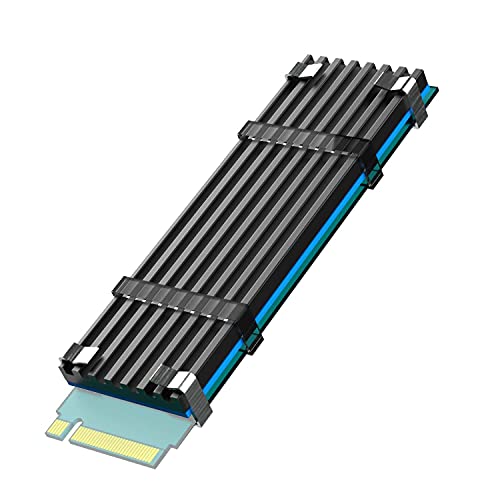
Lowest Price Here
GLOTRENDS Low-Profile M.2 SSD Heatsink
The lowest price of the group at our last check.
Best for: Spending as little as possible, with the Double-sided clip heatsink the next step up.
Our take Check price for GLOTRENDS Low-Profile M.2 SSD Heatsink (opens in a new tab)

Also Consider
Double-Sided Aluminium M.2 2280 Heatsink (PS5/PC)
Anodised, silver-plated aluminium that helps eliminate static.
Best for: Buyers who want anodised, silver-plated aluminium that helps eliminate static.
Our take Check price for Double-Sided Aluminium M.2 2280 Heatsink (PS5/PC) (opens in a new tab)

Clips Fitting
Thermalright M.2 Pro Heatsink (8mm heat pipe)
A clips fitting.
Best for: Buyers who want a clips fitting.
Our take Check price for Thermalright M.2 Pro Heatsink (8mm heat pipe) (opens in a new tab)

Strong Alternative
Thermalright TR-M.2 Type A B Heatsink
A 70 x 24 x 13mm body.
Best for: Buyers who want 70 x 24 x 13mm body.
Our take Check price for Thermalright TR-M.2 Type A B Heatsink (opens in a new tab)
Our Picks
Lowest Profile1 of 5
Laptop NVMe M.2 Copper Heatsink (2-pack) on Amazon (opens in a new tab)
The Copper laptop heatsink stands out for a minimum installation height of 1.5mm, and it adds a stated 10 to 20°C cooling effect, by the maker's claim.
Best for
- Boards with a graphics card close to the M.2 slot.
Skip if
- Price-first buyers should look at the GLOTRENDS low-profile, which cost less when we checked.
Why we like it
It also offers a 1.5mm height. On height it leads this guide at 1.5mm, ahead of the GLOTRENDS low-profile (3mm). No other pick in this guide offers a pure copper material; compare the GLOTRENDS low-profile, which has an an aluminium body material.
0.5mm and 1mm pads is unique to it among these picks, while the Double-sided clip heatsink uses thermal silicone pads. It also comes with two heatsinks in the pack. It is made for M.2 2280 drives; check that your drive is 2280 and note whether it is single- or double-sided.
It stands 1.5mm tall, so check the gap between your M.2 slot and the graphics card or CPU cooler. Only the Thermalright M.2 Pro came close to it on price at the time of writing; it cost the most of the 5 picks.
Key dimensions & specs
- Cooling: Passive
- Material: pure copper
- Height: 1.5mm
- Laptop use: Listed for laptops
- Fitting: Rubber ring or insulating sticker
- Thermal pads: 0.5mm and 1mm pads
Pros
- pure copper
- a low 1.5mm height
- a low-profile design for laptops
- Minimum installation height of 1.5mm
Cons
- Costs more than the GLOTRENDS low-profile at the time of writing
Lowest Price Here2 of 5
GLOTRENDS Low-Profile M.2 SSD Heatsink on Amazon (opens in a new tab)
The GLOTRENDS low-profile stands out for a 22x70x3mm body, and it adds tool-less fitting in under a minute.
Best for
- Spending as little as possible, with the Double-sided clip heatsink the next step up.
Skip if
- Skip it if this is a deal-breaker for you: listed for desktops only, not laptops.
Why we like it
It also offers a 3mm height. On height it sits mid-pack at 3mm: the Copper laptop heatsink comes in at 1.5mm, and the Thermalright TR-M.2 comes in at 13mm. You get an an aluminium body material here, which sets it apart from the Thermalright TR-M.2 and its an an anodised aluminium body material.
It is the only pick here with an one low-viscosity pad; the Copper laptop heatsink has 0.5mm and 1mm pads instead. You also get a stated 5 to 20°C cut in peak temperatures, by the maker's claim. It is made for M.2 2280 drives; check that your drive is 2280 and note whether it is single- or double-sided.
It was the cheapest of the group when we checked; the Double-sided clip heatsink was the next step up. The main gap: no laptop use, unlike the Copper laptop heatsink. If that matters, the Copper laptop heatsink has it.
Key dimensions & specs
- Cooling: Passive
- Material: an aluminium body
- Height: 3mm
- PS5 fit: Listed for PS5
- Laptop use: Desktop only
- Fitting: Metal clasps or rubber bands, no screws
- Thermal pads: One low-viscosity pad
Pros
- an aluminium body
- a low 3mm height
- a listed fit for the PS5's M.2 bay
- 22x70x3mm body
Cons
- Listed for desktops only, not laptops
- No laptop use, unlike the Copper laptop heatsink
Also Consider3 of 5
Double-Sided Aluminium M.2 2280 Heatsink (PS5/PC) on Amazon (opens in a new tab)
The Double-sided clip heatsink is built around anodised, silver-plated aluminium that helps eliminate static, with a stated 10 to 20°C cooling effect, by the maker's claim on top.
Best for
- Buyers who want anodised, silver-plated aluminium that helps eliminate static.
Skip if
- Price-first buyers should look at the GLOTRENDS low-profile, which cost less when we checked.
Why we like it
On the spec sheet, it offers a 10mm height. Its 10mm height ranks third of 5 here, behind the Copper laptop heatsink (1.5mm) and ahead of the Thermalright TR-M.2 (13mm). No other pick in this guide offers an A double-sided clip fitting; compare the Thermalright M.2 Pro, which has a clips fitting.
Thermal silicone pads is unique to it among these picks, while the GLOTRENDS low-profile uses an one low-viscosity pad. It also offers a listed fit for single-sided drives and the PS5. It is made for M.2 2280 drives; check that your drive is 2280 and note whether it is single- or double-sided.
It stands 10mm tall, so check the gap between your M.2 slot and the graphics card or CPU cooler. It was priced above the GLOTRENDS low-profile and below the Thermalright TR-M.2 at the time of writing.
Key dimensions & specs
- Cooling: Passive
- Material: a silver-plated aluminium alloy
- Height: 10mm
- PS5 fit: Listed for PS5
- Fitting: A double-sided clip
- Thermal pads: Thermal silicone pads
Pros
- a silver-plated aluminium alloy
- a listed fit for the PS5's M.2 bay
- Anodised, silver-plated aluminium that helps eliminate static
- Stated 10 to 20°C cooling effect, by the maker's claim
Cons
- Costs more than the GLOTRENDS low-profile at the time of writing
Clips Fitting4 of 5
Thermalright M.2 Pro Heatsink (8mm heat pipe) on Amazon (opens in a new tab)
The Thermalright M.2 Pro is built around a 75 x 22.7 x 11.7mm body, with an anodised, sandblasted aluminium finish on top.
Best for
- Buyers who want a clips fitting.
Skip if
- If budget leads, the GLOTRENDS low-profile was cheaper at our last price check.
Why we like it
On the spec sheet, it offers a 1 heat pipe count and offers an 11.7mm height. On height it sits mid-pack at 11.7mm: the Copper laptop heatsink comes in at 1.5mm, and the Thermalright TR-M.2 comes in at 13mm. A clips fitting is unique to it among these picks, while the Double-sided clip heatsink uses an A double-sided clip fitting.
It is the only pick here with double-layer silicone pads; the Copper laptop heatsink has 0.5mm and 1mm pads instead. It also comes with partial compatibility with M.2 2260 and 2242 drives. It is made for M.2 2280 drives; check that your drive is 2280 and note whether it is single- or double-sided.
It stands 11.7mm tall, so check the gap between your M.2 slot and the graphics card or CPU cooler. Its price falls between the Thermalright TR-M.2 and the Copper laptop heatsink, based on our last check.
Key dimensions & specs
- Cooling: Passive
- Material: an aluminium body with an 8mm copper heat pipe
- Heat pipes: 1
- Height: 11.7mm
- Fitting: Clips
- Thermal pads: Double-layer silicone pads
Pros
- an aluminium body with an 8mm copper heat pipe
- 75 x 22.7 x 11.7mm body
- Anodised, sandblasted aluminium finish
- Partial compatibility with M.2 2260 and 2242 drives
Cons
- Costs more than the GLOTRENDS low-profile at the time of writing
Strong Alternative5 of 5
Thermalright TR-M.2 Type A B Heatsink on Amazon (opens in a new tab)
What the Thermalright TR-M.2 brings to the table is a 70 x 24 x 13mm body, plus a stated 10 to 30°C cooling effect, by the maker's claim.
Best for
- Buyers who want 70 x 24 x 13mm body.
Skip if
- Choose another pick if you can't accept this: listed for desktops only, not laptops.
Why we like it
It also offers a 13mm height. Its 13mm height is the tallest in this group; the Copper laptop heatsink leads at 1.5mm. It is the only pick here with an an anodised aluminium body material; the Copper laptop heatsink has a pure copper material instead.
You get silicone pads on both sides here, which sets it apart from the Thermalright M.2 Pro and its double-layer silicone pads. You also get a design for desktop M.2 slots. It is made for M.2 2280 drives; check that your drive is 2280 and note whether it is single- or double-sided.
It stands 13mm tall, so check the gap between your M.2 slot and the graphics card or CPU cooler. When we checked, only the Double-sided clip heatsink and cheaper picks cost less, and the Thermalright M.2 Pro cost more. Height is its weakest area, and the Copper laptop heatsink covers it better at 1.5mm.
Key dimensions & specs
- Cooling: Passive
- Material: an anodised aluminium body
- Height: 13mm
- Laptop use: Desktop only
- Fitting: Double-sided clips with four screws
- Thermal pads: Silicone pads on both sides
Pros
- an anodised aluminium body
- 70 x 24 x 13mm body
- Stated 10 to 30°C cooling effect, by the maker's claim
- Design for desktop M.2 slots
Cons
- Listed for desktops only, not laptops
- Height trails the Copper laptop heatsink (1.5mm)
- No laptop use, unlike the Copper laptop heatsink
How We Chose These M.2 SSD Heatsinks
Each pick was assessed across 4 criteria weighted for real-world use.
- How these picks were ranked
- We lined up five M.2 SSD heatsinks on cooling, material, height and PS5 fit as the makers state them. These are research figures, not bench results: 3 of 5 picks leave out PS5 fit.
- What every pick has in common
- All 5, from the Copper laptop heatsink to the Thermalright TR-M.2, state cooling, material and height.
- Where the specs have gaps
- The Copper laptop heatsink, the Thermalright M.2 Pro and the Thermalright TR-M.2 give no PS5 fit; the Double-sided clip heatsink and the Thermalright M.2 Pro give no laptop use.
- Price range
- From the GLOTRENDS low-profile to the Copper laptop heatsink, all sat in the under $50 tier when we checked.
What to Look for in a M.2 SSD Heatsink
Key buying criteria so you get the right fit the first time.
How much height you need
Across these 5 picks height spans 13mm (the Thermalright TR-M.2) to 1.5mm (the Copper laptop heatsink). The GLOTRENDS low-profile comes second at 3mm, in the same price tier as the Copper laptop heatsink.
Laptop use
The Copper laptop heatsink has it; the GLOTRENDS low-profile and the Thermalright TR-M.2 go without. Settling laptop use first narrows 3 picks to 2 or 1.
Thermal pads
The Copper laptop heatsink lists 0.5mm and 1mm pads; the GLOTRENDS low-profile lists One low-viscosity pad; the Double-sided clip heatsink lists Thermal silicone pads; the Thermalright M.2 Pro lists Double-layer silicone pads; the Thermalright TR-M.2 lists Silicone pads on both sides. Sort out thermal pads before price: it splits 5 stated picks into groups of 1, 1, 1, 1 and 1.
Extras that separate them
The GLOTRENDS low-profile: tool-less fitting in under a minute. The Thermalright M.2 Pro: an anodised, sandblasted aluminium finish. The Thermalright TR-M.2: a stated 10 to 30°C cooling effect, by the maker's claim.
Where your budget lands
All 5 sat in the under $50 tier when we checked, from the GLOTRENDS low-profile at the low end to the Copper laptop heatsink at the top, so decide on features first.
How to Choose a M.2 SSD Heatsink
By priority
| Priority | Consider | Why |
|---|---|---|
| Boards with a graphics card close to the M.2 slot | Copper laptop heatsink | The shortest height here (1.5mm) |
| Spending as little as possible, with the Double-sided clip heatsink the next step up | GLOTRENDS low-profile | The lowest price of the group at our last check |
| Buyers who want anodised, silver-plated aluminium that helps eliminate static | Double-sided clip heatsink | Anodised, silver-plated aluminium that helps eliminate static |
| Buyers who want a clips fitting | Thermalright M.2 Pro | A clips fitting |
| Buyers who want 70 x 24 x 13mm body | Thermalright TR-M.2 | A 70 x 24 x 13mm body |
Scroll sideways to see every column.
Key specs side by side
The Copper laptop heatsink leads on height at 1.5mm, ahead of the GLOTRENDS low-profile at 3mm. "Not listed" marks PS5 fit where the Copper laptop heatsink, the Thermalright M.2 Pro and the Thermalright TR-M.2 leave the figure out.
| M.2 SSD Heatsink | Cooling | Material | Height | PS5 fit |
|---|---|---|---|---|
| Copper laptop heatsink | Passive | pure copper | 1.5mm | Not listed |
| GLOTRENDS low-profile | Passive | an aluminium body | 3mm | Listed for PS5 |
| Double-sided clip heatsink | Passive | a silver-plated aluminium alloy | 10mm | Listed for PS5 |
| Thermalright M.2 Pro | Passive | an aluminium body with an 8mm copper heat pipe | 11.7mm | Not listed |
| Thermalright TR-M.2 | Passive | an anodised aluminium body | 13mm | Not listed |
Scroll sideways to see every column.
Frequently Asked Questions
Is the Copper laptop heatsink ahead of the GLOTRENDS low-profile on height?
The Copper laptop heatsink is lowest on height at 1.5mm; the GLOTRENDS low-profile follows at 3mm, 50% apart. The spread runs down to the Thermalright TR-M.2 at 13mm.
What does the Copper laptop heatsink add over the GLOTRENDS low-profile?
On paper it adds height (1.5mm against 3mm). Both sat in the under $50 tier when we checked, so the gains in height cost little extra by tier.
Why is the Thermalright M.2 Pro our Clips Fitting pick?
It carries the badge for a clips fitting. The price of that: the GLOTRENDS low-profile, the cheapest pick, still beats it on height (3mm against 11.7mm). It suits anyone who wants a clips fitting.
Does the GLOTRENDS low-profile have PS5 fit, and which others do?
The GLOTRENDS low-profile and the Double-sided clip heatsink have it. The Copper laptop heatsink, the Thermalright M.2 Pro and the Thermalright TR-M.2 have no PS5 fit listed, so 2 of 5 picks are covered here.
What extras do the Copper laptop heatsink and the GLOTRENDS low-profile include?
The Copper laptop heatsink: a minimum installation height of 1.5mm. The GLOTRENDS low-profile: a 22x70x3mm body. The Double-sided clip heatsink: anodised, silver-plated aluminium that helps eliminate static.
Bottom Line
Our first pick is the Copper laptop heatsink. Look at the GLOTRENDS low-profile for the lowest price of the group at our last check, the Double-sided clip heatsink for anodised, silver-plated aluminium that helps eliminate static and the Thermalright M.2 Pro for a clips fitting if those matter more to you.
Measure the clearance above the M.2 slot, especially under a graphics card, and peel every film off the thermal pad before you fit it.