
Buying Guide
The Best Hard Drives for Gaming PCs
Four 3.5-inch hard drives from 4TB to 10TB compared on spindle speed, cache, recording method and warranty, for bulk game and media storage.
By The PC Journal editorial team
11 min read4 products evaluated
Hard drives are far slower than SSDs, but they still cost less per terabyte. In a gaming PC they suit the games you rarely play, recordings and backups.
We compared four 3.5-inch drives from 4TB to 10TB on spindle speed, cache, recording method and warranty. This is a research-based comparison built from maker specifications; we did not test these parts ourselves.
Quick Picks
Our 4 recommendations at a glance. Tap a pick for the full verdict.
Best Gaming Hard Drive
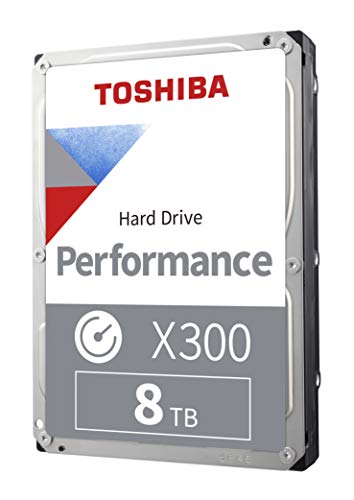
Toshiba X300 8TB
7200 RPM with CMR recording in 8TB.
Best for: Bulk game libraries.
Our take Check price for Toshiba X300 8TB (opens in a new tab)

Largest Capacity
WD Red Plus 10TB
10TB with a 512MB cache and CMR.
Best for: Recordings and large media libraries.
Our take Check price for WD Red Plus 10TB (opens in a new tab)

Well-Rounded Choice
Seagate IronWolf 8TB
The IronWolf 8TB spins at 7200 RPM with a 3-year warranty.
Best for: Buyers who want 7200 rpm spindle speed.
Our take Check price for Seagate IronWolf 8TB (opens in a new tab)

Best Budget Drive
Seagate BarraCuda 4TB
4TB at the lowest cost here.
Best for: Basic bulk storage.
Our take Check price for Seagate BarraCuda 4TB (opens in a new tab)
| Pick | Why it’s here | Best for | Price |
|---|---|---|---|
| 7200 RPM with CMR recording in 8TB. | Bulk game libraries. | Check price for Toshiba X300 8TB (opens in a new tab) |
| 10TB with a 512MB cache and CMR. | Recordings and large media libraries. | Check price for WD Red Plus 10TB (opens in a new tab) |
| The IronWolf 8TB spins at 7200 RPM with a 3-year warranty. | Buyers who want 7200 rpm spindle speed. | Check price for Seagate IronWolf 8TB (opens in a new tab) |
| 4TB at the lowest cost here. | Basic bulk storage. | Check price for Seagate BarraCuda 4TB (opens in a new tab) |
Our Picks
Best Gaming Hard Drive1 of 4
Toshiba X300 8TB on Amazon (opens in a new tab)
The X300 8TB is sold for gaming PCs, pairing 7200 RPM with CMR recording and a 256MB cache.
Best for
- Bulk game libraries.
Skip if
- Its warranty is not published, which rules it out if you need that number.
Why we like it
It is the hard drive to pick for a large backlog. It matches the IronWolf 8TB on capacity (8TB). On spindle speed it ties with the Red Plus 10TB and the IronWolf 8TB at 7200 RPM.
It matches the IronWolf 8TB and the BarraCuda 4TB on cache (256MB). You get a gaming and workstation designed for here, which sets it apart from the IronWolf 8TB and its an NAS designed for. You also get a design aimed at gaming PCs and high-end desktops.
It is a 3.5-inch SATA drive, so your case needs a 3.5-inch bay and your board a free SATA port; many new cases have few or no 3.5-inch bays. On price it sat third of 4, between the cheaper IronWolf 8TB and the pricier Red Plus 10TB, at the time of writing. The maker doesn't give its warranty; if that figure matters, the Red Plus 10TB offers 3-year.
Key dimensions & specs
- Capacity: 8TB
- Spindle speed: 7200 RPM
- Cache: 256MB
- Recording: CMR
- Designed for: Gaming and workstation
Pros
- 7200 RPM spindle speed
- CMR recording, which holds write speed better than SMR
- Design aimed at gaming PCs and high-end desktops
- Capacity of 8TB, ahead of the BarraCuda 4TB
Cons
- No published warranty
- Costs more than the BarraCuda 4TB at the time of writing
Largest Capacity2 of 4
WD Red Plus 10TB on Amazon (opens in a new tab)
The Red Plus 10TB is the largest drive here, with CMR recording, a 512MB cache and a 3-year warranty.
Best for
- Recordings and large media libraries.
Skip if
- If budget leads, the BarraCuda 4TB was cheaper at our last price check.
Why we like it
Its NAS rating suits always-on use. Its 10TB capacity is the largest here; the X300 8TB comes next at 8TB. On spindle speed it ties with the X300 8TB and the IronWolf 8TB at 7200 RPM.
On cache it leads this guide at 512MB, ahead of the X300 8TB (256MB). It shares an NAS designed for with the IronWolf 8TB; the BarraCuda 4TB goes with a desktop designed for. It is a 3.5-inch SATA drive, so your case needs a 3.5-inch bay and your board a free SATA port; many new cases have few or no 3.5-inch bays.
It is built for always-on NAS use, which also suits a desktop that runs long downloads or backups. It was the highest-priced of the 4 picks at the time of writing, so the case for it rests on what it adds over the X300 8TB and the rest.
Key dimensions & specs
- Capacity: 10TB
- Spindle speed: 7200 RPM
- Cache: 512MB
- Warranty: 3-year
- Recording: CMR
- Designed for: NAS
Pros
- 10TB of bulk storage
- 7200 RPM spindle speed
- 512MB cache
- 3-year warranty
Cons
- Costs more than the BarraCuda 4TB at the time of writing
Well-Rounded Choice3 of 4
Seagate IronWolf 8TB on Amazon (opens in a new tab)
The IronWolf 8TB spins at 7200 RPM with a 3-year warranty.
Best for
- Buyers who want 7200 rpm spindle speed.
Skip if
- Price-first buyers should look at the BarraCuda 4TB, which cost less when we checked.
Why we like it
It is built for NAS use but works in any desktop. On capacity it ties with the X300 8TB at 8TB. It matches the X300 8TB and the Red Plus 10TB on spindle speed (7200 RPM).
On cache it ties with the X300 8TB and the BarraCuda 4TB at 256MB. Like the Red Plus 10TB, it has an NAS designed for, while the X300 8TB uses a gaming and workstation designed for. It also offers a design for NAS and RAID use.
It is a 3.5-inch SATA drive, so your case needs a 3.5-inch bay and your board a free SATA port; many new cases have few or no 3.5-inch bays. It is built for always-on NAS use, which also suits a desktop that runs long downloads or backups. It was priced above the BarraCuda 4TB and below the X300 8TB at the time of writing.
Key dimensions & specs
- Capacity: 8TB
- Spindle speed: 7200 RPM
- Cache: 256MB
- Warranty: 3-year
- Designed for: NAS
Pros
- 7200 RPM spindle speed
- 3-year warranty
- Design for NAS and RAID use
- Capacity of 8TB, ahead of the BarraCuda 4TB
Cons
- Costs more than the BarraCuda 4TB at the time of writing
Best Budget Drive4 of 4
Seagate BarraCuda 4TB on Amazon (opens in a new tab)
The BarraCuda 4TB runs at 5400 RPM with a 256MB cache and a 190MB/s transfer rate.
Best for
- Basic bulk storage.
Skip if
- Skip it if this is a deal-breaker for you: 5400 RPM is slower for game installs.
Why we like it
It is basic, cheap bulk storage. On capacity it trails the group at 4TB, while the Red Plus 10TB is rated for 10TB. Its 5400 RPM spindle speed is the slowest in this group; the X300 8TB leads at 7200 RPM.
On cache it ties with the X300 8TB and the IronWolf 8TB at 256MB. No other pick in this guide offers a desktop designed for; compare the X300 8TB, which has a gaming and workstation designed for. It also offers free Seagate DiscWizard migration software.
It is a 3.5-inch SATA drive, so your case needs a 3.5-inch bay and your board a free SATA port; many new cases have few or no 3.5-inch bays. Install games you play most on an SSD and use the hard drive for the rest of the library, recordings and backups. It cost the least of the 4 picks at the time of writing, with the IronWolf 8TB the next step up.
Key dimensions & specs
- Capacity: 4TB
- Spindle speed: 5400 RPM
- Cache: 256MB
- Designed for: Desktop
Pros
- 190MB/s maximum sustained transfer rate
- Free Seagate DiscWizard migration software
- Desktop designed for, the only one here
- 4TB at the lowest cost here
Cons
- 5400 RPM is slower for game installs
- Capacity trails the Red Plus 10TB (10TB)
- Spindle speed trails the X300 8TB (7200 RPM)
How We Chose These Hard Drives
Each pick was assessed across 4 criteria weighted for real-world use.
- Capacity
- We compared capacities from 4TB to 10TB.
- Use case
- We checked each drive's intended use: desktop, gaming or NAS.
- Support
- We recorded listed warranty length.
- Speed
- We noted spindle speed, cache and recording method where listed.
What to Look for in a Hard Drive
Key buying criteria so you get the right fit the first time.
Use a hard drive for bulk storage
Hard drives load games far slower than SSDs. They make sense for a large library you rarely play, video recordings and backups.
7200 RPM loads faster
7200 RPM drives read faster than 5400 RPM drives, though both are far slower than any SSD.
One drive is not a backup
Keep important files in at least two places, such as an external drive or cloud storage.
Check your case for 3.5-inch bays
Many modern cases have few or no 3.5-inch bays. Count them before you buy.
Prefer CMR recording
CMR drives keep steady write speeds; SMR drives slow down on large rewrites. Makers list which one they use on many models.
Cost per terabyte favours larger drives
Larger drives usually cost less per terabyte. Buy once rather than adding small drives.
How to Choose a Hard Drive
By priority
| Priority | Consider | Why |
|---|---|---|
| Bulk game libraries | X300 8TB | 7200 RPM with CMR recording in 8TB |
| Recordings and large media libraries | Red Plus 10TB | 10TB with a 512MB cache and CMR |
| Basic bulk storage | BarraCuda 4TB | 4TB at the lowest cost here |
Scroll sideways to see every column.
Key specs side by side
Figures as each maker states them.
| Drive | Capacity | Spindle speed | Cache | Warranty |
|---|---|---|---|---|
| X300 8TB | 8TB | 7200 RPM | 256MB | Not listed |
| Red Plus 10TB | 10TB | 7200 RPM | 512MB | 3-year |
| IronWolf 8TB | 8TB | 7200 RPM | 256MB | 3-year |
| BarraCuda 4TB | 4TB | 5400 RPM | 256MB | Not listed |
Scroll sideways to see every column.
By price at the time of writing
Prices change often; these tiers reflect Amazon prices when this guide was updated.
| Price tier | Drives |
|---|---|
| About $150 to $250 | BarraCuda 4TB |
| About $250 to $500 | IronWolf 8TB, X300 8TB, Red Plus 10TB |
Frequently Asked Questions
Can I play games from a hard drive?
Yes, but load times are much longer and some new games require an SSD. Keep current games on an SSD.
How long do hard drives last?
Often many years, but any drive can fail. Warranty length is a fair guide to the maker's expectations.
Should I buy an external drive instead?
External drives are portable and good for backups; internal drives are cheaper per terabyte if you have a bay.
Are hard drives noisy?
They make some seek noise, especially 7200 RPM drives. Rubber-mounted bays help.
Can I use a NAS drive in a desktop?
Yes. NAS drives work in any PC with a SATA port and often carry longer warranties.
What is SMR?
Shingled recording packs more data but slows down on large rewrites. CMR drives avoid this.
Bottom Line
The Toshiba X300 8TB is the pick for game storage, the WD Red Plus 10TB has the most room, and the Seagate BarraCuda 4TB is the budget choice.
The Seagate IronWolf 8TB is the NAS-rated alternative at 7200 RPM.