
Buying Guide
The Best Gaming Speaker Bars for a PC Desk
A desk soundbar fits under a monitor and saves width. These five differ in inputs, bass and extras.
By The PC Journal editorial team
12 min read5 products evaluated
A speaker bar is the tidy way to get sound at a desk: one unit under the monitor instead of two speakers either side. Inputs vary, from USB-C to 3.5mm to Bluetooth.
We compared inputs, bass hardware, lighting and extras from each listing.
Quick Picks
Our 5 recommendations at a glance. Tap a pick for the full verdict.

Best Single-Cable Bar
Razer Leviathan V2 X PC Soundbar
Power and audio over one USB-C cable.
Best for: Tidy desks
Our take Check price for Razer Leviathan V2 X PC Soundbar (opens in a new tab)

Best Bass
Razer Leviathan V2 PC Soundbar with Subwoofer
Down-firing subwoofer included.
Best for: Games and films
Our take Check price for Razer Leviathan V2 PC Soundbar with Subwoofer (opens in a new tab)

Most Inputs
Creative Sound Blaster GS3 Soundbar
USB-C, AUX and Bluetooth 5.4 plus headphone out.
Best for: Multiple devices
Our take Check price for Creative Sound Blaster GS3 Soundbar (opens in a new tab)

Best Budget Bar
Redragon GS560 PC Soundbar
Lowest price tier with a front volume knob.
Best for: Budget desks
Our take Check price for Redragon GS560 PC Soundbar (opens in a new tab)
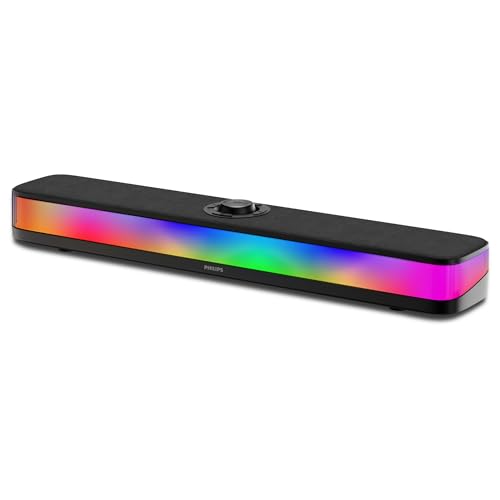
Best Portable Bar
Philips Portable Bluetooth Soundbar
12-hour battery.
Best for: Moving between rooms
Our take Check price for Philips Portable Bluetooth Soundbar (opens in a new tab)
| Pick | Why it’s here | Best for | Price |
|---|---|---|---|
| Power and audio over one USB-C cable. | Tidy desks | Check price for Razer Leviathan V2 X PC Soundbar (opens in a new tab) |
| Down-firing subwoofer included. | Games and films | Check price for Razer Leviathan V2 PC Soundbar with Subwoofer (opens in a new tab) |
| USB-C, AUX and Bluetooth 5.4 plus headphone out. | Multiple devices | Check price for Creative Sound Blaster GS3 Soundbar (opens in a new tab) |
| Lowest price tier with a front volume knob. | Budget desks | Check price for Redragon GS560 PC Soundbar (opens in a new tab) |
| 12-hour battery. | Moving between rooms | Check price for Philips Portable Bluetooth Soundbar (opens in a new tab) |
Our Picks
Best Single-Cable Bar1 of 5
Razer Leviathan V2 X PC Soundbar on Amazon (opens in a new tab)
Razer's Leviathan V2 X runs power and sound over one USB-C cable, with two drivers and two passive radiators.
Best for
- Tidy desks
Skip if
- Price-first buyers should look at the GS560, which cost less when we checked.
Why we like it
It is small enough to sit under a monitor. Two full-range drivers and two passive radiators fit in the most compact bar in Razer's Leviathan V2 range. It pairs over low-latency Bluetooth 5.0, and Razer's software controls lighting and audio switching.
It is the only pick here with a two passive radiators subwoofer; the Leviathan V2 has a down-firing subwoofer instead. 14 Chroma RGB zones extras is unique to it among these picks, while the GS3 uses headphone output extras. It also comes with a 90dB maximum volume.
Bluetooth adds some delay, so use a wired input for games. Its price falls between the Philips soundbar and the Leviathan V2, based on our last check. Buyers who need a confirmed peak power should compare it with the GS3, which offers 24W.
Key dimensions & specs
- Form: Desktop soundbar
- Inputs: USB-C (power and audio), Bluetooth 5.0
- Subwoofer: Two passive radiators
- Extras: 14 Chroma RGB zones
Pros
- Two drivers with two passive radiators
- Power and audio over one USB-C cable
- 90dB maximum volume
- 14 Chroma RGB zones extras, the only one here
Cons
- Costs more than the GS560 at the time of writing
Best Bass2 of 5
Razer Leviathan V2 PC Soundbar with Subwoofer on Amazon (opens in a new tab)
The Leviathan V2 adds a down-firing subwoofer and THX Spatial Audio to Razer's desktop bar.
Best for
- Games and films
Skip if
- Price-first buyers should look at the GS560, which cost less when we checked.
Why we like it
Bluetooth 5.2 covers phones. Two full-range drivers and a down-firing subwoofer come in a bar that fits under a monitor. THX Spatial Audio adds 7.1 virtual surround for games and films.
It also offers 18 Chroma RGB zones. Bluetooth adds some delay, so use a wired input for games. Before buying, weigh one limit: costs more than the GS560 at the time of writing.
It was the most expensive pick when we checked, so weigh what it adds over the Leviathan V2 X. Buyers who need a confirmed peak power should compare it with the GS3, which offers 24W.
Key dimensions & specs
- Form: Desktop soundbar with subwoofer
- Inputs: USB, Bluetooth 5.2
- Subwoofer: Down-firing subwoofer
- Extras: THX Spatial Audio, 18 RGB zones
Pros
- Down-firing subwoofer
- THX Spatial Audio 7.1 virtual surround
- 18 Chroma RGB zones
Cons
- Costs more than the GS560 at the time of writing
Most Inputs3 of 5
Creative Sound Blaster GS3 Soundbar on Amazon (opens in a new tab)
Creative's Sound Blaster GS3 takes USB-C, AUX and Bluetooth 5.4, and has a headphone output.
Best for
- Multiple devices
Skip if
- Worth skipping when no subwoofer, so deep bass comes only from the main driver is a problem.
Why we like it
It has 24W peak. Its racetrack drivers and port tube reach 24W peak, and SuperWide processing widens the stereo image. RGB presets include a peak meter that follows the audio.
Its RGB presets include a peak meter that follows the sound, and SuperWide processing widens the stereo image. You get headphone output extras here, which sets it apart from the Leviathan V2 X and its 14 Chroma RGB zones extras. You also get three inputs in a compact bar.
Bluetooth adds some delay, so use a wired input for games. On price it sat second of 5, between the cheaper GS560 and the pricier Philips soundbar, at the time of writing.
Key dimensions & specs
- Form: Desktop soundbar
- Peak power: 24W
- Inputs: USB-C, AUX, Bluetooth 5.4
- Subwoofer: None
- Extras: Headphone output
Pros
- Headphone output
- Bluetooth 5.4
- Three inputs in a compact bar
- Highest peak power of the picks (24W)
Cons
- No subwoofer, so deep bass comes only from the main drivers
- Costs more than the GS560 at the time of writing
Best Budget Bar4 of 5
Redragon GS560 PC Soundbar on Amazon (opens in a new tab)
Redragon's GS560 is a roughly 16in USB-powered bar with a front volume knob and four lighting modes.
Best for
- Budget desks
Skip if
- Choose another pick if you can't accept this: no subwoofer, so deep bass comes only from the main drivers.
Why we like it
Audio arrives over 3.5mm. At about 16 inches wide it fits under most monitors, and its RGB lighting can sync to the music. It suits a gaming desk where space for two speakers is tight.
A volume knob with a built-in power switch sits on the bar, and it runs on USB power with a 3.5mm audio cable. It works with PCs, TVs and consoles. USB supplies power only; sound arrives over the 3.5mm cable.
It cost the least of the 5 picks at the time of writing, with the GS3 the next step up. There is no published peak power figure, whereas the GS3 offers 24W.
Key dimensions & specs
- Form: Desktop soundbar
- Inputs: USB power, 3.5mm audio
- Subwoofer: None
- Extras: 4 lighting modes, volume knob
Pros
- Roughly 16in body that fits under most monitors
- Front volume knob
- Four lighting modes
- Lowest price tier with a front volume knob
Cons
- No subwoofer, so deep bass comes only from the main drivers
Best Portable Bar5 of 5
Philips Portable Bluetooth Soundbar on Amazon (opens in a new tab)
Philips's soundbar runs on a 12-hour battery and connects over Bluetooth 5.4.
Best for
- Moving between rooms
Skip if
- Skip it if this is a deal-breaker for you: no subwoofer, so deep bass comes only from the main drivers.
Why we like it
A built-in mic handles calls. It streams over Bluetooth 5.4, has RGB modes that follow the audio, and includes a microphone for calls. It fits under a monitor.
Its built-in battery lasts up to 12 hours, or 6 with lights on, so it works away from a power outlet. It outputs 14W peak from two full-range drivers. You also get 7W RMS output.
Bluetooth adds some delay, so use a wired input for games. Before buying, weigh one limit: costs more than the GS560 at the time of writing. It was priced above the GS3 and below the Leviathan V2 X at the time of writing.
Key dimensions & specs
- Form: Portable soundbar
- Peak power: 14W
- Inputs: Bluetooth 5.4
- Subwoofer: None
- Extras: 12-hour battery, built-in mic
Pros
- 12-hour battery
- Built-in microphone for calls
- 7W RMS output
- Bluetooth 5.4 inputs, the only one here
Cons
- No subwoofer, so deep bass comes only from the main drivers
- Costs more than the GS560 at the time of writing
How We Chose These Gaming Speaker Bars for PC
Each pick was assessed across 4 criteria weighted for real-world use.
- Form and size
- We recorded whether each is a soundbar, a stereo pair or a 2.1 set.
- Inputs
- We checked USB, 3.5mm, Bluetooth, optical and HDMI support.
- Extras
- We checked subwoofers, lighting, remotes and headphone outputs.
- Power figures
- We noted peak and RMS figures, without comparing unlike figures.
What to Look for in a Gaming Speaker Bar for PC
Key buying criteria so you get the right fit the first time.
Soundbar or stereo pair
A soundbar sits under a monitor and saves desk width. A stereo pair spreads the sound wider and usually fills a room better at the same price.
Inputs your PC has
USB speakers need no sound card; 3.5mm works with any PC; Bluetooth frees cables but adds delay; HDMI and optical suit TVs more than desktops.
Do you need a subwoofer
A separate or down-firing subwoofer adds low bass for films and games. In a flat or shared room, a 2.0 set may be the better neighbor.
Measure the desk
Check the width of a soundbar against the monitor stand, and the depth of stereo speakers against the desk edge.
Controls within reach
A front volume knob or a wired control pod saves reaching behind the PC. Some sets rely on software or a remote.
Read wattage carefully
Peak figures are much higher than RMS (continuous) figures, and brands mix them. Compare like with like, and treat wattage as a rough guide rather than a measure of quality.
How to Choose a Gaming Speaker Bar for PC
By priority
| Priority | Consider | Why |
|---|---|---|
| Tidy desks | Leviathan V2 X | Power and audio over one USB-C cable |
| Games and films | Leviathan V2 | Down-firing subwoofer included |
| Multiple devices | GS3 | USB-C, AUX and Bluetooth 5.4 plus headphone out |
| Budget desks | GS560 | Lowest price tier with a front volume knob |
| Moving between rooms | Philips soundbar | 12-hour battery |
Scroll sideways to see every column.
Key specs side by side
Figures as each maker states them.
| Speaker | Form | Peak power | Inputs | Subwoofer |
|---|---|---|---|---|
| Leviathan V2 X | Desktop soundbar | Not listed | USB-C (power and audio), Bluetooth 5.0 | Two passive radiators |
| Leviathan V2 | Desktop soundbar with subwoofer | Not listed | USB, Bluetooth 5.2 | Down-firing subwoofer |
| GS3 | Desktop soundbar | 24W | USB-C, AUX, Bluetooth 5.4 | None |
| GS560 | Desktop soundbar | Not listed | USB power, 3.5mm audio | None |
| Philips soundbar | Portable soundbar | 14W | Bluetooth 5.4 | None |
Scroll sideways to see every column.
By price at the time of writing
Prices change often; these tiers reflect Amazon prices when this guide was updated.
| Price tier | Speakers |
|---|---|
| Under $50 | GS560 |
| About $50 to $100 | GS3, Philips soundbar, Leviathan V2 X |
| About $150 to $250 | Leviathan V2 |
Frequently Asked Questions
Can I plug headphones into the speakers?
Only if the maker specifies a headphone output. Otherwise, use the PC's own jack.
Where should desk speakers go?
Place stereo speakers either side of the monitor at ear height, angled toward you. Keep a soundbar centered below the screen.
Is Bluetooth fine for games?
For casual play it is usable, but it adds delay. A wired input avoids that.
Do virtual surround modes work on PC?
Some need the brand's software or Windows spatial sound settings. Support can differ between Windows and macOS.
Can I use a TV soundbar with a PC?
Yes, over Bluetooth, optical or HDMI where the PC supports it. A desktop soundbar with USB or 3.5mm input is simpler at a desk.
Does RGB lighting affect sound?
No. Lighting is cosmetic; some sets let you turn it off.
Bottom Line
The Leviathan V2 X is the simplest desk bar with one USB-C cable. The Leviathan V2 adds a subwoofer, the GS3 adds a headphone output and three inputs, the GS560 costs least, and the Philips runs on battery.