
Buying Guide
The Best ATX Motherboards With Wi-Fi 7
We weighed five motherboards on M.2 slot count and wired network speed; the Z790 Tomahawk MAX has the most M.2 slot count, and the PRO B850-P costs the least.
By The PC Journal editorial team
12 min read5 products evaluated
Wi-Fi 7 and 2.5GbE give a future-proof network setup on an ATX board. Every pick is an ATX board with Wi-Fi 7 and 2.5GbE or faster, ordered from the lowest price.
We ranked these motherboards on M.2 slots, wired LAN and wi-Fi using manufacturer specifications; we did not test these motherboards ourselves, and where a maker leaves out power stages, we say so.
Quick Picks
Our 5 recommendations at a glance. Tap a pick for the full verdict.

Fastest Wired Network Speed
MSI PRO B850-P WiFi
The fastest wired network speed here (5Gbps).
Best for: Buyers who put wired network speed first.
Our take Check price for MSI PRO B850-P WiFi (opens in a new tab)

Also Consider
ASRock B850 Steel Legend WiFi
A PCIe 5.0 M.2 slot.
Best for: Buyers who want PCIe 5.0 M.2 slot.
Our take Check price for ASRock B850 Steel Legend WiFi (opens in a new tab)

Strong Alternative
MSI PRO Z890-S WiFi White
A PCIe 5.0 M.2 slot.
Best for: Buyers who want PCIe 5.0 M.2 slot.
Our take Check price for MSI PRO Z890-S WiFi White (opens in a new tab)

Most M.2 Slots
MSI MAG Z790 Tomahawk MAX WiFi
The most M.2 slot count here (5).
Best for: Buyers who put M.2 slot count first.
Our take Check price for MSI MAG Z790 Tomahawk MAX WiFi (opens in a new tab)
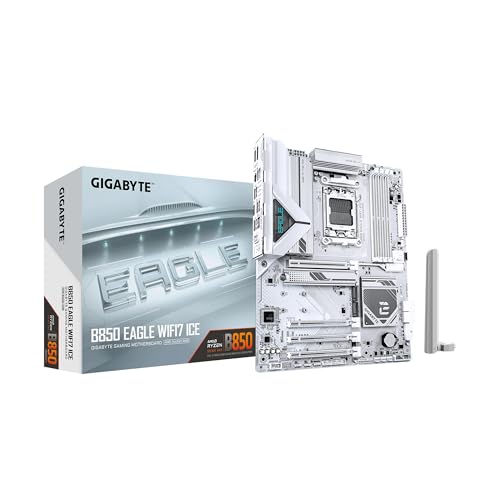
Premium Pick
GIGABYTE B850 Eagle WIFI7 ICE
A white ICE finish at the highest price in the group.
Best for: Buyers for whom price is not the deciding factor.
Our take Check price for GIGABYTE B850 Eagle WIFI7 ICE (opens in a new tab)
| Pick | Why it’s here | Best for | Price |
|---|---|---|---|
| The fastest wired network speed here (5Gbps). | Buyers who put wired network speed first. | Check price for MSI PRO B850-P WiFi (opens in a new tab) |
| A PCIe 5.0 M.2 slot. | Buyers who want PCIe 5.0 M.2 slot. | Check price for ASRock B850 Steel Legend WiFi (opens in a new tab) |
| A PCIe 5.0 M.2 slot. | Buyers who want PCIe 5.0 M.2 slot. | Check price for MSI PRO Z890-S WiFi White (opens in a new tab) |
| The most M.2 slot count here (5). | Buyers who put M.2 slot count first. | Check price for MSI MAG Z790 Tomahawk MAX WiFi (opens in a new tab) |
| A white ICE finish at the highest price in the group. | Buyers for whom price is not the deciding factor. | Check price for GIGABYTE B850 Eagle WIFI7 ICE (opens in a new tab) |
Our Picks
Fastest Wired Network Speed1 of 5
MSI PRO B850-P WiFi on Amazon (opens in a new tab)
The PRO B850-P keeps Wi-Fi 7 and 5Gbps LAN on a budget board, with tool-free M.2 clips.
Best for
- Buyers who put wired network speed first.
Skip if
- Look at the others if this bothers you: m.2 slot count of 3, behind the Z790 Tomahawk MAX (5).
Why we like it
Three M.2 slots are enough for most gaming builds. On M.2 slot count it ties with the PRO Z890-S White and the B850 Eagle ICE at 3. On wired network speed it leads this guide at 5Gbps, ahead of the B850 Steel Legend (2.5Gbps).
It shares an AM5 socket with the B850 Steel Legend and B850 Eagle ICE; the Z790 Tomahawk MAX goes with an LGA1700 socket. It also offers a PCIe 5.0 graphics slot. It uses AMD's AM5 socket, so it takes Ryzen 7000, 8000 and 9000 chips; a board built before a CPU's launch may need a BIOS update first, so check whether it supports BIOS Flashback.
It was the cheapest of the group when we checked; the B850 Steel Legend was the next step up. The main gap: M.2 slot count of 3, behind the Z790 Tomahawk MAX (5). If that matters, the Z790 Tomahawk MAX offers 5.
Key dimensions & specs
- M.2 slots: 3
- Wired LAN: 5Gbps
- Wi-Fi: Wi-Fi 7
- Form factor: ATX
- Socket: AM5
Pros
- 5Gbps wired Ethernet
- Wi-Fi 7 built in
- PCIe 5.0 graphics slot
- Tool-free EZ M.2 clips
Cons
- M.2 slot count of 3, behind the Z790 Tomahawk MAX (5)
Also Consider2 of 5
ASRock B850 Steel Legend WiFi on Amazon (opens in a new tab)
The B850 Steel Legend pairs four M.2 slots with a PCIe 5.0 M.2 slot and a white finish.
Best for
- Buyers who want PCIe 5.0 M.2 slot.
Skip if
- If budget leads, the PRO B850-P was cheaper at our last price check.
Why we like it
It fits light-themed builds that still need plenty of storage. On M.2 slot count it sits mid-pack at 4: the Z790 Tomahawk MAX offers 5, and the B850 Eagle ICE comes in at 3. On wired network speed it ties with the PRO Z890-S White, the Z790 Tomahawk MAX and the B850 Eagle ICE at 2.5Gbps.
You get 14+2+1 power stages here, which sets it apart from the B850 Eagle ICE and its 8+2+2 power stages. It shares an AM5 socket with the PRO B850-P and B850 Eagle ICE; the Z790 Tomahawk MAX goes with an LGA1700 socket. It uses AMD's AM5 socket, so it takes Ryzen 7000, 8000 and 9000 chips; a board built before a CPU's launch may need a BIOS update first, so check whether it supports BIOS Flashback. On price it sat second of 5, between the cheaper PRO B850-P and the pricier PRO Z890-S White, at the time of writing.
Key dimensions & specs
- M.2 slots: 4
- Wired LAN: 2.5Gbps
- Wi-Fi: Wi-Fi 7
- Power stages: 14+2+1
- Form factor: ATX
- Socket: AM5
Pros
- 4 M.2 slots for SSD expansion
- Wi-Fi 7 built in
- 14+2+1 power stage layout
- PCIe 5.0 M.2 slot
Cons
- Costs more than the PRO B850-P at the time of writing
Strong Alternative3 of 5
MSI PRO Z890-S WiFi White on Amazon (opens in a new tab)
The PRO Z890-S WiFi White is the lowest-priced Z890 board here, with Wi-Fi 7, 2.5Gbps LAN and a PCIe 5.0 M.2 slot.
Best for
- Buyers who want PCIe 5.0 M.2 slot.
Skip if
- Price-first buyers should look at the PRO B850-P, which cost less when we checked.
Why we like it
Three M.2 slots and no power layout keep it basic. On M.2 slot count it ties with the PRO B850-P and the B850 Eagle ICE at 3. On wired network speed it ties with the B850 Steel Legend, the Z790 Tomahawk MAX and the B850 Eagle ICE at 2.5Gbps.
An LGA1851 socket is unique to it among these picks, while the B850 Steel Legend uses an AM5 socket. No other pick in this guide offers a Z890 chipset; compare the Z790 Tomahawk MAX, which has a Z790 chipset. You also get memory support to DDR5-8600 (OC).
It uses Intel's LGA1851 socket for Core Ultra 200S processors, not older 12th to 14th Gen chips. Check the manual for which M.2 slots share lanes with SATA ports or the second PCIe slot before filling them all.
Key dimensions & specs
- M.2 slots: 3
- Wired LAN: 2.5Gbps
- Wi-Fi: Wi-Fi 7
- Form factor: ATX
- Socket: LGA1851
- Chipset: Z890
Pros
- Wi-Fi 7 built in
- PCIe 5.0 M.2 slot
- Memory support to DDR5-8600 (OC)
- White finish
Cons
- Costs more than the PRO B850-P at the time of writing
Most M.2 Slots4 of 5
MSI MAG Z790 Tomahawk MAX WiFi on Amazon (opens in a new tab)
The Z790 Tomahawk MAX offers five M.2 slots, Wi-Fi 7 and a 16+1+1 layout.
Best for
- Buyers who put M.2 slot count first.
Skip if
- Price-first buyers should look at the PRO B850-P, which cost less when we checked.
Why we like it
It is the most complete Z790 board for its price here. Its 5 M.2 slot count is the most here; the B850 Steel Legend comes next at 4. On wired network speed it ties with the B850 Steel Legend, the PRO Z890-S White and the B850 Eagle ICE at 2.5Gbps.
16+1+1 power stages is unique to it among these picks, while the B850 Eagle ICE uses 8+2+2 power stages. You get an LGA1700 socket here, which sets it apart from the B850 Eagle ICE and its an AM5 socket. It is the only pick here with a Z790 chipset; the PRO Z890-S White has a Z890 chipset instead.
It also comes with Bluetooth 5.4 alongside Wi-Fi 7 and a PCIe 5.0 graphics slot. Its price falls between the PRO Z890-S White and the B850 Eagle ICE, based on our last check.
Key dimensions & specs
- M.2 slots: 5
- Wired LAN: 2.5Gbps
- Wi-Fi: Wi-Fi 7
- Power stages: 16+1+1
- Form factor: ATX
- Socket: LGA1700
- Memory type: DDR5
- Chipset: Z790
Pros
- 5 M.2 slots for SSD expansion
- Wi-Fi 7 built in
- 16+1+1 power stage layout
- Bluetooth 5.4 alongside Wi-Fi 7
Cons
- Costs more than the PRO B850-P at the time of writing
Premium Pick5 of 5
GIGABYTE B850 Eagle WIFI7 ICE on Amazon (opens in a new tab)
The B850 Eagle WIFI7 ICE is a white B850 board with Wi-Fi 7, 2.5Gbps LAN and three M.2 slots.
Best for
- Buyers for whom price is not the deciding factor.
Skip if
- Skip it if M.2 slot count matters most to you; the Z790 Tomahawk MAX offers 5.
Why we like it
Its 8+2+2 layout suits six- to eight-core chips. On M.2 slot count it ties with the PRO B850-P and the PRO Z890-S White at 3. On wired network speed it ties with the B850 Steel Legend, the PRO Z890-S White and the Z790 Tomahawk MAX at 2.5Gbps.
You get 8+2+2 power stages here, which sets it apart from the Z790 Tomahawk MAX and its 16+1+1 power stages. It shares an AM5 socket with the PRO B850-P and B850 Steel Legend; the Z790 Tomahawk MAX goes with an LGA1700 socket. No other pick in this guide offers a B850 chipset; compare the PRO Z890-S White, which has a Z890 chipset.
It was the highest-priced of the 5 picks at the time of writing, so the case for it rests on what it adds over the Z790 Tomahawk MAX and the rest. The trade-off is M.2 slot count; for more, the Z790 Tomahawk MAX offers 5.
Key dimensions & specs
- M.2 slots: 3
- Wired LAN: 2.5Gbps
- Wi-Fi: Wi-Fi 7
- Power stages: 8+2+2
- Form factor: ATX
- Warranty: 3-year
- Socket: AM5
- Chipset: B850
Pros
- Wi-Fi 7 built in
- White ICE finish
- EZ-Latch for tool-free card removal
- 8+2+2 power stages, the only one here
Cons
- M.2 slot count trails the Z790 Tomahawk MAX (5)
- Wired network speed trails the PRO B850-P (5Gbps)
- Costs more than the PRO B850-P at the time of writing
How We Chose These ATX Motherboards With Wi-Fi 7
Each pick was assessed across 4 criteria weighted for real-world use.
- The figures behind the order
- We set side by side five boards on M.2 slot count, wired network speed, wi-Fi and power stages from manufacturer specifications. We did not test them in-house.
- What every pick has in common
- All 5, from the PRO B850-P to the B850 Eagle ICE, state M.2 slot count, wired network speed and wi-Fi and share Wi-Fi 7 wi-Fi.
- Where the specs have gaps
- The PRO B850-P and the PRO Z890-S White give no power stages; the PRO B850-P and the B850 Steel Legend give no chipset.
- Price range
- At our last check the picks ran from the PRO B850-P ($100 to $150) to the B850 Eagle ICE ($150 to $250).
What to Look for in an ATX Motherboard With Wi-Fi 7
Key buying criteria so you get the right fit the first time.
M.2 slot count across these picks
Here M.2 slot count runs from 3 on the B850 Eagle ICE to 5 on the Z790 Tomahawk MAX. The B850 Steel Legend comes second for less money.
How much wired network speed you need
Here wired network speed runs from 2.5Gbps on the B850 Eagle ICE to 5Gbps on the PRO B850-P. The PRO B850-P is the pick for wired network speed.
Socket
The PRO B850-P, the B850 Steel Legend and the B850 Eagle ICE list AM5; the PRO Z890-S White lists LGA1851; the Z790 Tomahawk MAX lists LGA1700.
Extras that separate them
The PRO Z890-S White: memory support to DDR5-8600 (OC). The Z790 Tomahawk MAX: a PCIe 5.0 graphics slot. The B850 Eagle ICE: EZ-Latch for tool-free card removal.
Budget
$100 to $150 buys the PRO B850-P; $150 to $250 buys the B850 Steel Legend, the PRO Z890-S White, the Z790 Tomahawk MAX and the B850 Eagle ICE at our last check.
How to Choose an ATX Motherboard With Wi-Fi 7
By priority
| Priority | Consider | Why |
|---|---|---|
| Buyers who put wired network speed first | PRO B850-P | The fastest wired network speed here (5Gbps) |
| Buyers who want PCIe 5.0 M.2 slot | B850 Steel Legend | A PCIe 5.0 M.2 slot |
| Buyers who want PCIe 5.0 M.2 slot | PRO Z890-S White | A PCIe 5.0 M.2 slot |
| Buyers who put M.2 slot count first | Z790 Tomahawk MAX | The most M.2 slot count here (5) |
| Buyers for whom price is not the deciding factor | B850 Eagle ICE | A white ICE finish at the highest price in the group |
Scroll sideways to see every column.
Key specs side by side
The Z790 Tomahawk MAX leads on M.2 slot count at 5, ahead of the B850 Steel Legend at 4. "Not listed" means the maker leaves that figure out.
| Board | M.2 slots | Wired LAN | Wi-Fi | Power stages |
|---|---|---|---|---|
| PRO B850-P | 3 | 5Gbps | Wi-Fi 7 | Not listed |
| B850 Steel Legend | 4 | 2.5Gbps | Wi-Fi 7 | 14+2+1 |
| PRO Z890-S White | 3 | 2.5Gbps | Wi-Fi 7 | Not listed |
| Z790 Tomahawk MAX | 5 | 2.5Gbps | Wi-Fi 7 | 16+1+1 |
| B850 Eagle ICE | 3 | 2.5Gbps | Wi-Fi 7 | 8+2+2 |
Scroll sideways to see every column.
By price at the time of writing
The PRO B850-P was the lowest-priced pick and the B850 Eagle ICE the highest when we checked; tiers move with Amazon pricing.
| Price tier | Boards |
|---|---|
| About $100 to $150 | PRO B850-P |
| About $150 to $250 | B850 Steel Legend, PRO Z890-S White, Z790 Tomahawk MAX, B850 Eagle ICE |
Frequently Asked Questions
Is the Z790 Tomahawk MAX ahead of the B850 Steel Legend on M.2 slot count?
The Z790 Tomahawk MAX leads at 5, with the B850 Steel Legend at 4. The B850 Eagle ICE is at the other end of this group with 3.
How does the B850 Steel Legend compare with the PRO B850-P on wired network speed?
The PRO B850-P leads at 5Gbps, with the B850 Steel Legend at 2.5Gbps.
What does the B850 Eagle ICE add over the PRO B850-P?
On the figures both makers state, it adds little. It does not win everywhere: the PRO B850-P still leads on wired network speed (5Gbps). The PRO B850-P was the lowest-priced pick when we checked, so pay the difference only if a feature outside the spec sheet matters to you.
Why is the Z790 Tomahawk MAX our Most M.2 Slots pick?
It earns the label for the most M.2 slot count here (5). It suits anyone who put M.2 slot count first.
Do the B850 Steel Legend and the Z790 Tomahawk MAX differ on power stages?
The B850 Steel Legend uses 14+2+1; the Z790 Tomahawk MAX uses 16+1+1; the B850 Eagle ICE uses 8+2+2. The makers of the PRO B850-P and the PRO Z890-S White don't say.
What extras do the PRO B850-P and the B850 Steel Legend include?
The PRO B850-P: a PCIe 5.0 graphics slot. The B850 Steel Legend: a PCIe 5.0 M.2 slot. The PRO Z890-S White: a PCIe 5.0 M.2 slot.
Bottom Line
Our first pick is the PRO B850-P, chosen for the fastest wired network speed here (5Gbps). Look at the B850 Steel Legend for a PCIe 5.0 M.2 slot, the PRO Z890-S White for a PCIe 5.0 M.2 slot and the Z790 Tomahawk MAX for the most M.2 slot count here (5) if those matter more to you.
Check the rear I/O for the USB ports you need.