
Buying Guide
The Best Compact Gaming Keyboards Under $50
Five keyboards ranked on polling rate and layout; the GEODMAER 65% is the cheapest route in.
By The PC Journal editorial team
12 min read5 products evaluated
A compact board under $50 saves desk space and money. Every pick is a compact or TKL layout that cost $50 or less, ordered from the lowest price.
The order reflects layout, switches and connection from maker specifications; a missing polling rate is flagged, not filled in rather than guess, since we have not benched them.
Quick Picks
Our 5 recommendations at a glance. Tap a pick for the full verdict.

Lowest Price Here
GEODMAER 65% Wired Gaming Keyboard
A lower price than the Maxfit61 and the rest when we checked.
Best for: Spending as little as possible.
Our take Check price for GEODMAER 65% Wired Gaming Keyboard (opens in a new tab)

Blue Clicky Switches
FANTECH Maxfit61
Blue clicky switches.
Best for: Buyers who want blue clicky switches.
Our take Check price for FANTECH Maxfit61 (opens in a new tab)

Also Consider
Attack Shark X68 HE
Dynamic keystrokes with up to 4 actions per key.
Best for: Buyers who want dynamic keystrokes with up to 4 actions per key.
Our take Check price for Attack Shark X68 HE (opens in a new tab)
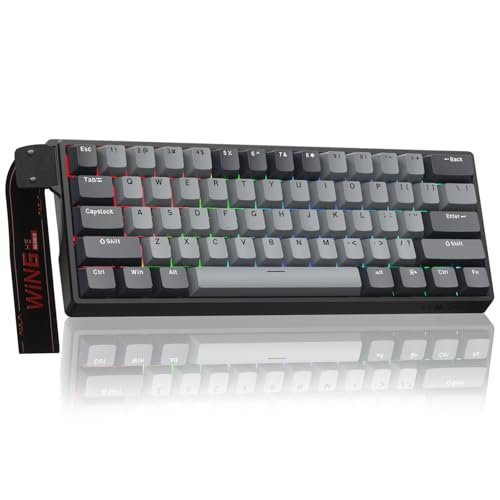
Strong Alternative
AULA WIN60 HE PRO Magnetic Keyboard
Rapid trigger with adjustable actuation.
Best for: Buyers who want rapid trigger with adjustable actuation.
Our take Check price for AULA WIN60 HE PRO Magnetic Keyboard (opens in a new tab)

Premium Pick
HyperX Alloy Origins Core Tenkeyless Mechanical Keyboard
The highest-priced pick here at the time of writing, with an aircraft-grade aluminum body.
Best for: Buyers who want the most complete package.
Our take Check price for HyperX Alloy Origins Core Tenkeyless Mechanical Keyboard (opens in a new tab)
Our Picks
Lowest Price Here1 of 5
GEODMAER 65% Wired Gaming Keyboard on Amazon (opens in a new tab)
GEODMAER's 65% board uses membrane keys with separate arrows and 26-key rollover.
Best for
- Spending as little as possible.
Skip if
- Skip it if this is a deal-breaker for you: membrane switches, not mechanical.
Why we like it
It is the cheapest keyboard here. Its 65% layout keeps separate arrow keys, and a detachable USB-C cable gives a steady wired connection. It saves desk space for wide mouse movements.
It shares a 65% (68 keys) layout with the X68 HE; the Maxfit61 goes with a 60% layout. You get membrane switches here, which sets it apart from the Alloy Origins Core and its HyperX tactile switches. It also comes with a lockable Windows key.
The GEODMAER 65% needs a free USB port, so check cable length to your case or monitor hub. Small layouts move keys to a function layer, so check the legend for arrows and F-keys. It cost the least of the 5 picks at the time of writing, with the Maxfit61 the next step up. There is no published polling rate figure, whereas the X68 HE offers 8,000Hz.
Key dimensions & specs
- Layout: 65% (68 keys)
- Switches: Membrane
- Connection: Wired
Pros
- Compact 65% (68 keys) layout
- Separate arrow keys
- 26-key rollover
- Lockable Windows key
Cons
- Membrane switches, not mechanical
- Wired only
Blue Clicky Switches2 of 5
FANTECH Maxfit61 on Amazon (opens in a new tab)
FANTECH's Maxfit61 is a wired 60% board with blue clicky switches and hot-swap for 3-pin and 5-pin switches.
Best for
- Buyers who want blue clicky switches.
Skip if
- Choose another pick if you can't accept this: no dedicated arrow keys or function row.
Why we like it
Pullers ship in the box. Pre-lubed stabilizers smooth the Enter, Backspace and Shift keys, which often rattle on budget 60% boards. It shares a 60% layout with the WIN60 HE PRO; the Alloy Origins Core goes with a TKL layout.
Blue clicky switches is unique to it among these picks, while the X68 HE uses hall effect magnetic switches. You also get switch and keycap pullers in the box and a detachable USB-C cable. The Maxfit61 needs a free USB port, so check cable length to your case or monitor hub.
Small layouts move keys to a function layer, so check the legend for arrows and F-keys. When we checked, only the GEODMAER 65% cost less, and the X68 HE cost more. If you want a confirmed polling rate, look to the X68 HE instead: it offers 8,000Hz, while this one gives no figure.
Key dimensions & specs
- Layout: 60%
- Switches: Blue clicky
- Connection: Wired
Pros
- Compact 60% layout
- Blue clicky switches
- Hot-swap for 3-pin and 5-pin switches from any brand
- Switch and keycap pullers in the box
Cons
- No dedicated arrow keys or function row
- Wired only
- Costs more than the GEODMAER 65% at the time of writing
Also Consider3 of 5
Attack Shark X68 HE on Amazon (opens in a new tab)
Attack Shark's X68 HE adds dynamic keystrokes, up to four actions per key, to rapid trigger in a 68-key frame.
Best for
- Buyers who want dynamic keystrokes with up to 4 actions per key.
Skip if
- Pass on it if wired onl rules it out for your setup.
Why we like it
It sits near $40 at the time of writing. Like the GEODMAER 65%, it has a 65% (68 keys) layout, while the Alloy Origins Core uses a TKL layout. Like the WIN60 HE PRO, it has hall effect magnetic switches, while the Maxfit61 uses blue clicky switches.
It also offers an adjustable actuation point. The X68 HE needs a free USB port, so check cable length to your case or monitor hub. High polling rates use more CPU time; drop to 1,000Hz if an older system stutters.
Small layouts move keys to a function layer, so check the legend for arrows and F-keys. Adjusting actuation needs the maker's software or web tool on Windows. On price it sat third of 5, between the cheaper Maxfit61 and the pricier WIN60 HE PRO, at the time of writing.
Key dimensions & specs
- Layout: 65% (68 keys)
- Switches: Hall effect magnetic
- Connection: Wired
- Polling rate: 8,000Hz
Pros
- Compact 65% (68 keys) layout
- Magnetic Hall effect switches
- 8,000Hz polling
- Dynamic keystrokes with up to 4 actions per key
Cons
- Wired only
- Costs more than the GEODMAER 65% at the time of writing
Strong Alternative4 of 5
AULA WIN60 HE PRO Magnetic Keyboard on Amazon (opens in a new tab)
The WIN60 HE PRO keeps the WIN60 HE's magnetic switches and 8000Hz polling and adds under-LED lighting.
Best for
- Buyers who want rapid trigger with adjustable actuation.
Skip if
- Worth skipping when no dedicated arrow keys or function ro is a problem.
Why we like it
The switches are hot-swappable. It shares a 60% layout with the Maxfit61; the Alloy Origins Core goes with a TKL layout. It shares hall effect magnetic switches with the X68 HE; the GEODMAER 65% goes with membrane switches.
You also get rapid trigger with adjustable actuation. The WIN60 HE PRO needs a free USB port, so check cable length to your case or monitor hub. High polling rates use more CPU time; drop to 1,000Hz if an older system stutters.
Small layouts move keys to a function layer, so check the legend for arrows and F-keys. Adjusting actuation needs the maker's software or web tool on Windows. It was priced above the X68 HE and below the Alloy Origins Core at the time of writing.
Key dimensions & specs
- Layout: 60%
- Switches: Hall effect magnetic
- Connection: Wired
- Polling rate: 8,000Hz
Pros
- Compact 60% layout
- Magnetic Hall effect switches
- 8,000Hz polling
- Rapid trigger with adjustable actuation
Cons
- No dedicated arrow keys or function row
- Wired only
- Costs more than the GEODMAER 65% at the time of writing
Premium Pick5 of 5
HyperX Alloy Origins Core Tenkeyless Mechanical Keyboard on Amazon (opens in a new tab)
HyperX puts the Alloy Origins Core in an aluminum body, which makes it the sturdiest board in this list.
Best for
- Buyers who want the most complete package.
Skip if
- Choose another pick if you can't accept this: wired only.
Why we like it
It is wired only, but the cable detaches for transport. Its tenkeyless layout frees mouse space, and the aluminium body resists flex. It is a wired tenkeyless board with low-profile HyperX Aqua switches and customizable RGB lighting.
Dropping the number pad leaves more room for mouse movement. It is the only pick here with a TKL layout; the GEODMAER 65% has a 65% (68 keys) layout instead. No other pick in this guide offers HyperX tactile switches; compare the X68 HE, which has hall effect magnetic switches.
The Alloy Origins Core needs a free USB port, so check cable length to your case or monitor hub. It was the most expensive pick when we checked, so weigh what it adds over the WIN60 HE PRO. Buyers who need a confirmed polling rate should compare it with the X68 HE, which offers 8,000Hz.
Key dimensions & specs
- Layout: TKL
- Switches: HyperX tactile
- Connection: Wired
Pros
- Tenkeyless layout leaves more room for the mouse
- HyperX tactile switches
- Aircraft-grade aluminum body
- Detachable USB-C cable
Cons
- Wired only
- Costs more than the GEODMAER 65% at the time of writing
How We Chose These Compact Gaming Keyboards Under $50
Each pick was assessed across 4 criteria weighted for real-world use.
- How these picks were ranked
- We set side by side five keyboards on layout, switches, connection and polling rate from manufacturer specifications. We did not test them in-house.
- What every pick has in common
- All 5, from the GEODMAER 65% to the Alloy Origins Core, state layout, switches and connection and share Wired connection.
- Where the specs have gaps
- The GEODMAER 65%, the Maxfit61 and the Alloy Origins Core give no polling rate.
- Price range
- From the GEODMAER 65% to the Alloy Origins Core, all sat in the under $50 tier when we checked.
What to Look for in a Compact Gaming Keyboard Under $50
Key buying criteria so you get the right fit the first time.
Switches
The GEODMAER 65% lists membrane; the Maxfit61 lists blue clicky; the X68 HE and the WIN60 HE PRO list hall effect magnetic; the Alloy Origins Core lists HyperX tactile. Rule out the mismatches before looking at price.
Setup checks
The GEODMAER 65% needs a free USB port, so check cable length to your case or monitor hub.
Extras that separate them
The X68 HE: rapid trigger. The WIN60 HE PRO: hot-swappable magnetic switches. The Alloy Origins Core: a detachable USB-C cable.
How much to spend
All 5 sat in one tier when we checked, from the GEODMAER 65% at the low end to the Alloy Origins Core at the top, so decide on features first.
Start from what matters most
Spending as little as possible: the GEODMAER 65%. Buyers who want blue clicky switches: the Maxfit61. Buyers who want the most complete package: the Alloy Origins Core.
How to Choose a Compact Gaming Keyboard Under $50
By priority
| Priority | Consider | Why |
|---|---|---|
| Spending as little as possible | GEODMAER 65% | A lower price than the Maxfit61 and the rest when we checked |
| Buyers who want blue clicky switches | Maxfit61 | Blue clicky switches |
| Buyers who want dynamic keystrokes with up to 4 actions per key | X68 HE | Dynamic keystrokes with up to 4 actions per key |
| Buyers who want rapid trigger with adjustable actuation | WIN60 HE PRO | Rapid trigger with adjustable actuation |
| Buyers who want the most complete package | Alloy Origins Core | The highest-priced pick here at the time of writing, with an aircraft-grade aluminum body |
Scroll sideways to see every column.
Key specs side by side
The GEODMAER 65%, the Maxfit61 and the rest, as their makers list them.
| Keyboard | Layout | Switches | Connection | Polling rate |
|---|---|---|---|---|
| GEODMAER 65% | 65% (68 keys) | Membrane | Wired | Not listed |
| Maxfit61 | 60% | Blue clicky | Wired | Not listed |
| X68 HE | 65% (68 keys) | Hall effect magnetic | Wired | 8,000Hz |
| WIN60 HE PRO | 60% | Hall effect magnetic | Wired | 8,000Hz |
| Alloy Origins Core | TKL | HyperX tactile | Wired | Not listed |
Scroll sideways to see every column.
Frequently Asked Questions
Why is the Maxfit61 our Blue Clicky Switches pick?
It earns the label for blue clicky switches. It suits anyone who wants blue clicky switches.
Do the GEODMAER 65% and the Maxfit61 differ on layout?
The GEODMAER 65% and the X68 HE use 65% (68 keys); the Maxfit61 and the WIN60 HE PRO use 60%; the Alloy Origins Core uses TKL.
Will the WIN60 HE PRO work with my setup?
The WIN60 HE PRO needs a free USB port, so check cable length to your case or monitor hub. In this guide it ranks fourth of 5.
What extras do the GEODMAER 65% and the Maxfit61 include?
The GEODMAER 65%: separate arrow keys. The Maxfit61: hot-swap for 3-pin and 5-pin switches from any brand. The X68 HE: dynamic keystrokes with up to 4 actions per key.
Should I pick the GEODMAER 65% or the Alloy Origins Core?
The GEODMAER 65% suits spending as little as possible; the Alloy Origins Core suits buyers who want the most complete package.
Bottom Line
Our first pick is the GEODMAER 65%, chosen for a lower price than the Maxfit61 and the rest when we checked. Look at the Maxfit61 for blue clicky switches, the X68 HE for dynamic keystrokes with up to 4 actions per key and the WIN60 HE PRO for rapid trigger with adjustable actuation if those matter more to you.
Check whether the keycaps and switches are replaceable.