
Buying Guide
The Best Gaming Keyboards Under $120
Five keyboards ranked on layout and switches; the F75 HE is the cheapest route in.
By The PC Journal editorial team
12 min read5 products evaluated
From $75 to $120 you find Hall-effect analog and wireless mechanical boards. Every keyboard cost 75 to 120 when we checked and lists its layout and switch type.
The order reflects layout, switches and connection from maker specifications; a missing switches is flagged, not filled in rather than guess, since we have not benched them.
Quick Picks
Our 5 recommendations at a glance. Tap a pick for the full verdict.

Lowest Price Here
AULA F75 HE Wireless
The lowest price among these keyboards at the time of writing.
Best for: Buyers who would rather put the savings elsewhere than into the Falchion Ace.
Our take Check price for AULA F75 HE Wireless (opens in a new tab)

Also Consider
ASUS ROG Falchion Ace
Arrow and navigation keys in a 306mm frame.
Best for: Buyers who want arrow and navigation keys in a 306mm frame.
Our take Check price for ASUS ROG Falchion Ace (opens in a new tab)

Strong Alternative
Keychron K3 Version 2
A Mac layout with extra Windows keycaps.
Best for: Buyers who want Mac layout with extra Windows keycaps.
Our take Check price for Keychron K3 Version 2 (opens in a new tab)

Worth a Look
Razer Huntsman V3 Pro Mini (Analog)
Rapid trigger with on-the-fly actuation changes.
Best for: Buyers who want rapid trigger with on-the-fly actuation changes.
Our take Check price for Razer Huntsman V3 Pro Mini (Analog) (opens in a new tab)
Premium Pick
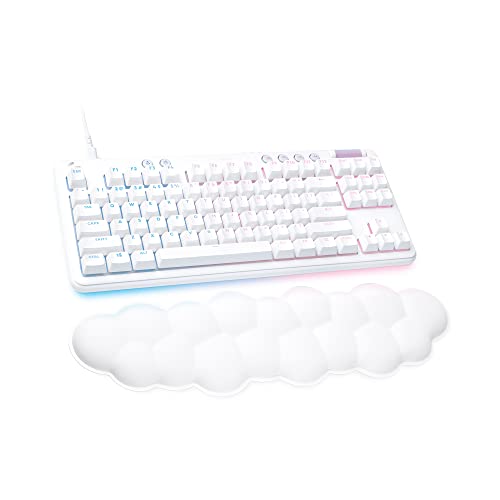
Logitech G713 Wired TKL Gaming Keyboard
The highest-priced pick here at the time of writing, with dedicated media controls.
Best for: Buyers who want dedicated media controls and can spend more than the Huntsman V3 Pro Mini analog costs.
Our take Check price for Logitech G713 Wired TKL Gaming Keyboard (opens in a new tab)
| Pick | Why it’s here | Best for | Price |
|---|---|---|---|
| The lowest price among these keyboards at the time of writing. | Buyers who would rather put the savings elsewhere than into the Falchion Ace. | Check price for AULA F75 HE Wireless (opens in a new tab) |
| Arrow and navigation keys in a 306mm frame. | Buyers who want arrow and navigation keys in a 306mm frame. | Check price for ASUS ROG Falchion Ace (opens in a new tab) |
| A Mac layout with extra Windows keycaps. | Buyers who want Mac layout with extra Windows keycaps. | Check price for Keychron K3 Version 2 (opens in a new tab) |
| Rapid trigger with on-the-fly actuation changes. | Buyers who want rapid trigger with on-the-fly actuation changes. | Check price for Razer Huntsman V3 Pro Mini (Analog) (opens in a new tab) |
| The highest-priced pick here at the time of writing, with dedicated media controls. | Buyers who want dedicated media controls and can spend more than the Huntsman V3 Pro Mini analog costs. | Check price for Logitech G713 Wired TKL Gaming Keyboard (opens in a new tab) |
Our Picks
Lowest Price Here1 of 5
AULA F75 HE Wireless on Amazon (opens in a new tab)
AULA's F75 HE brings Hall effect switches to a tri-mode 75% board with a 4000mAh battery and a knob.
Best for
- Buyers who would rather put the savings elsewhere than into the Falchion Ace.
Skip if
- Look at the other picks if you need a feature not covered above.
Why we like it
The switches are hot-swappable. No other pick in this guide offers a 75% (80 keys) layout; compare the G713, which has a TKL layout. It is the only pick here with hall effect magnetic switches; the Huntsman V3 Pro Mini analog has analog optical Gen-2 switches instead.
Use the F75 HE's dongle or cable for games; Bluetooth suits a laptop or tablet. Adjusting actuation needs the maker's software or web tool on Windows. It makes the most sense for buyers who would rather put the savings elsewhere than into the Falchion Ace, since it offers the lowest price among these keyboards at the time of writing. It undercut the Falchion Ace and every other pick on price at the time of writing.
Key dimensions & specs
- Layout: 75% (80 keys)
- Switches: Hall effect magnetic
- Connection: 2.4GHz, Bluetooth, wired
Pros
- Compact 75% (80 keys) layout
- Magnetic Hall effect switches
- Dongle, Bluetooth and wired modes
- 4000mAh battery
Also Consider2 of 5
ASUS ROG Falchion Ace on Amazon (opens in a new tab)
The ROG Falchion Ace fits arrow and navigation keys into a 306mm, 65% frame with ROG NX mechanical switches and double-shot PBT keycaps.
Best for
- Buyers who want arrow and navigation keys in a 306mm frame.
Skip if
- Skip it if this is a deal-breaker for you: wired only.
Why we like it
It is wired only. A touch panel on the left adjusts volume or runs shortcuts, and lubricated stabilisers smooth the larger keys. It is the only pick here with a 65% layout; the F75 HE has a 75% (80 keys) layout instead.
No other pick in this guide offers ROG NX mechanical switches; compare the F75 HE, which has hall effect magnetic switches. You also get lubricated switch stems. The Falchion Ace needs a free USB port, so check cable length to your case or monitor hub. Its price falls between the F75 HE and the K3, based on our last check.
Key dimensions & specs
- Layout: 65%
- Switches: ROG NX mechanical
- Connection: Wired
- Keycaps: Double-shot PBT
Pros
- Compact 65% layout
- ROG NX mechanical switches
- PBT keycaps resist shine
- Arrow and navigation keys in a 306mm frame
Cons
- Wired only
- Costs more than the F75 HE at the time of writing
Strong Alternative3 of 5
Keychron K3 Version 2 on Amazon (opens in a new tab)
Keychron's K3 is a low-profile 75% board with a Mac layout, extra Windows keycaps and QMK remapping.
Best for
- Buyers who want Mac layout with extra Windows keycaps.
Skip if
- If budget leads, the F75 HE was cheaper at our last price check.
Why we like it
It pairs with three devices. Its ultra-slim 75% layout pairs with up to three devices over Bluetooth 5.1, and it also works wired. It suits a laptop user who wants mechanical keys without a tall board.
It ships with keycaps for both Mac and Windows, and QMK firmware allows full key remapping. The aluminium top keeps it thin and light. No other pick in this guide offers low-profile mechanical switches; compare the Falchion Ace, which has ROG NX mechanical switches.
Use the K3's dongle or cable for games; Bluetooth suits a laptop or tablet. Its price falls between the Falchion Ace and the Huntsman V3 Pro Mini analog, based on our last check.
Key dimensions & specs
- Layout: 75%, low-profile
- Switches: Low-profile mechanical
- Connection: Bluetooth, wired
Pros
- Compact 75%, low-profile layout
- Low-profile mechanical switches
- Mac layout with extra Windows keycaps
- Pairing with 3 devices
Cons
- Costs more than the F75 HE at the time of writing
Worth a Look4 of 5
Razer Huntsman V3 Pro Mini (Analog) on Amazon (opens in a new tab)
This analog Huntsman V3 Pro Mini listing offers rapid trigger and on-the-fly actuation changes.
Best for
- Buyers who want rapid trigger with on-the-fly actuation changes.
Skip if
- Look at the others if this bothers you: no dedicated arrow keys or function row.
Why we like it
It is rated for less than the Esports edition. You get a 60% layout here, which sets it apart from the F75 HE and its a 75% (80 keys) layout. Analog optical Gen-2 switches is unique to it among these picks, while the Falchion Ace uses ROG NX mechanical switches.
It also offers an onboard visual guide for adjustments. The Huntsman V3 Pro Mini analog needs a free USB port, so check cable length to your case or monitor hub. Small layouts move keys to a function layer, so check the legend for arrows and F-keys. When we checked, only the K3 and cheaper picks cost less, and the G713 cost more.
Key dimensions & specs
- Layout: 60%
- Switches: Analog optical Gen-2
- Connection: Wired
- Keycaps: Doubleshot PBT
Pros
- Compact 60% layout
- PBT keycaps resist shine
- Rapid trigger with on-the-fly actuation changes
- Onboard visual guide for adjustments
Cons
- No dedicated arrow keys or function row
- Wired only
- Costs more than the F75 HE at the time of writing
Premium Pick5 of 5
Logitech G713 Wired TKL Gaming Keyboard on Amazon (opens in a new tab)
The G713 is a wired tenkeyless board with media controls and an included palm rest, which the other picks leave out.
Best for
- Buyers who want dedicated media controls and can spend more than the Huntsman V3 Pro Mini analog costs.
Skip if
- Skip it if this is a deal-breaker for you: wired only.
Why we like it
Per-key and perimeter LIGHTSYNC RGB comes with preloaded animations, and it belongs to the Aurora collection with matching headset and mouse. Keycaps and top plates in other colours are sold separately. Its cloud-shaped palm rest and compact TKL layout suit a small desk, and you choose between GX switch types.
A TKL layout is unique to it among these picks, while the F75 HE uses a 75% (80 keys) layout. The G713 needs a free USB port, so check cable length to your case or monitor hub. Only the Huntsman V3 Pro Mini analog came close to it on price at the time of writing; it cost the most of the 5 picks.
Key dimensions & specs
- Layout: TKL
- Connection: Wired
Pros
- Tenkeyless layout leaves more room for the mouse
- Dedicated media controls
- Included palm rest
- The highest-priced pick here at the time of writing, with dedicated media controls
Cons
- Wired only
- Costs more than the F75 HE at the time of writing
How We Chose These Gaming Keyboards Under $120
Each pick was assessed across 4 criteria weighted for real-world use.
- The figures behind the order
- We compared five keyboards on layout, switches, connection and keycaps as the makers state them. These are research figures, not bench results: 1 of 5 picks leave out switches.
- What every pick has in common
- All 5, from the F75 HE to the G713, state layout and connection.
- Where the specs have gaps
- The G713 gives no switches; the F75 HE, the K3 and the G713 give no keycaps.
- Price range
- From the F75 HE to the G713, all sat in the $50 to $100 tier when we checked.
What to Look for in a Gaming Keyboard Under $120
Key buying criteria so you get the right fit the first time.
Keycaps
The Falchion Ace lists Double-shot PBT; the Huntsman V3 Pro Mini analog lists Doubleshot PBT. Sort out keycaps before price: it splits 2 stated picks into groups of 1 and 1.
Fit and compatibility
Use the F75 HE's dongle or cable for games; Bluetooth suits a laptop or tablet. The Falchion Ace needs a free USB port, so check cable length to your case or monitor hub.
Extras that separate them
The K3: pairing with 3 devices. The Huntsman V3 Pro Mini analog: an onboard visual guide for adjustments. The G713: an included palm rest.
How much to spend
All 5 sat in the $50 to $100 tier when we checked, from the F75 HE at the low end to the G713 at the top, so decide on features first.
Start from what matters most
Buyers who would rather put the savings elsewhere than into the Falchion Ace: the F75 HE. Buyers who want dedicated media controls and can spend more than the Huntsman V3 Pro Mini analog costs: the G713.
How to Choose a Gaming Keyboard Under $120
By priority
| Priority | Consider | Why |
|---|---|---|
| Buyers who would rather put the savings elsewhere than into the Falchion Ace | F75 HE | The lowest price among these keyboards at the time of writing |
| Buyers who want arrow and navigation keys in a 306mm frame | Falchion Ace | Arrow and navigation keys in a 306mm frame |
| Buyers who want Mac layout with extra Windows keycaps | K3 | A Mac layout with extra Windows keycaps |
| Buyers who want rapid trigger with on-the-fly actuation changes | Huntsman V3 Pro Mini analog | Rapid trigger with on-the-fly actuation changes |
| Buyers who want dedicated media controls and can spend more than the Huntsman V3 Pro Mini analog costs | G713 | The highest-priced pick here at the time of writing, with dedicated media controls |
Scroll sideways to see every column.
Key specs side by side
The F75 HE, the Falchion Ace and the rest, as their makers list them.
| Keyboard | Layout | Switches | Connection | Keycaps |
|---|---|---|---|---|
| F75 HE | 75% (80 keys) | Hall effect magnetic | 2.4GHz, Bluetooth, wired | Not listed |
| Falchion Ace | 65% | ROG NX mechanical | Wired | Double-shot PBT |
| K3 | 75%, low-profile | Low-profile mechanical | Bluetooth, wired | Not listed |
| Huntsman V3 Pro Mini analog | 60% | Analog optical Gen-2 | Wired | Doubleshot PBT |
| G713 | TKL | Not listed | Wired | Not listed |
Scroll sideways to see every column.
Frequently Asked Questions
Why is the G713 our Premium Pick?
The label rests on the highest-priced pick here at the time of writing, with dedicated media controls. It is aimed at anyone who wants dedicated media controls and can spend more than the Huntsman V3 Pro Mini analog costs.
Do the F75 HE and the Falchion Ace differ on switches?
The F75 HE uses hall effect magnetic; the Falchion Ace uses ROG NX mechanical; the K3 uses low-profile mechanical; the Huntsman V3 Pro Mini analog uses Analog optical Gen-2. The G713 has no switches listed, so 4 of 5 picks are covered here.
Will the G713 work with my setup?
The G713 needs a free USB port, so check cable length to your case or monitor hub. In this guide it ranks fifth of 5, as our Premium Pick.
What extras do the F75 HE and the Falchion Ace include?
The F75 HE: a 4000mAh battery. The Falchion Ace: arrow and navigation keys in a 306mm frame. The K3: a Mac layout with extra Windows keycaps.
Who should choose the F75 HE?
The F75 HE carries our Lowest Price Here label for the lowest price among these keyboards at the time of writing. It ranks first of 5 here and sat in the $50 to $100 tier at our last price check; it suits anyone who would rather put the savings elsewhere than into the Falchion Ace.
Bottom Line
Our first pick is the F75 HE, chosen for the lowest price among these keyboards at the time of writing. Look at the Falchion Ace for arrow and navigation keys in a 306mm frame, the K3 for a Mac layout with extra Windows keycaps and the Huntsman V3 Pro Mini analog for rapid trigger with on-the-fly actuation changes if those matter more to you.
Decide whether adjustable actuation matters for the games you play before paying extra.