
Buying Guide
The Best Gaming Keyboards With Wrist Rests
Three keyboards compared, from the Apex 3 to the Strix Scope II 96 Wireless, with the trade-offs of each named.
By The PC Journal editorial team
11 min read3 products evaluated
A wrist rest keeps your wrists flat on long sessions. Every pick ships with a wrist rest or palm rest, ordered from the lowest price.
We sorted these picks by layout, switches and connection, working from the makers' own data; if a maker skips switches, the guide says so, and no figure here comes from our own testing.
Quick Picks
Our 3 recommendations at a glance. Tap a pick for the full verdict.

Lowest Price Here
SteelSeries Apex 3 RGB
The lowest price among these keyboards at the time of writing.
Best for: Buyers who would rather put the savings elsewhere in the build.
Our take Check price for SteelSeries Apex 3 RGB (opens in a new tab)
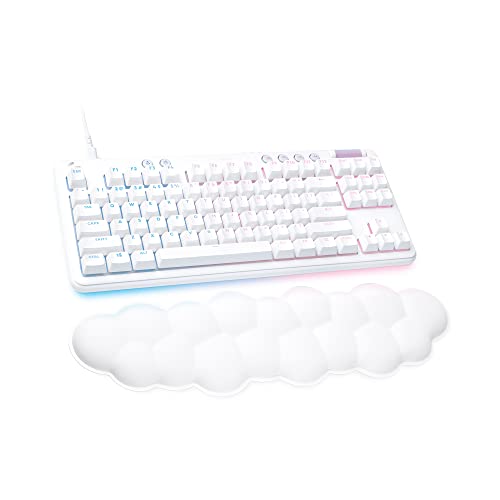
TKL Layout
Logitech G713 Wired TKL Gaming Keyboard
A TKL layout.
Best for: Buyers who want a TKL layout.
Our take Check price for Logitech G713 Wired TKL Gaming Keyboard (opens in a new tab)

Premium Pick
ASUS ROG Strix Scope II 96 Wireless Gaming Keyboard
Sound-dampening foam and switch-dampening pads at the highest price in the group.
Best for: Buyers for whom price is not the deciding factor.
Our take Check price for ASUS ROG Strix Scope II 96 Wireless Gaming Keyboard (opens in a new tab)
| Pick | Why it’s here | Best for | Price |
|---|---|---|---|
| The lowest price among these keyboards at the time of writing. | Buyers who would rather put the savings elsewhere in the build. | Check price for SteelSeries Apex 3 RGB (opens in a new tab) |
| A TKL layout. | Buyers who want a TKL layout. | Check price for Logitech G713 Wired TKL Gaming Keyboard (opens in a new tab) |
| Sound-dampening foam and switch-dampening pads at the highest price in the group. | Buyers for whom price is not the deciding factor. | Check price for ASUS ROG Strix Scope II 96 Wireless Gaming Keyboard (opens in a new tab) |
Our Picks
Lowest Price Here1 of 3
SteelSeries Apex 3 RGB on Amazon (opens in a new tab)
SteelSeries's Apex 3 uses whisper-quiet membrane switches with IP32 water resistance and a magnetic wrist rest.
Best for
- Buyers who would rather put the savings elsewhere in the build.
Skip if
- Choose another pick if you can't accept this: full-size board takes more desk width.
Why we like it
The maker specifies Xbox Series X|S, PS4 and PS5 support. Its whisper-quiet switches are rated for 20 million presses, and 10-zone RGB and dedicated media controls sit on the board. It is IP32 water resistant against accidental spills.
A full-size layout is unique to it among these picks, while the Strix Scope II 96 Wireless uses a 96% layout. The Apex 3 needs a free USB port, so check cable length to your case or monitor hub. It makes the most sense for buyers who would rather put the savings elsewhere in the build, since it offers the lowest price among these keyboards at the time of writing. It cost the least of the 3 picks at the time of writing, with the G713 the next step up.
Key dimensions & specs
- Layout: Full-size
- Switches: Whisper-quiet membrane
- Connection: Wired
Pros
- IP32 water resistance
- Magnetic wrist rest
- Listed support for Xbox Series X|S, PS4 and PS5
- Full-size layout, the only one here
Cons
- Full-size board takes more desk width
- Membrane switches, not mechanical
- Wired only
TKL Layout2 of 3
Logitech G713 Wired TKL Gaming Keyboard on Amazon (opens in a new tab)
The G713 is a wired tenkeyless board with media controls and an included palm rest, which the other picks leave out.
Best for
- Buyers who want a TKL layout.
Skip if
- Skip it if this is a deal-breaker for you: wired only.
Why we like it
Per-key and perimeter LIGHTSYNC RGB comes with preloaded animations, and it belongs to the Aurora collection with matching headset and mouse. Keycaps and top plates in other colours are sold separately. Its cloud-shaped palm rest and compact TKL layout suit a small desk, and you choose between GX switch types.
No other pick in this guide offers a TKL layout; compare the Apex 3, which has a full-size layout. The G713 needs a free USB port, so check cable length to your case or monitor hub. On price it sat second of 3, between the cheaper Apex 3 and the pricier Strix Scope II 96 Wireless, at the time of writing.
Key dimensions & specs
- Layout: TKL
- Connection: Wired
Pros
- Tenkeyless layout leaves more room for the mouse
- Dedicated media controls
- Included palm rest
- A TKL layout
Cons
- Wired only
- Costs more than the Apex 3 at the time of writing
Premium Pick3 of 3
ASUS ROG Strix Scope II 96 Wireless Gaming Keyboard on Amazon (opens in a new tab)
The ROG Strix Scope II 96 Wireless keeps a number pad in a frame ASUS lists as only 1cm wider than an 80% board.
Best for
- Buyers for whom price is not the deciding factor.
Skip if
- If budget leads, the Apex 3 was cheaper at our last price check.
Why we like it
It connects over 2.4GHz, Bluetooth or cable, with a 1,500 hours of battery on 2.4GHz. No other pick in this guide offers a 96% layout; compare the Apex 3, which has a full-size layout. It also offers sound-dampening foam and switch-dampening pads and a detachable wrist rest.
Use the Strix Scope II 96 Wireless's dongle or cable for games; Bluetooth suits a laptop or tablet. It also brings ROG NX Snow linear, pre-lubed, hot-swappable switches. It was the highest-priced of the 3 picks at the time of writing, so the case for it rests on what it adds over the G713 and the rest.
Key dimensions & specs
- Layout: 96%
- Switches: ROG NX Snow linear, pre-lubed, hot-swappable
- Connection: 2.4GHz, Bluetooth (3 devices), wired
- Battery life: 1500 hours
- Keycaps: PBT
Pros
- ROG NX Snow linear, pre-lubed, hot-swappable switches
- Dongle, Bluetooth and wired modes
- Up to 1500 hours per charge
- PBT keycaps resist shine
Cons
- Costs more than the Apex 3 at the time of writing
How We Chose These Gaming Keyboards With Wrist Rests
Each pick was assessed across 4 criteria weighted for real-world use.
- What we compared
- We lined up three keyboards on layout, switches and connection from manufacturer specifications. We did not test them in-house.
- The shared baseline
- All 3, from the Apex 3 to the Strix Scope II 96 Wireless, state layout and connection.
- Where the specs have gaps
- The G713 gives no switches.
- Price range
- At our last check the picks ran from the Apex 3 (under $50) to the Strix Scope II 96 Wireless ($100 to $150).
What to Look for in a Gaming Keyboard With Wrist Rests
Key buying criteria so you get the right fit the first time.
Fit and compatibility
The Apex 3 needs a free USB port, so check cable length to your case or monitor hub. Use the Strix Scope II 96 Wireless's dongle or cable for games; Bluetooth suits a laptop or tablet.
Features beyond the spec table
The Apex 3: a magnetic wrist rest. The G713: an included palm rest. The Strix Scope II 96 Wireless: a number pad in a body 1 cm wider than an 80% board.
Where your budget lands
Under $50 buys the Apex 3; $50 to $100 buys the G713; $100 to $150 buys the Strix Scope II 96 Wireless at our last check.
Match the pick to your priority
Buyers who would rather put the savings elsewhere in the build: the Apex 3. Buyers who want a TKL layout: the G713. Buyers for whom price is not the deciding factor: the Strix Scope II 96 Wireless.
Keycap material lasts longer than lighting
PBT keycaps resist the shine that ABS caps develop. Double-shot legends do not wear off.
How to Choose a Gaming Keyboard With Wrist Rests
By priority
| Priority | Consider | Why |
|---|---|---|
| Buyers who would rather put the savings elsewhere in the build | Apex 3 | The lowest price among these keyboards at the time of writing |
| Buyers who want a TKL layout | G713 | A TKL layout |
| Buyers for whom price is not the deciding factor | Strix Scope II 96 Wireless | Sound-dampening foam and switch-dampening pads at the highest price in the group |
Scroll sideways to see every column.
Key specs side by side
The Apex 3, the G713 and the rest, as their makers list them.
| Keyboard | Layout | Switches | Connection |
|---|---|---|---|
| Apex 3 | Full-size | Whisper-quiet membrane | Wired |
| G713 | TKL | Not listed | Wired |
| Strix Scope II 96 Wireless | 96% | ROG NX Snow linear, pre-lubed, hot-swappable | 2.4GHz, Bluetooth (3 devices), wired |
Scroll sideways to see every column.
By price at the time of writing
The Apex 3 was the lowest-priced pick and the Strix Scope II 96 Wireless the highest when we checked; tiers move with Amazon pricing.
| Price tier | Keyboards |
|---|---|
| Under $50 | Apex 3 |
| About $50 to $100 | G713 |
| About $100 to $150 | Strix Scope II 96 Wireless |
Frequently Asked Questions
What makes the G713 the TKL Layout?
It earns the label for a TKL layout. It suits anyone who wants a TKL layout.
Do the Apex 3 and the G713 differ on layout?
The Apex 3 uses full-size; the G713 uses TKL; the Strix Scope II 96 Wireless uses 96%.
What should I check before buying the Strix Scope II 96 Wireless?
Use the Strix Scope II 96 Wireless's dongle or cable for games; Bluetooth suits a laptop or tablet. In this guide it ranks third of 3, as our Premium Pick pick.
Beyond the specs, what sets the Apex 3 and the G713 apart?
The Apex 3: IP32 water resistance. The G713: dedicated media controls. The Strix Scope II 96 Wireless: sound-dampening foam and switch-dampening pads.
Should I pick the Apex 3 or the Strix Scope II 96 Wireless?
The Apex 3 suits buyers who would rather put the savings elsewhere in the build; the Strix Scope II 96 Wireless suits buyers for whom price is not the deciding factor.
Bottom Line
Our first pick is the Apex 3, chosen for the lowest price among these keyboards at the time of writing. Look at the G713 for a TKL layout and the Strix Scope II 96 Wireless for sound-dampening foam and switch-dampening pads at the highest price in the group if those matter more to you.
Set the rest at the keyboard's height.