
Buying Guide
The Best Gaming Desktop Chassis
Five larger chassis for high-end gaming desktops, with room for 360mm to 420mm radiators and up to E-ATX boards.
By The PC Journal editorial team
12 min read5 products evaluated
A larger chassis gives a high-end gaming desktop room to breathe: space for a 420mm radiator, an E-ATX board and a long graphics card. The trade-off is size on the desk.
We compared clearances, fans and board support from each listing; we did not test these cases.
Quick Picks
Our 5 recommendations at a glance. Tap a pick for the full verdict.

Best High-End Chassis
Fractal Design North XL
413mm GPU clearance and 420mm radiator support.
Best for: Large air-cooled or AIO builds.
Our take Check price for Fractal Design North XL (opens in a new tab)

Most Fans in a Chassis
Antec Flux Pro
Six fans with 420mm radiator support.
Best for: E-ATX builds.
Our take Check price for Antec Flux Pro (opens in a new tab)

Widest Board Support
CORSAIR 3500X
Mini-ITX to E-ATX boards behind wraparound glass.
Best for: Showcase builds of any size.

Best Quiet Chassis
Phanteks XT Pro Silent
Three fans and 360mm radiator support in a silent-focused design.
Best for: Quiet gaming desktops.
Our take Check price for Phanteks XT Pro Silent (opens in a new tab)
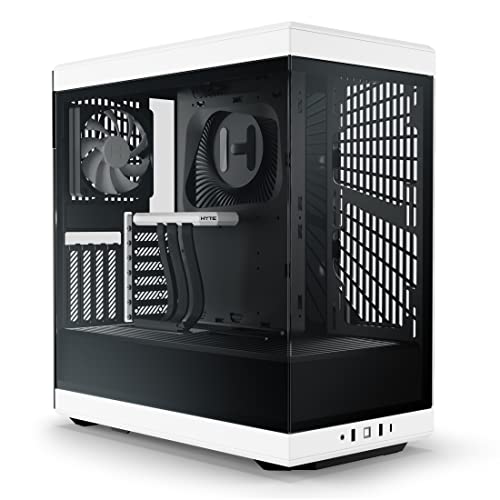
Best Budget Showcase
HYTE Y40
Panoramic glass with two fans.
Best for: Budget showcase builds.
| Pick | Why it’s here | Best for | Price |
|---|---|---|---|
| 413mm GPU clearance and 420mm radiator support. | Large air-cooled or AIO builds. | Check price for Fractal Design North XL (opens in a new tab) |
| Six fans with 420mm radiator support. | E-ATX builds. | Check price for Antec Flux Pro (opens in a new tab) |
| Mini-ITX to E-ATX boards behind wraparound glass. | Showcase builds of any size. | Check price for CORSAIR 3500X (opens in a new tab) |
| Three fans and 360mm radiator support in a silent-focused design. | Quiet gaming desktops. | Check price for Phanteks XT Pro Silent (opens in a new tab) |
| Panoramic glass with two fans. | Budget showcase builds. | Check price for HYTE Y40 (opens in a new tab) |
Our Picks
Best High-End Chassis1 of 5
Fractal Design North XL on Amazon (opens in a new tab)
The North XL scales Fractal's wood-fronted design up to E-ATX boards, 413mm graphics cards and a 420mm front radiator.
Best for
- Large air-cooled or AIO builds.
Skip if
- Price-first buyers should look at the XT Pro Silent, which cost less when we checked.
Why we like it
Three 140mm Aspect fans come fitted, and a 360mm radiator can go on top at the same time as the front one. With that 420mm front radiator installed, GPU room drops to 380mm. It takes E-ATX, ATX, mATX and mITX boards, with wood and alloy details on the front.
It matches the Flux Pro on largest radiator size (420mm). GPU limit in the North XL: 413mm, before front fans. The North XL takes 420mm radiators; mind RAM height. Only the Flux Pro came close to it on price at the time of writing; it cost the most of the 5 picks.
Key dimensions & specs
- Max GPU length: 413mm
- Largest radiator: 420mm
- Fans included: 3
- Motherboards: E-ATX, ATX, mATX, ITX
Pros
- Room for graphics cards up to 413mm long
- Fits a 420mm radiator
- 3 fans included
- Three 140mm Aspect PWM fans
Cons
- Costs more than the XT Pro Silent at the time of writing
Most Fans in a Chassis2 of 5
Antec Flux Pro on Amazon (opens in a new tab)
The Flux Pro includes six fans, the most in this guide, and takes a 420mm and a 360mm radiator together.
Best for
- E-ATX builds.
Skip if
- Skip it if price comes first: the XT Pro Silent cost less when we checked.
Why we like it
Two reverse fans sit on the PSU shroud to feed the graphics card, and a display shows CPU and GPU temperatures. The power supply mounts rotated 90 degrees, and the case takes E-ATX boards. It mixes metal, glass and wood, and removable brackets on the top, front and shroud make radiators easier to fit.
It matches the North XL on largest radiator size (420mm). It is the only pick here with E-ATX motherboards; the 3500X has mini-ITX to E-ATX motherboards instead. Confirm GPU length for the Flux Pro with its maker.
Boards: E-ATX. When we checked, only the Y40 and cheaper picks cost less, and the North XL cost more.
Key dimensions & specs
- Largest radiator: 420mm
- Fans included: 6
- Motherboards: E-ATX
Pros
- Fits a 420mm radiator
- 6 fans included
- 420mm and a 360mm radiator at the same time
- Two reverse fans on the PSU shroud
Cons
- Costs more than the XT Pro Silent at the time of writing
Widest Board Support3 of 5
CORSAIR 3500X on Amazon (opens in a new tab)
The 3500X wraps its front and side in glass and supports reverse-connection motherboards that hide their cables.
Best for
- Showcase builds of any size.
Skip if
- Price-first buyers should look at the XT Pro Silent, which cost less when we checked.
Why we like it
Radiators up to 360mm fit in the roof and on the side, and it takes boards from Mini-ITX to E-ATX. It takes Mini-ITX to E-ATX boards, supports ASUS BTF and MSI Project Zero, and its glass panels lift off easily. On largest radiator size it ties with the XT Pro Silent at 360mm.
Mini-ITX to E-ATX motherboards is unique to it among these picks, while the Flux Pro uses E-ATX motherboards. You also get mounts for up to ten 120mm fans. Confirm GPU length for the 3500X with its maker.
The 3500X takes 360mm radiators; mind RAM height. On price it sat second of 5, between the cheaper XT Pro Silent and the pricier Y40, at the time of writing.
Key dimensions & specs
- Largest radiator: 360mm
- Motherboards: Mini-ITX to E-ATX
- Glass: Wraparound front and side glass
Pros
- Fits a 360mm radiator
- Wraparound front and side glass
- Mounts for up to ten 120mm fans
- 360mm radiators in the roof and side
Cons
- Costs more than the XT Pro Silent at the time of writing
Best Quiet Chassis4 of 5
Phanteks XT Pro Silent on Amazon (opens in a new tab)
The XT Pro Silent swaps glass for closed panels lined with sound-dampening foam, which suits a PC that sits near you.
Best for
- Quiet gaming desktops.
Skip if
- Skip it if this is a deal-breaker for you: largest radiator size of 360mm, behind the North XL (420mm).
Why we like it
Three M25 fans come fitted, and a 360mm radiator fits on top. It fits the largest graphics cards and takes a 360mm radiator at the top without restrictions. On largest radiator size it ties with the 3500X at 360mm.
You also get seven 120mm fan positions. Confirm GPU length for the XT Pro Silent with its maker. The XT Pro Silent takes 360mm radiators; mind RAM height.
It undercut the 3500X and every other pick on price at the time of writing. The main gap: largest radiator size of 360mm, behind the North XL (420mm). If that matters, the North XL comes in at 420mm.
Key dimensions & specs
- Largest radiator: 360mm
- Fans included: 3
Pros
- Fits a 360mm radiator
- 3 fans included
- Sound-dampening foam on the closed panels
- Seven 120mm fan positions
Cons
- Largest radiator size of 360mm, behind the North XL (420mm)
Best Budget Showcase5 of 5
HYTE Y40 on Amazon (opens in a new tab)
The Y40 turns the graphics card to face the glass using an included riser, and a side 280mm radiator can sit beside it.
Best for
- Budget showcase builds.
Skip if
- Skip it if largest radiator size matters most to you; the North XL offers 420mm.
Why we like it
Two fans come fitted, one under the PSU shroud and one at the rear. A PCIe 4.0 riser cable comes in the box, so the graphics card sits vertically behind the front glass. Two 120mm fans are included.
Its colour-matched canopy hides the riser cable for a clean finish. On largest radiator size it trails the group at 280mm, while the North XL comes in at 420mm. Confirm GPU length for the Y40 with its maker.
The Y40 takes 280mm radiators; mind RAM height. On price it sat third of 5, between the cheaper 3500X and the pricier Flux Pro, at the time of writing.
Key dimensions & specs
- Largest radiator: 280mm
- Fans included: 2
- Glass: Panoramic tempered glass
Pros
- Panoramic tempered glass
- Vertical GPU layout with a riser cable included
- Side 280mm radiator mount with up to 120mm combined thickness
- Panoramic glass with two fans
Cons
- Largest radiator size trails the North XL (420mm)
- Costs more than the XT Pro Silent at the time of writing
How We Chose
Each pick was assessed across 4 criteria weighted for real-world use.
- Cooling layout
- We checked radiator sizes and positions, fan mounts and how many fans come in the box.
- Build features
- We recorded front USB-C, glass panels and layout features such as dual chambers.
- Size
- We noted motherboard support and, where the maker states it, the case volume.
- Hardware fit
- We compared listed GPU length, CPU cooler height and power supply limits.
What to Look for in a Gaming Desktop Chassis
Key buying criteria so you get the right fit the first time.
Plan radiator positions early
A case may list a 360mm radiator only at the front or only on top. Top mounts must clear the motherboard heatsinks and tall RAM, and front mounts can shorten the GPU limit.
Check motherboard size and connector layout
Mini-ITX, Micro-ATX and ATX boards need matching cases. Back-connect boards, which put their connectors on the rear, need a case with cutouts for them.
Check GPU length and thickness
Large graphics cards run past 330mm and take three or four slots. Compare your card with the case's GPU length figure, and note that front fans or a front radiator often cut it.
Vertical mounts need a riser cable and more width.
Mesh fronts and included fans
Mesh or perforated front panels breathe more easily than solid or glass fronts. Included fans save money; a case with none needs at least two or three before it is ready to use.
Confirm the power supply format
Most mid-towers take ATX power supplies, often with a length limit. Small cases may need SFX or SFX-L units, which cost more at the same wattage.
Match cooler height to the case
Every case offers a maximum CPU air cooler height. Tall dual-tower coolers need about 160mm to 170mm; small cases may take only a low-profile cooler or an AIO.
How to Choose a Gaming Desktop Chassis
By priority
| Priority | Consider | Why |
|---|---|---|
| Large air-cooled or AIO builds | North XL | 413mm GPU clearance and 420mm radiator support |
| E-ATX builds | Flux Pro | Six fans with 420mm radiator support |
| Showcase builds of any size | 3500X | Mini-ITX to E-ATX boards behind wraparound glass |
| Quiet gaming desktops | XT Pro Silent | Three fans and 360mm radiator support in a silent-focused design |
| Budget showcase builds | Y40 | Panoramic glass with two fans |
Scroll sideways to see every column.
Key specs side by side
Figures as each maker states them.
| Case | Largest radiator | Fans included | Motherboards | Glass |
|---|---|---|---|---|
| North XL | 420mm | 3 | E-ATX, ATX, mATX, ITX | Not listed |
| Flux Pro | 420mm | 6 | E-ATX | Not listed |
| 3500X | 360mm | Not listed | Mini-ITX to E-ATX | Wraparound front and side glass |
| XT Pro Silent | 360mm | 3 | Not listed | Not listed |
| Y40 | 280mm | 2 | Not listed | Panoramic tempered glass |
Scroll sideways to see every column.
By price at the time of writing
Prices change often; these tiers reflect Amazon prices when this guide was updated.
| Price tier | Cases |
|---|---|
| About $50 to $100 | XT Pro Silent, 3500X |
| About $100 to $150 | Y40, Flux Pro |
| About $150 to $250 | North XL |
Frequently Asked Questions
What is a back-connect case?
One with cutouts for motherboards that put their power and data connectors on the rear. It hides cables but needs a compatible board.
Is a Mini-ITX build harder?
It takes more planning: check GPU length, cooler height and power supply format first, and expect tighter cable routing.
How many case fans do I need?
Two intakes and one exhaust suit most builds. Add more for a hot graphics card or when a radiator sits in an intake position.
Do I need a full tower?
Only for very large radiators, E-ATX boards, custom loops or many drives. A good mid-tower fits most gaming builds, including large graphics cards.
Will the front USB-C port work with any motherboard?
It needs a USB-C front-panel header on the motherboard. Most current mid-range boards have one; older or budget boards may not.
Does a glass front make a PC run hotter?
It can, when air has to enter through narrow gaps. Glass-front cases that take air from the side or bottom avoid most of that penalty.
Bottom Line
The Fractal North XL is the best high-end chassis, and the Phanteks Flux Pro includes six fans. The Corsair 3500X takes any board size, the Phanteks XT Pro Silent suits quiet builds, and the Hyte Y40 is the budget showcase pick.