
Buying Guide
The Best DDR4 RAM Kits
Seven DDR4 kits compared on speed, CAS latency, capacity and height for AM4 and DDR4 Intel systems.
By The PC Journal editorial team
13 min read7 products evaluated
DDR4 is still the memory for AM4 and DDR4 versions of Intel LGA1700 boards. It does not fit AM5 or Core Ultra boards.
We compared seven DDR4 kits. This is a research-based comparison built from maker specifications and retailer listings; we did not test these parts ourselves.
Quick Picks
Our 7 recommendations at a glance. Tap a pick for the full verdict.

Best All-Round
CORSAIR Vengeance LPX 32GB (2x16GB) DDR4-3200 CL16
DDR4-3200 CL16 in a low-profile heatspreader.
Best for: Most DDR4 upgrades.
Our take Check price for CORSAIR Vengeance LPX 32GB (2x16GB) DDR4-3200 CL16 (opens in a new tab)

Best for Ryzen 5000
G.SKILL Ripjaws V 32GB (2x16GB) DDR4-3600 CL18
DDR4-3600 CL18 with XMP 2.0.
Best for: AM4 Ryzen 5000 systems.
Our take Check price for G.SKILL Ripjaws V 32GB (2x16GB) DDR4-3600 CL18 (opens in a new tab)

Solid Alternative
CORSAIR Vengeance RGB PRO 32GB (2x16GB) DDR4-3600 CL18
Vengeance RGB PRO lists DDR4-3600 at CL18 with iCUE lighting.
Best for: Buyers who want tight cl18 timings.
Our take Check price for CORSAIR Vengeance RGB PRO 32GB (2x16GB) DDR4-3600 CL18 (opens in a new tab)
Worth Considering
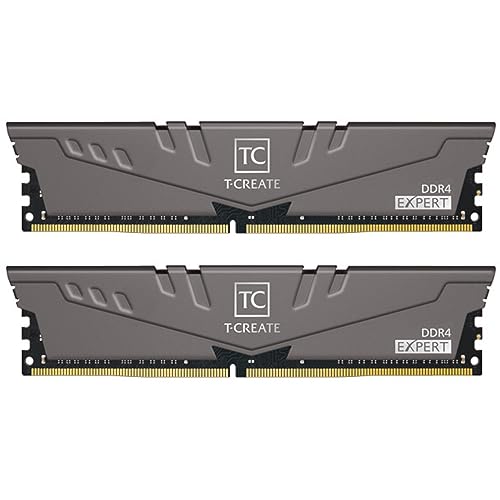
TEAMGROUP T-Create Expert 32GB (2x16GB) DDR4-3600 CL18
T-Create Expert DDR4 offers 3600MT/s at CL18 on a 10-layer PCB with no lighting.
Best for: Buyers who want tight cl18 timings.
Our take Check price for TEAMGROUP T-Create Expert 32GB (2x16GB) DDR4-3600 CL18 (opens in a new tab)

Well-Rounded Choice
Silicon Power Turbine 32GB (2x16GB) DDR4-3200 CL16
SP Turbine lists DDR4-3200 at CL16 at one of the lowest 32GB prices here.
Best for: Buyers who want tight cl16 timings.
Our take Check price for Silicon Power Turbine 32GB (2x16GB) DDR4-3200 CL16 (opens in a new tab)
Best 64GB
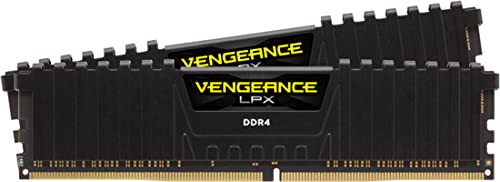
CORSAIR Vengeance LPX 64GB (2x32GB) DDR4-3200 CL16
64GB at DDR4-3200 CL16.
Best for: Heavy multitasking on DDR4.
Our take Check price for CORSAIR Vengeance LPX 64GB (2x32GB) DDR4-3200 CL16 (opens in a new tab)

Best 16GB
TEAMGROUP T-Force Vulcan Z 16GB (2x8GB) DDR4-3200 CL16
DDR4-3200 CL16 across 16GB.
Best for: Budget DDR4 builds.
Our take Check price for TEAMGROUP T-Force Vulcan Z 16GB (2x8GB) DDR4-3200 CL16 (opens in a new tab)
Our Picks
Best All-Round1 of 7
CORSAIR Vengeance LPX 32GB (2x16GB) DDR4-3200 CL16 on Amazon (opens in a new tab)
Vengeance LPX 32GB lists DDR4-3200 at CL16 in a low-profile heatspreader, a long-running default for DDR4 builds.
Best for
- Most DDR4 upgrades.
Skip if
- If budget leads, the Vulcan Z 16GB was cheaper at our last price check.
Why we like it
On CAS latency it ties with the SP Turbine, the Vengeance LPX 64GB and the Vulcan Z 16GB at CL16. It matches the Ripjaws V, the Vengeance RGB PRO, the T-Create Expert DDR4 and the SP Turbine on capacity (32GB (2 sticks)). You also get timings of 16-20-20-38.
Enable the memory profile in the BIOS after installing it; without it, the kit runs at a slower default speed. It is a DDR4 kit, so it fits AM4 boards and LGA1700 boards sold in DDR4 versions; it does not fit AM5, LGA1851 or any DDR5 board. On price it sat third of 7, between the cheaper SP Turbine and the pricier Ripjaws V, at the time of writing.
Key dimensions & specs
- CAS latency: CL16
- Rated speed: 3200MT/s
- Capacity: 32GB (2 sticks)
- Voltage: 1.35V
- Profiles: XMP 2.0
- Low profile: Yes
- Memory type: DDR4
Pros
- Tight CL16 timings
- Low-profile heatspreader that clears large air coolers
- Timings of 16-20-20-38
- Capacity of 32GB (2 sticks), ahead of the Vulcan Z 16GB
Cons
- Costs more than the Vulcan Z 16GB at the time of writing
Best for Ryzen 50002 of 7
G.SKILL Ripjaws V 32GB (2x16GB) DDR4-3600 CL18 on Amazon (opens in a new tab)
Ripjaws V lists DDR4-3600 at CL18 with XMP 2.0 in a black heatspreader.
Best for
- AM4 Ryzen 5000 systems.
Skip if
- Skip it if price comes first: the Vulcan Z 16GB cost less when we checked.
Why we like it
On CAS latency it ties with the Vengeance RGB PRO and the T-Create Expert DDR4 at CL18. It matches the Vengeance LPX 32GB, the Vengeance RGB PRO, the T-Create Expert DDR4 and the SP Turbine on capacity (32GB (2 sticks)). It also comes with timings of 18-22-22-42.
Enable the memory profile in the BIOS after installing it; without it, the kit runs at a slower default speed. It is a DDR4 kit, so it fits AM4 boards and LGA1700 boards sold in DDR4 versions; it does not fit AM5, LGA1851 or any DDR5 board. On price it sat fourth of 7, between the cheaper Vengeance LPX 32GB and the pricier T-Create Expert DDR4, at the time of writing.
Key dimensions & specs
- CAS latency: CL18
- Rated speed: 3600MT/s
- Capacity: 32GB (2 sticks)
- Voltage: 1.35V
- Profiles: XMP 2.0
- Memory type: DDR4
Pros
- Tight CL18 timings
- Timings of 18-22-22-42
- Black heatspreader
- Rated speed of 3600MT/s, ahead of the Vengeance LPX 32GB
Cons
- Costs more than the Vulcan Z 16GB at the time of writing
Solid Alternative3 of 7
CORSAIR Vengeance RGB PRO 32GB (2x16GB) DDR4-3600 CL18 on Amazon (opens in a new tab)
Vengeance RGB PRO lists DDR4-3600 at CL18 with iCUE lighting.
Best for
- Buyers who want tight cl18 timings.
Skip if
- If budget leads, the Vulcan Z 16GB was cheaper at our last price check.
Why we like it
On CAS latency it ties with the Ripjaws V and the T-Create Expert DDR4 at CL18. It matches the Vengeance LPX 32GB, the Ripjaws V, the T-Create Expert DDR4 and the SP Turbine on capacity (32GB (2 sticks)). It also offers timings of 18-22-22-42.
Enable the memory profile in the BIOS after installing it; without it, the kit runs at a slower default speed. It is a DDR4 kit, so it fits AM4 boards and LGA1700 boards sold in DDR4 versions; it does not fit AM5, LGA1851 or any DDR5 board. RGB heatspreaders are taller than plain ones, so check the clearance under a large tower cooler. On price it sat sixth of 7, between the cheaper T-Create Expert DDR4 and the pricier Vengeance LPX 64GB, at the time of writing.
Key dimensions & specs
- CAS latency: CL18
- Rated speed: 3600MT/s
- Capacity: 32GB (2 sticks)
- Voltage: 1.35V
- RGB: Yes
- Memory type: DDR4
Pros
- Tight CL18 timings
- Timings of 18-22-22-42
- ICUE lighting control
- Rated speed of 3600MT/s, ahead of the Vengeance LPX 32GB
Cons
- Costs more than the Vulcan Z 16GB at the time of writing
Worth Considering4 of 7
TEAMGROUP T-Create Expert 32GB (2x16GB) DDR4-3600 CL18 on Amazon (opens in a new tab)
T-Create Expert DDR4 offers 3600MT/s at CL18 on a 10-layer PCB with no lighting.
Best for
- Buyers who want tight cl18 timings.
Skip if
- Skip it if CAS latency matters most to you; the Vengeance LPX 32GB offers CL16.
Why we like it
It matches the Ripjaws V and the Vengeance RGB PRO on CAS latency (CL18). On capacity it ties with the Vengeance LPX 32GB, the Ripjaws V, the Vengeance RGB PRO and the SP Turbine at 32GB (2 sticks). Enable the memory profile in the BIOS after installing it; without it, the kit runs at a slower default speed.
It is a DDR4 kit, so it fits AM4 boards and LGA1700 boards sold in DDR4 versions; it does not fit AM5, LGA1851 or any DDR5 board. It was priced above the Ripjaws V and below the Vengeance RGB PRO at the time of writing. It gives ground on CAS latency, where the Vengeance LPX 32GB offers CL16.
Key dimensions & specs
- CAS latency: CL18
- Rated speed: 3600MT/s
- Capacity: 32GB (2 sticks)
- Memory type: DDR4
Pros
- Tight CL18 timings
- 10-layer PCB
- No lighting
- Rated speed of 3600MT/s, ahead of the Vengeance LPX 32GB
Cons
- CAS latency trails the Vengeance LPX 32GB (CL16)
- Costs more than the Vulcan Z 16GB at the time of writing
Well-Rounded Choice5 of 7
Silicon Power Turbine 32GB (2x16GB) DDR4-3200 CL16 on Amazon (opens in a new tab)
SP Turbine lists DDR4-3200 at CL16 at one of the lowest 32GB prices here.
Best for
- Buyers who want tight cl16 timings.
Skip if
- Skip it if price comes first: the Vulcan Z 16GB cost less when we checked.
Why we like it
It matches the Vengeance LPX 32GB, the Vengeance LPX 64GB and the Vulcan Z 16GB on CAS latency (CL16). On capacity it ties with the Vengeance LPX 32GB, the Ripjaws V, the Vengeance RGB PRO and the T-Create Expert DDR4 at 32GB (2 sticks). You also get a plain heatspreader.
Enable the memory profile in the BIOS after installing it; without it, the kit runs at a slower default speed. It is a DDR4 kit, so it fits AM4 boards and LGA1700 boards sold in DDR4 versions; it does not fit AM5, LGA1851 or any DDR5 board. It was priced above the Vulcan Z 16GB and below the Vengeance LPX 32GB at the time of writing.
Key dimensions & specs
- CAS latency: CL16
- Rated speed: 3200MT/s
- Capacity: 32GB (2 sticks)
- Voltage: 1.35V
- Memory type: DDR4
Pros
- Tight CL16 timings
- Plain heatspreader
- One of the lowest prices among the 32GB DDR4 kits here
- Capacity of 32GB (2 sticks), ahead of the Vulcan Z 16GB
Cons
- Costs more than the Vulcan Z 16GB at the time of writing
Best 64GB6 of 7
CORSAIR Vengeance LPX 64GB (2x32GB) DDR4-3200 CL16 on Amazon (opens in a new tab)
Vengeance LPX 64GB lists DDR4-3200 at CL16 across two 32GB sticks.
Best for
- Heavy multitasking on DDR4.
Skip if
- Price-first buyers should look at the Vulcan Z 16GB, which cost less when we checked.
Why we like it
It matches the Vengeance LPX 32GB, the SP Turbine and the Vulcan Z 16GB on CAS latency (CL16). On capacity it leads this guide at 64GB (2 sticks), ahead of the Vengeance LPX 32GB (32GB (2 sticks)). It also comes with timings of 16-20-20-38 and a low-profile heatspreader.
Enable the memory profile in the BIOS after installing it; without it, the kit runs at a slower default speed. It is a DDR4 kit, so it fits AM4 boards and LGA1700 boards sold in DDR4 versions; it does not fit AM5, LGA1851 or any DDR5 board. At our last price check it topped the group, with the Vengeance RGB PRO the nearest cheaper option.
Key dimensions & specs
- CAS latency: CL16
- Rated speed: 3200MT/s
- Capacity: 64GB (2 sticks)
- Voltage: 1.35V
- Low profile: Yes
- Memory type: DDR4
Pros
- Tight CL16 timings
- 64GB for heavy multitasking and creative work
- Low-profile heatspreader that clears large air coolers
- Timings of 16-20-20-38
Cons
- Costs more than the Vulcan Z 16GB at the time of writing
Best 16GB7 of 7
TEAMGROUP T-Force Vulcan Z 16GB (2x8GB) DDR4-3200 CL16 on Amazon (opens in a new tab)
Vulcan Z 16GB lists DDR4-3200 at CL16 with a low grey heatspreader.
Best for
- Budget DDR4 builds.
Skip if
- Skip it if rated speed matters most to you; the Ripjaws V offers 3600MT/s.
Why we like it
On CAS latency it ties with the Vengeance LPX 32GB, the SP Turbine and the Vengeance LPX 64GB at CL16. Its 16GB (2 sticks) capacity is the smallest in this group; the Vengeance LPX 64GB leads at 64GB (2 sticks). Enable the memory profile in the BIOS after installing it; without it, the kit runs at a slower default speed.
It is a DDR4 kit, so it fits AM4 boards and LGA1700 boards sold in DDR4 versions; it does not fit AM5, LGA1851 or any DDR5 board. It undercut the SP Turbine and every other pick on price at the time of writing. The trade-off is rated speed; for more, the Ripjaws V offers 3600MT/s.
Key dimensions & specs
- CAS latency: CL16
- Rated speed: 3200MT/s
- Capacity: 16GB (2 sticks)
- Memory type: DDR4
Pros
- Tight CL16 timings
- Low grey heatspreader
- DDR4-3200 CL16 across 16GB
Cons
- Rated speed trails the Ripjaws V (3600MT/s)
- Capacity trails the Vengeance LPX 64GB (64GB (2 sticks))
How We Chose
Each pick was assessed across 4 criteria weighted for real-world use.
- Profiles
- We checked for AMD EXPO and Intel XMP support.
- Capacity
- We focused on two-stick 32GB and 64GB kits.
- Fit
- We noted RGB and low-profile heatspreaders where listed.
- Speed and timings
- We compared listed speed and CAS latency.
What to Look for in a DDR4 RAM
Key buying criteria so you get the right fit the first time.
DDR4 only fits DDR4 boards
DDR4 kits fit AM4 boards and LGA1700 boards sold in DDR4 versions. AM5 and Core Ultra boards take DDR5 only, so check your board before buying.
3200 to 3600MT/s is the DDR4 range to buy
Ryzen 5000 chips favour 3600MT/s; Intel 12th to 14th Gen chips on DDR4 boards run 3200 to 3600MT/s comfortably. Faster DDR4 kits gain little.
Buy one two-stick kit
Two matched sticks run dual-channel and set up more easily than mixing kits. Buy the capacity you need in one kit.
32GB is the gaming default
32GB covers games with browsers and chat running. 16GB still works for lighter use and tight budgets.
Lower CAS latency helps
At the same speed, a lower CL number means lower latency. CL16 at 3200MT/s and CL18 at 3600MT/s land in the same place.
Watch heatspreader height
Tall or RGB heatspreaders can clash with large tower coolers. Low-profile kits avoid the problem.
How to Choose a DDR4 RAM
By priority
| Priority | Consider | Why |
|---|---|---|
| Most DDR4 upgrades | Vengeance LPX 32GB | DDR4-3200 CL16 in a low-profile heatspreader |
| AM4 Ryzen 5000 systems | Ripjaws V | DDR4-3600 CL18 with XMP 2.0 |
| Heavy multitasking on DDR4 | Vengeance LPX 64GB | 64GB at DDR4-3200 CL16 |
| Budget DDR4 builds | Vulcan Z 16GB | DDR4-3200 CL16 across 16GB |
Scroll sideways to see every column.
Key specs side by side
Figures as each maker states them.
| Kit | CAS latency | Rated speed | Capacity | Voltage |
|---|---|---|---|---|
| Vengeance LPX 32GB | CL16 | 3200MT/s | 32GB (2 sticks) | 1.35V |
| Ripjaws V | CL18 | 3600MT/s | 32GB (2 sticks) | 1.35V |
| Vengeance RGB PRO | CL18 | 3600MT/s | 32GB (2 sticks) | 1.35V |
| T-Create Expert DDR4 | CL18 | 3600MT/s | 32GB (2 sticks) | Not listed |
| SP Turbine | CL16 | 3200MT/s | 32GB (2 sticks) | 1.35V |
| Vengeance LPX 64GB | CL16 | 3200MT/s | 64GB (2 sticks) | 1.35V |
| Vulcan Z 16GB | CL16 | 3200MT/s | 16GB (2 sticks) | Not listed |
Scroll sideways to see every column.
By price at the time of writing
Prices change often; these tiers reflect Amazon prices when this guide was updated.
| Price tier | Kits |
|---|---|
| About $100 to $150 | Vulcan Z 16GB |
| About $150 to $250 | SP Turbine, Vengeance LPX 32GB, Ripjaws V |
| About $250 to $500 | T-Create Expert DDR4, Vengeance RGB PRO |
| About $500 to $1000 | Vengeance LPX 64GB |
Frequently Asked Questions
Is 16GB enough for gaming?
For many games, yes, but 32GB gives room for background apps and newer titles. Buy 32GB if the budget allows.
Does RGB memory perform differently?
No. RGB adds lighting and height, not speed.
Is DDR4 still worth buying?
Yes for upgrading an AM4 or DDR4 LGA1700 system. For a new build on AM5 or Core Ultra you need DDR5.
Can I add a kit to the memory I already have?
It often fails to run at the rated speed. Buying one kit with all the capacity you need is safer.
What happens if I don't enable XMP or EXPO?
The kit runs at a slower default speed. Enable the profile in the BIOS to get the rated speed.
Can I use DDR4 on an AM5 board?
No. AM5 supports DDR5 only, and DDR4 and DDR5 slots are keyed differently.
Bottom Line
Vengeance LPX 32GB is the default DDR4 kit. Ripjaws V suits Ryzen 5000, Vengeance LPX 64GB adds capacity, and Vulcan Z 16GB keeps costs low.