
Buying Guide
The Best CPUs for StarCraft II
From the Ryzen 5 5500 to the Core i5-14400F: four processors ranked on L3 cache and boost clock, with who should skip each one.
By The PC Journal editorial team
11 min read4 products evaluated
StarCraft II is a light PC game, which makes price and socket support the main buying points for a processor. Every pick has at least six cores and cost $170 or less, ordered by boost clock.
Our comparison rests on published figures for L3 cache, max boost and cores / threads; nothing here was tested in-house, and where a maker leaves out L3 cache, we say so.
Quick Picks
Our 4 recommendations at a glance. Tap a pick for the full verdict.

Highest Boost Clock
AMD Ryzen 5 8500G
The highest boost clock here (5GHz).
Best for: Buyers who put boost clock first.
Our take Check price for AMD Ryzen 5 8500G (opens in a new tab)
Largest Game Cache
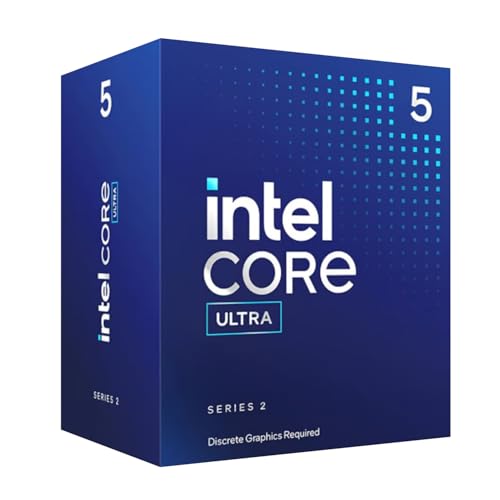
Intel Core Ultra 5 225F
The largest L3 cache here (22MB).
Best for: Players chasing 1% lows in simulation and esports titles.
Our take Check price for Intel Core Ultra 5 225F (opens in a new tab)

Premium Pick
Intel Core i5-14400F
6 performance and 4 efficient cores at the highest price in the group.
Best for: Buyers for whom price is not the deciding factor, since the Ryzen 5 5500 costs less.
Our take Check price for Intel Core i5-14400F (opens in a new tab)

Lowest Price Here
AMD Ryzen 5 5500
The cheapest way into this group, below the Core Ultra 5 225F.
Best for: Buyers who would rather put the savings elsewhere than into the Core Ultra 5 225F.
Our take Check price for AMD Ryzen 5 5500 (opens in a new tab)
| Pick | Why it’s here | Best for | Price |
|---|---|---|---|
| The highest boost clock here (5GHz). | Buyers who put boost clock first. | Check price for AMD Ryzen 5 8500G (opens in a new tab) |
| The largest L3 cache here (22MB). | Players chasing 1% lows in simulation and esports titles. | Check price for Intel Core Ultra 5 225F (opens in a new tab) |
| 6 performance and 4 efficient cores at the highest price in the group. | Buyers for whom price is not the deciding factor, since the Ryzen 5 5500 costs less. | Check price for Intel Core i5-14400F (opens in a new tab) |
| The cheapest way into this group, below the Core Ultra 5 225F. | Buyers who would rather put the savings elsewhere than into the Core Ultra 5 225F. | Check price for AMD Ryzen 5 5500 (opens in a new tab) |
Our Picks
Highest Boost Clock1 of 4
AMD Ryzen 5 8500G on Amazon (opens in a new tab)
The Ryzen 5 8500G is built around a Wraith Stealth cooler in the box, with Radeon graphics built in on top.
Best for
- Buyers who put boost clock first.
Skip if
- Look at the others if this bothers you: 6 cores leave less headroom for streaming alongside games.
Why we like it
On the spec sheet, it offers a 5GHz boost clock and offers a 6 cores core count. Nothing else here matches its 5GHz boost clock; the Core Ultra 5 225F comes closest at 4.9GHz. It is the only pick here with an AM5 socket; the Core i5-14400F has an LGA1700 socket instead.
No other pick in this guide offers DDR5 memory; compare the Core i5-14400F, which has DDR4 or DDR5 memory. It needs an AM5 board (A620, B650, B850, X670 or X870 series) and DDR5 memory; check the board's CPU support list for the minimum BIOS version. When we checked, only the Core Ultra 5 225F and cheaper picks cost less, and the Core i5-14400F cost more. If you want a confirmed L3 cache, look to the Core Ultra 5 225F instead: it offers 22MB, while this one gives no figure.
Key dimensions & specs
- Max boost: 5GHz
- Cores / threads: 6 cores
- Threads: 12
- Socket: AM5
- Memory: DDR5
- Cooler in box: Yes
- Integrated graphics: Yes
Pros
- Wraith Stealth cooler in the box
- Integrated graphics for display output without a graphics card
- Radeon graphics built in
- Highest boost clock of the picks (5GHz)
Cons
- 6 cores leave less headroom for streaming alongside games
- No published L3 cache
- No published rated power
Largest Game Cache2 of 4
Intel Core Ultra 5 225F on Amazon (opens in a new tab)
The Core Ultra 5 225F is a locked ten-core LGA1851 chip.
Best for
- Players chasing 1% lows in simulation and esports titles.
Skip if
- Skip it if this is a deal-breaker for you: no integrated graphics, so a graphics card is required.
Why we like it
It suits a budget Intel build that will pair with a B860 board. Its 22MB L3 cache is the largest here; the Core i5-14400F comes next at 20MB. On boost clock it sits mid-pack at 4.9GHz: the Ryzen 5 8500G offers 5GHz, and the Ryzen 5 5500 comes in at 4.2GHz.
It matches the Core i5-14400F on core count (10 cores). You get an LGA1851 socket here, which sets it apart from the Ryzen 5 5500 and its an AM4 socket. It also comes with 6 P-cores plus 4 E-cores and PCIe 5.0 and 4.0 support on Intel 800-series boards.
It needs an LGA1851 board (Intel 800-series chipset) and DDR5 memory; LGA1700 boards and coolers without an LGA1851 mounting kit will not fit. Its price falls between the Ryzen 5 5500 and the Ryzen 5 8500G, based on our last check. Buyers who need a confirmed rated power should compare it with the Ryzen 5 5500, which offers 65W.
Key dimensions & specs
- L3 cache: 22MB
- Max boost: 4.9GHz
- Cores / threads: 10 cores
- Socket: LGA1851
- Integrated graphics: No
Pros
- 6 P-cores plus 4 E-cores
- PCIe 5.0 and 4.0 support on Intel 800-series boards
- Largest L3 cache of the picks (22MB)
- Boost clock of 4.9GHz, ahead of the Core i5-14400F
Cons
- No integrated graphics, so a graphics card is required
- No published rated power
- Costs more than the Ryzen 5 5500 at the time of writing
Premium Pick3 of 4
Intel Core i5-14400F on Amazon (opens in a new tab)
The Core i5-14400F is a locked ten-core LGA1700 chip with no integrated graphics.
Best for
- Buyers for whom price is not the deciding factor, since the Ryzen 5 5500 costs less.
Skip if
- Choose another pick if you can't accept this: no cooler in the box.
Why we like it
It pairs well with a B660 or B760 board and DDR4. On L3 cache it sits mid-pack at 20MB: the Core Ultra 5 225F offers 22MB, and the Ryzen 5 5500 comes in at 16MB. On boost clock it sits mid-pack at 4.7GHz: the Ryzen 5 8500G offers 5GHz, and the Ryzen 5 5500 comes in at 4.2GHz.
It matches the Core Ultra 5 225F on core count (10 cores). An LGA1700 socket is unique to it among these picks, while the Core Ultra 5 225F uses an LGA1851 socket. It was the highest-priced of the 4 picks at the time of writing, so the case for it rests on what it adds over the Ryzen 5 8500G and the rest. The main gap: no cooler in box, unlike the Ryzen 5 8500G. If that matters, the Ryzen 5 8500G has it.
Key dimensions & specs
- L3 cache: 20MB
- Max boost: 4.7GHz
- Cores / threads: 10 cores
- Rated power: 125W
- Threads: 16
- Socket: LGA1700
- Memory: DDR4 or DDR5
- Cooler in box: No
- Integrated graphics: No
Pros
- 6 performance and 4 efficient cores
- DDR4 and DDR5 support
- PCIe 5.0 and 4.0 support
- L3 cache of 20MB, ahead of the Ryzen 5 5500
Cons
- No cooler in the box
- No integrated graphics, so a graphics card is required
- Costs more than the Ryzen 5 5500 at the time of writing
Lowest Price Here4 of 4
AMD Ryzen 5 5500 on Amazon (opens in a new tab)
The Ryzen 5 5500 is the cheapest six-core chip here.
Best for
- Buyers who would rather put the savings elsewhere than into the Core Ultra 5 225F.
Skip if
- Pass on it if 6 cores leave less headroom for streaming alongside games rules it out for your setup.
Why we like it
It has a smaller 16MB L3 cache and runs PCIe 3.0, which matters little for a budget graphics card. On L3 cache it trails the group at 16MB, while the Core Ultra 5 225F offers 22MB. On boost clock it trails the group at 4.2GHz, while the Ryzen 5 8500G offers 5GHz.
It matches the Ryzen 5 8500G on core count (6 cores). An AM4 socket is unique to it among these picks, while the Core i5-14400F uses an LGA1700 socket. You get DDR4 memory here, which sets it apart from the Core i5-14400F and its DDR4 or DDR5 memory.
It also comes with a Wraith Stealth cooler in the box. It drops into an AM4 board with DDR4 memory; older B450 and X470 boards need a BIOS that supports this chip, so check the support list before swapping. It undercut the Core Ultra 5 225F and every other pick on price at the time of writing.
Key dimensions & specs
- L3 cache: 16MB
- Max boost: 4.2GHz
- Cores / threads: 6 cores
- Rated power: 65W
- Threads: 12
- Socket: AM4
- Memory: DDR4
- Cooler in box: Yes
- Integrated graphics: No
Pros
- 65W rating suits a modest air cooler
- Wraith Stealth cooler in the box
- One of the cheapest six-core desktop chips
- AM4 socket, the only one here
Cons
- 6 cores leave less headroom for streaming alongside games
- AM4 is a final-generation platform with no newer CPUs coming
- No integrated graphics, so a graphics card is required
How We Chose
Each pick was assessed across 4 criteria weighted for real-world use.
- How these picks were ranked
- We compared four processors on L3 cache, boost clock, core count and rated power, using each maker's published specs. These are research figures, not bench results: 1 of 4 picks leave out L3 cache.
- The shared baseline
- All 4, from the Ryzen 5 8500G to the Ryzen 5 5500, state boost clock, core count and socket.
- Where the specs have gaps
- The Ryzen 5 8500G gives no L3 cache; the Ryzen 5 8500G and the Core Ultra 5 225F give no rated power.
- Price range
- At our last check the picks ran from the Ryzen 5 5500 ($50 to $100) to the Core i5-14400F ($150 to $250).
What to Look for in a CPUs for StarCraft II
Key buying criteria so you get the right fit the first time.
How much boost clock you need
Across these 4 picks boost clock spans 4.2GHz (the Ryzen 5 5500) to 5GHz (the Ryzen 5 8500G). For less, the Core Ultra 5 225F is the runner-up at 4.9GHz ($100 to $150 tier).
Core count across these picks
Here core count runs from 6 cores on the Ryzen 5 5500 to 10 cores on the Core Ultra 5 225F, a 67% spread. Start with the Core Ultra 5 225F if core count decides it.
L3 cache across these picks
The Core Ultra 5 225F tops L3 cache at 22MB and the Ryzen 5 5500 sits lowest at 16MB. Start with the Core Ultra 5 225F if L3 cache decides it. The Ryzen 5 8500G gives no L3 cache figure, so 3 of 4 picks are compared here.
Memory
The Ryzen 5 8500G lists DDR5; the Core i5-14400F lists DDR4 or DDR5; the Ryzen 5 5500 lists DDR4. Sort out memory before price: it splits 3 stated picks into groups of 1, 1 and 1.
Cooler in box
The Ryzen 5 8500G and the Ryzen 5 5500 have it; the Core i5-14400F goes without.
How to Choose a CPUs for StarCraft II
By priority
| Priority | Consider | Why |
|---|---|---|
| Buyers who put boost clock first | Ryzen 5 8500G | The highest boost clock here (5GHz) |
| Players chasing 1% lows in simulation and esports titles | Core Ultra 5 225F | The largest L3 cache here (22MB) |
| Buyers for whom price is not the deciding factor, since the Ryzen 5 5500 costs less | Core i5-14400F | 6 performance and 4 efficient cores at the highest price in the group |
| Buyers who would rather put the savings elsewhere than into the Core Ultra 5 225F | Ryzen 5 5500 | The cheapest way into this group, below the Core Ultra 5 225F |
Scroll sideways to see every column.
Key specs side by side
The Ryzen 5 8500G leads on boost clock at 5GHz, ahead of the Core Ultra 5 225F at 4.9GHz. "Not listed" marks L3 cache where the Ryzen 5 8500G leaves the figure out.
| Processor | L3 cache | Max boost | Cores / threads | Rated power |
|---|---|---|---|---|
| Ryzen 5 8500G | Not listed | 5GHz | 6 cores | Not listed |
| Core Ultra 5 225F | 22MB | 4.9GHz | 10 cores | Not listed |
| Core i5-14400F | 20MB | 4.7GHz | 10 cores | 125W |
| Ryzen 5 5500 | 16MB | 4.2GHz | 6 cores | 65W |
Scroll sideways to see every column.
By price at the time of writing
At our last check the cheapest pick, the Ryzen 5 5500, sat in the $50 to $100 tier, 3 tiers in all up to the Core i5-14400F at $150 to $250; Amazon prices move, so recheck before buying.
| Price tier | Processors |
|---|---|
| About $50 to $100 | Ryzen 5 5500 |
| About $100 to $150 | Core Ultra 5 225F, Ryzen 5 8500G |
| About $150 to $250 | Core i5-14400F |
Frequently Asked Questions
How does the Core Ultra 5 225F compare with the Ryzen 5 8500G on boost clock?
The Ryzen 5 8500G leads at 5GHz, with the Core Ultra 5 225F at 4.9GHz. The Ryzen 5 5500 closes the ranking at 4.2GHz.
Is the Core Ultra 5 225F ahead of the Core i5-14400F on L3 cache?
The Core Ultra 5 225F tops L3 cache at 22MB; the Core i5-14400F follows at 20MB, 10% apart. The spread runs down to the Ryzen 5 5500 at 16MB. No L3 cache figure is published for the Ryzen 5 8500G, which leaves 3 of 4 picks ranked here.
Which has the lowest rated power: the Ryzen 5 5500 or the Core i5-14400F?
Between the top two, it is 65W on the Ryzen 5 5500 against 125W on the Core i5-14400F, a 48% difference. The Ryzen 5 8500G and the Core Ultra 5 225F are left out of this ranking because their rated power isn't stated; 2 of 4 picks are ranked.
Is the Core i5-14400F worth paying more than the Ryzen 5 5500?
The spec sheets show boost clock (4.7GHz against 4.2GHz), core count (10 cores against 6 cores) and L3 cache (20MB against 16MB) in its favour. It does not win everywhere: the Ryzen 5 5500 still leads on rated power (65W). The Ryzen 5 5500 sat in the $50 to $100 tier and the Core i5-14400F in the $150 to $250 tier when we checked, with 2 other picks between them; pay the difference only if boost clock and core count decide your purchase.
What makes the Core Ultra 5 225F the Largest Game Cache?
It earns the label for the largest L3 cache here (22MB). The Core i5-14400F is next on L3 cache at 20MB, so this pick's 22MB is 10% further out. The Ryzen 5 5500, the cheapest pick, sat in the $50 to $100 tier against $100 to $150 here, without out-ranking it on any listed spec. It makes sense for players chasing 1% lows in simulation and esports titles.
Do the Ryzen 5 8500G and the Core Ultra 5 225F differ on socket?
The Ryzen 5 8500G uses AM5; the Core Ultra 5 225F uses LGA1851; the Core i5-14400F uses LGA1700; the Ryzen 5 5500 uses AM4.
Bottom Line
Our first pick is the Ryzen 5 8500G, chosen for the highest boost clock here (5GHz). Look at the Core i5-14400F for 6 performance and 4 efficient cores at the highest price in the group and the Ryzen 5 5500 for the cheapest way into this group, below the Core Ultra 5 225F if those matter more to you.
Match the memory type (DDR4 or DDR5) to the board you choose.