
Buying Guide
The Best Capture Cards Under $150
Three streaming devices compared, from the Game Capture Neo to the 4K S, with the trade-offs of each named.
By The PC Journal editorial team
11 min read3 products evaluated
From $60 to $150 capture cards add 4K passthrough and internal PCIe options. Every card cost 60 to 150 when we checked and is a dedicated capture card.
Our comparison rests on published figures for type, what it does and connection; where a maker leaves a figure out, we say so, and no figure here comes from our own testing.
Quick Picks
Our 3 recommendations at a glance. Tap a pick for the full verdict.

Premium Pick
Elgato 4K S Capture Card
The top of this price range, adding capture at 1440p120 or 1080p240.
Best for: Spending more than the HD60 Pro costs for the fullest feature set in this group.
Our take Check price for Elgato 4K S Capture Card (opens in a new tab)
Also Consider
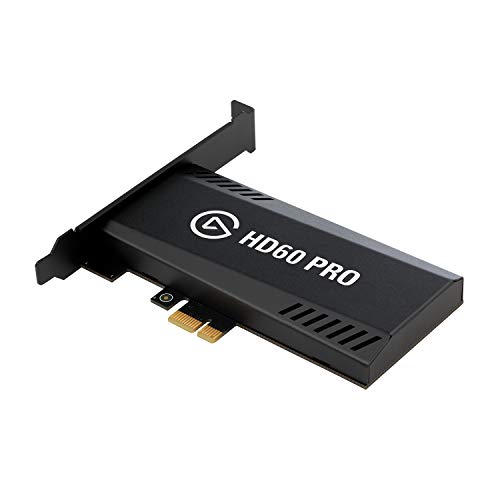
Elgato HD60 Pro PCIe Capture Card
1080p60 capture with passthrough.
Best for: Buyers who want 1080p60 capture with passthrough.
Our take Check price for Elgato HD60 Pro PCIe Capture Card (opens in a new tab)

Lowest Price Here
Elgato Game Capture Neo
Undercutting the HD60 Pro on price when we checked.
Best for: Getting 4K60 HDR passthrough for the least money.
Our take Check price for Elgato Game Capture Neo (opens in a new tab)
| Pick | Why it’s here | Best for | Price |
|---|---|---|---|
| The top of this price range, adding capture at 1440p120 or 1080p240. | Spending more than the HD60 Pro costs for the fullest feature set in this group. | Check price for Elgato 4K S Capture Card (opens in a new tab) |
| 1080p60 capture with passthrough. | Buyers who want 1080p60 capture with passthrough. | Check price for Elgato HD60 Pro PCIe Capture Card (opens in a new tab) |
| Undercutting the HD60 Pro on price when we checked. | Getting 4K60 HDR passthrough for the least money. | Check price for Elgato Game Capture Neo (opens in a new tab) |
Our Picks
Premium Pick1 of 3
Elgato 4K S Capture Card on Amazon (opens in a new tab)
What the 4K S brings to the table is capture at 1440p120 or 1080p240, plus HDR10 capture with tone mapping on Windows.
Best for
- Spending more than the HD60 Pro costs for the fullest feature set in this group.
Skip if
- Skip it if price comes first: the Game Capture Neo cost less when we checked.
Why we like it
It captures at 4K60 from PS5, Xbox Series X/S and Switch 2. A 3.5mm analog input records party chat or commentary with the game audio. It plays and captures at 1440p120 or 1080p240, and it works with PS5, Xbox Series X/S and Switch 2.
A 4K60 HDR10 capture key figure is unique to it among these picks, while the HD60 Pro uses a 1080p60 capture key figure. A capture card needs the console or second PC's HDMI output and a free USB port on the streaming PC; check which USB version it needs. It was the most expensive pick when we checked, so weigh what it adds over the HD60 Pro.
Key dimensions & specs
- Type: Game capture card
- What it does: Captures a console or second PC
- Connection: HDMI in and out, USB
- Key figure: 4K60 HDR10 capture
Pros
- Capture at 1440p120 or 1080p240
- HDR10 capture with tone mapping on Windows
- Support for PS5, Xbox Series X/S and Switch 2
- 4K60 HDR10 capture key figure, the only one here
Cons
- Costs more than the Game Capture Neo at the time of writing
Also Consider2 of 3
Elgato HD60 Pro PCIe Capture Card on Amazon (opens in a new tab)
The HD60 Pro is built around 1080p60 capture with passthrough, with Instant Gameview low-latency preview on top.
Best for
- Buyers who want 1080p60 capture with passthrough.
Skip if
- Price-first buyers should look at the Game Capture Neo, which cost less when we checked.
Why we like it
It sits in a PCIe slot and captures 1080p60 with zero-lag passthrough. Flashback recording and unlimited capture length come through Elgato's software. Instant Gameview keeps delay low while recording, and recordings save to your drive with no time limit.
It suits a desktop with a spare PCIe slot. No other pick in this guide offers a 1080p60 capture key figure; compare the 4K S, which has a 4K60 HDR10 capture key figure. It also offers an internal card that frees a USB port.
A capture card needs the console or second PC's HDMI output and a free USB port on the streaming PC; check which USB version it needs. It was priced above the Game Capture Neo and below the 4K S at the time of writing.
Key dimensions & specs
- Type: Internal PCIe capture card
- What it does: Captures a console or second PC
- Connection: PCIe, HDMI in and out
- Key figure: 1080p60 capture
Pros
- 1080p60 capture with passthrough
- Instant Gameview low-latency preview
- Internal card that frees a USB port
- 1080p60 capture key figure, the only one here
Cons
- Costs more than the Game Capture Neo at the time of writing
Lowest Price Here3 of 3
Elgato Game Capture Neo on Amazon (opens in a new tab)
Elgato's Game Capture Neo records 1080p60 and passes 4K60 HDR through to your TV.
Best for
- Getting 4K60 HDR passthrough for the least money.
Skip if
- Look at the other picks if you need a feature not covered above.
Why we like it
It needs no drivers. It works with a PC or an iPad. It captures from PlayStation, Xbox, Switch or any HDMI console, and it is small enough to sit next to the console.
The capture unit is about the size of a smartphone, so it packs easily for events. Setup needs only three connections: the console, the display and a computer or iPad. You also get driver-free setup.
A capture card needs the console or second PC's HDMI output and a free USB port on the streaming PC; check which USB version it needs. It was the cheapest of the group when we checked; the HD60 Pro was the next step up.
Key dimensions & specs
- Type: Game capture card
- What it does: Captures a console or second PC
- Connection: HDMI in and out, USB
- Key figure: 1080p60 capture, 4K60 HDR passthrough
Pros
- 4K60 HDR passthrough
- 1080p60 capture
- Driver-free setup
- Undercutting the HD60 Pro on price when we checked
How We Chose These Capture Cards Under $150
Each pick was assessed across 4 criteria weighted for real-world use.
- The figures behind the order
- We lined up three streaming gear on type, what it does, connection and key figure from manufacturer specifications. We did not test them in-house, and all 4 compared fields are stated for every pick.
- The shared baseline
- All 3, from the 4K S to the Game Capture Neo, state type, what it does and connection.
- Who each pick suits
- The 4K S for the top of this price range, adding capture at 1440p120 or 1080p240; the HD60 Pro for 1080p60 capture with passthrough; the Game Capture Neo for undercutting the HD60 Pro on price when we checked.
- Price range
- From the Game Capture Neo to the 4K S, all sat in the $100 to $150 tier when we checked.
What to Look for in a Capture Card Under $150
Key buying criteria so you get the right fit the first time.
Features beyond the spec table
The 4K S: HDR10 capture with tone mapping on Windows. The HD60 Pro: Instant Gameview low-latency preview. The Game Capture Neo: 1080p60 capture.
How much to spend
Price does little to separate these 3: the Game Capture Neo through the 4K S all landed in the $100 to $150 tier, which leaves features to decide it.
Match the pick to your priority
Spending more than the HD60 Pro costs for the fullest feature set in this group: the 4K S. Getting 4K60 HDR passthrough for the least money: the Game Capture Neo.
Do you need a capture card
Streaming a PC game from the same PC needs no capture card. A capture card is for consoles, a second PC or a camera.
Light your face
A key light lets any webcam run a faster shutter and cleaner image. Mount it off to one side of the camera.
How to Choose a Capture Card Under $150
By priority
| Priority | Consider | Why |
|---|---|---|
| Spending more than the HD60 Pro costs for the fullest feature set in this group | 4K S | The top of this price range, adding capture at 1440p120 or 1080p240 |
| Buyers who want 1080p60 capture with passthrough | HD60 Pro | 1080p60 capture with passthrough |
| Getting 4K60 HDR passthrough for the least money | Game Capture Neo | Undercutting the HD60 Pro on price when we checked |
Scroll sideways to see every column.
Key specs side by side
The 4K S, the HD60 Pro and the rest, as their makers list them.
| Streaming gear | Type | What it does | Connection | Key figure |
|---|---|---|---|---|
| 4K S | Game capture card | Captures a console or second PC | HDMI in and out, USB | 4K60 HDR10 capture |
| HD60 Pro | Internal PCIe capture card | Captures a console or second PC | PCIe, HDMI in and out | 1080p60 capture |
| Game Capture Neo | Game capture card | Captures a console or second PC | HDMI in and out, USB | 1080p60 capture, 4K60 HDR passthrough |
Scroll sideways to see every column.
Frequently Asked Questions
What makes the 4K S the Premium Pick?
It earns the label for the top of this price range, adding capture at 1440p120 or 1080p240. It makes sense for spending more than the HD60 Pro costs for the fullest feature set in this group.
Beyond the specs, what sets the 4K S and the HD60 Pro apart?
The 4K S: capture at 1440p120 or 1080p240. The HD60 Pro: 1080p60 capture with passthrough. The Game Capture Neo: 4K60 HDR passthrough.
Who should choose the Game Capture Neo?
The Game Capture Neo carries our Lowest Price Here label for undercutting the HD60 Pro on price when we checked. It ranks third of 3 here and sat in the $100 to $150 tier at our last price check; it suits getting 4K60 HDR passthrough for the least money.
Should I pick the 4K S or the Game Capture Neo?
The 4K S suits spending more than the HD60 Pro costs for the fullest feature set in this group; the Game Capture Neo suits getting 4K60 HDR passthrough for the least money.
Can I stream a console without a capture card?
Consoles can stream directly to some platforms, but a capture card lets you add overlays and a camera on the PC.
Bottom Line
Our first pick is the 4K S, chosen for the top of this price range, adding capture at 1440p120 or 1080p240. Look at the HD60 Pro for 1080p60 capture with passthrough and the Game Capture Neo for undercutting the HD60 Pro on price when we checked if those matter more to you.
An internal card needs a free PCIe slot; an external one only needs a USB 3.0 port.