
Buying Guide
The Best 550W Power Supplies for Everyday and Entry-Level Gaming PCs
Three ATX 3.1 units for office PCs and entry-level gaming builds, compared on warranty, cabling and what each gives up to hit its price.
By The PC Journal editorial team
10 min read3 products evaluated
A 550W power supply covers most office PCs, home theatre builds and entry-level gaming systems with a modest graphics card. At this wattage the differences are less about capacity and more about what each maker trims to hit a low price: cable design, efficiency tier and warranty length.
We compared three ATX 3.1 units on their specifications from Amazon. We did not test them ourselves, and we note where a listing leaves out a detail you might want.
Before buying at this wattage, check your graphics card's recommended PSU wattage. If you plan to move to a more demanding card within a year or two, a 650W unit may save you buying twice.
Quick Picks
Our 3 recommendations at a glance. Tap a pick for the full verdict.

Most Efficient
MONTECH Century II 550W
The highest efficiency certification here (80 Plus Gold).
Best for: Buyers who weigh running cost and heat over price.
Our take Check price for MONTECH Century II 550W (opens in a new tab)
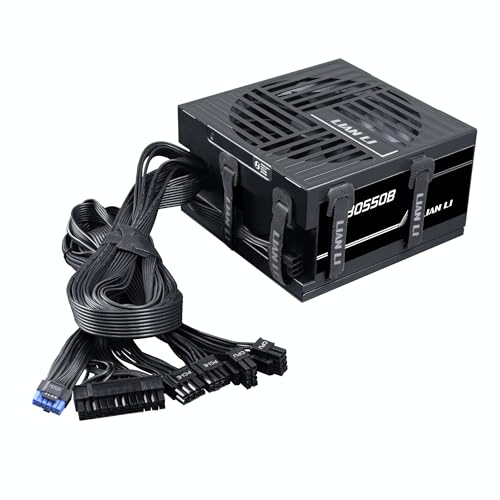
Best Mid-Price Alternative
LIAN LI RB550
A 135mm fan and a 5-year warranty for a few dollars more than the cheapest unit here.
Best for: Office and light gaming PCs that want a larger fan without paying for modular cables.

Best Budget Pick
MONTECH BETA 2 550W
The lowest price in this group when we checked.
Best for: Builders who would rather put the savings into the graphics card.
Our take Check price for MONTECH BETA 2 550W (opens in a new tab)
| Pick | Why it’s here | Best for | Price |
|---|---|---|---|
| The highest efficiency certification here (80 Plus Gold). | Buyers who weigh running cost and heat over price. | Check price for MONTECH Century II 550W (opens in a new tab) |
| A 135mm fan and a 5-year warranty for a few dollars more than the cheapest unit here. | Office and light gaming PCs that want a larger fan without paying for modular cables. | Check price for LIAN LI RB550 (opens in a new tab) |
| The lowest price in this group when we checked. | Builders who would rather put the savings into the graphics card. | Check price for MONTECH BETA 2 550W (opens in a new tab) |
Our Picks
Most Efficient1 of 3
MONTECH Century II 550W on Amazon (opens in a new tab)
The MONTECH Century II 550W gives a low-wattage build features usually saved for pricier units: Gold efficiency, fully modular cables and a 10-year warranty.
Best for
- Buyers who weigh running cost and heat over price.
Skip if
- Look at the other picks if you need a feature not covered above.
Why we like it
Its 135mm fan can stop at light load, so an office or media PC stays silent most of the day. It costs a little more than the BETA 2 beside it, and the difference buys modular cables, Gold efficiency and a fan that stops at idle. Its 135mm FDB fan has a zero RPM mode, and it uses 100% Japanese capacitors.
The silver metallic finish is MONTECH's signature look. It is ATX 3.1 and PCIe 5.1 ready with a 12V-2x6 cable. Nothing else here matches its Gold efficiency tier; the LIAN LI RB550 comes closest at Bronze.
Key dimensions & specs
- Form factor: ATX, ATX 3.1
- Efficiency: 80 Plus Gold
- Fan: 135mm, zero-RPM mode
- GPU cables: 1× 12V-2x6
- Cabling: fully modular
- Warranty: 10 years
Pros
- 80 Plus Gold certified
- 10-year warranty
- Fan stops at low load
- Native 12V-2x6 cable
Cons
- No Cybenetics noise class
- Length not published
Best Mid-Price Alternative2 of 3
LIAN LI RB550 on Amazon (opens in a new tab)
The Lian Li RB550 sits between the two MONTECH units: a Bronze unit with a 135mm fan and a 5-year warranty.
Best for
- Office and light gaming PCs that want a larger fan without paying for modular cables.
Skip if
- Heat and efficiency under long, heavy loads matter to you.
Why we like it
Lian Li describes integrated cable management rather than modular cables, which keeps the price close to the cheapest option here. If you want Gold efficiency or a fan that stops at idle, the Century II is worth the extra few dollars. Built-in routing channels and Velcro straps on the housing tidy spare cable length, and active PFC keeps delivery stable.
It is 80 Plus Bronze. A 135mm hydraulic-bearing fan keeps it quiet. On efficiency tier it ties with the MONTECH BETA 2 550W at Bronze. It also comes with a 135mm fan for low-noise cooling.
Key dimensions & specs
- Form factor: ATX, ATX 3.1
- Efficiency: 80 Plus Bronze
- Fan: 135mm
- Warranty: 5 years
Pros
- 80 Plus Bronze certified
- Integrated cable management rather than modular cables
- 135mm fan for low-noise cooling
Cons
- Only 80 Plus Bronze
- No zero-RPM mode
Best Budget Pick3 of 3
MONTECH BETA 2 550W on Amazon (opens in a new tab)
The MONTECH BETA 2 550W is the lowest-cost way into an ATX 3.1 power supply here.
Best for
- Builders who would rather put the savings into the graphics card.
Skip if
- Your case is small and you need to remove unused cables.
Why we like it
Its cables are fixed and its efficiency is 80 Plus Bronze, so it suits a simple office PC where cable tidiness and heat under heavy load matter less. The maker doesn't state a warranty term, so confirm it with MONTECH before buying. It supports 200% system peaks and 300% GPU power excursions under ATX 3.1, and DC-to-DC topology gives tight voltage regulation.
The cables are fixed, not modular. It matches the LIAN LI RB550 on efficiency tier (Bronze). It also offers fixed, non-modular cables that keep the cost down. It gives ground on efficiency tier, where the MONTECH Century II 550W offers Gold.
Key dimensions & specs
- Form factor: ATX, ATX 3.1
- Efficiency: 80 Plus Bronze
- Cabling: non-modular
Pros
- 80 Plus Bronze certified
- Fixed, non-modular cables that keep the cost down
- ATX 3.x compatible
Cons
- Non-modular cables
- Only 80 Plus Bronze
- No published warranty term
How We Chose These 550W Power Supplies
Each pick was assessed across 4 criteria weighted for real-world use.
- Physical fit
- We recorded form factor and stated length, which decide whether a unit fits your case at all.
- Efficiency certification
- We compared 80 Plus and Cybenetics tiers, noting where a unit carries both.
- Warranty and build
- We compared warranty length and listed component details such as capacitor ratings.
- Connectors
- We recorded native 12V-2x6 support and PCIe connector counts from each listing, because connectors decide GPU compatibility.
What to Look for in 550W Power Supplies
Key buying criteria so you get the right fit the first time.
Size wattage from the card maker's guidance
Graphics card makers publish a recommended power supply wattage for each card. Start from that figure for your exact model and add headroom only if you plan a bigger card later.
More unused wattage does not make a system faster; it mainly adds cost.
Match cables to your graphics card
Before comparing wattage, look up the power sockets on your exact graphics card. Each socket needs its own matching cable from the power supply.
Partner cards built on the same GPU can differ, so use the model number, not the chip name.
Check depth against your case
Case manuals list a maximum power supply length. Subtract room for the modular plugs, which stick out of the back of the unit, and for any fan or drive cage behind it.
Most ATX units here are 140mm to 160mm deep; high-wattage units can reach 180mm.
12V-2x6 is a socket change
ATX 3.1 replaced the 12VHPWR socket with 12V-2x6, whose shorter sense pins keep power off until the plug is fully inserted. The cable itself did not change.
Push the plug in until it clicks and avoid bending the cable sharply at the connector.
Where budget units cut costs
Lower prices usually mean a shorter warranty, a simpler fan and fewer certifications. Most still include the key protections and an ATX 3.1 12V-2x6 cable.
The warranty term is a quick check of how long the maker stands behind it.
Keep each unit's own cables
It is tempting to keep the cables already routed in your case. Don't: pinouts at the PSU end vary between brands and models, and a mismatched cable can destroy components.
Use only the cables supplied with the new unit.
How to Choose 550W Power Supplies
By priority
| Priority | Consider | Why |
|---|---|---|
| Buyers who weigh running cost and heat over price | MONTECH Century II 550W | The highest efficiency certification here (80 Plus Gold) |
| Office and light gaming PCs that want a larger fan without paying for modular cables | LIAN LI RB550 | A 135mm fan and a 5-year warranty for a few dollars more than the cheapest unit here |
| Builders who would rather put the savings into the graphics card | MONTECH BETA 2 550W | The lowest price in this group when we checked |
Scroll sideways to see every column.
By graphics card cables
Counts as stated in each listing; check your card's power sockets against them.
| Power supply | Native 12V-2x6 | PCIe 6+2 |
|---|---|---|
| MONTECH Century II 550W | 1 | Not listed |
| LIAN LI RB550 | Not listed | Not listed |
| MONTECH BETA 2 550W | Not listed | Not listed |
Scroll sideways to see every column.
Frequently Asked Questions
Is a Platinum power supply worth paying more for?
Mainly for heavy, sustained loads or very quiet builds. For typical gaming, fit, connectors and warranty matter more.
Do I need an adapter for a 12V-2x6 graphics card?
Not with the picks here. Every unit offers a native 12V-2x6 cable or suitable PCIe connectors, so an adapter adds an extra plug for no benefit.
Is a cheap power supply safe?
Look for a recognized certification, a native 12V-2x6 cable where needed, and a stated warranty. Those are easy checks on any listing.
Will a 550W or 650W unit limit future GPU upgrades?
It can. If you expect to move to a higher-power card, check that card's recommended wattage now.
What changed between ATX 3.0 and ATX 3.1?
Mainly the GPU power socket: ATX 3.1 uses 12V-2x6, whose shorter sense pins cut power if the plug isn't fully seated.
How do I know a power supply will fit my case?
Find the maximum PSU length in your case manual and compare it with the unit's depth, leaving room for the modular plugs.
Bottom Line
The MONTECH Century II 550W is the easy recommendation: Gold efficiency, fully modular cables, a fan that stops at low load and a 10-year warranty, all for a small premium over the cheapest units.
The Lian Li RB550 suits a tidy budget build with a larger fan, and the MONTECH BETA 2 550W is the lowest-cost option if you can live with fixed cables and Bronze efficiency.