
Buying Guide
The Best 480Hz Monitors
From the CRUA 27 540Hz to the ASUS PG27AQWP-W: five monitors ranked on refresh rate and screen size, with who should skip each one.
By The PC Journal editorial team
12 min read5 products evaluated
A 480Hz monitor only shows its speed if your graphics card can render that many frames, so it suits older or lighter games. Every monitor here lists a 480Hz or faster refresh rate and is not one of the 500Hz models.
We sorted these picks by refresh rate, resolution and size, working from the makers' own data; nothing here was tested in-house, and if a maker skips HDR, the guide says so.
Quick Picks
Our 5 recommendations at a glance. Tap a pick for the full verdict.

Lowest Price Here
CRUA 27-inch 540Hz FHD
The lowest price of the group at our last check.
Best for: Keeping the cost under $500.
Our take Check price for CRUA 27-inch 540Hz FHD (opens in a new tab)
Also Consider
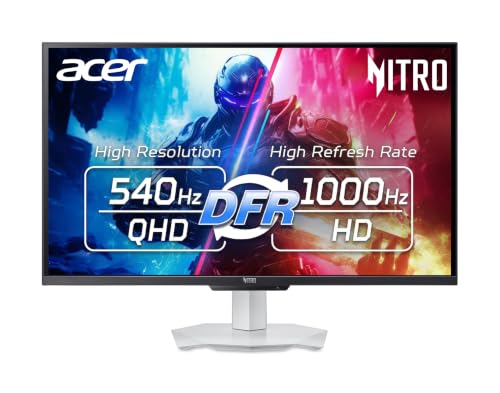
Acer Nitro XV273U F5
A 1000Hz mode at 1280x720 through dynamic frequency and resolution switching.
Best for: Buyers who want 1000Hz mode at 1280x720 through dynamic frequency and resolution switching.
Our take Check price for Acer Nitro XV273U F5 (opens in a new tab)

Premium Pick
ASUS ROG Swift PG27AQWP-W
A dual mode that runs HD at 720Hz at the highest price in the group.
Best for: Buyers for whom price is not the deciding factor, since the CRUA 27 540Hz costs less.
Our take Check price for ASUS ROG Swift PG27AQWP-W (opens in a new tab)

Strong Alternative
Dell 24 AW2524HF
A 480Hz native refresh with a 500Hz overclock.
Best for: Buyers who want 480Hz native refresh with a 500Hz overclock.
Our take Check price for Dell 24 AW2524HF (opens in a new tab)

WOLED Panel
ASUS ROG Swift PG27AQDP
A WOLED panel.
Best for: Buyers who want a WOLED panel.
Our take Check price for ASUS ROG Swift PG27AQDP (opens in a new tab)
| Pick | Why it’s here | Best for | Price |
|---|---|---|---|
| The lowest price of the group at our last check. | Keeping the cost under $500. | Check price for CRUA 27-inch 540Hz FHD (opens in a new tab) |
| A 1000Hz mode at 1280x720 through dynamic frequency and resolution switching. | Buyers who want 1000Hz mode at 1280x720 through dynamic frequency and resolution switching. | Check price for Acer Nitro XV273U F5 (opens in a new tab) |
| A dual mode that runs HD at 720Hz at the highest price in the group. | Buyers for whom price is not the deciding factor, since the CRUA 27 540Hz costs less. | Check price for ASUS ROG Swift PG27AQWP-W (opens in a new tab) |
| A 480Hz native refresh with a 500Hz overclock. | Buyers who want 480Hz native refresh with a 500Hz overclock. | Check price for Dell 24 AW2524HF (opens in a new tab) |
| A WOLED panel. | Buyers who want a WOLED panel. | Check price for ASUS ROG Swift PG27AQDP (opens in a new tab) |
Our Picks
Lowest Price Here1 of 5
CRUA 27-inch 540Hz FHD on Amazon (opens in a new tab)
The CRUA 27 540Hz stands out for 400 nits of brightness, and it adds HDMI 2.1 and DisplayPort 1.4 inputs.
Best for
- Keeping the cost under $500.
Skip if
- Look at the other picks if you need a feature not covered above.
Why we like it
It also offers a 540Hz refresh rate and offers a 27 inches screen size. On refresh rate it ties with the Acer Nitro XV273U F5 and the ASUS PG27AQWP-W at 540Hz. It matches the Acer Nitro XV273U F5 on screen size (27 inches).
It shares a 1920x1080 (1080p) resolution with the Dell AW2524HF; the ASUS PG27AQWP-W goes with a 2560x1440 (1440p) resolution. It shares an IPS panel with the Acer Nitro XV273U F5; the Dell AW2524HF goes with a fast IPS panel. A 120% sRGB color gamut is unique to it among these picks, while the ASUS PG27AQWP-W uses a 99.5% DCI-P3 color gamut.
It also offers built-in speakers and a stand that rotates into portrait orientation. At 1080p, 540Hz is within reach of mid-range graphics cards in esports titles; use DisplayPort if your card's HDMI port is older. No other pick here cost less at our last price check, and the Acer Nitro XV273U F5 was closest.
Key dimensions & specs
- Refresh rate: 540Hz
- Resolution: 1920x1080 (1080p)
- Size: 27 inches
- Panel: IPS
- Response: 1ms
- Color gamut: 120% sRGB
- Adaptive sync: AMD FreeSync
- Stand: height adjustment and 90 degree pivot
Pros
- a 540Hz refresh rate for fast motion
- an IPS panel with wide viewing angles
- 120% sRGB colour coverage
- AMD FreeSync to reduce screen tearing
Also Consider2 of 5
Acer Nitro XV273U F5 on Amazon (opens in a new tab)
What the Acer Nitro XV273U F5 brings to the table is a 1000Hz mode at 1280x720 through dynamic frequency and resolution switching, plus Delta E under 2.
Best for
- Buyers who want 1000Hz mode at 1280x720 through dynamic frequency and resolution switching.
Skip if
- Price-first buyers should look at the CRUA 27 540Hz, which cost less when we checked.
Why we like it
It also offers a 540Hz refresh rate and offers a 27 inches screen size. It shares a 2560x1440 (1440p) resolution with the ASUS PG27AQWP-W and PG27AQDP; the Dell AW2524HF goes with a 1920x1080 (1080p) resolution. It shares an IPS panel with the CRUA 27 540Hz; the ASUS PG27AQWP-W goes with a tandem OLED panel.
A DisplayHDR 600 is unique to it among these picks, while the PG27AQDP uses a DisplayHDR True Black 400. It also offers two DisplayPort 1.4 and two HDMI 2.1 inputs and built-in 2W speakers. To see 540Hz at 1440p, connect over DisplayPort or HDMI 2.1; older HDMI 2.0 ports cap the refresh rate lower. When we checked, only the CRUA 27 540Hz cost less, and the Dell AW2524HF cost more.
Key dimensions & specs
- Refresh rate: 540Hz
- Resolution: 2560x1440 (1440p)
- Size: 27 inches
- Panel: IPS
- Response: 0.5ms
- HDR: DisplayHDR 600
- Color gamut: 95% DCI-P3
- Adaptive sync: AMD FreeSync Premium
- Stand: tilt, +/-20 degree swivel, +/-90 degree pivot and 5.9 inch height adjustment
Pros
- a 540Hz refresh rate for fast motion
- 1440p resolution, sharper than 1080p at 27 inches
- an IPS panel with wide viewing angles
- DisplayHDR 600 certification
Cons
- Costs more than the CRUA 27 540Hz at the time of writing
Premium Pick3 of 5
ASUS ROG Swift PG27AQWP-W on Amazon (opens in a new tab)
The ASUS PG27AQWP-W is built around a dual mode that runs HD at 720Hz, with Delta E under 2 with a colour pre-calibration report in the box on top.
Best for
- Buyers for whom price is not the deciding factor, since the CRUA 27 540Hz costs less.
Skip if
- Worth skipping when oLED burn-in risk with static desktop elements is a problem.
Why we like it
On the spec sheet, it offers a 540Hz refresh rate and offers a 26.5 inches screen size. On refresh rate it ties with the CRUA 27 540Hz and the Acer Nitro XV273U F5 at 540Hz. It matches the PG27AQDP on screen size (26.5 inches).
It shares a 2560x1440 (1440p) resolution with the Acer Nitro XV273U F5 and PG27AQDP; the Dell AW2524HF goes with a 1920x1080 (1080p) resolution. You get a tandem OLED panel here, which sets it apart from the PG27AQDP and its a WOLED panel. You get a DisplayHDR True Black 500 here, which sets it apart from the PG27AQDP and its a DisplayHDR True Black 400.
It also comes with DisplayPort 2.1 UHBR20 and HDMI 2.1 inputs and a Neo Proximity Sensor that blanks the screen when you leave the desk. Only the PG27AQDP came close to it on price at the time of writing; it cost the most of the 5 picks.
Key dimensions & specs
- Refresh rate: 540Hz
- Resolution: 2560x1440 (1440p)
- Size: 26.5 inches
- Panel: Tandem OLED
- Response: 0.02ms
- HDR: DisplayHDR True Black 500
- Color gamut: 99.5% DCI-P3
- Adaptive sync: G-SYNC
- Warranty: 3-year
Pros
- a 540Hz refresh rate for fast motion
- 1440p resolution, sharper than 1080p at 27 inches
- a Tandem OLED panel with per-pixel contrast
- DisplayHDR True Black 500 certification
Cons
- OLED burn-in risk with static desktop elements
- Costs more than the CRUA 27 540Hz at the time of writing
Strong Alternative4 of 5
Dell 24 AW2524HF on Amazon (opens in a new tab)
What the Dell AW2524HF brings to the table is a 480Hz native refresh with a 500Hz overclock, plus TUV ComfortView Plus low blue light.
Best for
- Buyers who want 480Hz native refresh with a 500Hz overclock.
Skip if
- Skip it if screen size matters most to you; the CRUA 27 540Hz offers 27 inches.
Why we like it
It also offers a 480Hz refresh rate and offers a 24.5 inches screen size. On refresh rate it ties with the PG27AQDP at 480Hz. Its 24.5 inches screen size is the smallest in this group; the CRUA 27 540Hz leads at 27 inches.
It shares a 1920x1080 (1080p) resolution with the CRUA 27 540Hz; the ASUS PG27AQWP-W goes with a 2560x1440 (1440p) resolution. A fast IPS panel is unique to it among these picks, while the Acer Nitro XV273U F5 uses an IPS panel. A 99% sRGB color gamut is unique to it among these picks, while the Acer Nitro XV273U F5 uses a 95% DCI-P3 color gamut.
It also comes with a 0.5ms GtG minimum response time and a DisplayPort connection recommended to reach the top refresh rate. When we checked, only the Acer Nitro XV273U F5 and cheaper picks cost less, and the PG27AQDP cost more.
Key dimensions & specs
- Refresh rate: 480Hz
- Resolution: 1920x1080 (1080p)
- Size: 24.5 inches
- Panel: Fast IPS
- Response: 0.5ms
- Color gamut: 99% sRGB
- Adaptive sync: AMD FreeSync Premium
Pros
- a 480Hz refresh rate for fast motion
- a Fast IPS panel with wide viewing angles
- 99% sRGB colour coverage
- AMD FreeSync Premium to reduce screen tearing
Cons
- Screen size trails the CRUA 27 540Hz (27 inches)
- Costs more than the CRUA 27 540Hz at the time of writing
WOLED Panel5 of 5
ASUS ROG Swift PG27AQDP on Amazon (opens in a new tab)
The PG27AQDP goes further to 480Hz on a WOLED panel, the fastest here, for players whose PCs can feed it.
Best for
- Buyers who want a WOLED panel.
Skip if
- Pass on it if oLED burn-in risk with static desktop elements rules it out for your setup.
Why we like it
On refresh rate it ties with the Dell AW2524HF at 480Hz. It matches the ASUS PG27AQWP-W on screen size (26.5 inches). It shares a 2560x1440 (1440p) resolution with the Acer Nitro XV273U F5 and ASUS PG27AQWP-W; the Dell AW2524HF goes with a 1920x1080 (1080p) resolution.
You get a WOLED panel here, which sets it apart from the Dell AW2524HF and its a fast IPS panel. You get a DisplayHDR True Black 400 here, which sets it apart from the ASUS PG27AQWP-W and its a DisplayHDR True Black 500. To see 480Hz at 1440p, connect over DisplayPort or HDMI 2.1; older HDMI 2.0 ports cap the refresh rate lower.
Leave the maker's pixel-refresh routines enabled and hide static taskbars to limit burn-in risk. It was priced above the Dell AW2524HF and below the ASUS PG27AQWP-W at the time of writing. It gives ground on refresh rate, where the CRUA 27 540Hz offers 540Hz.
Key dimensions & specs
- Refresh rate: 480Hz
- Resolution: 2560x1440 (1440p)
- Size: 26.5 inches
- Panel: WOLED
- Response: 0.03ms
- HDR: DisplayHDR True Black 400
- Color gamut: 99% DCI-P3
- Adaptive sync: G-SYNC Compatible
- Warranty: 3-year
Pros
- a 480Hz refresh rate for fast motion
- 1440p resolution, sharper than 1080p at 27 inches
- a WOLED panel with per-pixel contrast
- DisplayHDR True Black 400 certification
Cons
- OLED burn-in risk with static desktop elements
- Refresh rate trails the CRUA 27 540Hz (540Hz)
- Costs more than the CRUA 27 540Hz at the time of writing
How We Chose These 480Hz Monitors
Each pick was assessed across 4 criteria weighted for real-world use.
- How these picks were ranked
- We compared five monitors on refresh rate, resolution, screen size and panel as the makers state them. Nothing was tested in-house; 7 of the 10 fields compared are stated for every pick, while HDR and stand have gaps.
- The shared baseline
- All 5, from the CRUA 27 540Hz to the PG27AQDP, state refresh rate, resolution and screen size.
- Where the specs have gaps
- The CRUA 27 540Hz and the Dell AW2524HF give no HDR; the ASUS PG27AQWP-W, the Dell AW2524HF and the PG27AQDP give no stand.
- Price range
- At our last check the picks ran from the CRUA 27 540Hz ($250 to $500) to the ASUS PG27AQWP-W ($1000 to $1500).
What to Look for in a 480Hz Monitor
Key buying criteria so you get the right fit the first time.
Refresh rate across these picks
The CRUA 27 540Hz tops refresh rate at 540Hz and the PG27AQDP sits lowest at 480Hz; 3 picks share the top figure. If refresh rate is your first filter, the CRUA 27 540Hz sets the ceiling at 540Hz.
Screen size
Across these 5 picks screen size spans 24.5 inches (the Dell AW2524HF) to 27 inches (the CRUA 27 540Hz). Start with the CRUA 27 540Hz if screen size decides it.
Panel
The CRUA 27 540Hz and the Acer Nitro XV273U F5 list IPS; the ASUS PG27AQWP-W lists Tandem OLED; the Dell AW2524HF lists Fast IPS; the PG27AQDP lists WOLED.
Response
The CRUA 27 540Hz lists 1ms; the Acer Nitro XV273U F5 and the Dell AW2524HF list 0.5ms; the ASUS PG27AQWP-W lists 0.02ms; the PG27AQDP lists 0.03ms. Sort out response before price: it splits 5 stated picks into groups of 2, 1, 1 and 1.
Features beyond the spec table
The ASUS PG27AQWP-W: Delta E under 2 with a colour pre-calibration report in the box. The Dell AW2524HF: TUV ComfortView Plus low blue light. The PG27AQDP: a 480Hz refresh rate at 1440p.
How to Choose a 480Hz Monitor
By priority
| Priority | Consider | Why |
|---|---|---|
| Keeping the cost under $500 | CRUA 27 540Hz | The lowest price of the group at our last check |
| Buyers who want 1000Hz mode at 1280x720 through dynamic frequency and resolution switching | Acer Nitro XV273U F5 | A 1000Hz mode at 1280x720 through dynamic frequency and resolution switching |
| Buyers for whom price is not the deciding factor, since the CRUA 27 540Hz costs less | ASUS PG27AQWP-W | A dual mode that runs HD at 720Hz at the highest price in the group |
| Buyers who want 480Hz native refresh with a 500Hz overclock | Dell AW2524HF | A 480Hz native refresh with a 500Hz overclock |
| Buyers who want a WOLED panel | PG27AQDP | A WOLED panel |
Scroll sideways to see every column.
Key specs side by side
The CRUA 27 540Hz leads on refresh rate at 540Hz, ahead of the Acer Nitro XV273U F5 at 540Hz.
| Monitor | Refresh rate | Resolution | Size | Panel |
|---|---|---|---|---|
| CRUA 27 540Hz | 540Hz | 1920x1080 (1080p) | 27 inches | IPS |
| Acer Nitro XV273U F5 | 540Hz | 2560x1440 (1440p) | 27 inches | IPS |
| ASUS PG27AQWP-W | 540Hz | 2560x1440 (1440p) | 26.5 inches | Tandem OLED |
| Dell AW2524HF | 480Hz | 1920x1080 (1080p) | 24.5 inches | Fast IPS |
| PG27AQDP | 480Hz | 2560x1440 (1440p) | 26.5 inches | WOLED |
Scroll sideways to see every column.
By price at the time of writing
At our last check the cheapest pick, the CRUA 27 540Hz, sat in the $250 to $500 tier, 3 tiers in all up to the ASUS PG27AQWP-W at $1000 to $1500; Amazon prices move, so recheck before buying.
| Price tier | Monitors |
|---|---|
| About $250 to $500 | CRUA 27 540Hz, Acer Nitro XV273U F5 |
| About $500 to $1000 | Dell AW2524HF, PG27AQDP |
| About $1000 to $1500 | ASUS PG27AQWP-W |
Frequently Asked Questions
Is the ASUS PG27AQWP-W worth paying more than the CRUA 27 540Hz?
The ASUS PG27AQWP-W matches or trails the CRUA 27 540Hz on refresh rate and screen size, so pay more only for a feature the spec sheet doesn't cover. The CRUA 27 540Hz leads on screen size (27 inches). The CRUA 27 540Hz sat in the $250 to $500 tier and the ASUS PG27AQWP-W in the $1000 to $1500 tier when we checked, with 3 other picks between them.
What makes the PG27AQDP the WOLED Panel?
The label rests on a WOLED panel. It gives up refresh rate (480Hz against 540Hz) and screen size (26.5 inches against 27 inches) to the CRUA 27 540Hz, the cheapest pick. It is aimed at anyone who wants a WOLED panel.
Do the CRUA 27 540Hz and the Acer Nitro XV273U F5 differ on resolution?
The CRUA 27 540Hz and the Dell AW2524HF use 1920x1080 (1080p); the Acer Nitro XV273U F5, the ASUS PG27AQWP-W and the PG27AQDP use 2560x1440 (1440p).
Beyond the specs, what sets the CRUA 27 540Hz and the Acer Nitro XV273U F5 apart?
The CRUA 27 540Hz: 400 nits of brightness. The Acer Nitro XV273U F5: a 1000Hz mode at 1280x720 through dynamic frequency and resolution switching. The ASUS PG27AQWP-W: a dual mode that runs HD at 720Hz.
Should I pick the CRUA 27 540Hz or the PG27AQDP?
The CRUA 27 540Hz suits keeping the cost under $500; the PG27AQDP suits buyers who want a WOLED panel.
Bottom Line
Our first pick is the CRUA 27 540Hz, chosen for the lowest price of the group at our last check. Look at the Acer Nitro XV273U F5 for a 1000Hz mode at 1280x720 through dynamic frequency and resolution switching, the ASUS PG27AQWP-W for a dual mode that runs HD at 720Hz at the highest price in the group and the Dell AW2524HF for a 480Hz native refresh with a 500Hz overclock if those matter more to you.
Use DisplayPort and the cable in the box; some models only reach the top refresh rate over one input.