
Buying Guide
The Best RGB Gaming PCs
Five gaming PCs compared, from the HELLOLAND King White to the Sirius i7, with the trade-offs of each named.
By The PC Journal editorial team
12 min read5 products evaluated
RGB prebuilts come lit out of the box. Every pick includes RGB lighting, ordered from the lowest price.
Our comparison rests on published figures for graphics card, VRAM and processor; where a maker leaves out power supply, we say so, and no figure here comes from our own testing.
Quick Picks
Our 5 recommendations at a glance. Tap a pick for the full verdict.

Lowest Price Here
HELLOLAND King White Prebuilt Gaming PC (Ryzen 5 5500, RX 6500 XT 4GB)
The lowest price of the group at our last check.
Best for: Spending as little as possible.
Our take Check price for HELLOLAND King White Prebuilt Gaming PC (Ryzen 5 5500, RX 6500 XT 4GB) (opens in a new tab)

Also Consider
ZYNEEX Prebuilt Gaming PC (Ryzen 5 5500, RTX 3050 6GB)
ARGB air cooling and Wi-Fi listed.
Best for: Buyers who want ARGB air cooling and Wi-Fi listed.
Our take Check price for ZYNEEX Prebuilt Gaming PC (Ryzen 5 5500, RTX 3050 6GB) (opens in a new tab)

Strong Alternative
MXZ Gaming PC (Core i5-12400F, RTX 4060)
Six RGB fans.
Best for: Buyers who want six RGB fans.
Our take Check price for MXZ Gaming PC (Core i5-12400F, RTX 4060) (opens in a new tab)

Worth a Look
iBUYPOWER Scale (Core i5-14400F, RTX 4060 8GB)
DDR5 memory with RGB.
Best for: Buyers who want DDR5 memory with RGB.
Our take Check price for iBUYPOWER Scale (Core i5-14400F, RTX 4060 8GB) (opens in a new tab)
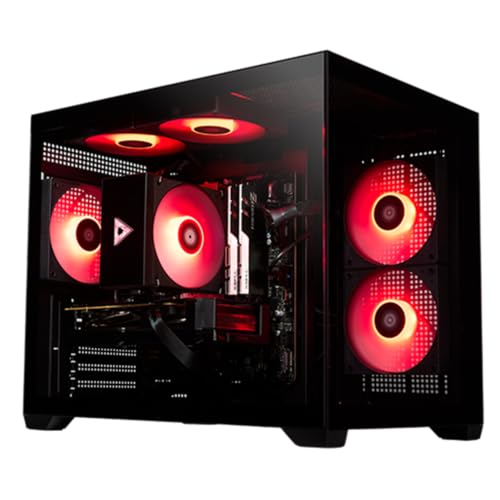
Most Memory
STORMCRAFT Sirius (Core i7-14700F, RTX 5060 Ti 8GB)
The most memory here (32GB).
Best for: Buyers who put memory first.
Our take Check price for STORMCRAFT Sirius (Core i7-14700F, RTX 5060 Ti 8GB) (opens in a new tab)
Our Picks
Lowest Price Here1 of 5
HELLOLAND King White Prebuilt Gaming PC (Ryzen 5 5500, RX 6500 XT 4GB) on Amazon (opens in a new tab)
HELLOLAND's King White puts a Ryzen 5 5500 and an RX 6500 XT 4GB in a white case with five RGB fans.
Best for
- Spending as little as possible.
Skip if
- Pass on it if 4GB of VRAM can force lower texture settings in newer games at 1440 rules it out for your setup.
Why we like it
The 4GB card limits it to lighter games and esports titles at 1080p. On VRAM it trails the group at 4GB, while the MXZ i5-12400F RTX 4060 offers 8GB. On memory it ties with the ZYNEEX R5 5500 RTX 3050, the MXZ i5-12400F RTX 4060 and the iBUYPOWER Scale at 16GB.
You get an RX 6500 XT graphics card here, which sets it apart from the Sirius i7 and its an RTX 5060 Ti graphics card. It shares a ryzen 5 5500 processor with the ZYNEEX R5 5500 RTX 3050; the iBUYPOWER Scale goes with a core i5-14400F processor. It also offers a one-year parts and labor warranty.
Check the HELLOLAND King White's ports against your monitor: most graphics cards use DisplayPort and HDMI, so match the cable to the refresh rate you want. It cost the least of the 5 picks at the time of writing, with the ZYNEEX R5 5500 RTX 3050 the next step up.
Key dimensions & specs
- Graphics card: RX 6500 XT
- VRAM: 4GB
- Processor: Ryzen 5 5500
- Memory: 16GB
- Memory type: DDR4-3200
- SSD: 1TB
- Warranty: 1 year parts and labor
- Case colour: White
Pros
- A RX 6500 XT graphics card
- White case with five RGB fans
- One-year parts and labor warranty
- SSD capacity of 1TB, ahead of the MXZ i5-12400F RTX 4060
Cons
- 4GB of VRAM can force lower texture settings in newer games at 1440p
- 16GB of RAM is enough for games but tight alongside streaming or editing
- VRAM trails the MXZ i5-12400F RTX 4060 (8GB)
Also Consider2 of 5
ZYNEEX Prebuilt Gaming PC (Ryzen 5 5500, RTX 3050 6GB) on Amazon (opens in a new tab)
ZYNEEX offers every core part: Ryzen 5 5500, RTX 3050 6GB, 16GB of DDR4-3200 and a 1TB NVMe SSD.
Best for
- Buyers who want ARGB air cooling and Wi-Fi listed.
Skip if
- Worth skipping when 6GB of VRAM can force lower texture settings in newer games at 1440 is a problem.
Why we like it
ARGB air cooling and Wi-Fi are included. On VRAM it sits mid-pack at 6GB: the MXZ i5-12400F RTX 4060 offers 8GB, and the HELLOLAND King White comes in at 4GB. On SSD capacity it ties with the HELLOLAND King White, the iBUYPOWER Scale and the Sirius i7 at 1TB.
You get an RTX 3050 graphics card here, which sets it apart from the Sirius i7 and its an RTX 5060 Ti graphics card. It also offers a 1TB SSD. Check the ZYNEEX R5 5500 RTX 3050's ports against your monitor: most graphics cards use DisplayPort and HDMI, so match the cable to the refresh rate you want.
The ZYNEEX R5 5500 RTX 3050's PSU wattage isn't published, so ask the seller before planning a GPU upgrade. With 16GB installed, check for free memory slots before adding more. There is no published power supply wattage figure, whereas the Sirius i7 offers 650W.
Key dimensions & specs
- Graphics card: RTX 3050
- VRAM: 6GB
- Processor: Ryzen 5 5500
- Memory: 16GB
- Memory type: DDR4-3200
- SSD: 1TB
Pros
- A RTX 3050 graphics card
- ARGB air cooling and Wi-Fi listed
- 1TB SSD
- VRAM of 6GB, ahead of the HELLOLAND King White
Cons
- 6GB of VRAM can force lower texture settings in newer games at 1440p
- 16GB of RAM is enough for games but tight alongside streaming or editing
- Costs more than the HELLOLAND King White at the time of writing
Strong Alternative3 of 5
MXZ Gaming PC (Core i5-12400F, RTX 4060) on Amazon (opens in a new tab)
MXZ's build uses a Core i5-12400F with an RTX 4060, the newest graphics card among these five.
Best for
- Buyers who want six RGB fans.
Skip if
- Look at the others if this bothers you: 8GB of VRAM can force lower texture settings in newer games at 1440p.
Why we like it
The maker specifies a 550W power supply, but the SSD is only 500GB. On VRAM it ties with the iBUYPOWER Scale and the Sirius i7 at 8GB. On memory it ties with the HELLOLAND King White, the ZYNEEX R5 5500 RTX 3050 and the iBUYPOWER Scale at 16GB.
On SSD capacity it trails the group at 500GB, while the HELLOLAND King White is rated for 1TB. It shares an RTX 4060 graphics card with the iBUYPOWER Scale; the Sirius i7 goes with an RTX 5060 Ti graphics card. You get a core i5-12400F processor here, which sets it apart from the Sirius i7 and its a core i7-14700F processor.
You also get six RGB fans. It was priced above the ZYNEEX R5 5500 RTX 3050 and below the iBUYPOWER Scale at the time of writing.
Key dimensions & specs
- Graphics card: RTX 4060
- VRAM: 8GB
- Processor: Core i5-12400F
- Memory: 16GB
- Memory type: DDR4-3200
- SSD: 500GB
- Power supply: 550W
Pros
- A RTX 4060 graphics card
- A 550W power supply
- Six RGB fans
- VRAM of 8GB, ahead of the ZYNEEX R5 5500 RTX 3050
Cons
- 8GB of VRAM can force lower texture settings in newer games at 1440p
- 16GB of RAM is enough for games but tight alongside streaming or editing
- A 500GB SSD fills quickly with modern games
Worth a Look4 of 5
iBUYPOWER Scale (Core i5-14400F, RTX 4060 8GB) on Amazon (opens in a new tab)
iBUYPOWER's Scale pairs a Core i5-14400F with an RTX 4060 8GB and DDR5-5200 RGB memory.
Best for
- Buyers who want DDR5 memory with RGB.
Skip if
- Choose another pick if you can't accept this: 8GB of VRAM can force lower texture settings in newer games at 1440p.
Why we like it
It suits 1080p play at a lower price than most RTX 5060 systems here. It matches the MXZ i5-12400F RTX 4060 and the Sirius i7 on VRAM (8GB). It matches the HELLOLAND King White, the ZYNEEX R5 5500 RTX 3050 and the MXZ i5-12400F RTX 4060 on memory (16GB).
Like the MXZ i5-12400F RTX 4060, it has an RTX 4060 graphics card, while the Sirius i7 uses an RTX 5060 Ti graphics card. It is the only pick here with a core i5-14400F processor; the HELLOLAND King White has a ryzen 5 5500 processor instead. No other pick in this guide offers a DDR5-5200 memory type; compare the MXZ i5-12400F RTX 4060, which has a DDR4-3200 memory type.
You also get a 1TB SSD. Its price falls between the MXZ i5-12400F RTX 4060 and the Sirius i7, based on our last check. If memory is your priority, the Sirius i7 (32GB) is the stronger choice.
Key dimensions & specs
- Graphics card: RTX 4060
- VRAM: 8GB
- Processor: Core i5-14400F
- Memory: 16GB
- Memory type: DDR5-5200
- SSD: 1TB
Pros
- A RTX 4060 graphics card
- DDR5 memory with RGB
- 1TB SSD
- VRAM of 8GB, ahead of the ZYNEEX R5 5500 RTX 3050
Cons
- 8GB of VRAM can force lower texture settings in newer games at 1440p
- 16GB of RAM is enough for games but tight alongside streaming or editing
- Memory trails the Sirius i7 (32GB)
Most Memory5 of 5
STORMCRAFT Sirius (Core i7-14700F, RTX 5060 Ti 8GB) on Amazon (opens in a new tab)
Sirius i7 pairs a Core i7-14700F with an RTX 5060 Ti with 8GB of VRAM, plus 32GB of DDR4-3200 and a 1TB SSD.
Best for
- Buyers who put memory first.
Skip if
- Choose another pick if you can't accept this: 8GB of VRAM can force lower texture settings in newer games at 1440p.
Why we like it
It also comes with a 650W Gold PSU and 32GB of RGB DDR4. It matches the MXZ i5-12400F RTX 4060 and the iBUYPOWER Scale on VRAM (8GB). Its 32GB memory is the most here; the HELLOLAND King White comes next at 16GB.
It matches the HELLOLAND King White, the ZYNEEX R5 5500 RTX 3050 and the iBUYPOWER Scale on SSD capacity (1TB). No other pick in this guide offers an RTX 5060 Ti graphics card; compare the MXZ i5-12400F RTX 4060, which has an RTX 4060 graphics card. Check the Sirius i7's ports against your monitor: most graphics cards use DisplayPort and HDMI, so match the cable to the refresh rate you want.
The 650W power supply is the stated figure; check its connectors before a later GPU upgrade. It was the highest-priced of the 5 picks at the time of writing, so the case for it rests on what it adds over the iBUYPOWER Scale and the rest.
Key dimensions & specs
- Graphics card: RTX 5060 Ti
- VRAM: 8GB
- Processor: Core i7-14700F
- Memory: 32GB
- Memory type: DDR4-3200
- SSD: 1TB
- Power supply: 650W
- PSU rating: 80 Plus Gold
Pros
- A RTX 5060 Ti graphics card
- 32GB of RAM
- A 650W power supply
- An 80 Plus Gold power supply
Cons
- 8GB of VRAM can force lower texture settings in newer games at 1440p
- Costs more than the HELLOLAND King White at the time of writing
How We Chose These RGB Gaming PCs
Each pick was assessed across 4 criteria weighted for real-world use.
- What we compared
- We lined up five prebuilt PCs on graphics card, VRAM, processor and memory from manufacturer specifications. We did not test them in-house.
- The shared baseline
- All 5, from the HELLOLAND King White to the Sirius i7, state graphics card, VRAM and processor.
- Where the specs have gaps
- The HELLOLAND King White, the ZYNEEX R5 5500 RTX 3050 and the iBUYPOWER Scale give no power supply wattage.
- Price range
- At our last check the picks ran from the HELLOLAND King White ($500 to $1000) to the Sirius i7 ($1000 to $1500).
What to Look for in an RGB Gaming PC
Key buying criteria so you get the right fit the first time.
VRAM
Here VRAM runs from 4GB on the HELLOLAND King White to 8GB on the MXZ i5-12400F RTX 4060. The MXZ i5-12400F RTX 4060 is the pick for VRAM.
How much memory you need
Here memory runs from 16GB on the iBUYPOWER Scale to 32GB on the Sirius i7. Start with the Sirius i7 if memory decides it.
How much SSD capacity you need
Here SSD capacity runs from 500GB on the MXZ i5-12400F RTX 4060 to 1TB on the HELLOLAND King White. The HELLOLAND King White is the pick for SSD capacity.
Processor
The HELLOLAND King White and the ZYNEEX R5 5500 RTX 3050 list ryzen 5 5500; the MXZ i5-12400F RTX 4060 lists Core i5-12400F; the iBUYPOWER Scale lists Core i5-14400F; the Sirius i7 lists Core i7-14700F. Rule out the mismatches before looking at price.
Memory type
The HELLOLAND King White, the ZYNEEX R5 5500 RTX 3050, the MXZ i5-12400F RTX 4060 and the Sirius i7 list DDR4-3200; the iBUYPOWER Scale lists DDR5-5200. Rule out the mismatches before looking at price.
Trust specific listings
Prefer listings that name every part: CPU model, GPU model and VRAM, RAM, SSD and PSU. Vague terms like "Core i7" or "brand may vary" leave room for weaker parts.
How to Choose an RGB Gaming PC
By priority
| Priority | Consider | Why |
|---|---|---|
| Spending as little as possible | HELLOLAND King White | The lowest price of the group at our last check |
| Buyers who want ARGB air cooling and Wi-Fi listed | ZYNEEX R5 5500 RTX 3050 | ARGB air cooling and Wi-Fi listed |
| Buyers who want six RGB fans | MXZ i5-12400F RTX 4060 | Six RGB fans |
| Buyers who want DDR5 memory with RGB | iBUYPOWER Scale | DDR5 memory with RGB |
| Buyers who put memory first | Sirius i7 | The most memory here (32GB) |
Scroll sideways to see every column.
Key specs side by side
The MXZ i5-12400F RTX 4060 leads on VRAM at 8GB, ahead of the iBUYPOWER Scale at 8GB.
| Prebuilt PC | Graphics card | VRAM | Processor | Memory |
|---|---|---|---|---|
| HELLOLAND King White | RX 6500 XT | 4GB | Ryzen 5 5500 | 16GB |
| ZYNEEX R5 5500 RTX 3050 | RTX 3050 | 6GB | Ryzen 5 5500 | 16GB |
| MXZ i5-12400F RTX 4060 | RTX 4060 | 8GB | Core i5-12400F | 16GB |
| iBUYPOWER Scale | RTX 4060 | 8GB | Core i5-14400F | 16GB |
| Sirius i7 | RTX 5060 Ti | 8GB | Core i7-14700F | 32GB |
Scroll sideways to see every column.
By price at the time of writing
The HELLOLAND King White was the lowest-priced pick and the Sirius i7 the highest when we checked; tiers move with Amazon pricing.
| Price tier | Prebuilt PCs |
|---|---|
| About $500 to $1000 | HELLOLAND King White, ZYNEEX R5 5500 RTX 3050, MXZ i5-12400F RTX 4060 |
| About $1000 to $1500 | iBUYPOWER Scale, Sirius i7 |
Frequently Asked Questions
Which has the most memory: the Sirius i7 or the HELLOLAND King White?
The Sirius i7 leads at 32GB, with the HELLOLAND King White at 16GB.
How does the MXZ i5-12400F RTX 4060 compare with the Sirius i7 on power supply wattage?
The Sirius i7 leads at 650W, with the MXZ i5-12400F RTX 4060 at 550W. The HELLOLAND King White, the ZYNEEX R5 5500 RTX 3050 and the iBUYPOWER Scale don't state a figure, so they sit outside this comparison.
Is the Sirius i7 worth paying more than the HELLOLAND King White?
On paper it adds VRAM (8GB against 4GB) and memory (32GB against 16GB). The HELLOLAND King White was the lowest-priced pick when we checked, so pay the difference only if those gains matter to you.
What makes the Sirius i7 the Most Memory?
It earns the label for the most memory here (32GB). It suits anyone who put memory first.
Do the HELLOLAND King White and the ZYNEEX R5 5500 RTX 3050 differ on graphics card?
The HELLOLAND King White uses RX 6500 XT; the ZYNEEX R5 5500 RTX 3050 uses RTX 3050; the MXZ i5-12400F RTX 4060 and the iBUYPOWER Scale use RTX 4060; the Sirius i7 uses RTX 5060 Ti.
What should I check before buying the HELLOLAND King White?
Check the HELLOLAND King White's ports against your monitor: most graphics cards use DisplayPort and HDMI, so match the cable to the refresh rate you want. The HELLOLAND King White's PSU wattage isn't published, so ask the seller before planning a GPU upgrade. In this guide it ranks first of 5, as our Lowest Price Here pick.
Bottom Line
Our first pick is the HELLOLAND King White, chosen for the lowest price of the group at our last check. Look at the ZYNEEX R5 5500 RTX 3050 for ARGB air cooling and Wi-Fi listed, the MXZ i5-12400F RTX 4060 for six RGB fans and the iBUYPOWER Scale for DDR5 memory with RGB if those matter more to you.
Install the lighting app to control the fans.