
Buying Guide
The Best MSI Gaming Desktops
Four MSI gaming desktops, from RTX 4060 to RTX 5080, each with its CPU, graphics, memory and storage named.
By The PC Journal editorial team
11 min read4 products evaluated
MSI builds its desktops from its own boards and graphics cards. These four run from an Aegis ZS with an RTX 4060 up to a Vision ZS that pairs a Ryzen 7 9800X3D with an RTX 5070.
Our comparison uses what each seller states, not hands-on testing. Listings without a named CPU, a GPU with its VRAM, a RAM figure or an SSD size were dropped, as were renewed units and outlier prices.
Quick Picks
Our 4 recommendations at a glance. Tap a pick for the full verdict.
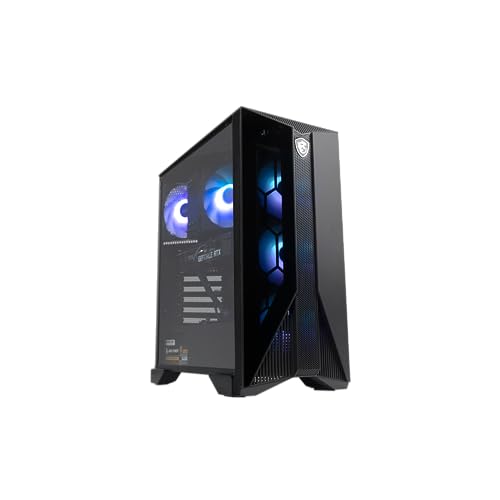
Lowest Price Here
MSI Aegis ZS (Ryzen 7 7700, RTX 4060 8GB)
The lowest price among these picks at the time of writing.
Best for: Keeping the budget tight.
Our take Check price for MSI Aegis ZS (Ryzen 7 7700, RTX 4060 8GB) (opens in a new tab)

Core i5-14400F Pick
MSI Codex R2 (Core i5-14400F, RTX 5070 12GB)
A Core i5-14400F processor.
Best for: Buyers who prefer this CPU platform.
Our take Check price for MSI Codex R2 (Core i5-14400F, RTX 5070 12GB) (opens in a new tab)
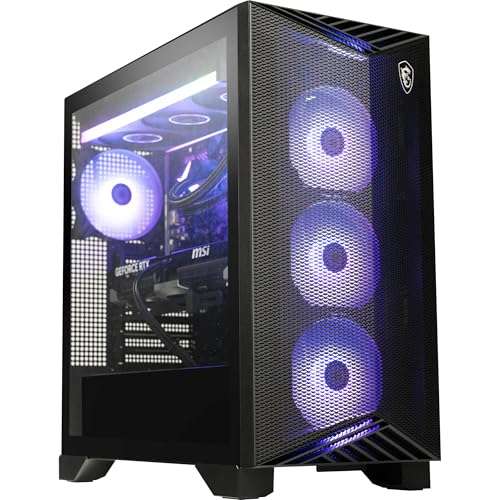
Most VRAM
MSI Aegis ZS (Ryzen 9 9900X, RTX 5080 16GB)
16GB of VRAM on the RTX 5080.
Best for: High texture settings at 1440p and above.
Our take Check price for MSI Aegis ZS (Ryzen 9 9900X, RTX 5080 16GB) (opens in a new tab)
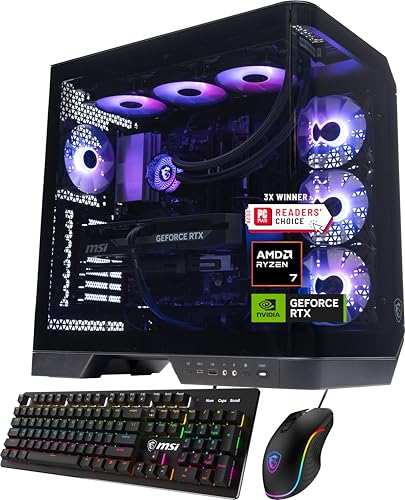
Gaming-Focused CPU
MSI Vision ZS (Ryzen 7 9800X3D, RTX 5070 12GB)
A Ryzen 7 9800X3D with 3D V-Cache.
Best for: High-refresh play where the CPU matters.
Our take Check price for MSI Vision ZS (Ryzen 7 9800X3D, RTX 5070 12GB) (opens in a new tab)
| Pick | Why it’s here | Best for | Price |
|---|---|---|---|
| The lowest price among these picks at the time of writing. | Keeping the budget tight. | Check price for MSI Aegis ZS (Ryzen 7 7700, RTX 4060 8GB) (opens in a new tab) |
| A Core i5-14400F processor. | Buyers who prefer this CPU platform. | Check price for MSI Codex R2 (Core i5-14400F, RTX 5070 12GB) (opens in a new tab) |
| 16GB of VRAM on the RTX 5080. | High texture settings at 1440p and above. | Check price for MSI Aegis ZS (Ryzen 9 9900X, RTX 5080 16GB) (opens in a new tab) |
| A Ryzen 7 9800X3D with 3D V-Cache. | High-refresh play where the CPU matters. | Check price for MSI Vision ZS (Ryzen 7 9800X3D, RTX 5070 12GB) (opens in a new tab) |
Our Picks
Lowest Price Here1 of 4
MSI Aegis ZS (Ryzen 7 7700, RTX 4060 8GB) on Amazon (opens in a new tab)
Inside the Aegis ZS RTX 4060 are a Ryzen 7 7700 and an RTX 4060 with 8GB of VRAM, backed by 16GB of DDR5 and 1TB of SSD storage.
Best for
- Keeping the budget tight.
Skip if
- Choose another pick if you can't accept this: 8GB of VRAM can force lower texture settings in newer games at 1440p.
Why we like it
It also comes with an AM5 platform with Wi-Fi 6E. Its PSU wattage isn't published, so ask the seller before a GPU upgrade. On memory it trails the group at 16GB, while the MSI Codex R2 offers 32GB.
On SSD capacity it ties with the MSI Codex R2 at 1TB. An RTX 4060 graphics card is unique to it among these picks, while the Vision ZS uses an RTX 5070 graphics card. A ryzen 7 7700 processor is unique to it among these picks, while the Aegis ZS RTX 5080 uses a ryzen 9 9900X processor.
It shares a DDR5 memory type with the MSI Codex R2 and Vision ZS; the Aegis ZS RTX 5080 goes with a DDR5-6000 memory type. No other pick here cost less at our last price check, and the MSI Codex R2 was closest. VRAM is its weakest area, and the Aegis ZS RTX 5080 covers it better at 16GB.
Key dimensions & specs
- Graphics card: RTX 4060
- VRAM: 8GB
- Processor: Ryzen 7 7700
- Memory: 16GB
- Memory type: DDR5
- SSD: 1TB
Pros
- A RTX 4060 graphics card
- AM5 platform with Wi-Fi 6E
- Ryzen 7 7700 processor, the only one here
- The lowest price among these picks at the time of writing
Cons
- 8GB of VRAM can force lower texture settings in newer games at 1440p
- 16GB of RAM is enough for games but tight alongside streaming or editing
- VRAM trails the Aegis ZS RTX 5080 (16GB)
Core i5-14400F Pick2 of 4
MSI Codex R2 (Core i5-14400F, RTX 5070 12GB) on Amazon (opens in a new tab)
MSI Codex R2 pairs a Core i5-14400F with an RTX 5070 with 12GB of VRAM, plus 32GB of DDR5 and a 1TB SSD.
Best for
- Buyers who prefer this CPU platform.
Skip if
- Skip it if SSD capacity matters most to you; the Aegis ZS RTX 5080 offers 2TB.
Why we like it
It also comes with air cooling and Wi-Fi 6E. Its PSU wattage isn't published, so ask the seller before a GPU upgrade. It matches the Vision ZS on VRAM (12GB).
It matches the Aegis ZS RTX 5080 and the Vision ZS on memory (32GB). It matches the Aegis ZS RTX 4060 on SSD capacity (1TB). Like the Vision ZS, it has an RTX 5070 graphics card, while the Aegis ZS RTX 4060 uses an RTX 4060 graphics card.
It is the only pick here with a core i5-14400F processor; the Aegis ZS RTX 4060 has a ryzen 7 7700 processor instead. Its price falls between the Aegis ZS RTX 4060 and the Aegis ZS RTX 5080, based on our last check. If SSD capacity is your priority, the Aegis ZS RTX 5080 (2TB) is the stronger choice.
Key dimensions & specs
- Graphics card: RTX 5070
- VRAM: 12GB
- Processor: Core i5-14400F
- Memory: 32GB
- Memory type: DDR5
- SSD: 1TB
Pros
- A RTX 5070 graphics card
- 12GB of VRAM for high texture settings
- 32GB of RAM
- Air cooling and Wi-Fi 6E
Cons
- SSD capacity trails the Aegis ZS RTX 5080 (2TB)
- Costs more than the Aegis ZS RTX 4060 at the time of writing
Most VRAM3 of 4
MSI Aegis ZS (Ryzen 9 9900X, RTX 5080 16GB) on Amazon (opens in a new tab)
Inside the Aegis ZS RTX 5080 are a Ryzen 9 9900X and an RTX 5080 with 16GB of VRAM, backed by 32GB of DDR5-6000 and 2TB of SSD storage.
Best for
- High texture settings at 1440p and above.
Skip if
- Price-first buyers should look at the Aegis ZS RTX 4060, which cost less when we checked.
Why we like it
It also comes with a 360mm liquid cooler and Wi-Fi 7. Its PSU wattage isn't published, so ask the seller before a GPU upgrade. Its 16GB VRAM is the most here; the MSI Codex R2 comes next at 12GB.
It matches the MSI Codex R2 and the Vision ZS on memory (32GB). It is the only pick here with an RTX 5080 graphics card; the Vision ZS has an RTX 5070 graphics card instead. It is the only pick here with a ryzen 9 9900X processor; the MSI Codex R2 has a core i5-14400F processor instead.
No other pick in this guide offers a DDR5-6000 memory type; compare the Vision ZS, which has a DDR5 memory type. It also offers a keyboard and mouse in the box. Its price falls between the MSI Codex R2 and the Vision ZS, based on our last check.
Key dimensions & specs
- Graphics card: RTX 5080
- VRAM: 16GB
- Processor: Ryzen 9 9900X
- Memory: 32GB
- Memory type: DDR5-6000
- SSD: 2TB
Pros
- A RTX 5080 graphics card
- 16GB of VRAM for high texture settings
- 32GB of RAM
- A 2TB SSD
Cons
- Costs more than the Aegis ZS RTX 4060 at the time of writing
Gaming-Focused CPU4 of 4
MSI Vision ZS (Ryzen 7 9800X3D, RTX 5070 12GB) on Amazon (opens in a new tab)
Vision ZS pairs a Ryzen 7 9800X3D with an RTX 5070 with 12GB of VRAM, plus 32GB of DDR5 and a 2TB SSD.
Best for
- High-refresh play where the CPU matters.
Skip if
- Skip it if price comes first: the Aegis ZS RTX 4060 cost less when we checked.
Why we like it
It also comes with a 360mm AIO in a glass-panel Vision case. Its PSU wattage isn't published, so ask the seller before a GPU upgrade. On VRAM it ties with the MSI Codex R2 at 12GB.
On memory it ties with the MSI Codex R2 and the Aegis ZS RTX 5080 at 32GB. It shares an RTX 5070 graphics card with the MSI Codex R2; the Aegis ZS RTX 5080 goes with an RTX 5080 graphics card. You get a ryzen 7 9800X3D processor here, which sets it apart from the Aegis ZS RTX 4060 and its a ryzen 7 7700 processor.
It shares a DDR5 memory type with the Aegis ZS RTX 4060 and MSI Codex R2; the Aegis ZS RTX 5080 goes with a DDR5-6000 memory type. Only the Aegis ZS RTX 5080 came close to it on price at the time of writing; it cost the most of the 4 picks.
Key dimensions & specs
- Graphics card: RTX 5070
- VRAM: 12GB
- Processor: Ryzen 7 9800X3D
- Memory: 32GB
- Memory type: DDR5
- SSD: 2TB
Pros
- A RTX 5070 graphics card
- 12GB of VRAM for high texture settings
- An Ryzen 7 9800X3D with 3D V-Cache
- 32GB of RAM
Cons
- Costs more than the Aegis ZS RTX 4060 at the time of writing
How We Chose These MSI Gaming Desktops
Each pick was assessed across 4 criteria weighted for real-world use.
- Price and warranty
- We compared prices at the time of writing and the warranty terms each listing states.
- Power and upgrades
- We recorded PSU wattage and rating where listed, which decides later GPU upgrades.
- Stated parts
- We included only listings that name the CPU, the GPU with its VRAM, the RAM and the SSD capacity.
- Balance
- We compared how the CPU, memory and storage match the graphics card's class.
What to Look for in an MSI Gaming Desktop
Key buying criteria so you get the right fit the first time.
Check memory and storage
16GB of RAM runs games; 32GB leaves room for streaming, browsers and editing. A 1TB SSD holds a handful of large games, so plan for a second drive if you keep a big library.
Read the warranty terms
Prebuilt warranties vary from one year of parts and labor to three years. Check who handles repairs and whether shipping is covered.
Start with the graphics card
The GPU decides gaming performance more than any other part. Match it to your monitor: an RTX 5060 class card suits 1080p, an RTX 5070 suits 1440p, and 4K high-refresh play needs an RTX 5080 or above.
Check the VRAM figure too; 8GB cards can need lower texture settings in newer games.
Trust specific listings
Prefer listings that name every part: CPU model, GPU model and VRAM, RAM, SSD and PSU. Vague terms like "Core i7" or "brand may vary" leave room for weaker parts.
Pair a sensible processor
A current six- or eight-core CPU is enough for most games. X3D chips with extra cache help at high frame rates, while older or unnamed CPUs are a warning sign in a listing.
Look for a named power supply
A listing that states wattage and an 80 Plus rating is easier to trust and to upgrade later. When a listing is silent, ask before buying.
How to Choose an MSI Gaming Desktop
By priority
| Priority | Consider | Why |
|---|---|---|
| Keeping the budget tight | Aegis ZS RTX 4060 | The lowest price among these picks at the time of writing |
| Buyers who prefer this CPU platform | MSI Codex R2 | A Core i5-14400F processor |
| High texture settings at 1440p and above | Aegis ZS RTX 5080 | 16GB of VRAM on the RTX 5080 |
| High-refresh play where the CPU matters | Vision ZS | A Ryzen 7 9800X3D with 3D V-Cache |
Scroll sideways to see every column.
Key specs side by side
Figures as each maker states them.
| Prebuilt PC | Graphics card | VRAM | Processor | Memory |
|---|---|---|---|---|
| Aegis ZS RTX 4060 | RTX 4060 | 8GB | Ryzen 7 7700 | 16GB |
| MSI Codex R2 | RTX 5070 | 12GB | Core i5-14400F | 32GB |
| Aegis ZS RTX 5080 | RTX 5080 | 16GB | Ryzen 9 9900X | 32GB |
| Vision ZS | RTX 5070 | 12GB | Ryzen 7 9800X3D | 32GB |
Scroll sideways to see every column.
By price at the time of writing
Prices change often; these tiers reflect Amazon prices when this guide was updated.
| Price tier | Prebuilt PCs |
|---|---|
| About $1000 to $1500 | Aegis ZS RTX 4060 |
| Over $1500 | MSI Codex R2, Aegis ZS RTX 5080, Vision ZS |
Frequently Asked Questions
Is 16GB of RAM enough for gaming?
For most games, yes. 32GB helps when you stream, keep many browser tabs open or edit video alongside gaming.
Is a prebuilt cheaper than building a PC?
Sometimes. Prebuilts include Windows, assembly and a system warranty; building yourself can cost less but you handle part choices and support.
Can I upgrade a prebuilt later?
Usually. Check the power supply wattage and connectors, the case's GPU clearance and free RAM slots before buying a part.
Do prebuilt PCs come with extra software?
Some do. Check the product page for trial software, and remove what you do not need after setup.
What does "brand may vary" mean in a listing?
The builder may ship an equivalent part from a different maker. The model and capacity should match; ask the seller if it matters to you.
How much VRAM do I need?
8GB works at 1080p with some texture compromises in newer games; 12GB to 16GB is more comfortable at 1440p and 4K.
Bottom Line
Our first pick is the Aegis ZS RTX 4060, chosen for the lowest price among these picks at the time of writing. Look at the MSI Codex R2 for a Core i5-14400F processor, the Aegis ZS RTX 5080 for 16GB of VRAM on the RTX 5080 and the Vision ZS for a Ryzen 7 9800X3D with 3D V-Cache if those matter more to you.
MSI listings leave out PSU wattage; ask before planning a GPU upgrade.